| Author |
Message |
AnalogRocks
Forum Moderator

Joined: 08 Mar 2006
Posts: 26706
Location: Toronto, Ontario, Canada
TV/Projector: Sony 1252Q, AMPRO 4000G
|
| Posted: Sun Jan 10, 2010 2:40 am Post subject: Setting custom resolution with Nvidia and Powestrip |
|
|
Here's a one stop shop for this instead of having it spread out through many threads.
If you find a tid bit feel free to copy/paste it here. Even if it isn't yours.
Just remember to give credit for the post and a link to the original post if it's copied.
Mark had a great one tonight so I'm doing the copy/paste:
http://www.curtpalme.com/forum/viewtopic.php?p=228983#228983
__________________________________________________________________________________________________
Mark_A_W
Club Member
Joined: 15 Mar 2006
Posts: 2604
Location: Sunny Melbourne Australia
Link Posted: Sat Jan 09, 2010 7:35 pm Post subject:
I dunno, I've never used anything but a PC.
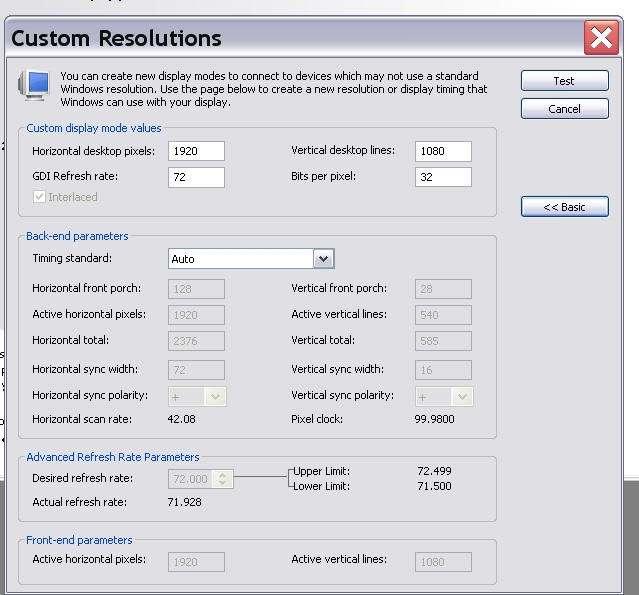
But did you know, that with the Nvidia timings your have to use "half" the vertical res if you're doing interlaced - so 540 instead of 1080....boy that cost me some hours...
___________________________________________________________________________________________________
|
|
| Back to top |
|
 |
Mark_A_W
Joined: 15 Mar 2006
Posts: 3068
Location: Sunny Melbourne Australia
|
| Posted: Mon Jan 11, 2010 8:39 am Post subject: |
|
|
Here are working timings for 1080i 71.929hz on Nvidia (change the timing from Auto to create or tweak it..).
Notice the GDI timing is 72hz? This means software like XBMC "sees" the right refresh rate, which it won't with Powerstrip on an ATi.
| Description: |
|
| Filesize: |
127.33 KB |
| Viewed: |
20213 Time(s) |
|
|
|
| Back to top |
|
|
Mark_A_W
Joined: 15 Mar 2006
Posts: 3068
Location: Sunny Melbourne Australia
|
| Posted: Mon Jan 11, 2010 8:45 am Post subject: |
|
|
|
Oh, and Jeremy, you could transpose the contents of that other thread with the Ati details here (and delete this post).
|
|
| Back to top |
|
|
GREG1292

Joined: 10 Oct 2006
Posts: 417
Location: indiana
|
| Posted: Thu Jan 14, 2010 5:00 pm Post subject: Re: Setting custom resolution with Nvidia and Powestrip |
|
|
| AnalogRocks wrote: | Here's a one stop shop for this instead of having it spread out through many threads.
If you find a tid bit feel free to copy/paste it here. Even if it isn't yours.
Just remember to give credit for the post and a link to the original post if it's copied.
Mark had a great one tonight so I'm doing the copy/paste:
http://www.curtpalme.com/forum/viewtopic.php?p=228983#228983
__________________________________________________________________________________________________
Mark_A_W
Club Member
Joined: 15 Mar 2006
Posts: 2604
Location: Sunny Melbourne Australia
Link Posted: Sat Jan 09, 2010 7:35 pm Post subject:
I dunno, I've never used anything but a PC.
But did you know, that with the Nvidia timings your have to use "half" the vertical res if you're doing interlaced - so 540 instead of 1080....boy that cost me some hours...
___________________________________________________________________________________________________ |
So that is why my projector freaks out on 1080I  Cost me some hours as well Analog! Cost me some hours as well Analog! 
Mark is that with just bnc or you have an hdfury or moome stripper as well! These timings I assume won't
stress out the electronics?
Great idea for a thread Analog
_________________
https://www.avforums.com/threads/worldwide-crt-projector-shootout.2000957/page-87
https://discuss.avscience.com/?topic=30.120
|
|
| Back to top |
|
|
the_maniac
Joined: 10 Jul 2009
Posts: 111
Location: Austria - Europe
|
| Posted: Fri Jan 29, 2010 9:00 am Post subject: |
|
|
on the pic above the interlaced check box is disabled, so when you set the lines to 540 is it enabled ?
or is it working with powerstrip even when the check box is disabled ?
i think i'm going to change my mainboard from ATI onboard to Nvidia onboard (8200) because of gamma correction but only if im 100% sure that 1080i works
_________________
www.diy-community.de
|
|
| Back to top |
|
|
Mark_A_W
Joined: 15 Mar 2006
Posts: 3068
Location: Sunny Melbourne Australia
|
| Posted: Fri Jan 29, 2010 9:49 am Post subject: |
|
|
"on the pic above the interlaced check box is disabled, so when you set the lines to 540 is it enabled ? "
It works when you set Timing Standard to custom - all the boxes become active.
"or is it working with powerstrip even when the check box is disabled ? "
Do not use Powerstrip with an Nvidia card.
And yes, 1080i works on Nvidia. At least it does on my 8500 card.
|
|
| Back to top |
|
|
johnnynickel
Joined: 10 Jan 2011
Posts: 12
Location: Southern Vermont
|
| Posted: Mon Jan 10, 2011 8:23 pm Post subject: |
|
|
|
Why shouldn't you use powerstrip with nvidia?
|
|
| Back to top |
|
|
johnnynickel
Joined: 10 Jan 2011
Posts: 12
Location: Southern Vermont
|
| Posted: Mon Jan 10, 2011 8:35 pm Post subject: |
|
|
|
the answer is right in that link. sorry.
|
|
| Back to top |
|
|
|
|





