| Author |
Message |
digitalayon
Joined: 02 Mar 2009
Posts: 921
|
| Posted: Thu Dec 31, 2009 10:47 pm Post subject: OK a few questions!!!....Am I in for a weekend of Hell? |
|
|
I am going to my old man's house to setup his Runco 933(NEC 6PG XTRA) this weekend. He has a low basement so I will be using only two pieces of 3 1/2 foot channel strut. So no left and right movement for adjusting can be done so I will have to be very precise on the measuring to center it just right. My question on this part is the mounting of the bolts and rail hangers.....I see the 4 holes on the unit and they look like 3/8 inch in size but could be wrong....however are these holes the right ones to use assuming I find the right size bolts? Or are they for something else? They are in the corners on the bottom...two in the front and two in the back.....
Now my next question is on the setup. He has a 100 inch 16:9 screen that he purchased. He will only be watching widescreen movies from his PC. We tested it the other night(upsidedown) and we got a nice 1280x768 resolution but the image is too big. So we will shrink it to 100 inches. It played a 4:3 format just fine at a even 95 inches. So.....will this be focus only or will it require convergence and focus? Either way is ok....I was hoping to get away with not having to converge. I didn't have to do hardly any of this with my Barco 1208s/2 because it had Iris.
|
|
| Back to top |
|
 |
ecrabb
Forum Moderator

Joined: 13 Mar 2006
Posts: 15909
Location: Utah
TV/Projector: JVC RS40, Epson 5010
|
| Posted: Thu Dec 31, 2009 11:36 pm Post subject: |
|
|
I'm not familiar with the NEC machines, so I can't tell you about the physical mounts... Somebody will chime in on that. I know on the XG, those holes at the four corners are for feet, and NOT for mounting. Don't know about the PG, though...
As for convergence, you ALWAYS have to converge the image... If you install a projector, move a projector, or change the projector/screen relationship in any way, it will need to be converged. It's the nature of the beast. You will do yourself and your old man a great dis-service if you try to set up a CRT projector without re-converging it.
Oh, and if the 4:3 image was 95" diag, then that works out to only about an 87" diag 16:9... Which means you'll have to move the projector further back, and yes - it will need to be focused and converged. You'll need to do a full setup.
Have you determined what your throw needs to be for the screen size?
I wouldn't call it a weekend of hell, but I'd definitely set aside a full day for your mounting and install, and a decent setup.
SC
|
|
| Back to top |
|
|
garyfritz

Joined: 08 Apr 2006
Posts: 12088
Location: Fort Collins, CO
|
| Posted: Thu Dec 31, 2009 11:39 pm Post subject: |
|
|
Why no left/right movement? If you need it, you can mount 2 pieces of strut one way (e.g. parallel to the joists) and 2 pieces at right angles. That gives you freedom to adjust the channel nuts to move the projector front/back and left/right.
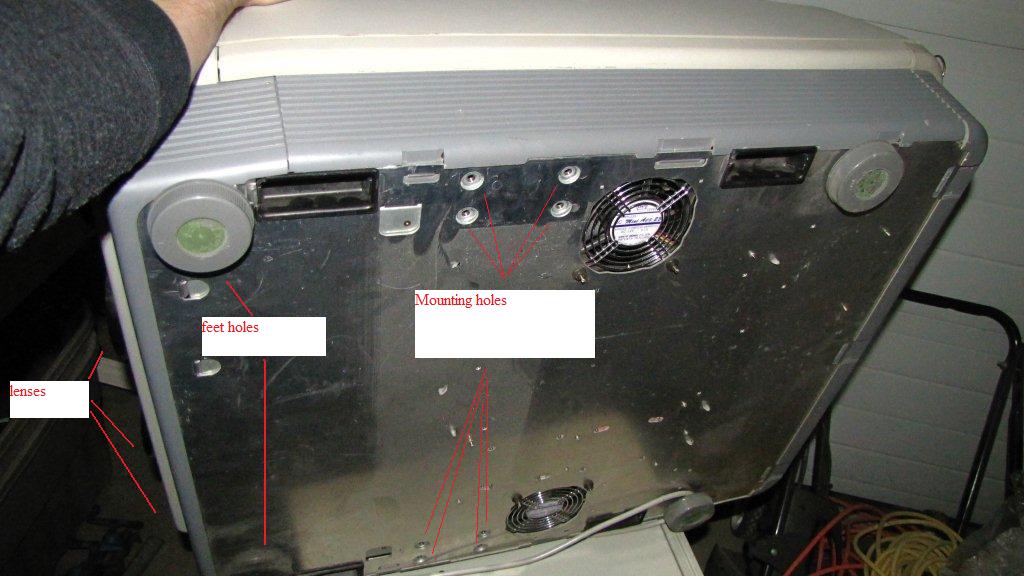
**DO NOT** use the 4 corner holes to mount your projector!!! On a NEC those are intended for foot holes. They are in very thin metal and are NOT safe for hanging the projector. Look in the center of the projector base for some stronger mounting holes.
ANY time you mount a CRT projector, you have to converge. Doesn't have to be a weekend of hell. Just several hours of heck. 
Mount the projector at the proper distance/angle as described in the manual, then spend a little time tweaking the convergence. It will be worth it. Mounting at the proper distance/angle is critical, especially for an NEC.
|
|
| Back to top |
|
|
Curt Palme
CRT Tech
Joined: 08 Mar 2006
Posts: 24396
Location: Langley, BC
TV/Projector: All of them!
|
| Posted: Thu Dec 31, 2009 11:39 pm Post subject: |
|
|
NO! you cannot use the holes in the corner of the set for hanging. Someone on avs posted a pix of a few years ago of a corner ripping loose on him. Not good.
You need to use the 4 holes on each side, just forward of the centerpoint. That's where the ceiling bracket attaches.
The throw should be about 1.4 X the width of the screen.
|
|
| Back to top |
|
|
Mr. Green

Joined: 23 Feb 2007
Posts: 1394
Location: Calgary
TV/Projector: Marquee 9501LC / NEC 9PG+
|
| Posted: Fri Jan 01, 2010 12:40 am Post subject: |
|
|
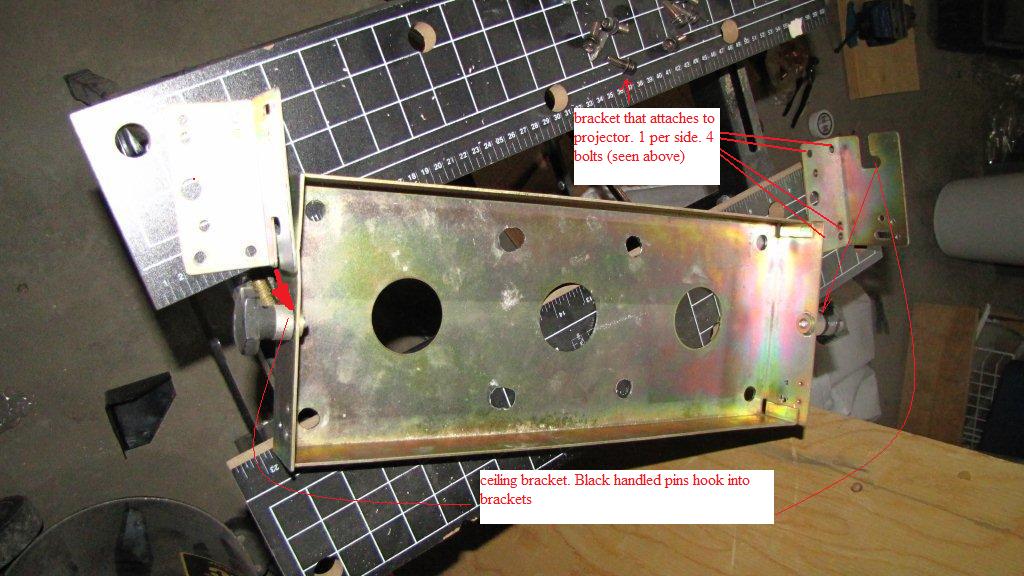
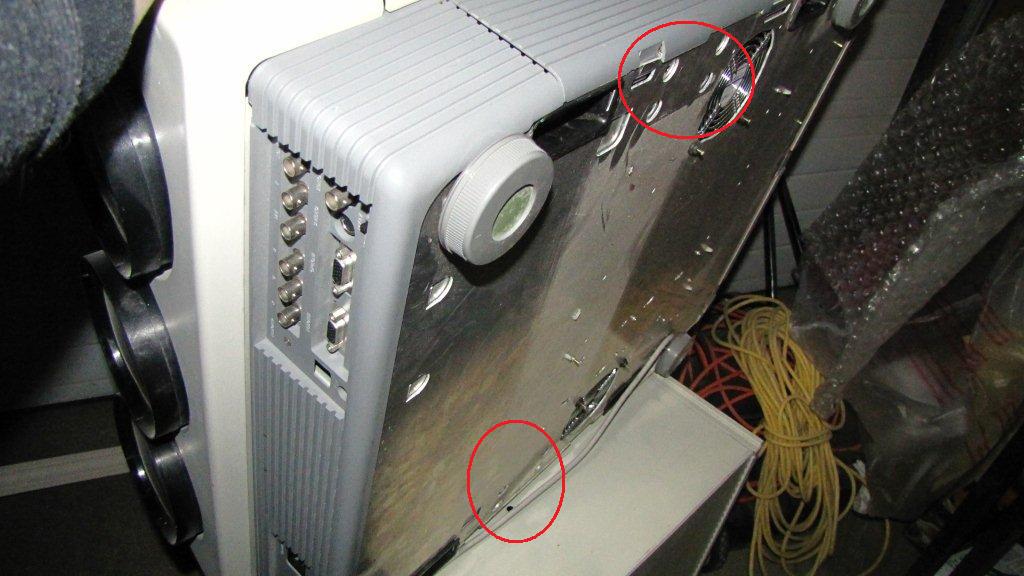
Hello, I couldn't find any pictures of this so here's some I just took. Sorry if I overly simplified it. This is my 9PG+ so I believe the chassis is the same/ similar. Mine has the feet in the holes you described. Hope this helps.
It would be great if you have a ceiling bracket. They make hanging these things a breeze. Just mount bracket to roof, open up the pins and hook the projector on. There's a slot at the back of each side bracket to adjust tilt.
| Description: |
|
| Filesize: |
110.11 KB |
| Viewed: |
3230 Time(s) |
|
| Description: |
|
| Filesize: |
89.92 KB |
| Viewed: |
3230 Time(s) |
|
| Description: |
|
| Filesize: |
86.49 KB |
| Viewed: |
3230 Time(s) |
|
_________________
You can be young only once but, you can be immature forever.
Current Projector Marquee9501LC with PS3 (BLu-Ray) at 1080P LOVE IT! Screen is an Elunevision 120" 4:3 (2.4 gain - no hotspots). (also own a NEC 9PG+)
|
|
| Back to top |
|
|
Mr. Green
Joined: 23 Feb 2007
Posts: 1394
Location: Calgary
TV/Projector: Marquee 9501LC / NEC 9PG+
|
| Posted: Fri Jan 01, 2010 1:39 am Post subject: |
|
|
Oh, I forgot to mention. Sure you'll need to redo the setup, but since you already have it setup it will just be geometry and focus. I find that if you had a really good setup to start with, then readjusting is a lot faster.
_________________
You can be young only once but, you can be immature forever.
Current Projector Marquee9501LC with PS3 (BLu-Ray) at 1080P LOVE IT! Screen is an Elunevision 120" 4:3 (2.4 gain - no hotspots). (also own a NEC 9PG+)
|
|
| Back to top |
|
|
donaldk
Joined: 17 Jun 2008
Posts: 308
|
| Posted: Fri Jan 01, 2010 2:16 am Post subject: |
|
|
|
Drill out the holes in the unistrut that you intend to use to screw the wto unistrut rails to the ceiling. Drill them out sideways from the existing round holes, this should give you some leeway in the angle and placement of the NEC. Only some though. Add some metalrings if the holes are wider than the bolthead
|
|
| Back to top |
|
|
digitalayon
Joined: 02 Mar 2009
Posts: 921
|
| Posted: Fri Jan 01, 2010 3:19 am Post subject: |
|
|
|
Oh crap.... I would have had a projector land on me.... LOL....THANKS GUYS!!! I have some brackets but not the ceiling mount. Oh well....I'll keep moving on this....thanks everyone
|
|
| Back to top |
|
|
garyfritz
Joined: 08 Apr 2006
Posts: 12088
Location: Fort Collins, CO
|
| Posted: Fri Jan 01, 2010 6:40 am Post subject: |
|
|
|
You don't *need* a ceiling mount. You could bolt struts to the bottom of the NEC using the mounting holes, running left-right, then connect those to the front-back strut on the ceiling with threaded rod between channel nuts in the top & bottom struts. Only trouble is that it's pretty tough to adjust angle that way. Maybe you could vary the angle by using long bolts in the mounting holes, and back them out as necessary to adjust the angle. Mounted properly the base *should* be level, but you might need to tweak that a bit.
|
|
| Back to top |
|
|
jask

Joined: 17 Mar 2006
Posts: 10187
Location: kamloops BC
|
| Posted: Fri Jan 01, 2010 7:24 am Post subject: |
|
|
The geometry of the screen to projector is at least half the battle... if you set up properly you will be able to methodically fly through the rest of the set up( if you have done an NEC before. ...) If the physical alignment is off you will have nothing but misery and compromise with a couple of soft corners or edges; adjustments to one area will fight other adjustments.
If you have access to a laser a plumb and a level you can rip through the set-up.
I still get a laugh out of people saying the NEC projectors have "too many" adjustments... this forum is full of techie geek electronics tweaking, O.C.D. perfectionists that can find room for improvement in just about anything they look at...(as it should be...) but if you have a well set up NEC, you can throw a picture that will do exactly what we are all here for.
and when he is ready to upgrade to a 909 in 3 Months....call Curt 
|
|
| Back to top |
|
|
BradTheAggie

Joined: 08 Mar 2006
Posts: 651
Location: Oak Point, Texas
|
| Posted: Fri Jan 01, 2010 4:20 pm Post subject: |
|
|
I think I still have one of those brackets, if you are interested...
_________________
(bholman on the AVS forum)
|
|
| Back to top |
|
|
|
|




