| Author |
Message |
eroc57
Joined: 01 Nov 2008
Posts: 19
Location: Austin, TX
|
| Posted: Sun Dec 27, 2009 4:47 am Post subject: Sony D-50 / U-Verse issue |
|
|
|
Hi everyone. I have a Sony D-50 that I have hooked up to my computer so I play movies via my DVD drive and that works fine. I bought a 30' dvi-to-hdmi cable to connect my U-verse box to my D-50 (it's in an adjacent room). I can't get a picture no matter how I connect it and what settings I choose. I'd greatly appreciate it if someone with more knowledge than I have on this could respond w/ a possible solution. Thanks!
|
|
| Back to top |
|
 |
TheVerge
Joined: 19 Jul 2009
Posts: 928
|
| Posted: Sun Dec 27, 2009 5:40 pm Post subject: |
|
|
HDCP if i had to guess.
You need an HDFURY1/2/3 or use component.
|
|
| Back to top |
|
|
eroc57
Joined: 01 Nov 2008
Posts: 19
Location: Austin, TX
|
| Posted: Sun Dec 27, 2009 7:13 pm Post subject: |
|
|
|
Hi - thanks so much for the reply. Sadly, I'm pretty illiterate when it comes to this stuff. Verge (or somebody)...could you please elaborate on that last response? I'm afraid I have no idea what you are talking about. Thanks!
|
|
| Back to top |
|
|
drice1234
Joined: 07 Oct 2006
Posts: 1309
Location: Allen, Texas
|
| Posted: Sun Dec 27, 2009 7:42 pm Post subject: |
|
|
|
The D50 does not have an hdmi or dvi input on it. How are you getting the signal into the projector? HDFury device?
|
|
| Back to top |
|
|
Zebu Fellenz
Joined: 21 Dec 2006
Posts: 2567
|
| Posted: Sun Dec 27, 2009 9:45 pm Post subject: |
|
|
Welcome to the forum,
We need some more details.
A HDMI to DVI cable carries a digital signal, unless you have a HD-Fury or an internal Moome card for your D50 you cannot use a digital signal, as the only connections on a D50 are RGBHV, S-video, and composite all of which are analog.
Can you post a picture of how the cable is being used?
Likely you need a digital->analog converter like the HD-Fury, but we can't tell until we know more.
Erik
|
|
| Back to top |
|
|
eroc57
Joined: 01 Nov 2008
Posts: 19
Location: Austin, TX
|
| Posted: Sun Dec 27, 2009 11:52 pm Post subject: |
|
|
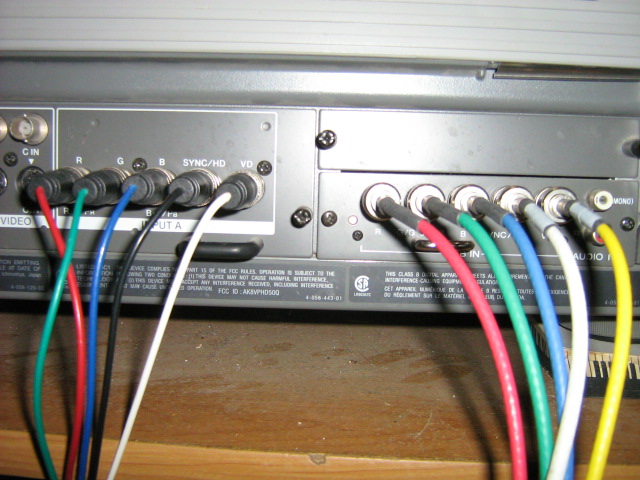
I've enclosed a pic of the back of my D50. The cords on the left connect to my computer. That works just fine. The ones on the right have a dvi adapter at the end that came w/ the projector so I figured - incorrectly I guess - that it was already primed to connect to a digital video source. I bought a dvi to hdmi cord to connect it to my U-verse box, but, alas, no picture, regardless of how I connect it. Btw, the printing under the cords on the right that is hard to see says "RGB IN". What's the cheapest way to go to resolve this? Thanks!
| Description: |
|
| Filesize: |
116.64 KB |
| Viewed: |
2498 Time(s) |
|
|
|
| Back to top |
|
|
TheVerge
Joined: 19 Jul 2009
Posts: 928
|
| Posted: Mon Dec 28, 2009 3:07 pm Post subject: |
|
|
| drice1234 wrote: | | The D50 does not have an hdmi or dvi input on it. How are you getting the signal into the projector? HDFury device? |
Woah, what was i thinking when i made that post.
|
|
| Back to top |
|
|
TheVerge
Joined: 19 Jul 2009
Posts: 928
|
| Posted: Mon Dec 28, 2009 3:09 pm Post subject: |
|
|
| eroc57 wrote: | | Btw, the printing under the cords on the right that is hard to see says "RGB IN". What's the cheapest way to go to resolve this? |
HDFURY1
That dvi to RGB convertor will work but only for dvi-a... Since you are coming from HDMI, you are using the digital portion so the pins with the analog signal aren't even carrying information.
|
|
| Back to top |
|
|
|
|




