| Author |
Message |
David1
Joined: 20 Dec 2006
Posts: 24
|
| Posted: Thu Nov 26, 2009 10:10 pm Post subject: CbCr 4:4:4 - RGB 4:2:0 and 0-255 vs 16-235 questions |
|
|
I have a HDMI hd 1.3 v2 card running in a Sony 1292
I am trying to understand the best set up to control the YCbCr 4:4:4 , RGB 4:2:0 color space and the 0-255 vs 16-235 level control.
I have two main HDMI sources being input into my 1292. Direct Tv STB and a SONY S360.
If I am understanding the set up guides I would be best with YCbCr 444 and 0-255 from the Blu Ray and RBG 16-235 from the STB? Am I correct here?
Can I set each input of the 1.3 v2 to different gamma, color space and range settings?
Anyone want to explain?
Thanks
David
|
|
| Back to top |
|
 |
Tom.W

Joined: 09 Mar 2006
Posts: 6635
|
|
| Back to top |
|
|
moome
Joined: 01 Jun 2007
Posts: 497
|
| Posted: Fri Nov 27, 2009 12:41 am Post subject: Re: CbCr 4:4:4 - RGB 4:2:0 and 0-255 vs 16-235 questions |
|
|
| David1 wrote: | I have a HDMI hd 1.3 v2 card running in a Sony 1292
I am trying to understand the best set up to control the YCbCr 4:4:4 , RGB 4:2:0 color space and the 0-255 vs 16-235 level control.
I have two main HDMI sources being input into my 1292. Direct Tv STB and a SONY S360.
If I am understanding the set up guides I would be best with YCbCr 444 and 0-255 from the Blu Ray and RBG 16-235 from the STB? Am I correct here?
Can I set each input of the 1.3 v2 to different gamma, color space and range settings?
Anyone want to explain?
Thanks
David |
the gamma setting will be different for each input, and will memorize automatically after you adjust the gamma.
the color space will be automatically select, and output will fixed at RGB.
the range setting can use remote "A" button to get auto range (16-235 or 0-255), or "B" with range expand, or "C" shift black to get birghter image, please see the datasheet.
for my G90, I use "C".
| Description: |
|

Download |
| Filename: |
ifb_fhd_v121.pdf |
| Filesize: |
1011.56 KB |
| Downloaded: |
783 Time(s) |
|
|
| Back to top |
|
|
David1
Joined: 20 Dec 2006
Posts: 24
|
| Posted: Fri Nov 27, 2009 1:01 am Post subject: Re: CbCr 4:4:4 - RGB 4:2:0 and 0-255 vs 16-235 questions |
|
|
Wow that was very helpful, excellent article, guess the answer is YCbCr 4:4:4 with 16-235 but make sure I can see BTB and WTW by using the gamma adjustments on the card. For Blu Ray.
What is the standard for mpeg 4 direct Tv broadcasts?
Thanks
David
| David1 wrote: | I have a HDMI hd 1.3 v2 card running in a Sony 1292
I am trying to understand the best set up to control the YCbCr 4:4:4 , RGB 4:2:0 color space and the 0-255 vs 16-235 level control.
I have two main HDMI sources being input into my 1292. Direct Tv STB and a SONY S360.
If I am understanding the set up guides I would be best with YCbCr 444 and 0-255 from the Blu Ray and RBG 16-235 from the STB? Am I correct here?
Can I set each input of the 1.3 v2 to different gamma, color space and range settings?
Anyone want to explain?
Thanks
David |
|
|
| Back to top |
|
|
Tom.W
Joined: 09 Mar 2006
Posts: 6635
|
|
| Back to top |
|
|
CIR Engineering

Joined: 25 Aug 2008
Posts: 4269
Location: Chicago USA & Berlin Germany
|
| Posted: Fri Nov 27, 2009 11:15 pm Post subject: Re: CbCr 4:4:4 - RGB 4:2:0 and 0-255 vs 16-235 questions |
|
|
| David1 wrote: | Wow that was very helpful, excellent article, guess the answer is YCbCr 4:4:4 with 16-235 but make sure I can see BTB and WTW by using the gamma adjustments on the card. For Blu Ray.
What is the standard for mpeg 4 direct Tv broadcasts?
Thanks
David
| David1 wrote: | I have a HDMI hd 1.3 v2 card running in a Sony 1292
I am trying to understand the best set up to control the YCbCr 4:4:4 , RGB 4:2:0 color space and the 0-255 vs 16-235 level control.
I have two main HDMI sources being input into my 1292. Direct Tv STB and a SONY S360.
If I am understanding the set up guides I would be best with YCbCr 444 and 0-255 from the Blu Ray and RBG 16-235 from the STB? Am I correct here?
Can I set each input of the 1.3 v2 to different gamma, color space and range settings?
Anyone want to explain?
Thanks
David |
|
With BD use 422 for the best colors. This will be 10-bit without any conversion from the disc.
craigr
_________________
JETI 1501-HiRes 2nm Spectroradiometer
JETI 1211 Spectroradiometer
Photo Research PR-650 Spectroradiometer
Klein K10-A Colorimeter
Murideo Fresco SIX-G HDMI 2.x Multimedia Generator
Murideo Fresco SIX-A HDMI 2.x Analyzer
Light Illusion ColourSpace XPT Color Calibration Software
Light Illusion LightSpace XPT Pro Version 10.x Color Calibration Software
OMARDRIS JVC Software Patch to use K10-A and Jeti with JVC OEM AutoCal Software!
Sencore CR7000 CRT Tube Analyzer / Rejuvenater
Authorized Dealer for Lumagen & just about everything worth buying 
www.CIR-Engineering.com - craigr@cir-engineering.com
Phone: 865-405-6892
|
|
| Back to top |
|
|
Nashou66

Joined: 12 Jan 2007
Posts: 16171
Location: West Seneca NY
|
| Posted: Fri Nov 27, 2009 11:39 pm Post subject: |
|
|
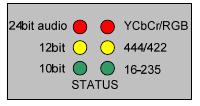
Craig, On your card does the YUV(YcbCr/RGB) led come on or stay off when feeding it YUV? On my cards no matter what i do that LED does not come on.
I need to know for sure what my Scaler is putting out to help diagnose a problem with them.
I have a feeling they are not outputing YUV. So i went directly from my BD player and still no LED.
Athanasios
| Description: |
|
| Filesize: |
5.5 KB |
| Viewed: |
33498 Time(s) |
|
_________________
Don't blame your underwear for your crooked ass~ unknown Greek philosopher
"Republicans believe every day is the Fourth of July, but the Democrats believe every day is April 15." --- President Reagan
One Smart Dog!!!
Marquee High Performance Bellows now shipping!!
Marquee Modifications and Performance Enhancement
Marquee C-element and Bellow removal
|
|
| Back to top |
|
|
CIR Engineering
Joined: 25 Aug 2008
Posts: 4269
Location: Chicago USA & Berlin Germany
|
| Posted: Wed Dec 02, 2009 6:55 pm Post subject: |
|
|
| Nashou66 wrote: | Craig, On your card does the YUV(YcbCr/RGB) led come on or stay off when feeding it YUV? On my cards no matter what i do that LED does not come on.
I need to know for sure what my Scaler is putting out to help diagnose a problem with them.
I have a feeling they are not outputing YUV. So i went directly from my BD player and still no LED.
Athanasios |
Well, on all the cards I've worked with the LED's function as Moome describes in his manual. I have a feeling your source is not sending YCbCr. Try connecting your BD player directly to one of your IFB's and try YCbCr to see if Moome's LED's change with color space.
craigr
_________________
JETI 1501-HiRes 2nm Spectroradiometer
JETI 1211 Spectroradiometer
Photo Research PR-650 Spectroradiometer
Klein K10-A Colorimeter
Murideo Fresco SIX-G HDMI 2.x Multimedia Generator
Murideo Fresco SIX-A HDMI 2.x Analyzer
Light Illusion ColourSpace XPT Color Calibration Software
Light Illusion LightSpace XPT Pro Version 10.x Color Calibration Software
OMARDRIS JVC Software Patch to use K10-A and Jeti with JVC OEM AutoCal Software!
Sencore CR7000 CRT Tube Analyzer / Rejuvenater
Authorized Dealer for Lumagen & just about everything worth buying
www.CIR-Engineering.com - craigr@cir-engineering.com
Phone: 865-405-6892
|
|
| Back to top |
|
|
Nashou66
Joined: 12 Jan 2007
Posts: 16171
Location: West Seneca NY
|
| Posted: Wed Dec 02, 2009 7:20 pm Post subject: |
|
|
| CIR Engineering wrote: | | Nashou66 wrote: | Craig, On your card does the YUV(YcbCr/RGB) led come on or stay off when feeding it YUV? On my cards no matter what i do that LED does not come on.
I need to know for sure what my Scaler is putting out to help diagnose a problem with them.
I have a feeling they are not outputing YUV. So i went directly from my BD player and still no LED.
Athanasios |
Well, on all the cards I've worked with the LED's function as Moome describes in his manual. I have a feeling your source is not sending YCbCr. Try connecting your BD player directly to one of your IFB's and try YCbCr to see if Moome's LED's change with color space.
craigr |
thats the thing, my LG BH200 player connected directly to the moome wont sync properly. I get all distorted and jagged image. it sucks. And i have other issue with the blend units that are frustrating me.
But i do not see a menu option for changing color space on my player. With my BH100 player it also has no option but it only outputs 1080p@24, so i cant go straight in.
I need a pro here to help sort all this out, wanna come up here with Cliff next weekend I'll tell him he has to pick you up if you can handle his crazy driving!!
Athanasios
_________________
Don't blame your underwear for your crooked ass~ unknown Greek philosopher
"Republicans believe every day is the Fourth of July, but the Democrats believe every day is April 15." --- President Reagan
One Smart Dog!!!
Marquee High Performance Bellows now shipping!!
Marquee Modifications and Performance Enhancement
Marquee C-element and Bellow removal
|
|
| Back to top |
|
|
Tom.W
Joined: 09 Mar 2006
Posts: 6635
|
| Posted: Wed Dec 02, 2009 7:56 pm Post subject: |
|
|
Quote:
I need a pro here to help sort all this out, wanna come up here with Cliff next weekend I'll tell him he has to pick you up if you can handle his crazy driving!!
Athanasios
Anybody have a death wish ???

|
|
| Back to top |
|
|
AnalogRocks
Forum Moderator

Joined: 08 Mar 2006
Posts: 26706
Location: Toronto, Ontario, Canada
TV/Projector: Sony 1252Q, AMPRO 4000G
|
|
| Back to top |
|
|
Nashou66
Joined: 12 Jan 2007
Posts: 16171
Location: West Seneca NY
|
| Posted: Thu Dec 03, 2009 1:36 am Post subject: |
|
|
| CIR Engineering wrote: | | Nashou66 wrote: | Craig, On your card does the YUV(YcbCr/RGB) led come on or stay off when feeding it YUV? On my cards no matter what i do that LED does not come on.
I need to know for sure what my Scaler is putting out to help diagnose a problem with them.
I have a feeling they are not outputing YUV. So i went directly from my BD player and still no LED.
Athanasios |
Well, on all the cards I've worked with the LED's function as Moome describes in his manual. I have a feeling your source is not sending YCbCr. Try connecting your BD player directly to one of your IFB's and try YCbCr to see if Moome's LED's change with color space.
craigr |
Just found out via a couple AVS forum members their LG BH200 output rgb on their displays. 
Looks like I might be getting an Oppo in the near future.
Athanasios
_________________
Don't blame your underwear for your crooked ass~ unknown Greek philosopher
"Republicans believe every day is the Fourth of July, but the Democrats believe every day is April 15." --- President Reagan
One Smart Dog!!!
Marquee High Performance Bellows now shipping!!
Marquee Modifications and Performance Enhancement
Marquee C-element and Bellow removal
|
|
| Back to top |
|
|
MikeEby

Joined: 24 Jun 2007
Posts: 5237
Location: Osceola, Indiana
|
| Posted: Thu Dec 03, 2009 1:46 am Post subject: |
|
|
| Nashou66 wrote: |
Looks like I might be getting an Oppo in the near future.
Athanasios |
Oppo is the way to go for sure...I guess they are working on new firmware for moving subtitles...That's pretty much a must for a 2:40AR blend.
Mike
_________________
Doing HD since the last century!
|
|
| Back to top |
|
|
cinema mad
Joined: 25 Nov 2009
Posts: 219
|
| Posted: Thu Dec 03, 2009 1:48 am Post subject: |
|
|
| Nashou66 wrote: | | CIR Engineering wrote: | | Nashou66 wrote: | Craig, On your card does the YUV(YcbCr/RGB) led come on or stay off when feeding it YUV? On my cards no matter what i do that LED does not come on.
I need to know for sure what my Scaler is putting out to help diagnose a problem with them.
I have a feeling they are not outputing YUV. So i went directly from my BD player and still no LED.
Athanasios |
Well, on all the cards I've worked with the LED's function as Moome describes in his manual. I have a feeling your source is not sending YCbCr. Try connecting your BD player directly to one of your IFB's and try YCbCr to see if Moome's LED's change with color space.
craigr |
thats the thing, my LG BH200 player connected directly to the moome wont sync properly. I get all distorted and jagged image. it sucks. And i have other issue with the blend units that are frustrating me.
But i do not see a menu option for changing color space on my player. With my BH100 player it also has no option but it only outputs 1080p@24, so i cant go straight in.
I need a pro here to help sort all this out, wanna come up here with Cliff next weekend I'll tell him he has to pick you up if you can handle his crazy driving!!
Athanasios |
Hi,
The Bh 100/200 dont output YcBcR 4:2:2, Panasonic does....
Cheers....
|
|
| Back to top |
|
|
Nashou66
Joined: 12 Jan 2007
Posts: 16171
Location: West Seneca NY
|
| Posted: Thu Dec 03, 2009 2:40 am Post subject: |
|
|
| MikeEby wrote: | | Nashou66 wrote: |
Looks like I might be getting an Oppo in the near future.
Athanasios |
Oppo is the way to go for sure...I guess they are working on new firmware for moving subtitles...That's pretty much a must for a 2:40AR blend.
Mike |
That would be awesome!!!!! I would still keep the Bh200 though for Hd-DVD.
Athanasios
_________________
Don't blame your underwear for your crooked ass~ unknown Greek philosopher
"Republicans believe every day is the Fourth of July, but the Democrats believe every day is April 15." --- President Reagan
One Smart Dog!!!
Marquee High Performance Bellows now shipping!!
Marquee Modifications and Performance Enhancement
Marquee C-element and Bellow removal
|
|
| Back to top |
|
|
|
|