| Author |
Message |
dean cobb
Joined: 19 Sep 2009
Posts: 16
Location: Parma Ohio
|
| Posted: Tue Nov 24, 2009 2:59 am Post subject: blue will not adjust blotches on screen |
|
|
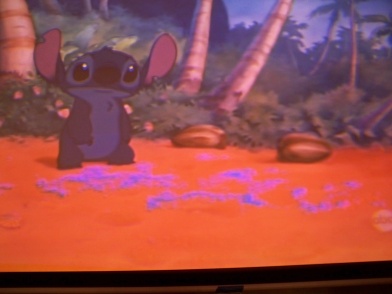
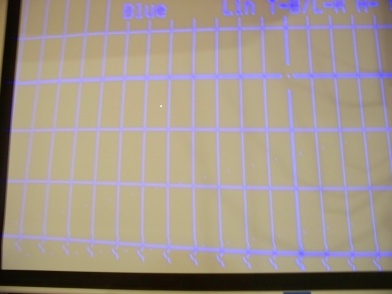
blue will not converge bottom two horizontal lines uneven. when I try to make better other areas get worse. I can make the red and green match. Followed zenith service manual no help. Tried numerous times. Also I get blotches on the screen most of the time also. Only running s video at this time. Waiting for rgbhv cable to come in. I am using a zenith pro 895x. thanks
| Description: |
|
| Filesize: |
46.99 KB |
| Viewed: |
6384 Time(s) |
|
| Description: |
|
| Filesize: |
42.13 KB |
| Viewed: |
6384 Time(s) |
|
|
|
| Back to top |
|
 |
Sparky015

Joined: 12 May 2009
Posts: 1185
Location: Cleveland / Akron, OH
|
| Posted: Tue Nov 24, 2009 2:42 pm Post subject: |
|
|
Dean, I found that if the rasters are not centered and mechanically alligned to start, then the electronic convergence has to work that much harder, and you end up with things like this. If you turn contrast down and bring up your patterns, are they centered on the tube face and aligned to the other tubes?
Paul
_________________
~Paul
|
|
| Back to top |
|
|
CIR Engineering

Joined: 25 Aug 2008
Posts: 4269
Location: Chicago USA & Berlin Germany
|
| Posted: Tue Nov 24, 2009 2:57 pm Post subject: |
|
|
Is this rear projection?
It looks like your image is not centered in the raster or is at least too far towards the bottom of the raster. If the set has independent controls for raster centering, and image placement inside the raster, then you will need to use these controls. Often however, rear projection or direct view CRT's do not have these adjustments. If this is the case, you will have to just overscan the unusable part of the image and just push it off the screen so you can't see it anymore.
craigr
_________________
JETI 1501-HiRes 2nm Spectroradiometer
JETI 1211 Spectroradiometer
Photo Research PR-650 Spectroradiometer
Klein K10-A Colorimeter
Murideo Fresco SIX-G HDMI 2.x Multimedia Generator
Murideo Fresco SIX-A HDMI 2.x Analyzer
Light Illusion ColourSpace XPT Color Calibration Software
Light Illusion LightSpace XPT Pro Version 10.x Color Calibration Software
OMARDRIS JVC Software Patch to use K10-A and Jeti with JVC OEM AutoCal Software!
Sencore CR7000 CRT Tube Analyzer / Rejuvenater
Authorized Dealer for Lumagen & just about everything worth buying 
www.CIR-Engineering.com - craigr@cir-engineering.com
Phone: 865-405-6892
|
|
| Back to top |
|
|
Nashou66

Joined: 12 Jan 2007
Posts: 16171
Location: West Seneca NY
|
|
| Back to top |
|
|
macgyver655
Joined: 22 Aug 2007
Posts: 8508
|
| Posted: Tue Nov 24, 2009 3:41 pm Post subject: |
|
|
Forget about those squiggly lines at the bottom but you do have some convergence issues. This document will show you how your adjustments function. One adjustment may affect another area so you just have to figure out how to correct it afterwards. If you are unable to correct it then you have a blue convergence electronic problem.
I would neutral all the blue convergence settings and start from scratch.
As far as the blotches, I would look into the blue lens and check for fungus. You may have to pull the lens to get a good look.
http://www.curtpalme.com/docs/Zenith880_881_900_ConvergenceControls.jpg
|
|
| Back to top |
|
|
Sparky015
Joined: 12 May 2009
Posts: 1185
Location: Cleveland / Akron, OH
|
| Posted: Tue Nov 24, 2009 3:44 pm Post subject: |
|
|
I would just add that you have to do less convergence if your mechanical setup and tube raster setup is done properly, so I would start there and work your way to convergence. It will make your pj more reliable as well, as your electronics won't have to work as hard. I don't have a Zenith, but my two Marquees worked this way.
Paul
_________________
~Paul
|
|
| Back to top |
|
|
CIR Engineering
Joined: 25 Aug 2008
Posts: 4269
Location: Chicago USA & Berlin Germany
|
| Posted: Tue Nov 24, 2009 4:54 pm Post subject: |
|
|
| Nashou66 wrote: | I always thought those squiggles or bends at one edge of an image is the vertical timings not being large enough . I had the same issue and increased the pixels for Total V and they went away.
Athanasios |
Yes, this is true and is essentially one in the same with what I was saying. If the total pixels are not great enough, you will not be able to even fit the image inside the raster, so moving the image inside it will not help
Good advice!
craigr
_________________
JETI 1501-HiRes 2nm Spectroradiometer
JETI 1211 Spectroradiometer
Photo Research PR-650 Spectroradiometer
Klein K10-A Colorimeter
Murideo Fresco SIX-G HDMI 2.x Multimedia Generator
Murideo Fresco SIX-A HDMI 2.x Analyzer
Light Illusion ColourSpace XPT Color Calibration Software
Light Illusion LightSpace XPT Pro Version 10.x Color Calibration Software
OMARDRIS JVC Software Patch to use K10-A and Jeti with JVC OEM AutoCal Software!
Sencore CR7000 CRT Tube Analyzer / Rejuvenater
Authorized Dealer for Lumagen & just about everything worth buying
www.CIR-Engineering.com - craigr@cir-engineering.com
Phone: 865-405-6892
|
|
| Back to top |
|
|
macgyver655
Joined: 22 Aug 2007
Posts: 8508
|
| Posted: Tue Nov 24, 2009 5:46 pm Post subject: |
|
|
|
Those squiggles are the image falloff before the beam sweeps back to the top. It is normally off the screen. The bottom line of the grid is probably to high, which is what I think he is saying. His main issue is the improper geometry of the grid.
|
|
| Back to top |
|
|
dean cobb
Joined: 19 Sep 2009
Posts: 16
Location: Parma Ohio
|
| Posted: Thu Nov 26, 2009 5:29 am Post subject: blue still will not align |
|
|
| macgyver655 wrote: | | Those squiggles are the image falloff before the beam sweeps back to the top. It is normally off the screen. The bottom line of the grid is probably to high, which is what I think he is saying. His main issue is the improper geometry of the grid. |
I have tried what everybody suggested but no help. You understand what I am saying. My lower left screen will not adjust proper. could switching neck boards between tubes to see if it gets better or what is next step. thanks
|
|
| Back to top |
|
|
macgyver655
Joined: 22 Aug 2007
Posts: 8508
|
| Posted: Thu Nov 26, 2009 5:38 am Post subject: Re: blue still will not align |
|
|
| dean cobb wrote: | | macgyver655 wrote: | | Those squiggles are the image falloff before the beam sweeps back to the top. It is normally off the screen. The bottom line of the grid is probably to high, which is what I think he is saying. His main issue is the improper geometry of the grid. |
I have tried what everybody suggested but no help. You understand what I am saying. My lower left screen will not adjust proper. could switching neck boards between tubes to see if it gets better or what is next step. thanks |
No, switching the neckboards wont help this issue. This is only on the blue, correct? Do the lines move when you try to adjust?
|
|
| Back to top |
|
|
dean cobb
Joined: 19 Sep 2009
Posts: 16
Location: Parma Ohio
|
| Posted: Fri Nov 27, 2009 1:44 am Post subject: Re: blue still will not align |
|
|
| macgyver655 wrote: | | dean cobb wrote: | | macgyver655 wrote: | | Those squiggles are the image falloff before the beam sweeps back to the top. It is normally off the screen. The bottom line of the grid is probably to high, which is what I think he is saying. His main issue is the improper geometry of the grid. |
I have tried what everybody suggested but no help. You understand what I am saying. My lower left screen will not adjust proper. could switching neck boards between tubes to see if it gets better or what is next step. thanks |
No, switching the neckboards wont help this issue. This is only on the blue, correct? Do the lines move when you try to adjust? |
The lines try to adjust in all directions when I move them but the bottom left or right always stays to curved. I had no problems with green or red. I did reset the raster for that tube I got it better but the right lower is off now. I am going to try again tonight to make it better.
|
|
| Back to top |
|
|
macgyver655
Joined: 22 Aug 2007
Posts: 8508
|
| Posted: Fri Nov 27, 2009 2:23 am Post subject: Re: blue still will not align |
|
|
| dean cobb wrote: | | macgyver655 wrote: | | dean cobb wrote: | | macgyver655 wrote: | | Those squiggles are the image falloff before the beam sweeps back to the top. It is normally off the screen. The bottom line of the grid is probably to high, which is what I think he is saying. His main issue is the improper geometry of the grid. |
I have tried what everybody suggested but no help. You understand what I am saying. My lower left screen will not adjust proper. could switching neck boards between tubes to see if it gets better or what is next step. thanks |
No, switching the neckboards wont help this issue. This is only on the blue, correct? Do the lines move when you try to adjust? |
The lines try to adjust in all directions when I move them but the bottom left or right always stays to curved. I had no problems with green or red. I did reset the raster for that tube I got it better but the right lower is off now. I am going to try again tonight to make it better. |
If you still dont have success, I would try swapping the convergence harness wires between the blue and red. You would then use the red controls to adjust the blue and the blue controls for the red. Now if the blue adjusts properly and the red doesn't then you have an electronic problem.
You do have both the manual switch and menu selection set to ceiling, right? If your projector is on the ceiling.
|
|
| Back to top |
|
|
dean cobb
Joined: 19 Sep 2009
Posts: 16
Location: Parma Ohio
|
| Posted: Mon Nov 30, 2009 11:53 pm Post subject: Re: blue still will not align |
|
|
| macgyver655 wrote: | | dean cobb wrote: | | macgyver655 wrote: | | dean cobb wrote: | | macgyver655 wrote: | | Those squiggles are the image falloff before the beam sweeps back to the top. It is normally off the screen. The bottom line of the grid is probably to high, which is what I think he is saying. His main issue is the improper geometry of the grid. |
I have tried what everybody suggested but no help. You understand what I am saying. My lower left screen will not adjust proper. could switching neck boards between tubes to see if it gets better or what is next step. thanks |
No, switching the neckboards wont help this issue. This is only on the blue, correct? Do the lines move when you try to adjust? |
The lines try to adjust in all directions when I move them but the bottom left or right always stays to curved. I had no problems with green or red. I did reset the raster for that tube I got it better but the right lower is off now. I am going to try again tonight to make it better. |
If you still dont have success, I would try swapping the convergence harness wires between the blue and red. You would then use the red controls to adjust the blue and the blue controls for the red. Now if the blue adjusts properly and the red doesn't then you have an electronic problem.
You do have both the manual switch and menu selection set to ceiling, right? If your projector is on the ceiling. |
I went back in and reset the raster on the blue tube just very little and resized the green and red convergence adjustments then tried blue again. It is alot better . But I have a new problem. On the right side of the screen about 10 inches. A noticable vertical lighter area. When I cover blue it goes away. Suspect toe setting but my green tube does have some wear. I will post picture again and make new post if I have to. Thanks for the help.
|
|
| Back to top |
|
|
macgyver655
Joined: 22 Aug 2007
Posts: 8508
|
| Posted: Tue Dec 01, 2009 12:27 am Post subject: |
|
|
|
It will depend if your outside the wear area. If your not outside the wear area then try moving the blanking in on that side until it hits the picture edge.
|
|
| Back to top |
|
|
|
|




