| Author |
Message |
rob17
Joined: 10 Dec 2008
Posts: 21
|
| Posted: Tue Oct 27, 2009 3:49 am Post subject: FC and F2 error codes on a Runco 980/NEC PG xtra |
|
|
I have been stumped by my projector for awhile so I put it on the back shelf of things to do until now. Awhile back I was getting problems from my dvd player when it was upconverting. I originally thought it was the projector and went to zero all of the settings.
When I was trying to center the raster by turning one of the pots on the deflection board, I accidentally turned the wrong pot and the projector flickered and shut down. When I would power it back up I would get the FC and F2 error codes that would blink back and fourth. Looking over the internet I found out that I had either shorted the deflection board or the power supply. I bought a new deflection board and power supply from a member here and installed them and still have the same problem.
thanks ,
-rob
|
|
| Back to top |
|
 |
macgyver655
Joined: 22 Aug 2007
Posts: 8508
|
| Posted: Tue Oct 27, 2009 4:26 am Post subject: |
|
|
|
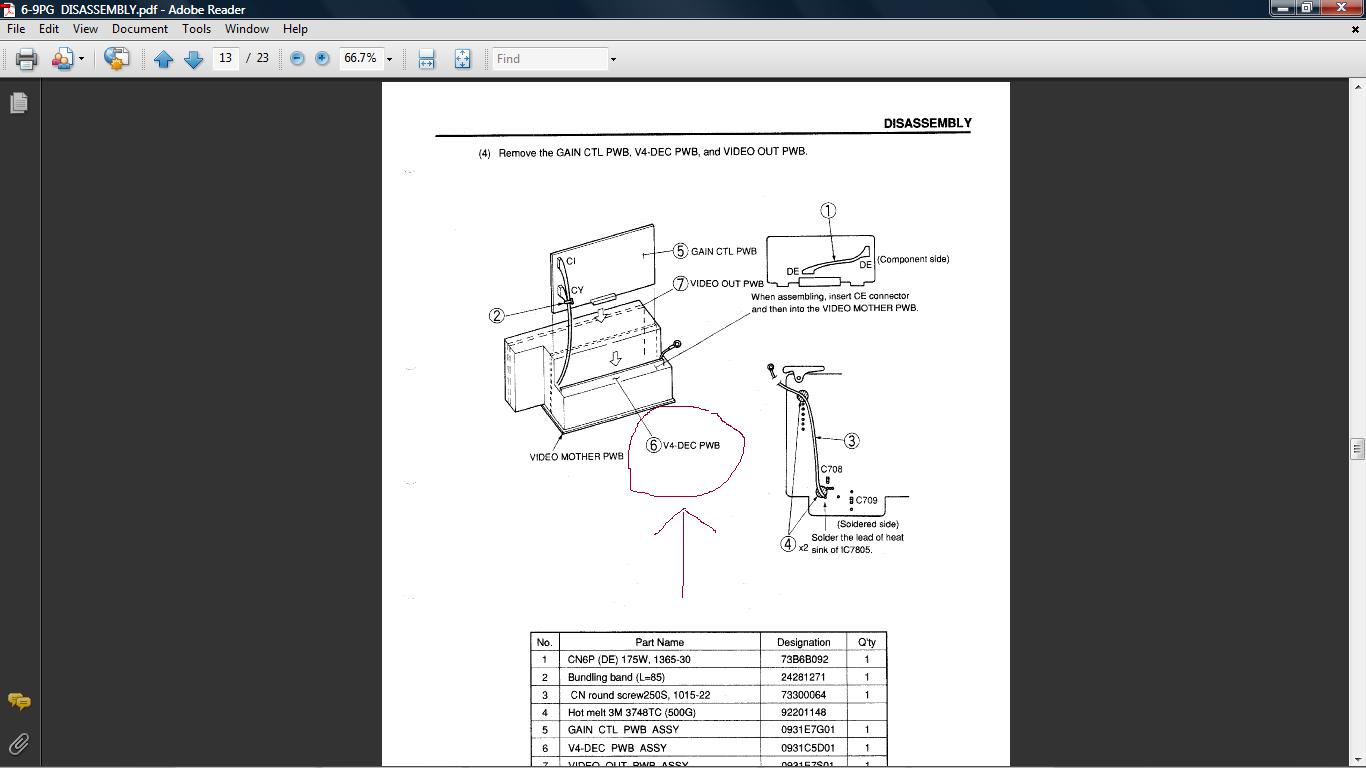
You need to try pulling the video decoder board and see if the code changes.
|
|
| Back to top |
|
|
rob17
Joined: 10 Dec 2008
Posts: 21
|
| Posted: Tue Oct 27, 2009 7:00 pm Post subject: |
|
|
| macgyver655 wrote: | | You need to try pulling the video decoder board and see if the code changes. |
Which board is that exactly? I looked through the NEC 6PG layout and setup tip section and did not see where that is at. What location is it in?
|
|
| Back to top |
|
|
macgyver655
Joined: 22 Aug 2007
Posts: 8508
|
| Posted: Wed Oct 28, 2009 1:15 am Post subject: |
|
|
Try this
| Description: |
|
| Filesize: |
87.13 KB |
| Viewed: |
4505 Time(s) |
|
|
|
| Back to top |
|
|
rob17
Joined: 10 Dec 2008
Posts: 21
|
| Posted: Sat Oct 31, 2009 6:02 am Post subject: |
|
|
|
I finally got to pulling the video decoder board out tonight, when i did that the error code switched to just FC.
|
|
| Back to top |
|
|
macgyver655
Joined: 22 Aug 2007
Posts: 8508
|
| Posted: Sat Oct 31, 2009 4:16 pm Post subject: |
|
|
Looks like your +15 volt line still has a problem. The decoder board error may just be there because of lack of the 15 volts so it may be fine. Now the question is whether the power supply is not producing the +15 volts or another board is drawing down the +15 volt line. If you dont know how to properly test out this problem then all you can do is try pulling some more boards to see if the FC code goes away. However other codes will come up instead so this can be difficult. Heres some boards you can try pulling or just disconnecting but no guarantees you'll find the problem.
C board, F board, DCPD drive, gain control, video out, point, I guess you get the point.
|
|
| Back to top |
|
|
rob17
Joined: 10 Dec 2008
Posts: 21
|
| Posted: Sun Nov 01, 2009 4:15 am Post subject: |
|
|
So far I have pulled the C board, F board, deflection board, astig board, hv board, system, wave, control, point, video output, and the gain control, none of them changed the error code. How do I see if the psu is outputting 15v? Which color of wire coming from it carries the 15v?
Also, what is the DCPD drive?
many thanks MacGyver!
|
|
| Back to top |
|
|
stefuel

Joined: 07 Mar 2006
Posts: 3353
Location: Green Harbor MA USA
|
| Posted: Sun Nov 01, 2009 2:22 pm Post subject: |
|
|
I wonder how many times on this and AVS forum it has been said to "NOT TOUCH ANY POTS ON ANY NEC." You'll need a scope to re-calibrate the projector. Your best bet now is to remember which pot and how much you turned it and put it back as close to the original position. Then hope for the best.
_________________
Chip
A Barco is only a AmPro with training wheels
Card carrying member of the AVS chain gang.
|
|
| Back to top |
|
|
rob17
Joined: 10 Dec 2008
Posts: 21
|
| Posted: Sun Nov 01, 2009 5:21 pm Post subject: |
|
|
|
Stefuel, I know I heard that infamous line many times. It was only a quarter turn and I turned it right back to where it was after it had immediately shut off. With the new deflection board I bought and put in. On the deflection board that I put in I should not have to change any of the pots on that since it was working in the projector it came out of, right?
|
|
| Back to top |
|
|
macgyver655
Joined: 22 Aug 2007
Posts: 8508
|
| Posted: Sun Nov 01, 2009 6:51 pm Post subject: |
|
|
| rob17 wrote: | So far I have pulled the C board, F board, deflection board, astig board, hv board, system, wave, control, point, video output, and the gain control, none of them changed the error code. How do I see if the psu is outputting 15v? Which color of wire coming from it carries the 15v?
Also, what is the DCPD drive?
many thanks MacGyver! |
DCPC.....digital CPC drive
The FC +15 volt error is one of the most difficult to diagnose. It would be odd that the replacement PS would have the same problem and I'm sure you bought it as a working unit.
You must also realize the function characteristics of error codes. The code doesn't always mean that thats where the problem is. It merely means that its the first or only code triggered. A completely different problem may be in a sideways manner triggering the FC code only because the PS went into shut down based on a different problem.
If your thinking of tracking this down on your own I would suggest getting a copy of the service manual and start testing. Either that or send Curt some boards to test.
One question I will ask though is did you unplug the set every time you removed a board to test for the FC code. It must be unplugged to clear the code before the next try.
|
|
| Back to top |
|
|
Curt Palme
CRT Tech
Joined: 08 Mar 2006
Posts: 24396
Location: Langley, BC
TV/Projector: All of them!
|
| Posted: Sun Nov 01, 2009 6:54 pm Post subject: |
|
|
It could be the SMPS, deflection board or any board that needs to stay in the set to power up. I don't think turning the pot really caused the error, or should I say, turning the pot didn't necessarily blow something up, but maybe turning the pot itself ended up stressing a part that was about to fail anyways.
But yes, finding an Fc error is a pain in the ASCII in an NEC.
|
|
| Back to top |
|
|
benareeno
Joined: 22 Mar 2006
Posts: 1614
Location: ottawa, canada
|
| Posted: Mon Nov 02, 2009 5:11 pm Post subject: |
|
|
|
Did the F2 error go away?? What exactly is the F2 error?
|
|
| Back to top |
|
|
|
|




