| Author |
Message |
Revox
Joined: 13 Feb 2008
Posts: 158
|
| Posted: Wed Sep 09, 2009 11:12 pm Post subject: Magnetical Setup M. 8500, white Balance, pictures |
|
|
I think it's not entertaining to ask only questions, so first i'll tell something about the circumstances.
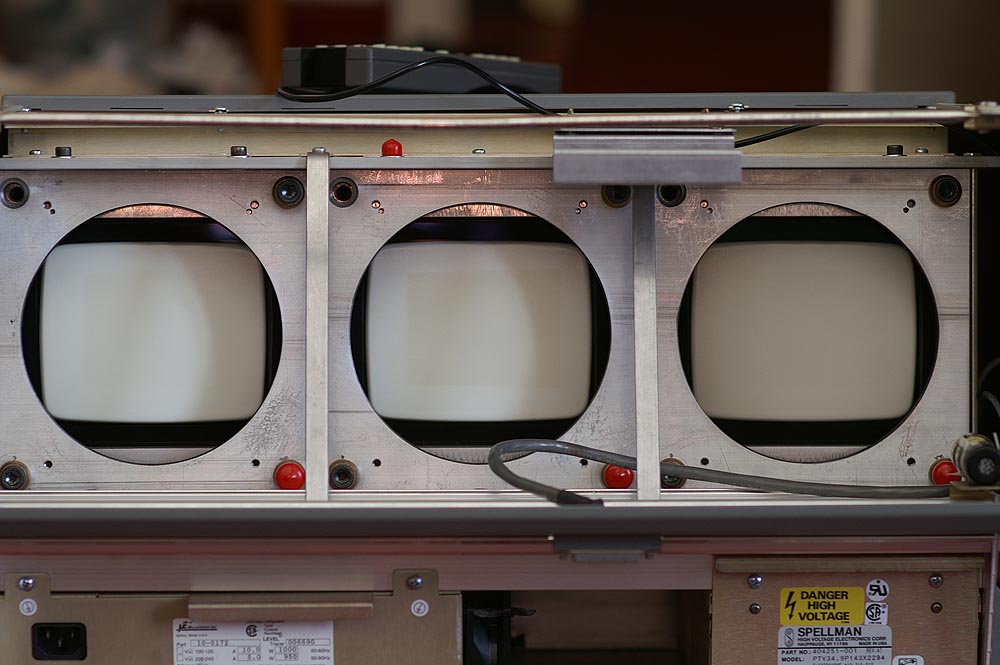
I got an two 8500 from an recycling company for 400€. Both machines have only 800Ours on the counter but the university which used these projektors drove them very hard. The green Tube got wear and a slight burn in.
The wear area on blue and red was a little bit to little for me. As a conclusion i ordered new Tubes from ebay.com .
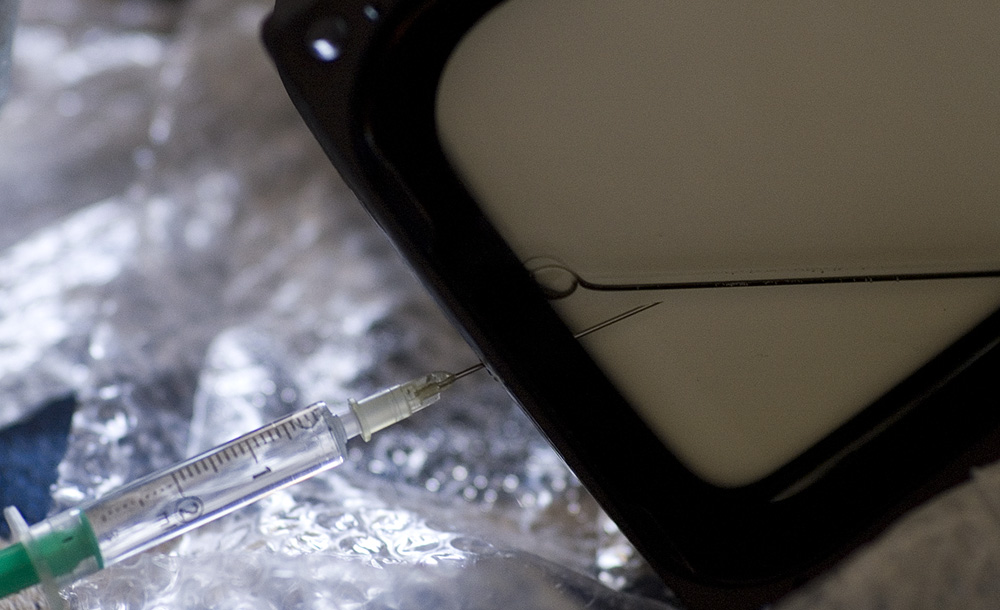
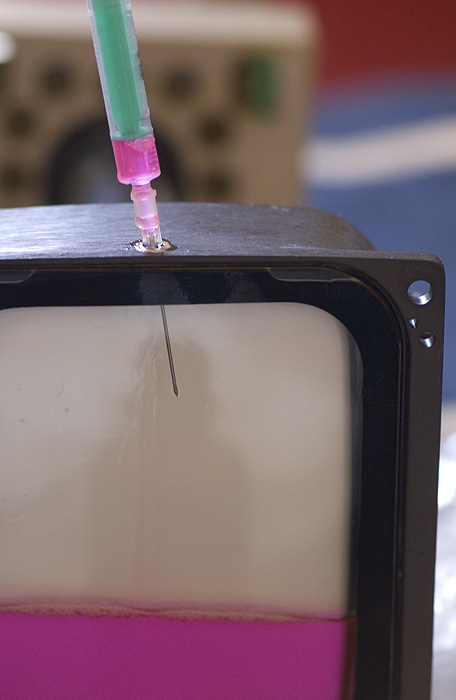
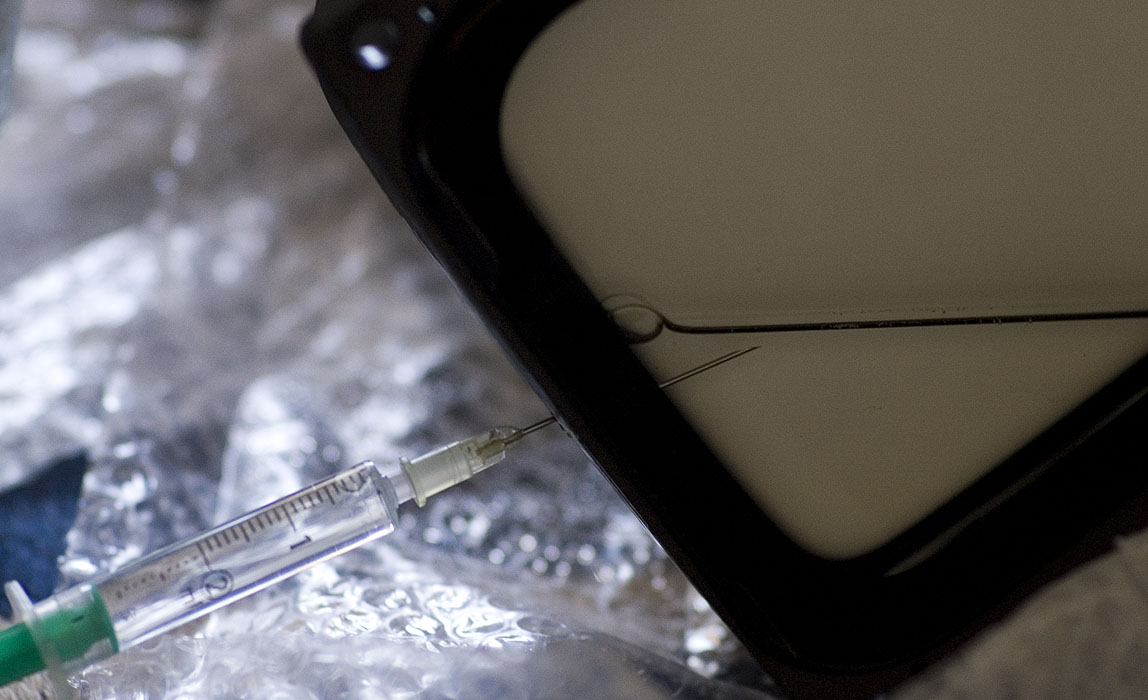
When the tubes a ripped out it is easy to colour the red and green one. I used the glykol of old SD 187 tubes with a spotburn. Then comes the part (you know) with problems: Magnetics setup!
I red the procedure on etechvideo but still have some problems, or at least things i am not knowing if they are "normal".
1. The Astig - 2Pole settings of red is good, the "spot" is exactly in the middle of the shadow. But when i defocused, the whole picture moves a lot (at least 1/6 convergence pattern zone)
2. The Astig - 4Pole Setings controlled digitaly by the stigmator amp are realy fine in the middle of the picture on the green tube. On the left side the form of the "circle" is like a "triangle". tourning the focus yoke round the neck did not really have an influence on this.
Eventually there are amateur mistakes made by me.
I didn't enjoy the magnetic setup, especially the centering is very hard to handle with the heavy yoke.
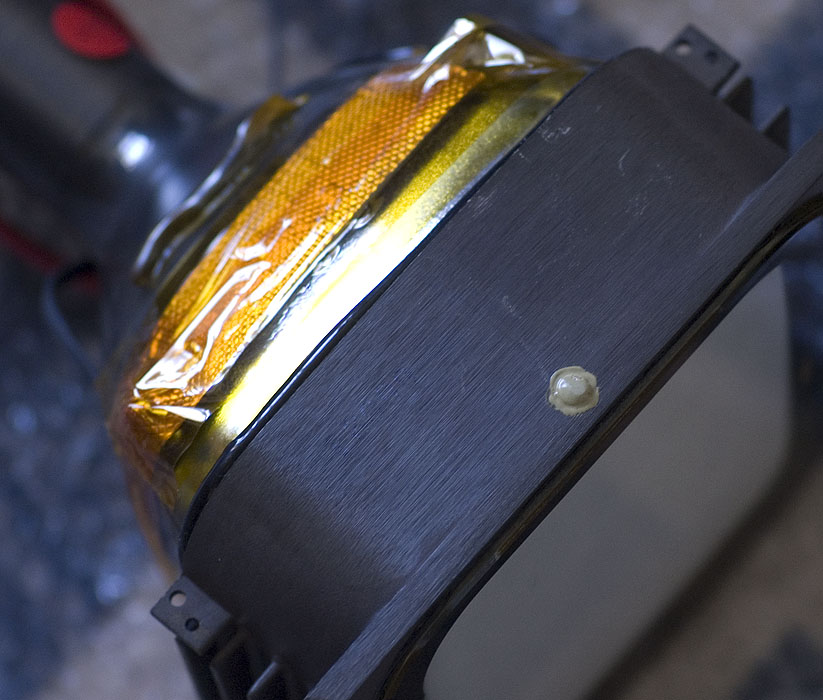
To entertain, Photos:
| Description: |
|
| Filesize: |
107.65 KB |
| Viewed: |
9006 Time(s) |
|
| Description: |
|
| Filesize: |
179.82 KB |
| Viewed: |
9006 Time(s) |
|
| Description: |
|
| Filesize: |
88 KB |
| Viewed: |
9006 Time(s) |
|
| Description: |
|
| Filesize: |
127.16 KB |
| Viewed: |
7132 Time(s) |
|
| Description: |
|
| Filesize: |
127.25 KB |
| Viewed: |
9006 Time(s) |
|
Last edited by Revox on Fri Sep 11, 2009 12:33 am; edited 3 times in total
|
|
| Back to top |
|
 |
Revox
Joined: 13 Feb 2008
Posts: 158
|
| Posted: Wed Sep 09, 2009 11:27 pm Post subject: |
|
|
|
I'll take the important "DOT" picture tomorow evening. It's 2o'clock here and i fall into sleep by myself (this translation from german to english is a little bit funny).
|
|
| Back to top |
|
|
Nashou66

Joined: 12 Jan 2007
Posts: 16171
Location: West Seneca NY
|
| Posted: Thu Sep 10, 2009 12:26 am Post subject: |
|
|
to get the grid to stay straight when ramping the focus you have to go back and forth between the two pole and the focus coil till you get it not to move, that is a pain in the derrière !!!! keep at it and you'll get it but it takes time, once you do one the others come easy, also keep the clamp inside the focus coil loose too it helps with moving the coil around.
Athanasios
_________________
Don't blame your underwear for your crooked ass~ unknown Greek philosopher
"Republicans believe every day is the Fourth of July, but the Democrats believe every day is April 15." --- President Reagan
One Smart Dog!!!
Marquee High Performance Bellows now shipping!!
Marquee Modifications and Performance Enhancement
Marquee C-element and Bellow removal
|
|
| Back to top |
|
|
draganm

Joined: 08 Mar 2006
Posts: 8990
Location: Colorado
|
| Posted: Thu Sep 10, 2009 2:50 am Post subject: Re: Magnetical Setup M. 8500 after tube change |
|
|
| Revox wrote: | | 2. The Astig - 4Pole Setings controlled digitaly by the stigmator amp are realy fine in the middle of the picture on the green tube. On the left side the form of the "circle" is like a "triangle". tourning the focus yoke round the neck did not really have an influence on this. |
with only 2 pole flare rings guitar pic shaped stig in the corners is not unsual. Looks like your doing a really good job on the 8500 though, keep at it and you will be rewarded with a very nice picture. 
|
|
| Back to top |
|
|
Revox
Joined: 13 Feb 2008
Posts: 158
|
| Posted: Thu Sep 10, 2009 9:08 am Post subject: |
|
|
Ok, i think ive something to do in the evening ours  White balance and [...] and going nuts. White balance and [...] and going nuts.
When the picture moves to right top, i must adjust the "lighter flare" to left bottom?
I think the last 5% sharpness are very hard to get, so ill take pictures in the evening and you can decide for me if i should be satisfied.
A Question for centering: one half of vertical convergence Field is to much divergence?
|
|
| Back to top |
|
|
Nashou66
Joined: 12 Jan 2007
Posts: 16171
Location: West Seneca NY
|
| Posted: Thu Sep 10, 2009 11:22 am Post subject: |
|
|
| Revox wrote: | Ok, i think ive something to do in the evening ours White balance and [...] and going nuts.
When the picture moves to right top, i must adjust the "lighter flare" to left bottom?
I think the last 5% sharpness are very hard to get, so ill take pictures in the evening and you can decide for me if i should be satisfied.
A Question for centering: one half of vertical convergence Field is to much divergence? |
What do you mean by this? do you mean one half of a grid square is off? if so, then you can do better. The closer you get all grids lined up with no electronic control the less drift in convergence you will have and the Projector will run cooler.
Athanasios
_________________
Don't blame your underwear for your crooked ass~ unknown Greek philosopher
"Republicans believe every day is the Fourth of July, but the Democrats believe every day is April 15." --- President Reagan
One Smart Dog!!!
Marquee High Performance Bellows now shipping!!
Marquee Modifications and Performance Enhancement
Marquee C-element and Bellow removal
|
|
| Back to top |
|
|
draganm
Joined: 08 Mar 2006
Posts: 8990
Location: Colorado
|
| Posted: Thu Sep 10, 2009 4:25 pm Post subject: |
|
|
| Nashou66 wrote: | | Revox wrote: | | A Question for centering: one half of vertical convergence Field is to much divergence? |
What do you mean by this? do you mean one half of a grid square is off? if so, then you can do better. The closer you get all grids lined up with no electronic control the less drift in convergence you will have and the Projector will run cooler.
Athanasios |
Well if you line up the left/right edges of the grids like the "guided menu" tells you to do then the center squares are 50% off for blue and Red in oposite driections due to the angled throw. I think that's what he's talking about?
that's normal, on a MArquee the convergence really pushes the grid around heavilly and it's unavoidable.
|
|
| Back to top |
|
|
Revox
Joined: 13 Feb 2008
Posts: 158
|
| Posted: Thu Sep 10, 2009 4:41 pm Post subject: |
|
|
I meant that i must shift the complete red colour 1/2 zone up. So Nashou66 was right in decripting my writing.
So its slowly getting dark in Berlin and i'll start the CRT soon.
|
|
| Back to top |
|
|
Nashou66
Joined: 12 Jan 2007
Posts: 16171
Location: West Seneca NY
|
| Posted: Thu Sep 10, 2009 4:49 pm Post subject: |
|
|
| Revox wrote: | I meant that i must shift the complete red colour 1/2 zone up. So Nashou66 was right in decripting my writing.
So its slowly getting dark in Berlin and i'll start the CRT soon. |
ok this is a bit too far off but you can still use the red/blue size adjust in the service menu or durring the (help) onscreen mechanical set up guide.
But I would work on the focus coil to get the grid more close to the green. But first make sure the green grid does not move during the focus going up and down. once you get the green to be steady for the full 0 to 100 focus and the dots are round then go and match the red and blue to the green.
Athanasios
_________________
Don't blame your underwear for your crooked ass~ unknown Greek philosopher
"Republicans believe every day is the Fourth of July, but the Democrats believe every day is April 15." --- President Reagan
One Smart Dog!!!
Marquee High Performance Bellows now shipping!!
Marquee Modifications and Performance Enhancement
Marquee C-element and Bellow removal
|
|
| Back to top |
|
|
Revox
Joined: 13 Feb 2008
Posts: 158
|
| Posted: Thu Sep 10, 2009 5:05 pm Post subject: |
|
|
Ok, short question before I start:
When the Focus causes nearly no shift at all, the 2 pole astig is right? Or is only the position of the focus coil right?
red and blue varied 4cm on my 165cm x 270cm screen
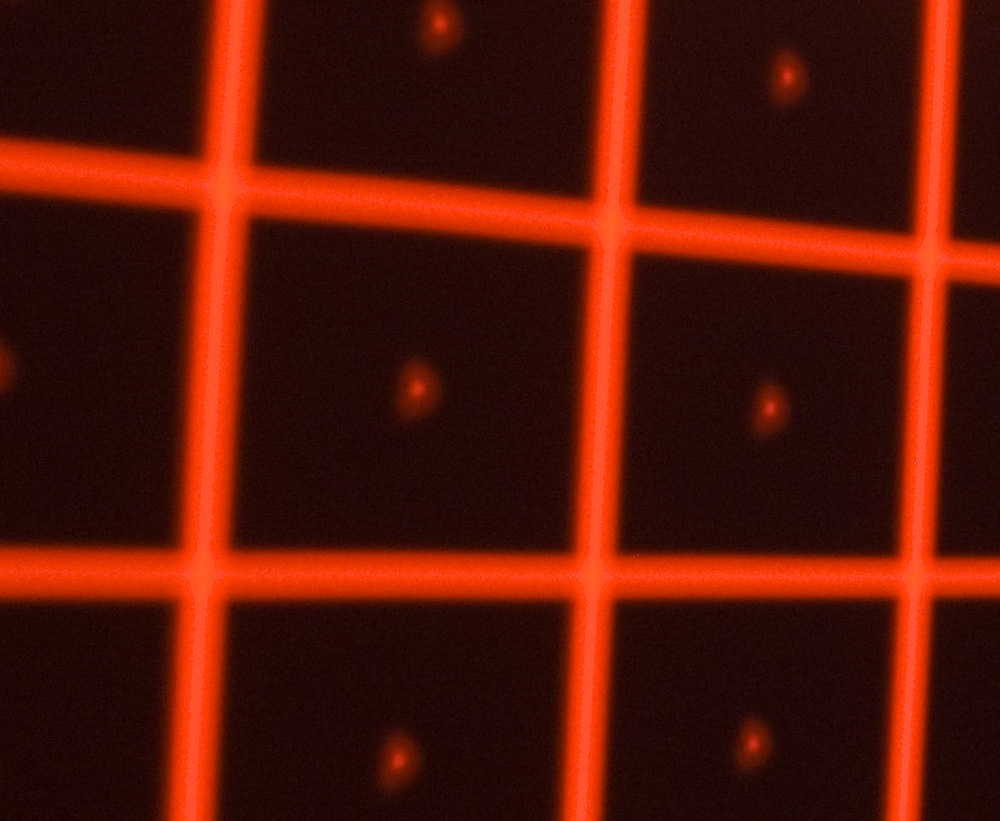
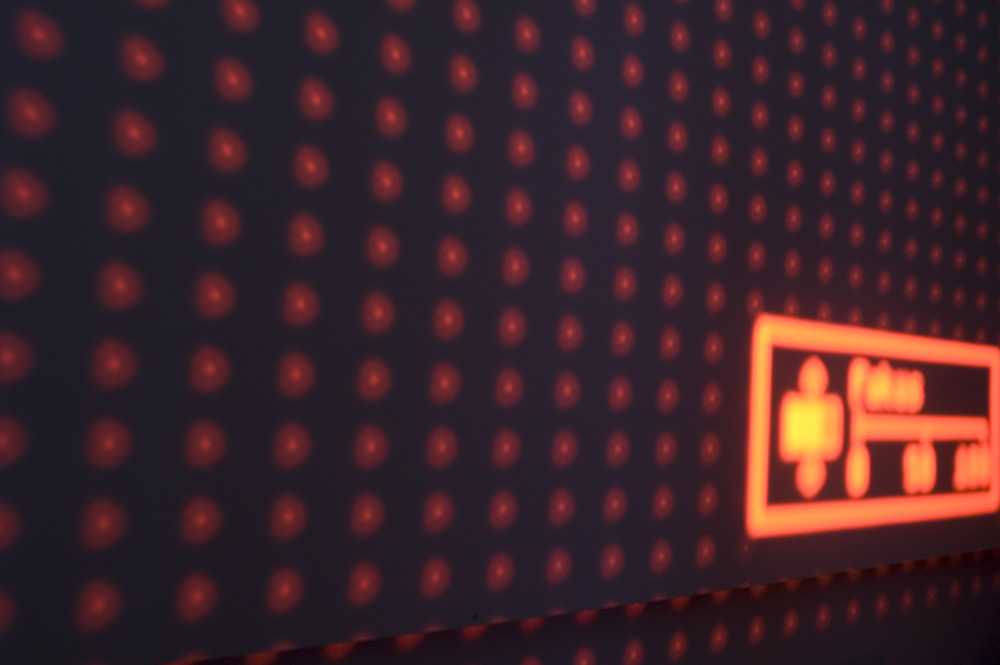
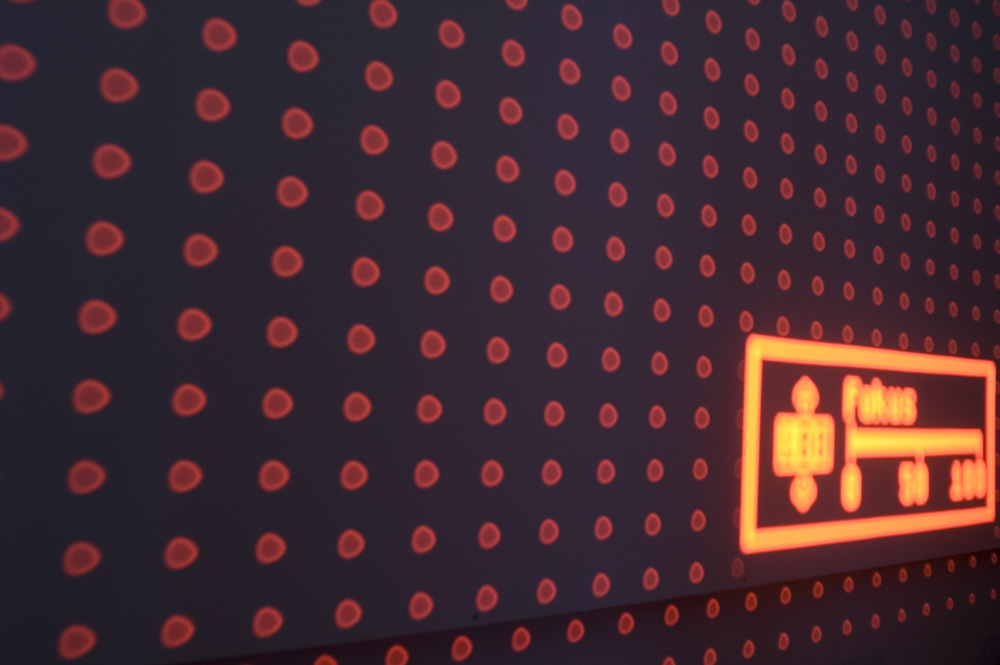
I tried to find the optima via the grid test pattern after the role: the "lighter" flare should be in middle of the "blur".
Two photos, camera position wasn't changed between.
For me the dots look right (but like this nice guitar tool)
| Description: |
|
| Filesize: |
223.43 KB |
| Viewed: |
8882 Time(s) |
|
| Description: |
|
| Filesize: |
122.34 KB |
| Viewed: |
8885 Time(s) |
|
| Description: |
|
| Filesize: |
142.88 KB |
| Viewed: |
8885 Time(s) |
|
|
|
| Back to top |
|
|
Nashou66
Joined: 12 Jan 2007
Posts: 16171
Location: West Seneca NY
|
| Posted: Thu Sep 10, 2009 5:47 pm Post subject: |
|
|
| Revox wrote: | Ok, short question before I start:
When the Focus causes nearly no shift at all, the 2 pole astig is right? Or is only the position of the focus coil right?
red and blue varied 4cm on my 165cm x 270cm screen
I tried to find the optima via the grid test pattern after the role: the "lighter" flare should be in middle of the "blur".
Two photos, camera position wasn't changed between.
For me the dots look right (but like this nice guitar tool) |
The Dots look fine!! Nice job, one thing, did you disconnect the astig cables before you did the CPC magnets?
this should be done and then do the final touches with the cables connected. This of course is if you have focus coils with the astig windings.
now for your first question, if it does not move at all it is a combination of both coils being right. you can have the dot in the center with only using the focus coil and not the 2 pole but once you adjust focus it moves. So it is when Both the Focus coil and the Color Purity Control Magnets (CPC) are perfect. the other CPC magnets will not affect if the grid moves or not. so I always work on the focus coils and 2 pole together , then move to the 4 and 6 pole, then last the electronic astig. if your good no electronic adjustment is needed.
Athanasios
_________________
Don't blame your underwear for your crooked ass~ unknown Greek philosopher
"Republicans believe every day is the Fourth of July, but the Democrats believe every day is April 15." --- President Reagan
One Smart Dog!!!
Marquee High Performance Bellows now shipping!!
Marquee Modifications and Performance Enhancement
Marquee C-element and Bellow removal
|
|
| Back to top |
|
|
Revox
Joined: 13 Feb 2008
Posts: 158
|
| Posted: Thu Sep 10, 2009 6:14 pm Post subject: |
|
|
Oh, whats the colour purity magnet?
I only have the 2 Pole astig and one magnet weel which is sticket together (can be tourned around without any influence on the grids)
Is this the CPC magnet?
I dont have a manual 4 and 6 pole manual moved magnet.
I think i don't understand what effect causes moving. For these 2 pictures, 2Pole astig looks right, centering is only "ok". But when a defocused the grid is moving to right top. What to do to compensate this movment? So the Focus coil isn't in center?
|
|
| Back to top |
|
|
draganm
Joined: 08 Mar 2006
Posts: 8990
Location: Colorado
|
| Posted: Thu Sep 10, 2009 6:52 pm Post subject: |
|
|
| Revox wrote: | Oh, whats the colour purity magnet?
I only have the 2 Pole astig and one magnet weel which is sticket together (can be tourned around without any influence on the grids) ? |
that's a dummy ring, it doesn't do anything just a spacer.
| Revox wrote: | | I think i don't understand what effect causes moving. For these 2 pictures, 2Pole astig looks right, centering is only "ok". But when a defocused the grid is moving to right top. What to do to compensate this movment? So the Focus coil isn't in center? |
Probably. You loosen the 3 Brass wing-nuts and osciallte the coil around until grid is centered on tube face. If there's any glue between the F-coil and convergence coil it needs to be cleaned off. Be careful, if you scracth the Copper winding the conv. coil is ruined.
|
|
| Back to top |
|
|
Nashou66
Joined: 12 Jan 2007
Posts: 16171
Location: West Seneca NY
|
| Posted: Thu Sep 10, 2009 6:59 pm Post subject: |
|
|
| Revox wrote: | Oh, whats the colour purity magnet?
I only have the 2 Pole astig and one magnet weel which is sticket together (can be tourned around without any influence on the grids)
Is this the CPC magnet?
yes the set of magnets most call the astig magnets are actually called Color Purity control , that is "C P C". it makes sence since if the dots are not the same size or shape for each color then the calibration for greyscale wont be perfect as each tube will not show the right amount of color intensity because of the spread of the phosphor being lit up by the electron beam.
I dont have a manual 4 and 6 pole manual moved magnet.
You should have a 4 pole too at least? I never seen just a two pole CPC magnet set? can you take a pic of your magnets?
I think i don't understand what effect causes moving. For these 2 pictures, 2Pole astig looks right, centering is only "ok". But when a defocused the grid is moving to right top. What to do to compensate this movment? So the Focus coil isn't in center?
This is the hard part, both control the location of the bright dot in the bigger dot but also control how the grids move's while focusing, so you have to keep centering the main focus coil and then check the bright dot (cpc mags), then go back and move the coil, but this moves the dot, so you have to adjust the cpc mags again... it keeps going back and forth till you find the grid moves very little maybe 1 inch to 1/2 an inch while adjusting the focus from 0 to 100. it takes many tries but eventually it becomes pretty easy. the main reason its so hard is the stupid plastic cover around the tube!! it is hard to get your hand around the focus coil and move it to where you want it and then clamp it till you adjust it again. I have always wanted to remove the covers while doing magnets and then put them back after i was done but that it too much work
|
Also its easier if you start with all magnets "nulled" that is when they have no effect on the dot if you move them around the tube, its easy to do this if you remove the set and null the magnets by putting the tabs next to each other.
Athanasios
_________________
Don't blame your underwear for your crooked ass~ unknown Greek philosopher
"Republicans believe every day is the Fourth of July, but the Democrats believe every day is April 15." --- President Reagan
One Smart Dog!!!
Marquee High Performance Bellows now shipping!!
Marquee Modifications and Performance Enhancement
Marquee C-element and Bellow removal
|
|
| Back to top |
|
|
Revox
Joined: 13 Feb 2008
Posts: 158
|
| Posted: Thu Sep 10, 2009 7:16 pm Post subject: |
|
|
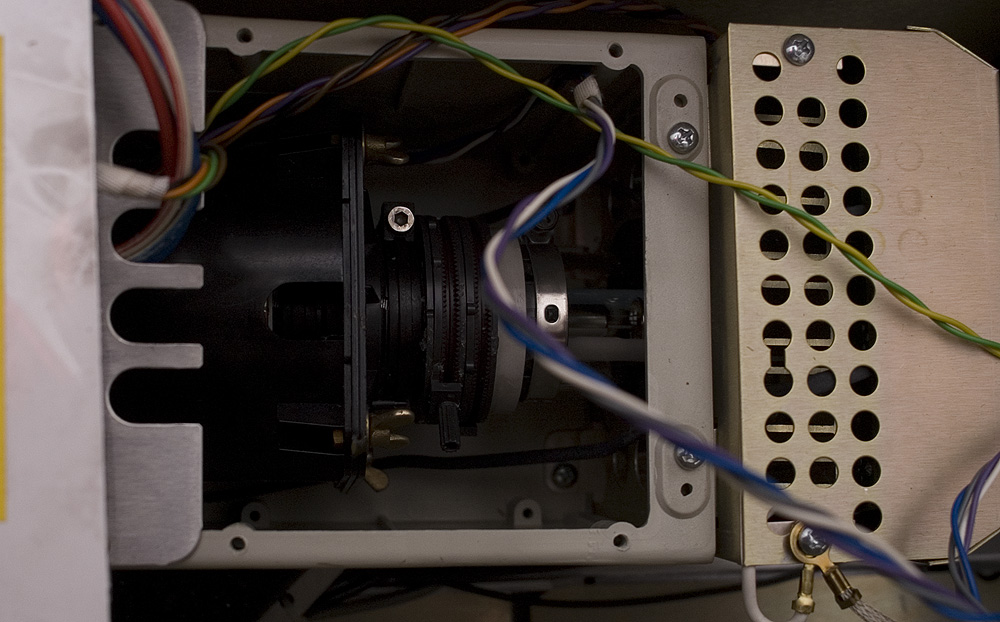
When i press the focus coil totaly down, so the picture is anything else than centered BUT the picture doesn't move when play around with the focus control. That's really strange isn't it? I agree with you that the 2 pole astig has got a slight influence on this, but not as much as i need.
It's possible, that i smashed the gear a little bit (of the 2-pole Focus), but i think it doesn't matter?
But it's a little bit better now, i think its only one thumb moving up and down (not left right anymore).
| Description: |
|
| Filesize: |
213.85 KB |
| Viewed: |
8852 Time(s) |
|
|
|
| Back to top |
|
|
Nashou66
Joined: 12 Jan 2007
Posts: 16171
Location: West Seneca NY
|
| Posted: Thu Sep 10, 2009 8:04 pm Post subject: |
|
|
Hmm I never seen a 2 pole only CPC magnet structure. well as long as you got the movement to only be a thumb width than your good to go. Side to side is harder to tame than the up and down from my experience, you know you can also twist the focus coil to move the grid where you want it. but id leave it where it is now if your only about and inch of movement.
Athanasios
_________________
Don't blame your underwear for your crooked ass~ unknown Greek philosopher
"Republicans believe every day is the Fourth of July, but the Democrats believe every day is April 15." --- President Reagan
One Smart Dog!!!
Marquee High Performance Bellows now shipping!!
Marquee Modifications and Performance Enhancement
Marquee C-element and Bellow removal
|
|
| Back to top |
|
|
PaulB
Joined: 26 Oct 2007
Posts: 359
Location: Bonnie (but rainy) Scotland
|
| Posted: Thu Sep 10, 2009 8:10 pm Post subject: |
|
|
I'm pretty sure 2 Pole is normal on the Marquee, or at least normal on the early models (pre VDC)??
Nice job on the Magnets, you did that in one night!!?? If mine looked like that i'd be very happy indeed!
_________________
Paul
|
|
| Back to top |
|
|
Revox
Joined: 13 Feb 2008
Posts: 158
|
| Posted: Thu Sep 10, 2009 8:42 pm Post subject: |
|
|
I think it is the second nigth. So enought is enought. Red is ok now. Green is unsharp in the bottom and not exactly round. Maybe, enough isn't enought. So now, white balance...
Last edited by Revox on Thu Sep 10, 2009 11:13 pm; edited 1 time in total
|
|
| Back to top |
|
|
Nashou66
Joined: 12 Jan 2007
Posts: 16171
Location: West Seneca NY
|
|
| Back to top |
|
|
Revox
Joined: 13 Feb 2008
Posts: 158
|
| Posted: Thu Sep 10, 2009 11:12 pm Post subject: |
|
|
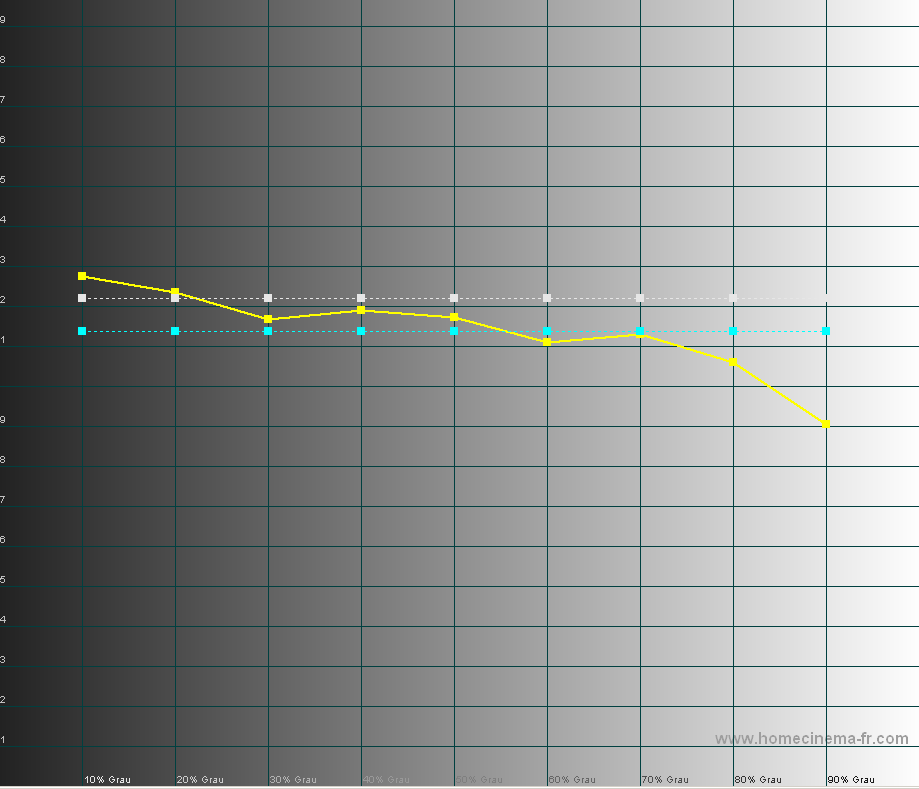
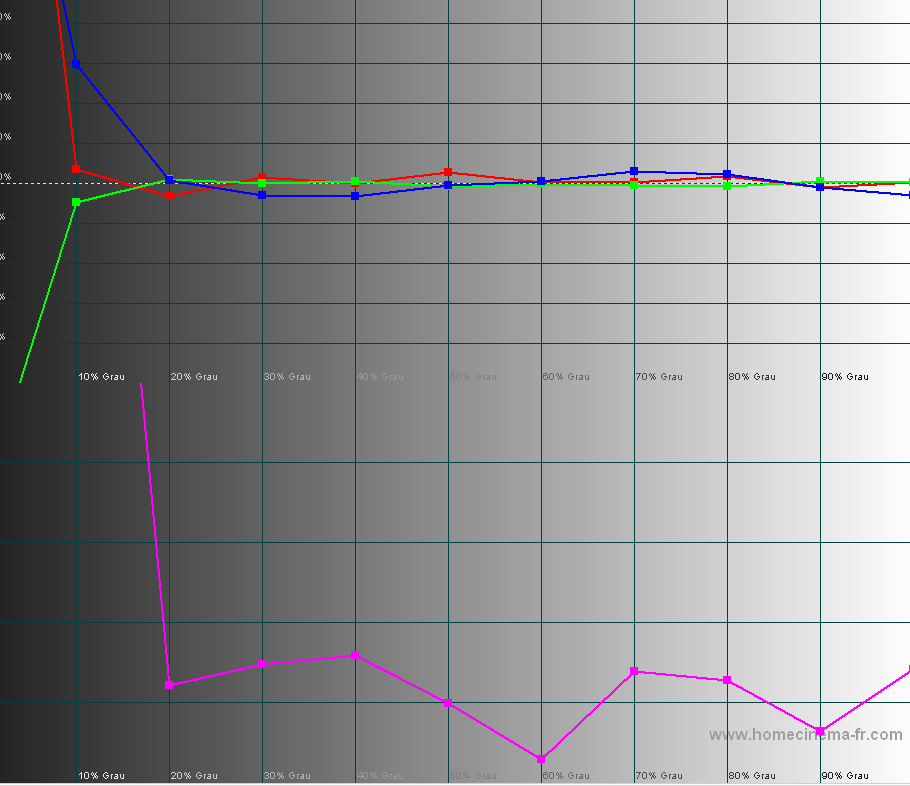
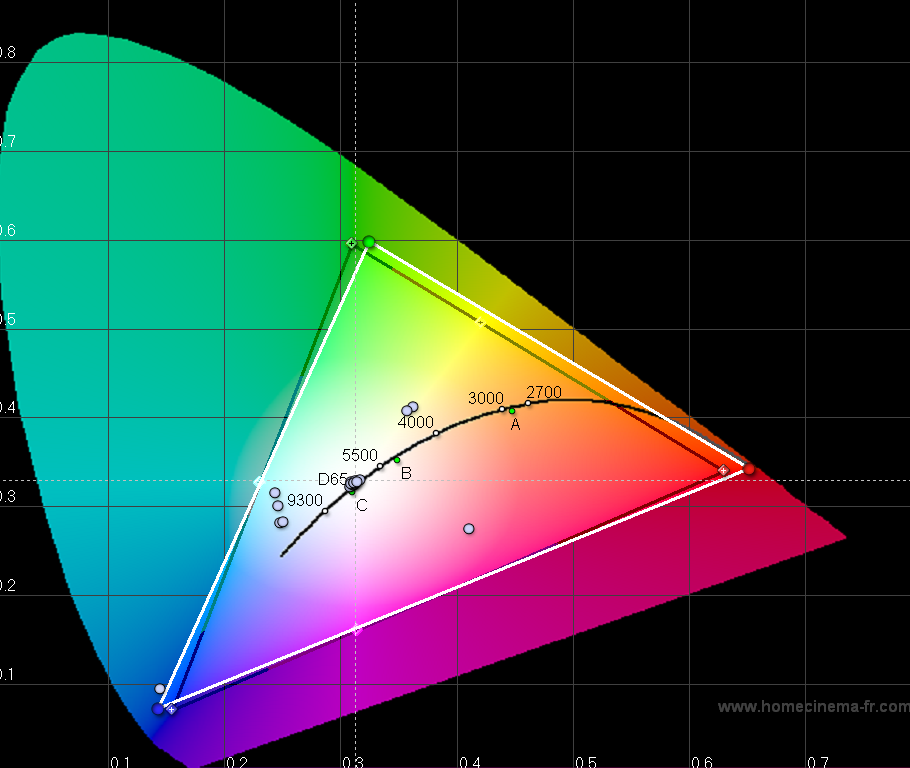
The "unsharp" green was only in the bottom line, Scheimpflug was ok. I wasn't able to get a sharper image with any possible sheinpflug. I think it's electronical. With medium contrast it's not visible.
My white balance settings:
| Description: |
|
| Filesize: |
6.41 KB |
| Viewed: |
8793 Time(s) |

|
| Description: |
|
| Filesize: |
19.57 KB |
| Viewed: |
8793 Time(s) |
|
| Description: |
|
| Filesize: |
24.04 KB |
| Viewed: |
8793 Time(s) |
|
| Description: |
|
| Filesize: |
163.04 KB |
| Viewed: |
8793 Time(s) |
|
|
|
| Back to top |
|
|
|
|




