|
As this forum is rarely used anymore, we've locked it. Feel free to browse and read. Questions? Please reach out to us directly. Cheers! |

|
 |
|
|
| Author |
Message |
daves123
Joined: 16 Jan 2009
Posts: 126
|
| Posted: Tue Aug 25, 2009 5:51 pm Post subject: Does a dvi/hdmi switch like this exist? |
|
|
|
I need to be able to switch 2 inputs and 2 outputs separate of each other. I know this can be accomplished with a switch and a separate matrix switch, just wondering if there is an all in one solution. What I want to do is switch between 2 sources into my scaler, and then switch between 2 displays. My RPTV and my PJ. The scaler only has one dvi in and one dvi out. Hopefully I explained this ok, cuz i'm a little confused myself.
|
|
| Back to top |
|
 |
jkruger

Joined: 24 Oct 2007
Posts: 2435
Location: Carlsbad, CA
|
| Posted: Tue Aug 25, 2009 6:28 pm Post subject: |
|
|
This one will work:
http://www.monoprice.com/products/product.asp?c_id=101&cp_id=10110&cs_id=1011002&p_id=5704&seq=1&format=2
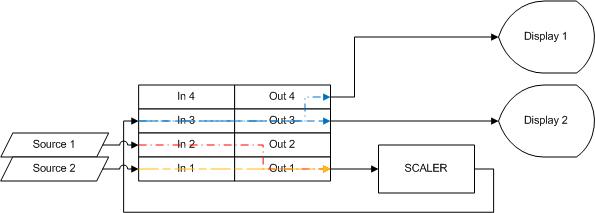
You will need dvi-hdmi cables to hook it up but then all you need to do is run your souces into any of the first three inputs, hook the scaler's input to one of the outputs and the output to the fourth input and then you can use three different displays on the other three outputs. this will give you a complete matrix of switching ability. Three sources in, three displays, and the scaler can be switched in or out of the line in any configuration.
|
|
| Back to top |
|
|
daves123
Joined: 16 Jan 2009
Posts: 126
|
| Posted: Tue Aug 25, 2009 8:47 pm Post subject: |
|
|
Perfect, that looks like exactly what I need. I'm still a little confused though. Just to be clear, I want to hook up 2 sources to my scaler that only has 1 input, and switch the scaler between 2 displays. If the scalers input is hooked up to one of the matrix switches outputs, is it still able to display the scaler on the other 3 outputs?
Thanks for the help, i'm just having a little trouble wrapping my head around this one.
|
|
| Back to top |
|
|
jkruger
Joined: 24 Oct 2007
Posts: 2435
Location: Carlsbad, CA
|
| Posted: Tue Aug 25, 2009 11:48 pm Post subject: |
|
|
|
yes. any input can be connected to any or all outputs, any input run thru the matrix to the scaler and then back to the matrix and out thru one, two, or three outputs. or one input can bypass the scaler while two others go thru it. any of the four inputs can be connected to any of the four outputs. by using one output for the scaler's source, you can then run the scaler's output back thru a different input on the matrix and send it to any of it's outputs, except the one the scaler is hooked to, it might not like that much. I doubt it would do any damage but it would be just a loop in the signal.
|
|
| Back to top |
|
|
jarseneau

Joined: 06 Nov 2007
Posts: 323
Location: WI
|
| Posted: Wed Aug 26, 2009 1:26 am Post subject: |
|
|
| daves123 wrote: | Perfect, that looks like exactly what I need. I'm still a little confused though. Just to be clear, I want to hook up 2 sources to my scaler that only has 1 input, and switch the scaler between 2 displays. If the scalers input is hooked up to one of the matrix switches outputs, is it still able to display the scaler on the other 3 outputs?
Thanks for the help, i'm just having a little trouble wrapping my head around this one. |
dave, before you buy the matrix switcher, I really think you are asking for something else.
Here is what I picture
Input 1-----\............................................................/------- Display 1
..................HDMI switch---->Scaler--->HDMI Splitter
Input 2-----/............................................................\------- Display 2
So you actually need 1 switch in line ahead of the scaler and another device to let you connect both displays to the output of the scaler. After the scaler you don't really need a switch. Just turn on one or both displays to show the signal that was routed into the scaler.
You would put a switch like this before the scaler and connect this splitter between the scaler and your displays
Or you could do this..
| Description: |
|
| Filesize: |
15.39 KB |
| Viewed: |
8161 Time(s) |
|
_________________
Jerry
|
|
| Back to top |
|
|
daves123
Joined: 16 Jan 2009
Posts: 126
|
| Posted: Thu Aug 27, 2009 10:04 pm Post subject: |
|
|
|
Those diagrams help. I tried to draw it out myself and was still confused thanks. So both jkrugers method 2nd drawing, and yours 1st will work then. I knew I could do it with 2 separate boxes, but wasn't sure about a matrix switcher. For cost reasons I think i'll stick with the switch / splitter option, unless you guys think the matrix switch would offer any advantages quality wise, due to less cables being run.
|
|
| Back to top |
|
|
jkruger
Joined: 24 Oct 2007
Posts: 2435
Location: Carlsbad, CA
|
|
| Back to top |
|
|
|
|
|
|
|
You cannot post new topics in this forum
You cannot reply to topics in this forum
You cannot edit your posts in this forum
You cannot delete your posts in this forum
You cannot vote in polls in this forum
You cannot attach files in this forum
You can download files in this forum
|
Forum powered by phpBB © phpBB Group
|
|




