| Author |
Message |
AnalogRocks
Forum Moderator

Joined: 08 Mar 2006
Posts: 26706
Location: Toronto, Ontario, Canada
TV/Projector: Sony 1252Q, AMPRO 4000G
|
| Posted: Wed Aug 12, 2009 1:55 am Post subject: Does the Pionner PDA-5002 input card scale 1080i to native |
|
|
Hi guys,
does anyone know if the PDA-5002 video input card scale 1080i to the native panel resolution of a Pioneer PDP-503MXE?
In the PDF file it says the 5002 can handle a 1080i/50 signal. However it doens't state that in the spec's for the Pioneer PDP-503MXE.
Do these Pioneer add in cards do internal scaling?
TIA guys.
_________________
Tech support for nothing
CRT.
HD done right!
|
|
| Back to top |
|
 |
macgyver655
Joined: 22 Aug 2007
Posts: 8508
|
| Posted: Wed Aug 12, 2009 10:18 pm Post subject: |
|
|
I'm not sure exactly what question you want answered so I'll shoot from the hip and you can clarify.
I'm showing inputs 1 and 2 which are on the 5002 will except 1080i 50 and 60, along with some other resolutions.
I doubt the card itself does any scaling as this would be processed on the signal board.
Was I close to the answer? 
|
|
| Back to top |
|
|
macgyver655
Joined: 22 Aug 2007
Posts: 8508
|
| Posted: Wed Aug 12, 2009 10:21 pm Post subject: |
|
|
Oh wait. Thats incorrect.
The 5002 is inputs 3, 4 and 5. I'm not seeing 1080i on those inputs. 
|
|
| Back to top |
|
|
ecrabb
Forum Moderator

Joined: 13 Mar 2006
Posts: 15909
Location: Utah
TV/Projector: JVC RS40, Epson 5010
|
| Posted: Wed Aug 12, 2009 11:17 pm Post subject: |
|
|
Yeah, I would guess the input boards function just as the input boards do on our projectors: Convert incoming signals to a reference color space - say, RGB or YPbPr 4:4:4 analog - and leave any further processing to the built-in signal processor to de-interlace, scale, etc. It would be silly to duplicate that functionality (deinterlacing, scaling) across half a dozen different interface cards.
I would assume the input cards do the A/D conversion - say, if the input to the processor is always digital. Some cards would need A/D (component), while some would not (DVI or HDMI). Or, I guess the bus connector could just connect to analog cards to an A/D converter section, while digital input cards would bypass that section.
With as powerful as the video processing is these days, the input cards are probably more hardware interface than anything else.
SC
|
|
| Back to top |
|
|
AnalogRocks
Forum Moderator
Joined: 08 Mar 2006
Posts: 26706
Location: Toronto, Ontario, Canada
TV/Projector: Sony 1252Q, AMPRO 4000G
|
| Posted: Thu Aug 13, 2009 12:19 am Post subject: |
|
|
See that's where I'm hung up. The panel doesn't say it will accept 1080i 50 which is what we're trying for.
The manual for the 5002 card says it's compatible with 1080i 50. This makes me think there may be a scaler in the 5002 card.
Mac any ideas?
_________________
Tech support for nothing
CRT.
HD done right!
|
|
| Back to top |
|
|
macgyver655
Joined: 22 Aug 2007
Posts: 8508
|
| Posted: Thu Aug 13, 2009 5:18 pm Post subject: |
|
|
Thats interesting. The document I have says the opposite. The panel (input1 and 2) will accept 1080i, and the input card (inputs 3, 4 and 5) doesn't state 1080i.
I'm assuming your talking about the DVI connection specifically.According to the technical manual the DVI-D (input 5) does not list 1080i as a compatible resolution. However it does list the VGA and the RGBHV (inputs 1 and 2) as being able to accept 1080i @ 50 or 60.
What device are you using to sent 1080i and to what port and does the screen say anything?
|
|
| Back to top |
|
|
macgyver655
Joined: 22 Aug 2007
Posts: 8508
|
| Posted: Thu Aug 13, 2009 5:54 pm Post subject: |
|
|
Here's some stuff to swallow. I have more if you want.
| Description: |
|
| Filesize: |
204.01 KB |
| Viewed: |
10 Time(s) |
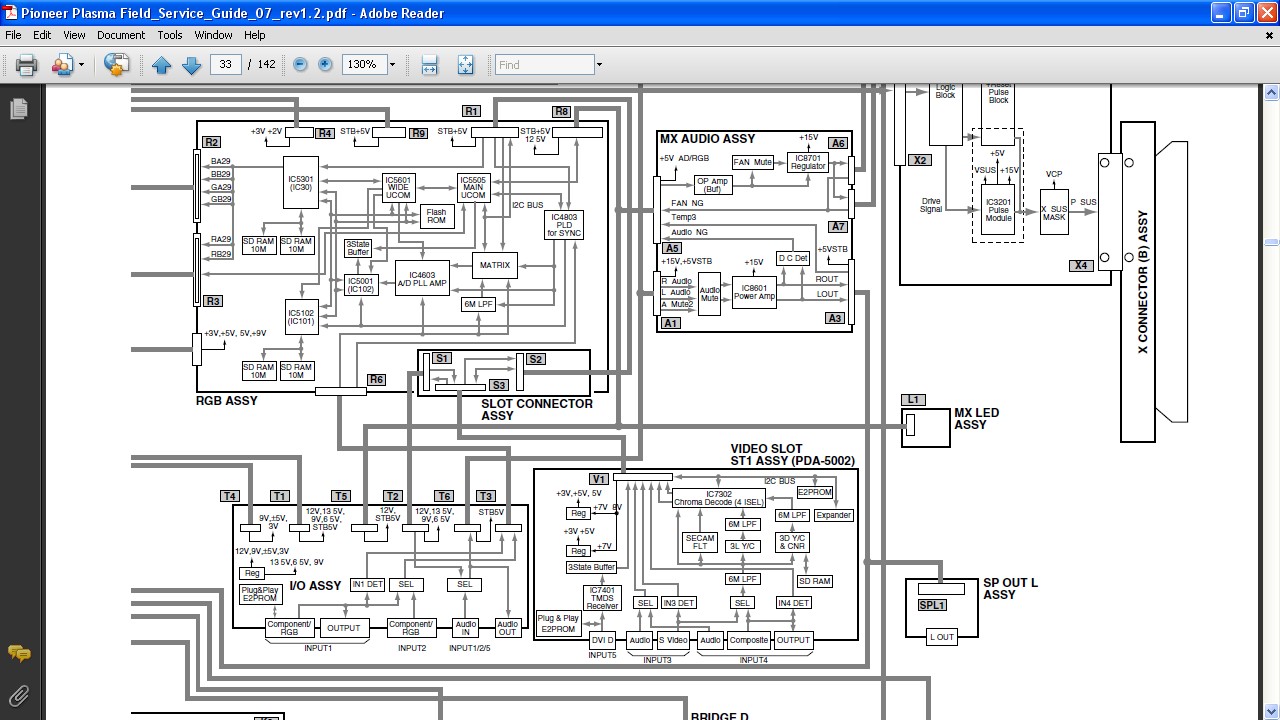
|
|
|
| Back to top |
|
|
crosstownk

Joined: 13 Aug 2009
Posts: 5
|
| Posted: Thu Aug 13, 2009 7:56 pm Post subject: |
|
|
| macgyver655 wrote: | The panel (input1 and 2) will accept 1080i, and the input card (inputs 3, 4 and 5) doesn't state 1080i.
|
That's what I'm reading in the manual. However, it would appear from having read various manuals that input 1 & 2 will only accept 1080i if the PDA-5002 is installed. So would it not therefore appear that the PDA-5002 does indeed scale? I'm by no means an expert in this field but it seems that while the PDA-5002 does not accept 1080, it enables inputs 1 & 2 to accept it......?
See the link below and note pages 4,6,7 & 8. The small star symbol indicates that the PDA-5002 is required. Does this shed any light?
http://www.pioneer.no/files/no/503mxe1_25.pdf
Essentially what I'm trying to do is determine if HDFury will allow me to hook my Sky+HD box to my PDP-503MXE using the HDMI out on the Sky STB.
BTW, AnalogRocks, thanks for all the effort in trying to sort this out for me! All you guys rock!
Seán.
|
|
| Back to top |
|
|
macgyver655
Joined: 22 Aug 2007
Posts: 8508
|
| Posted: Thu Aug 13, 2009 8:37 pm Post subject: |
|
|
I saw that chart on page 4 before. According to that chart inputs 3,4 and 5 wont work because they are on the input card, so that only makes sense. If the ports aren't there they cant work.. 
As far as ports 1 and 2 is says it wont except component without the card.
Anyways, if your trying to use the Fury, what port are you trying to use? Give me some more info.....
Do you have the 5002 input card?
|
|
| Back to top |
|
|
crosstownk
Joined: 13 Aug 2009
Posts: 5
|
| Posted: Thu Aug 13, 2009 8:46 pm Post subject: |
|
|
Yes - I have the video card installed. I'm not worried what input I use as long as get HD to work. I have not yet purchased the Fury - I'm trying to determine if it will do what I need it to do. I am hoping that the fury can be used via the VGA or the RGBHV component. I'm currently using the S-Video on the PDA-5002 and would prefer to have better than that if the option is available to me.
The Sky HD STB outputs both 720p/50 and 1080i/50 (although I have read that it may be 1080i/25). 720p/50 is not an option with the 503MXE and PDA-5002 so my last port of call is 1080i.
|
|
| Back to top |
|
|
macgyver655
Joined: 22 Aug 2007
Posts: 8508
|
| Posted: Thu Aug 13, 2009 9:47 pm Post subject: |
|
|
|
What kind of outputs does the Sky box have? Hdmi, DVI, component, composite?
|
|
| Back to top |
|
|
crosstownk
Joined: 13 Aug 2009
Posts: 5
|
| Posted: Thu Aug 13, 2009 9:52 pm Post subject: |
|
|
HDMI, S-Video & SCART. So HDMI is my only option for HD but the Pioneer display is not HDCP compliant 
|
|
| Back to top |
|
|
crosstownk
Joined: 13 Aug 2009
Posts: 5
|
| Posted: Thu Sep 10, 2009 8:28 pm Post subject: |
|
|
A quick update on this.
As I wanted my Sky+HD STB to provide me with HD on the Pioneer, I contacted Sky and asked them if they could supply me with an older STB with component outputs.
The engineer called today and installed the STB. When I came home from work I made the necessary connections and switched to Input 2. The picture was green. After a quick look at the user manual I found that I needed to switch the input from RGB to Component. Once I did this all was well. The output of the Sky+HD STB is set to 1080i and I've an immaculate picture on the Pioneer.
So does the PDA-5002 scale to native? -- YES it does.
Thanks to everyone here for their help and input, it was much appreciated.
|
|
| Back to top |
|
|
AnalogRocks
Forum Moderator
Joined: 08 Mar 2006
Posts: 26706
Location: Toronto, Ontario, Canada
TV/Projector: Sony 1252Q, AMPRO 4000G
|
| Posted: Fri Sep 11, 2009 1:44 am Post subject: |
|
|
Thanks for that update. Glad you got it going. How was Sky to deal with when you asked them for an older set top box?
_________________
Tech support for nothing
CRT.
HD done right!
|
|
| Back to top |
|
|
crosstownk
Joined: 13 Aug 2009
Posts: 5
|
| Posted: Fri Sep 11, 2009 8:19 am Post subject: |
|
|
Sky were quite good to deal with. I've called them on other occassions with other problems and I usually find them OK once I get through to someone with a brain in their head! This time it took two phone calls as the first rep didn't understand what I was on about - not even remotely. He started by telling me that he would fix my problem and then proceeded to go through the "switch it off/unplug the power/reboot" procedure!!!!   So I hung up. The next guy knew exactly what I meant and arranged it for me. The initial appointment had to be put back as the contractor who was due to install the box didn't have the correct box. But eventually it all worked out. So I hung up. The next guy knew exactly what I meant and arranged it for me. The initial appointment had to be put back as the contractor who was due to install the box didn't have the correct box. But eventually it all worked out.
|
|
| Back to top |
|
|
|
|




