| Author |
Message |
chrisnicholson
Joined: 22 Jul 2009
Posts: 2
|
| Posted: Wed Jul 22, 2009 6:14 pm Post subject: Not too sure what I'm doing wrong |
|
|
Greetings,
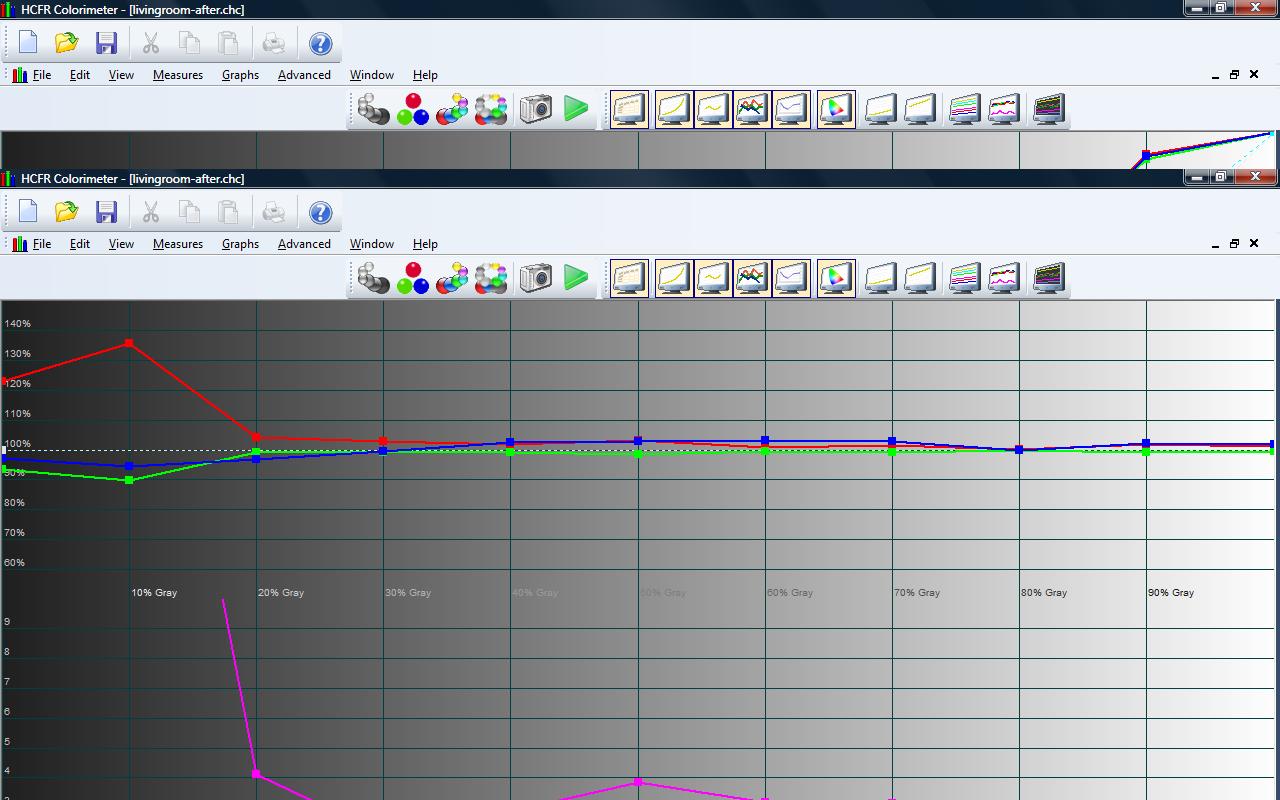
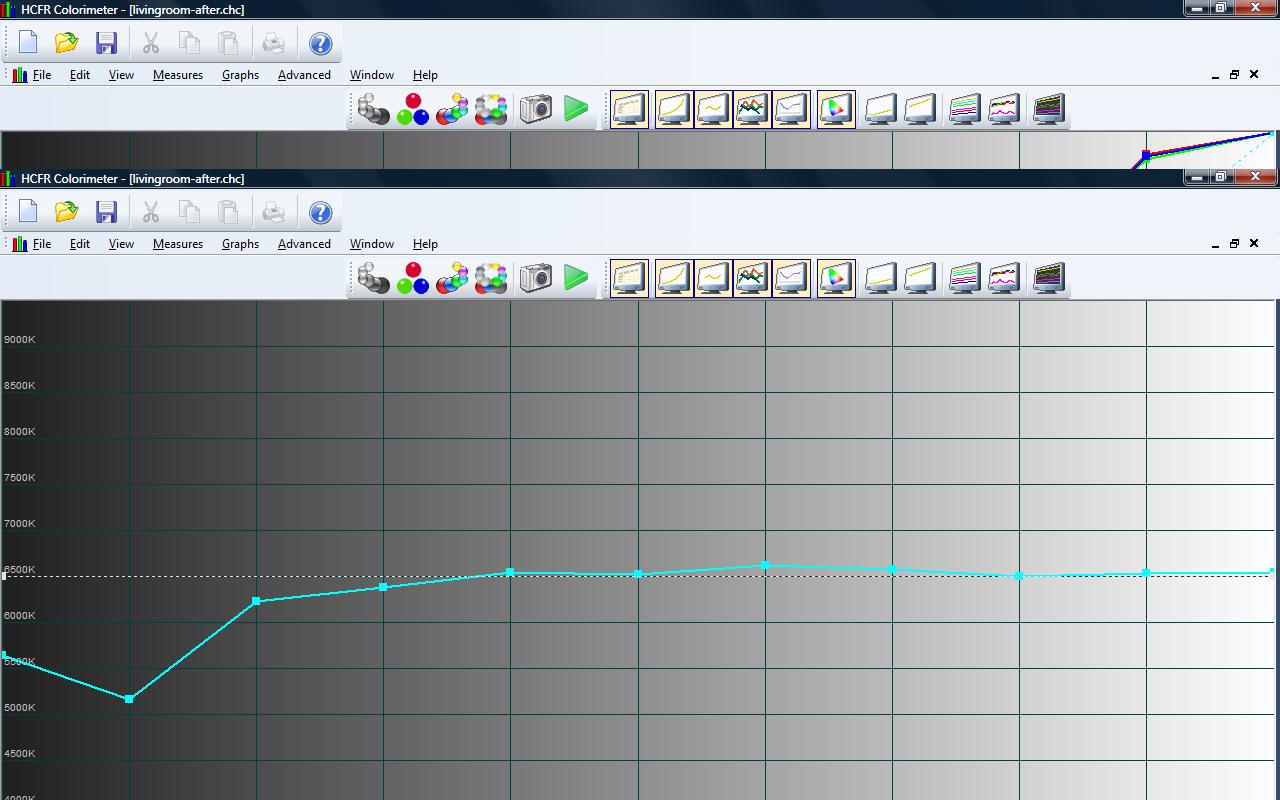
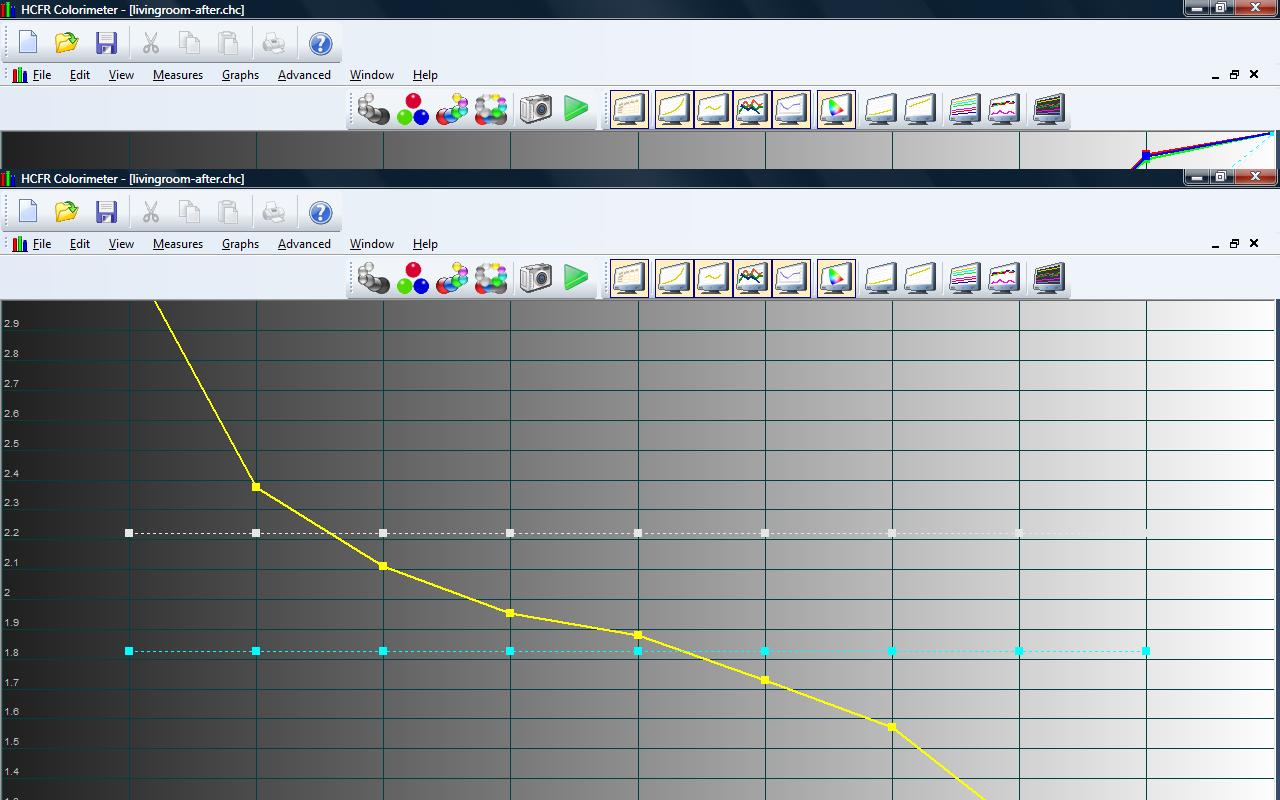
First off I'd like to once again thank Kal for his time and efforts into putting the Dummies guide together...I picked up my eyeone and started tweaking things once I read the guide and figured out what to actually do to calibrate a monitor other than looking through colored plastic sheets!! I have a panasonic th-42px6 plasma and a philips dvp5992 setup that I'm trying to get right. The display actually looks a lot better than it did before I started adjusting my greyscale so I'm actually happy where the picture is right now but my graphs are off a little bit and my gamma is WAY jacked up. I have spent a few hours tweaking things and I can't seem to get my gamma correct....any help would be appreciated!
| Description: |
|
| Filesize: |
124.49 KB |
| Viewed: |
21 Time(s) |
|
| Description: |
|
| Filesize: |
148.15 KB |
| Viewed: |
18 Time(s) |
|
| Description: |
|
| Filesize: |
109.81 KB |
| Viewed: |
26 Time(s) |
|
| Description: |
|
| Filesize: |
109.41 KB |
| Viewed: |
16 Time(s) |
|
| Description: |
|
| Filesize: |
123.75 KB |
| Viewed: |
25 Time(s) |
|
|
|
| Back to top |
|
 |
dsskid
Joined: 20 Apr 2009
Posts: 28
Location: Long Island, NY
|
| Posted: Thu Jul 23, 2009 1:58 pm Post subject: |
|
|
|
It appears that your contrast levels may be set too high, and your brightness levels a little low. What are your current user menu settings?
|
|
| Back to top |
|
|
garyfritz

Joined: 08 Apr 2006
Posts: 12088
Location: Fort Collins, CO
|
| Posted: Thu Jul 23, 2009 2:39 pm Post subject: |
|
|
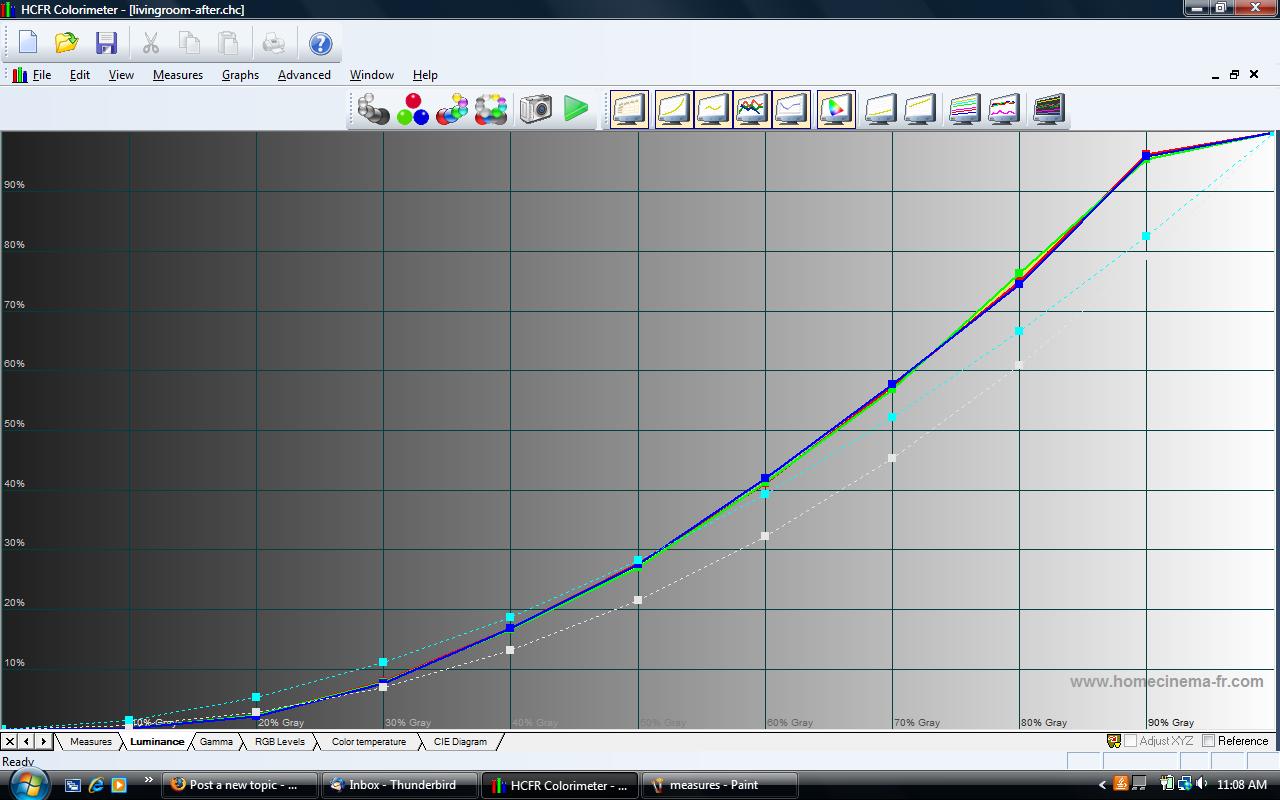
That'd be my guess too. I've never tweaked a plasma so I'm no expert on its particular behavior, but it looks to me like the display is being overdriven. You've got the contrast cranked up WAY too high, and the display is "flattening out" at the top because the display has saturated and run out of juice. Look at the luminance.jpg image to see what I mean.
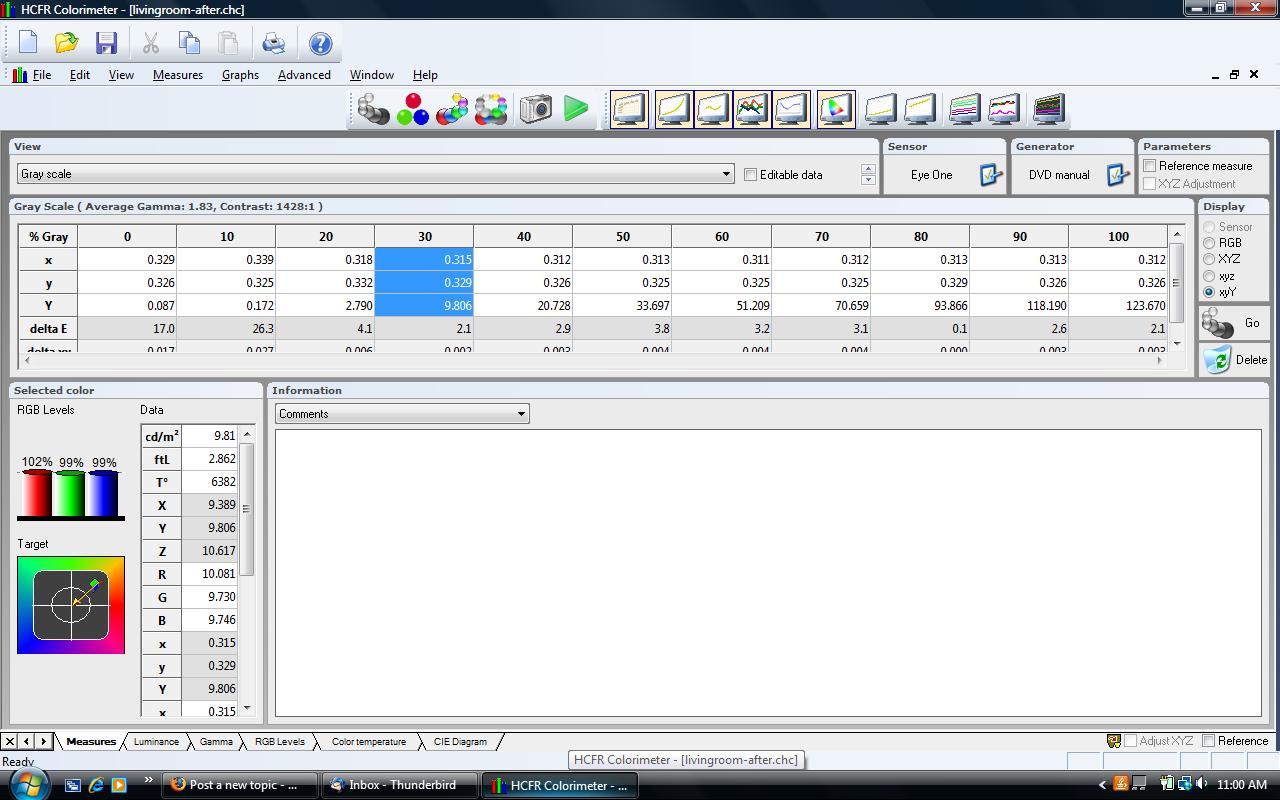
The measures.jpg shows your Y value (luminance) at 100IRE is 123.6 cd/m^2, which I think translates roughly to 36 ftL -- that's a hella bright image! No wonder you're overdriving it! That would be bright even in full daylight.
In any event, it looks like that's about the max your display can pump out, so you just need to back off on the contrast so the display doesn't get into saturation and flatten out at the high IREs. Maybe you can still get 100 cd/m^2 or more at 100IRE, but by backing off the contrast the whole luminance curve (and thus your gamma) should fall back into a more reasonable range. Then you can decide if you need to tweak the brightness to get the low end into line.
|
|
| Back to top |
|
|
chrisnicholson
Joined: 22 Jul 2009
Posts: 2
|
| Posted: Thu Jul 23, 2009 6:00 pm Post subject: Many thanks! |
|
|
|
Thanks for the replies! I set the ftL to around 38.2 at 100IRE per the dummies guide (between 30-40) but after rereading some things that would make sense that is set too high as the display can't push it...I'll try backing it down to around 30ish and go from there...
|
|
| Back to top |
|
|
garyfritz
Joined: 08 Apr 2006
Posts: 12088
Location: Fort Collins, CO
|
| Posted: Thu Jul 23, 2009 6:15 pm Post subject: |
|
|
Hope that works out for you! Unless you watch in full sunlight, 30 ftL should still be plenty. Which is good, since that seems to be about all your display can produce.
For reference, most of us CRT projector guys are satisfied with 12-15 ftL. But we generally watch that in a cave. CRTs don't have enough oomph to watch in ambient light, unless you project onto a really small screen. For a 100" screen like many of us like, you have to be satisfied with a dimmer image.
|
|
| Back to top |
|
|
|
|





