| Author |
Message |
gan
Joined: 10 Feb 2007
Posts: 36
Location: Geraldton Western Australia
|
| Posted: Sun Jul 05, 2009 7:32 am Post subject: Barco Throw Distance Calculator |
|
|
Is anyone having trouble opening the throw distance calculator?
im running windows xp and vista on different computers and neither will open the file.
Im trying to determine the distance for the 808s from the ceiling in order to fabricate a bracket.
However the calculator in the install manual (assuming my calculations are correct) would have the pj 557mm
from the ceiling?does the calculator take into consideration the lens angle?
It doesnt seem accurate given that my D50 practically bolted straight to the ceiling with the factory bracket.
And that bracket is only 120mm.In all the pics ive seen on the site the pjs mostly it seems are fitted pretty snugly to the ceiling although its difficult to tell the screen height in relation to the pj.
is there something im missing?
maybe a couple of beers and a few hours away from it and the answer will come.
Can any Barco 808s owners chime in?
|
|
| Back to top |
|
 |
RobertMfromLI

Joined: 29 Jun 2009
Posts: 114
Location: West Islip, NY
|
| Posted: Sun Jul 05, 2009 11:08 pm Post subject: |
|
|
Try this:
http://www.curtpalme.com/Barco500_Downloads.shtm
Look for "Barco Throw Distance Calculator (Lens Program v15.1)" - first link.
I have no problems opening it in WinXP. Decompress it, install it to whatever location, then go into that location and run "LENS.EXE"
So, if you are having problems with a different version - maybe try the one above. If you are having problems with the SAME version, try reinstalling over it.
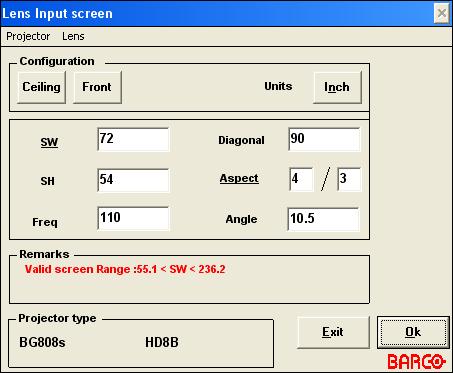
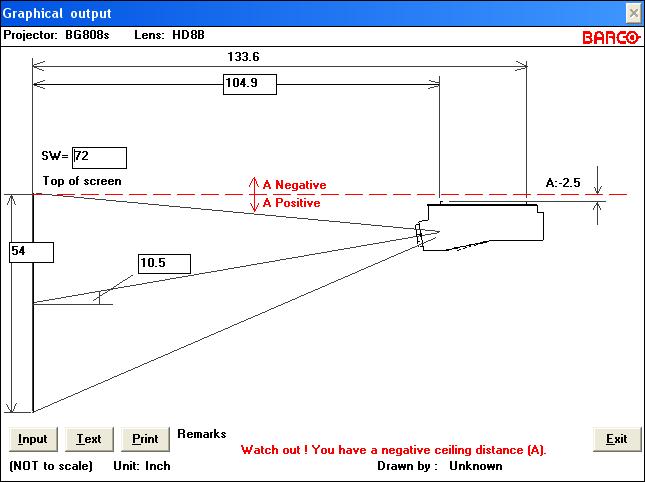
Now, as for figuring out the distances, look at these image. Once you hit "OK" on the input screen, you will be shown the second image, which shows you the distances in reference to the various parts of the projector (casing, front, frame, etc).
I randomly picked a screen size and lense for these... select whatever ones are appropriate for your setup.
Also note, you need to take into account other things such as pulley frame (if you have one), etc - which are not included in this calculation - so make sure you follow the picture in respect to where you are measuring from.
| Description: |
Input screen (mine set to inches instead of cm/mm).
Select Projector->Discontinued->808s->(Sub-Model)
Then select Lens->(lens)
Then enter width or height and record info & select "OK" |
|
| Filesize: |
24.33 KB |
| Viewed: |
11986 Time(s) |
|
| Description: |
| Here is the diagram from Front/Ceiling Mount at the settings I chose. |
|
| Filesize: |
34.32 KB |
| Viewed: |
11987 Time(s) |
|
_________________
Kirk's 5 Year Mission continues at Star Trek New Voyages: Phase 2
Last edited by RobertMfromLI on Sun Jul 05, 2009 11:27 pm; edited 1 time in total
|
|
| Back to top |
|
|
RobertMfromLI
Joined: 29 Jun 2009
Posts: 114
Location: West Islip, NY
|
| Posted: Sun Jul 05, 2009 11:18 pm Post subject: |
|
|
A negative ceiling distance (which is NOT shown with the proper placement of the projector in the image/drawing) means the top of the screen must be whatever distance indicated below the top line indicated for the projector.
So, in the example above, the projector's rails need to be 2.5" ABOVE the top of the screen (even though the image shows the projector below it - it's just the stock image used by the program).
So, keep an eye out for that warning on whatever options you choose, and look for a minus sign in front of the (A) distance.
_________________
Kirk's 5 Year Mission continues at Star Trek New Voyages: Phase 2
|
|
| Back to top |
|
|
gan
Joined: 10 Feb 2007
Posts: 36
Location: Geraldton Western Australia
|
| Posted: Sun Jul 05, 2009 11:57 pm Post subject: Barco Throw Distance Calculator |
|
|
Thanks for the reply RobertMfromLI,Much appreciated.
Numerous times i have tried to open that very file unzipped it tried to run LENS EXE only to get the same message from adobe reader on both win xp and vista saying it cant open because it either not a supported file type or file is damaged.im running the latest version or adobe reader 9.1.ive also tried sending the file to desktop to open it from there but get the same result.Every other file on that page will open no probs just not the lens program.
should i be using Adobe reader?
It is the distance from the ceiling to the rails of the projector that i need, there is a calc in the install manual
but as i stated earlier after the calculations are done using that it gives a distance of 557mm from ceiling to pj which is unrealistic.
The program you showed is definitely what i need to determine the correct distance.
Thanks again for your input.
|
|
| Back to top |
|
|
gan
Joined: 10 Feb 2007
Posts: 36
Location: Geraldton Western Australia
|
| Posted: Mon Jul 06, 2009 12:26 am Post subject: Barco Throw Distance Calculator |
|
|
Thanks RobertMfromLI i managed to open the program in winxp.
Thanks to the rain i have a whole day to get this baby up on the ceiling and running.
Like a kid with a new toy WOOHOO!!!!!
|
|
| Back to top |
|
|
RobertMfromLI
Joined: 29 Jun 2009
Posts: 114
Location: West Islip, NY
|
| Posted: Mon Jul 06, 2009 1:48 am Post subject: |
|
|
Hey gan,
Any time! Glad I could help. As for what is in the manuals, there should be a variety of pages, where the distances will be different (ie: ceiling, table, front, rear, etc). Keep in mind also that the manuals may not apply to your particular setup if your setup has different lens/sub-model combinations. For instance, I did (in the lens program) 808s->OEM HD8 and the figures were DRASTICALLY different from the images I posted above (and probably similar to the ones you see in the manual). So, if you have the OEM HD8 model, then yeah, you should have weird figures AND you may need a different scheimpflug setup (the lens program should tell you) - the PJ in that sub-model was at near screen center.
So... the program may be the best bet. Let us know how it goes... or post the measurements it suggests if you aren't sure (though I only have a growing understanding of the Barco 500/800 lines, there are many on here with far more knowledge who can jump in if I dont have the answer or accidentally supply the wrong one).
Best,
Robert
_________________
Kirk's 5 Year Mission continues at Star Trek New Voyages: Phase 2
|
|
| Back to top |
|
|
akajester

Joined: 09 Jul 2008
Posts: 934
Location: Wisconsin
|
| Posted: Mon Jul 06, 2009 1:55 am Post subject: |
|
|
I didn't see this mentioned. Keep in mind the calculations assume a 4x3 screen. If you are doing 16x9 do the math to find out the height difference, then you can move it closer to the ceiling that much. My screen is 7ft wide and I was able to move it 9" closer to the ceiling due to the difference. 
|
|
| Back to top |
|
|
RobertMfromLI
Joined: 29 Jun 2009
Posts: 114
Location: West Islip, NY
|
| Posted: Mon Jul 06, 2009 1:56 am Post subject: |
|
|
| akajester wrote: | | I didn't see this mentioned. Keep in mind the calculations assume a 4x3 screen. If you are doing 16x9 do the math to find out the height difference, then you can move it closer to the ceiling that much. My screen is 7ft wide and I was able to move it 9" closer to the ceiling due to the difference. |
And if you are doing that (or using a 4:3 screen and predominantly showing 16x9 content), dont forget that you can mask off areas of the tube/image in the PJ's setup menu.
_________________
Kirk's 5 Year Mission continues at Star Trek New Voyages: Phase 2
|
|
| Back to top |
|
|
gan
Joined: 10 Feb 2007
Posts: 36
Location: Geraldton Western Australia
|
| Posted: Mon Jul 06, 2009 3:26 am Post subject: Barco Throw Distance Calculator |
|
|
Hi all,
i used the program based on my screen size which is 266cm wide x 150 cm high and the program spat out a -18.1cm
this i take it means the top of the screen needs to be 18.1cm below the rails on my 808s which believe it or not given my current screen height will be perfect if i use the Sony bracket (with modifications) bolted straight up to the ceiling! How good is that?
But wait theres more......
The throw distance for the Barco would have meant having to shift the existing Sony bracket back 17cm
however if i reduce the given throw distance by 5% as recommended by the CRT gurus that equates to you guessed it
close enough to 17cm! so i dont have to drill more holes or plug then paint existing ones,which i dont mind doing but that gives me more time to get the 808 dialled in.
But wait theres even more....... lol
Im not sure if im 100% correct with this but ill put it out there so feel free to shoot me down.
The HD144s with the adaptor plates im going to fit (Plates are on there way the 144s im still trying to nail down) will when fitted given the position of the pj which is already 17cm closer to the screen should just about be the correct throw distance for the 144s.
Man im having a good day!!!! make that a GREAT day!
|
|
| Back to top |
|
|
RobertMfromLI
Joined: 29 Jun 2009
Posts: 114
Location: West Islip, NY
|
| Posted: Mon Jul 06, 2009 3:44 am Post subject: |
|
|
Wow! that all sounds wonderful! (and right about on the money!)
My first setup was rather interesting, as I calculated distances AFTER I had planned where everything was being installed. And I was *dead on*
That was simply "sheer luck" - my room had an angled roof (taller in the front), and allowed an 11'x8.25' screen in the front (with room underneath for a center channel speaker and room on each side for the front speakers (with the left one just fitting between the screen and the room door). My room was 20' long - minus room for cabling and a foot between the screen and the screen wall put the projector at a tiny bit under 15' from PJ body to screen.
So... turned out that my PJ should have been a tiny bit under 15' from the screen (14.98'), 4.8" below the screen (which was about what it was with the 1' space above the screen and the slope of the ceiling), and thus dead on perfect simply because the geometry of my room was perfect in relationship to the size screen it would fit and the easiest place to mount the PJ.
Go figure. Not quite as lucky this time around... I need a screen that is 3' bigger at the current PJ distance because there was no other places for screen and PJ (cant move closer together - yet... not until we make a custom PJ rack)
_________________
Kirk's 5 Year Mission continues at Star Trek New Voyages: Phase 2
|
|
| Back to top |
|
|
gan
Joined: 10 Feb 2007
Posts: 36
Location: Geraldton Western Australia
|
| Posted: Mon Jul 06, 2009 4:20 am Post subject: |
|
|
Yeah that is fantastic given the sloping roof and room size,sorta like it was meant to be.
We moved into this house three years ago i designed and built it originally with a family room which was smack bang dead center of the house, so perfect for a CRT.The Family room very quckly turned into " Dads HT Room " i bought on ebay eight months earlier a Sony D50 which was patiently waiting to be hoisted up to the ceiling of " Dads HT Room " anyway my wife was horrified one day when she walked in to see myself and son on two lifts of dirty old scaffold rigged on the brand new carpet while we grunted and sweated the Sony up to its new resting place.Needless to say the Sony for the last few years has been fantastic,i have tweaked and tweaked till the PQ is about the best it can be and we have been very happy with it.The only problem is every time i get on this site i read about the 8" PJs and the 9" PJs and start to want.lol,I had been doing a few cash jobs recently and it was burning a hole in my pocket when THE NEWSLETTER arrived saying that there was a bunch of 808s for sale,so after some email tooing and froing with THE MAN Curt, said 808s is now sitting on a coffee table under a very sad and dejected looking D50.I cant wait to fire up the 808s and start tweaking i love this hobby! and so does the better half,the beer guzzling sports watching all weekenders were becoming a bit to much and a happy wife equals a happy life!!
|
|
| Back to top |
|
|
studio
Joined: 24 Mar 2006
Posts: 191
|
| Posted: Thu Apr 29, 2010 11:01 am Post subject: |
|
|
|
Have a 1209s. Does anyone know the actual len angle relative to the screen? From the face of the len to the screen if hung level?
|
|
| Back to top |
|
|
Ile

Joined: 09 Mar 2006
Posts: 1491
Location: Jyväskylä, Finland
|
| Posted: Thu Apr 29, 2010 11:41 am Post subject: |
|
|
| studio wrote: | | Have a 1209s. Does anyone know the actual len angle relative to the screen? From the face of the len to the screen if hung level? |
Projection angle (=lens angle) is 10,5 degree in all front projection Barcos when brackets are in level.
|
|
| Back to top |
|
|
tommo2

Joined: 03 Jun 2006
Posts: 226
Location: Ireland
|
| Posted: Mon May 03, 2010 12:22 pm Post subject: |
|
|
I would stay a million miles away from that calculator. It will not allow you to maximise phosphor usage. You need to mount the pj on a moveable trolley or table or something and experiment.
You will need to increase H SIZE to around 95% of maximum and move the pj in/out until it fits the screen. Then do a quick geometry setup: keystone, bow etc. The increase H size tp 98% and do it all again.
Then measure how far your pj is from the screen. This will ensure you have your pj at the exact distance which allows you to use as much phosphor as possible and will give the best resolution and brightest pic. It will also result in less wear of the tubes.
The calculator you are using will probably be using around 75% of H size, resulting in a little over half of the phosphor area being used.
Think of it this way:
If you have a 8" tube face, and your H size is set to 75%, thats 6" x 6" = 36 square inch phosphor area. If you can achieve 8" x 8" thats 64 square inches. Yeah i know the screen is not perfectly square, and you probably wont achieve the full 8 inches, but you know what i mean
_________________
pull up the handbrake and walk away
Barco Data 701s
iScan HD scaler with sdi mod
Oppo 981HD with sdi mod
Xbox 360
Playstation 2
Denon AVR 1507 7.1 AV receiver
Wharfedale Diamond 9.4 floorstanders (front)
Wharfedale EVO2 (center)
Pioneer 100W (sides)
Wharfedale Diamond 9.1 (rear)
Wharfedale SW150 active subwoofer
Photos on the way!
|
|
| Back to top |
|
|
|
|




