| Author |
Message |
lexx21
Joined: 10 Oct 2008
Posts: 119
|
| Posted: Mon Jun 29, 2009 10:38 pm Post subject: hdmi to hdfury2 to extron rgb 202 plus... help with sync |
|
|
Here is my video chain.....
hd-dvd - > iscan vp30 hdmi in -> vp30 hdmi out -> hdfury2 -> hd15 to d9 adapter -> input 1 on extron 202 plus -> rgb 5 bnc out to projector
I need to be able to get the sync for H/V to be negative. Currently I have a very distorted blue picure (rolling, out of sync, etc...) with a green line down the right side of the screen. I didn't see a dip switch on the back of the unit for this and the manual for the 202 plus on the extron site doesn't exist. There is one for a 202 Rxi, but that looks significantly different to my unit.
I am not using the extron breakout cable though. I am using a hd15 -> d9 adapter and plugging the hdfury2 directly into input 1 on the back of the 202 plus. The hd-dvd is 1080i out only, so it's not trying to process 1080p.
Any help with switch settings, etc... would be greatly appreciated.
I have tried turning the 75ohm switch on/off - no help
I have tried swapping the h/v cables - no help (projector shows "no signal" at that point)
I am using the power supply for the hdfury2
I ensured that the vp30 was outputing negative h/v sync - no help
I bypassed he vp30 and went from the hd-dvd player directly into he extron. - no help
Thanks in advance
|
|
| Back to top |
|
 |
AnalogRocks
Forum Moderator

Joined: 08 Mar 2006
Posts: 26706
Location: Toronto, Ontario, Canada
TV/Projector: Sony 1252Q, AMPRO 4000G
|
| Posted: Tue Jun 30, 2009 1:54 am Post subject: |
|
|
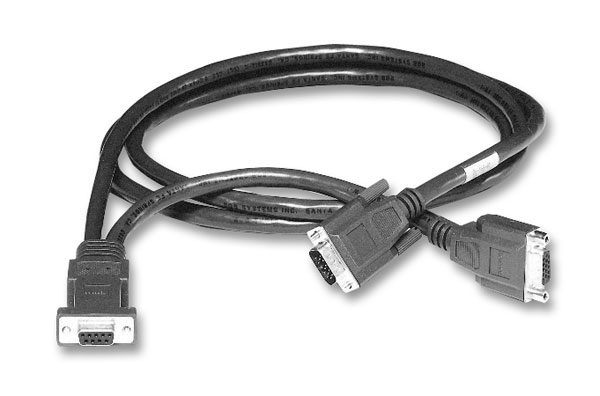
If that's the cable that came with the HDfury2 it won't work. That's a Barco Port 3 cable. Extron uses a different pin out.
_________________
Tech support for nothing
CRT.
HD done right!
|
|
| Back to top |
|
|
lexx21
Joined: 10 Oct 2008
Posts: 119
|
| Posted: Tue Jun 30, 2009 3:40 am Post subject: |
|
|
I'm going directly from the hd15 connector of the hdfury2 to the extron. I'm not using any cable between the two. I purchased a hd15 to db9 adapter from one of the online cable suppliers. It looks like a gender changer.
Also the hdfury2 is set to rgbhv, not component.
Is the hd15 on the end of a fury2 not the same pinout as a vga connector?
|
|
| Back to top |
|
|
lexx21
Joined: 10 Oct 2008
Posts: 119
|
| Posted: Wed Jul 01, 2009 12:11 pm Post subject: |
|
|
|
I wasn't able to get this to work even after going through all of the threads that would relate to it, so I just ordered a box1021 instead of trying to use the Extron. There were no manuals for that thing ANYWHERE on the internet.
|
|
| Back to top |
|
|
AnalogRocks
Forum Moderator
Joined: 08 Mar 2006
Posts: 26706
Location: Toronto, Ontario, Canada
TV/Projector: Sony 1252Q, AMPRO 4000G
|
| Posted: Wed Jul 01, 2009 2:58 pm Post subject: |
|
|
| lexx21 wrote: | I'm going directly from the hd15 connector of the hdfury2 to the extron. I'm not using any cable between the two. I purchased a hd15 to db9 adapter from one of the online cable suppliers. It looks like a gender changer.
Also the hdfury2 is set to rgbhv, not component.
Is the hd15 on the end of a fury2 not the same pinout as a vga connector? |
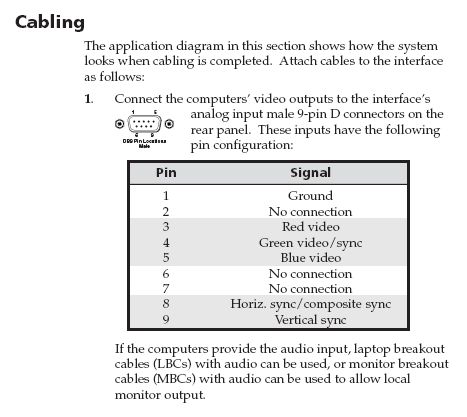
Yes the end of the HDfury2 uses VGA pin out. However the Extron uses a custom pin input. Unless you ordered an HD15 to DE9 gender changer that was meant for use with the Extron it won't work.
_________________
Tech support for nothing
CRT.
HD done right!
|
|
| Back to top |
|
|
Tom.W

Joined: 09 Mar 2006
Posts: 6635
|
| Posted: Wed Jul 01, 2009 3:56 pm Post subject: |
|
|
| lexx21 wrote: | | I wasn't able to get this to work even after going through all of the threads that would relate to it, so I just ordered a box1021 instead of trying to use the Extron. There were no manuals for that thing ANYWHERE on the internet. |
Try here...
http://www.extron.com/product/product.aspx?id=rgb202rxi
Takes a custom Extron cable...
| Description: |
|
| Filesize: |
26.82 KB |
| Viewed: |
15733 Time(s) |
|
|
|
| Back to top |
|
|
lexx21
Joined: 10 Oct 2008
Posts: 119
|
| Posted: Wed Jul 01, 2009 4:54 pm Post subject: |
|
|
Thanks guys. The Extron shall be retired (unless someone wants it that is) as I wait with much anxiousness for my box1021 to arrive in my grubby little hands.... heh heh.
I kind of figured that it had to be something weird with the D9 connector. Extron themselves said that the 202 plus didn't change sync from positive to negative, which I found hard to believe since Curt tried out a fury with a negative sync pj and it worked using the 202 plus. I wanted to go the box1021 route anyway, but was just trying to use the Extron until I could afford it (which I ordered today.... WOOOT!).
Have a safe weekend.
|
|
| Back to top |
|
|
Tom.W
Joined: 09 Mar 2006
Posts: 6635
|
| Posted: Wed Jul 01, 2009 5:13 pm Post subject: |
|
|
|
The Extron can force negative sync...Read the spec sheet again.
|
|
| Back to top |
|
|
lexx21
Joined: 10 Oct 2008
Posts: 119
|
| Posted: Wed Jul 01, 2009 6:57 pm Post subject: |
|
|
|
HA! If only could get the spec sheet...lol. Like I said, I looked high and low for the manual. They took the pdf file down from the Extron site. Doesn't matter anyway, the box1021 is coming. I have this mental pic of the elves furiously packing it for shipping as I type. Delusions are grand aren't they? lol
|
|
| Back to top |
|
|
Tom.W
Joined: 09 Mar 2006
Posts: 6635
|
| Posted: Wed Jul 01, 2009 7:51 pm Post subject: |
|
|
RGB 202 Rxi
Video
Routing 2 x 1 router
Gain 0.5 V to 1.45 Vp-p
Bandwidth 300 MHz (-3 dB)
Rise time 1.5 ns
Video input
Number/signal type 2 analog RGBHV, RGBS, RGsB, RsGsBs
Connectors 2 male 9-pin D for MBC/LBC cable or buffer
Nominal level 0.7 Vp-p for RGB
Minimum/maximum levels Analog: 0.3 V to 1.45 Vp-p with no offset at unity gain
Impedance 75 ohms or high Z, switchable (set to 75 ohms if no local monitor is connected)
Horizontal frequency 15 kHz to 150 kHz
Vertical frequency 40 Hz to 140 Hz
Return loss <-30 dB @ 5 MHz
DC offset (max. allowable) 4 V
Video output
Number/signal type 1 analog RGBHV, RGBS, RGsB
Connectors 6 BNC female
Nominal level 0.7 Vp-p for RGB
Minimum/maximum levels 0.3 V to 1.30 Vp-p with 0.7 Vp-p nominal input level
Impedance 75 ohms
Return loss -30 dB @ 5 MHz
DC offset ±5 mV with input at 0 offset
Sync
Input type RGBHV, RGBS, RGsB, RsGsBs
Output type RGBHV, RGBS, RGsB
Input level 2 V to 5.5 Vp-p with ±0.2 VDC offset max.
Output level TTL: 4 V to 5 Vp-p, unterminated
Input impedance 510 ohms
Output impedance 75 ohms
Max. propagation delay 85 ns
Max. rise/fall time 2 ns
Polarity RGBHV: tracks polarity (or force negative sync via DIP switch)
RGBS, RGsB: negative
Audio
Routing 2 x 1 stereo router
Gain Unbalanced output: 0 dB; balanced output: +6 dB
Frequency response 20 Hz to 20 kHz, ±0.05 dB
THD + Noise 0.03% @ 1 kHz, 0.3% @ 20 kHz at nominal level
S/N >90 dB at maximum output (17 dBu), balanced (unweighted)
Crosstalk <-90 dB @ 1 kHz, fully loaded
Stereo channel separation >90 dB @ 1 kHz
Audio input
Number/signal type 2 PC level stereo, unbalanced
Connectors (2) 3.5 mm mini audio jacks (female, tip, ring, sleeve)
Impedance >10k ohms, unbalanced, DC coupled
Nominal level -10 dBV (316 mV)
Maximum level +8.5 dBu, (balanced or unbalanced) at 1% THD+N
NOTE 0 dBu = 0.775 Vrms, 0 dBV = 1 Vrms, 0 dBV » 2 dBu
Audio output
Number/signal type 1 buffered stereo (2 channel), balanced/unbalanced
Connectors (1) 3.5 mm captive screw connector, 5 pole
Impedance 50 ohms unbalanced, 100 ohms balanced
Gain error ±0.1 dB channel to channel
Maximum level (Hi-Z) >+14 dBu, balanced at 1% THD+N
Maximum level (600 ohm) >+8.5 dBm, balanced at 1% THD+N
Control/remote — switcher/interface/scaler/Extron device
Serial control port RS-232, 9-pin female D connector (also used for contact closure)
Baud rate and protocol 9600 baud, 8 data bits, 1 stop bit, no parity
Serial control pin configurations 2 = TX, 3 = RX, 5 = GND
Contact closure (1) 9-pin female D connector (also used for RS-232)
Contact closure pin configuration 1 = input #1, 4 = input #2, 5 = GND
Program control Extron's control/configuration program for Windows®
Extron's Simple Instruction Set (SIS™)
General
Input power 100 VAC to 240 VAC, 50/60 Hz, 18 watts, internal, autoswitchable
MBC power jacks 9.0 VDC, 0.15 A
Temperature/humidity Storage: -40 to +158 °F (-40 to +70 °C) / 10% to 90%, noncondensing
Operating: +32 to +113 °F (0 to +45 °C) / 10% to 90%, noncondensing
Rack mount Yes, with optional 1U rack shelf, part #60-190-01 or 60-604-01
Also furniture mountable with an optional under-desk mounting kit (part #70‑077‑01) or through-desk mounting kit (part #70‑077‑02)
Enclosure type Metal, vented
Enclosure dimensions 1.75" H x 8.75" W x 8.6" D (1U high, half rack wide)
4.4 cm H x 22.2 cm W x 21.8 cm D
(Depth excludes knobs.)
Product weight 2.2 lbs (1.0 kg)
Shipping weight 5 lbs (3 kg)
Vibration ISTA 1A in carton (International Safe Transit Association)
Listings UL, CUL
Compliances CE, FCC Class A, VCCI, AS/NZS, ICES
MTBF 30,000 hours
Warranty 3 years parts and labor
|
|
| Back to top |
|
|
jkruger

Joined: 24 Oct 2007
Posts: 2435
Location: Carlsbad, CA
|
| Posted: Wed Jul 01, 2009 7:52 pm Post subject: |
|
|
|
Are the 202 plus and the 202 rxi the same?
|
|
| Back to top |
|
|
Tom.W
Joined: 09 Mar 2006
Posts: 6635
|
|
| Back to top |
|
|
jkruger
Joined: 24 Oct 2007
Posts: 2435
Location: Carlsbad, CA
|
| Posted: Wed Jul 01, 2009 8:08 pm Post subject: |
|
|
| jkruger wrote: | | Are the 202 plus and the 202 rxi the same? |
I have an Extron 202 XI. How is it different from the 202 PLUS that he has and the 202 RXI?
|
|
| Back to top |
|
|
lexx21
Joined: 10 Oct 2008
Posts: 119
|
| Posted: Wed Jul 01, 2009 8:55 pm Post subject: |
|
|
No, the 202 Rxi and the plus are not the same. The 202 plus is a much older model.
In order to change the sync polarity in the Rxi model, Extron publishes it's manual on their site showing which jumpers to change. There is no manual for the 202 plus on their site. The person that I spoke to yesterday at Extron actually had to go dig up a paper manual for the thing since she couldn't get it in electronic form.
So, basically the 202 plus and the 202 Rxi are apples and oranges. They are not the same thing. The circuit board inside is VERY different between the two. And the jumpers that I am talking about are on the circuit board itself, not the dip switches on the back.
|
|
| Back to top |
|
|
Decibel

Joined: 31 May 2007
Posts: 904
Location: Roma - Italia
|
| Posted: Thu Jul 09, 2009 8:44 am Post subject: |
|
|
Sorry for the language ...
lexx21 have you solved your problem?
However ... my friend has sent to me this image from extron RGB 440
| Description: |
|
| Filesize: |
35.1 KB |
| Viewed: |
15651 Time(s) |
|
_________________
Domenico (Barco fan!)
|
|
| Back to top |
|
|
lexx21
Joined: 10 Oct 2008
Posts: 119
|
| Posted: Thu Jul 09, 2009 2:17 pm Post subject: |
|
|
In a round about way, yes I did solve the problem. I ordered a box1021 and decided to ditch the extron all together...lol.
Actually I was able to get Extron to send me the manual (scanned into a pdf file) for the 202 plus, which I then sent to Curt to put up on his site. I figured that since there were so many of these things for sale on Ebay, it might be a good idea.
|
|
| Back to top |
|
|
AnalogRocks
Forum Moderator
Joined: 08 Mar 2006
Posts: 26706
Location: Toronto, Ontario, Canada
TV/Projector: Sony 1252Q, AMPRO 4000G
|
| Posted: Thu Jul 09, 2009 2:20 pm Post subject: |
|
|
Didn't Extron have all the manuals up on their site at one point?
_________________
Tech support for nothing
CRT.
HD done right!
|
|
| Back to top |
|
|
lexx21
Joined: 10 Oct 2008
Posts: 119
|
| Posted: Thu Jul 09, 2009 9:38 pm Post subject: |
|
|
Probably at one point they did. But they actually had to go back and find a paper manual for the 202 plus. That is what they scanned to make the pdf for me. Right now they have the manuals for the later model 202's up on their site which are different from the 202 plus internally. Had I gone with a 202 Rxi or something of that ilk, I would have been set to go.
I sent the pdf to Curt so that he could put them up in his manuals section. I figured that since so many of those things are being sold on ebay, someone was bound to come up against the same problem that I had.
|
|
| Back to top |
|
|
clemfm
Joined: 27 Jun 2011
Posts: 1
|
| Posted: Mon Jun 27, 2011 11:11 pm Post subject: |
|
|
Can't see the Extron RGB Plus manual in the manuals section, could someone email it to clemfm @ dlps dot com
Thanks in advance.
|
|
| Back to top |
|
|
|
|




