| Author |
Message |
km987654

Joined: 25 Jul 2007
Posts: 2874
Location: Australia
TV/Projector: Barco BG809s
|
| Posted: Mon Jun 22, 2009 8:33 am Post subject: Raster Size too Large |
|
|
OK
Barco 1101. Raster size is just slightly too large for the tubes. If the proper H-Shift board setup has been followed then one of the tubes is a small as it gets and its just too large for the tube face. So how do I make the raster small enough to fit on the tube face?? I did try a second H Shift board with the same result.
|
|
| Back to top |
|
 |
Ile

Joined: 09 Mar 2006
Posts: 1491
Location: Jyväskylä, Finland
|
| Posted: Mon Jun 22, 2009 4:02 pm Post subject: |
|
|
In Barcos rasters are always too large for faceplate, if you want decent sized picture for faceplate. But if you mean that picture is too wide, you can adjust master width from smps sub board pot.

Width coils is used only to adjust RGB to have same width, least one must be turned fully in. Those also affect to horizontal linearity. Before that make sure that all yokes are pushed against tube bell, because yoke position in neck affect to raster size. Adjust coils with non magnetic tool, you can make one from plastic or wood chopstick.
|
|
| Back to top |
|
|
km987654
Joined: 25 Jul 2007
Posts: 2874
Location: Australia
TV/Projector: Barco BG809s
|
| Posted: Mon Jun 22, 2009 10:36 pm Post subject: |
|
|
I have both a liniarity and width problem.
The raster is larger than the tube face (by a small amount) and when viewing the test pattern the sqaures on the left are norrower than the ones on the right. I understand how the width coils work as far as RGB width goes and thats telling me that at least one of the oversized rasters is too large for the tube face as that coil will be turned right in.
Do I fix the liniarity problem with these width coils?
I had forgotten about the trimpot on the SMPS sub board though but that will not adjust the raster width will it? that trimpot adjusts picture width. I can adjust picture width using the H Size control on the geometry menu.
Last edited by km987654 on Tue Jun 23, 2009 11:27 am; edited 1 time in total
|
|
| Back to top |
|
|
Ile
Joined: 09 Mar 2006
Posts: 1491
Location: Jyväskylä, Finland
|
| Posted: Tue Jun 23, 2009 10:23 am Post subject: |
|
|
| km987654 wrote: | Do I fix the liniarity problem with these width coils?
I had forgotten about the trimpot on the SMPS sub board though but that will not adjust the raster width will it? that trimpot adjusts picture width. I can adjust picture width using the H Size control on the gemoetry menu. |
Check if horizontal def board have linearity pot like newer Barcos have.
SMPS sub pot is right place to adjust raster/picture (these goes hand in hand) width. Adjust it with highest resolution and hwidth set to around 90 from menu.
|
|
| Back to top |
|
|
km987654
Joined: 25 Jul 2007
Posts: 2874
Location: Australia
TV/Projector: Barco BG809s
|
| Posted: Tue Jun 23, 2009 10:42 am Post subject: |
|
|
I am using H deflection R7622675 and I don't have circuit diagram for this board. I do have circuit diagram for the lower scan rate H Deflection R7617415 and it does have liniarity adjustment.
Do you know where I might obtain circuit diagram for R7622675 or at least information on its trim pots?? or are the adjustments the same for each board?
|
|
| Back to top |
|
|
Ile
Joined: 09 Mar 2006
Posts: 1491
Location: Jyväskylä, Finland
|
| Posted: Wed Jun 24, 2009 7:03 am Post subject: |
|
|
|
This is for Data 801s/808 board, P1 should be found also from Graphics board. I think it's not needed to be 18kHz, you wont use so small resolutions anyway.
|
|
| Back to top |
|
|
km987654
Joined: 25 Jul 2007
Posts: 2874
Location: Australia
TV/Projector: Barco BG809s
|
| Posted: Wed Jun 24, 2009 8:10 am Post subject: |
|
|
|
Thanks for your input into this.
|
|
| Back to top |
|
|
km987654
Joined: 25 Jul 2007
Posts: 2874
Location: Australia
TV/Projector: Barco BG809s
|
| Posted: Wed Jun 24, 2009 11:52 am Post subject: |
|
|
I have adjusted the pot on the SMPS sub board to reduce the raster size so that it now fits on the tube face.
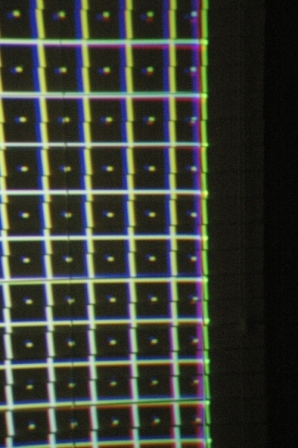
I have noticed that the convergence grid is hard against one edge of the raster. This is distorting that edge for convergence. How do I move the convergence grid away from the edge of the raster. This existed before reducing the raster size. It is causing the grid to distort in an upward direction and it appears to fold back on itself very slightly right at that edge. I hope this explanation is clear.
|
|
| Back to top |
|
|
Ile
Joined: 09 Mar 2006
Posts: 1491
Location: Jyväskylä, Finland
|
| Posted: Thu Jun 25, 2009 8:21 am Post subject: |
|
|
If it's one of those internal patterns, who cares those are pretty bulky anyway.
If you get same problem with video, you need bigger porch settings from your source. You need scaler or pc for custom timings.
|
|
| Back to top |
|
|
km987654
Joined: 25 Jul 2007
Posts: 2874
Location: Australia
TV/Projector: Barco BG809s
|
| Posted: Thu Jun 25, 2009 9:31 am Post subject: |
|
|
I am using a Genlock pattern at 1080i/60. I do have a Lumagen Vision scaler though. So I can fix this problem using porch settings? Next time I am using the projector I will take a few pix and post them for you but this problem makes it impossible to converge RGB at that edge of the image. Anyway it seems strange that the pattern is hard against one edge of the raster. It seems that something is not adjusted correctly.
Or are you saying simply do convergence using the source input and ignore the genlock pattern?
|
|
| Back to top |
|
|
km987654
Joined: 25 Jul 2007
Posts: 2874
Location: Australia
TV/Projector: Barco BG809s
|
| Posted: Thu Jun 25, 2009 12:34 pm Post subject: |
|
|
Here is a picture of the problem. Look at the right edge you can see its compressed. Don worry about the jaggard edges I just projected this onto some window blindsand my camera is not in focus but you get the point.
| Description: |
|
| Filesize: |
123.63 KB |
| Viewed: |
8020 Time(s) |
|
|
|
| Back to top |
|
|
Ile
Joined: 09 Mar 2006
Posts: 1491
Location: Jyväskylä, Finland
|
| Posted: Thu Jun 25, 2009 11:13 pm Post subject: |
|
|
If you lower contrast to 10 and raise brightness to 80 and look to tubes, is there few mm unused raster in left and right side of the picture? (blankings off)
Or is raster right edge folding straight from picture edge and there is no room to move left?
Things should look similar with video, but check anyway.
|
|
| Back to top |
|
|
km987654
Joined: 25 Jul 2007
Posts: 2874
Location: Australia
TV/Projector: Barco BG809s
|
| Posted: Fri Jun 26, 2009 10:12 am Post subject: |
|
|
|
Been through that and the folding edge of the pattern is right up against the raster edge on the right. There is plenty of raster outside the pattern on the left which leads me to think that the pattern is shifted to the right. You can move the video with H Phase in geometry menu.
|
|
| Back to top |
|
|
Ile
Joined: 09 Mar 2006
Posts: 1491
Location: Jyväskylä, Finland
|
| Posted: Fri Jun 26, 2009 2:17 pm Post subject: |
|
|
Maybe there is some compatibility issue with your controller and other boards. There is no adjustments for internal grids.
Use test grid from your scaler or test disc. 
|
|
| Back to top |
|
|
km987654
Joined: 25 Jul 2007
Posts: 2874
Location: Australia
TV/Projector: Barco BG809s
|
| Posted: Sun Jun 28, 2009 9:45 am Post subject: |
|
|
| Ile wrote: | Maybe there is some compatibility issue with your controller and other boards. There is no adjustments for internal grids.
Use test grid from your scaler or test disc. |
Yes that would be right. I have changed the controller for one with a slightly later firmware and the problem has gone. There is now another problem but I believe that the right controller needs to be from a BG801s and the ones I have are from a BD801s.
I do have a BG808s controller. I might try it but I doubt that this will solve the problem.
|
|
| Back to top |
|
|
|
|




