| Author |
Message |
garyfritz

Joined: 08 Apr 2006
Posts: 12088
Location: Fort Collins, CO
|
| Posted: Wed Jun 17, 2009 3:30 am Post subject: Marquee: long or short retrace? |
|
|
While tweaking the setup on my 8500, I noticed that I was cutting off a fair amount on the sides. The overscan pattern in AVCHD showed I was displaying almost all the image top & bottom, but I was cutting off over 5% on left & right.
I was running with "LONG" retrace. I tried "SHORT" and it shows the whole image. But I haven't switched to it yet because I'll have to re-converge if I do.
Any reason to prefer one or the other, other than cutting off the image? I'm running 1080p.
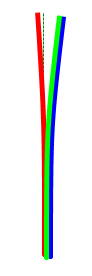
On another subject: I've noticed a bit of a convergence problem at the very top of the screen. On the top 2" or so, red bends a little to the left, B & G bend a bit to the right -- see pic. I can't fix it with convergence because the convergence moves more than that little bit of the screen. I'm not certain but it *might* be a little better with SHORT retrace. Any guesses what might cause that?
| Description: |
|
| Filesize: |
2.76 KB |
| Viewed: |
10428 Time(s) |
|
|
|
| Back to top |
|
 |
Mark_A_W
Joined: 15 Mar 2006
Posts: 3068
Location: Sunny Melbourne Australia
|
| Posted: Wed Jun 17, 2009 5:17 am Post subject: |
|
|
|
Gary, I know nothing about Marquees, but if you add more vertical porch pixels to the top of the image, you will fix that squiggly line at the top issue.
|
|
| Back to top |
|
|
tse
Joined: 03 May 2006
Posts: 1014
Location: Sweatbucket, Fl.
|
| Posted: Wed Jun 17, 2009 12:23 pm Post subject: |
|
|
If you can live with part of the picture missing then use long retrace. It is a tiny bit easier on the HDM. The lines bending different directions at the the top is usually caused by an imperfect deflection yoke. VDC ran into that several years ago. It was a particular problem for customers that were stacking one image above another in their simulators.
Scott
_________________
"Were we directed from Washington when to sow and when to reap, we would soon want bread."
Thomas Jefferson
|
|
| Back to top |
|
|
garyfritz
Joined: 08 Apr 2006
Posts: 12088
Location: Fort Collins, CO
|
| Posted: Wed Jun 17, 2009 1:23 pm Post subject: |
|
|
Mark, I use a PS3 as my source so I can't control the porches. But from what tse says it may not be the porch anyway.
Scott, I'd rather have the whole image, but missing 5-6" on each side isn't fatal. If it's better to run with long, I'll stick with it. Thanks!
|
|
| Back to top |
|
|
csamos

Joined: 10 Jul 2008
Posts: 59
Location: Austin, TX
|
| Posted: Wed Jun 17, 2009 3:30 pm Post subject: Re: Marquee: long or short retrace? |
|
|
| garyfritz wrote: | While tweaking the setup on my 8500, I noticed that I was cutting off a fair amount on the sides. The overscan pattern in AVCHD showed I was displaying almost all the image top & bottom, but I was cutting off over 5% on left & right.
I was running with "LONG" retrace. I tried "SHORT" and it shows the whole image. But I haven't switched to it yet because I'll have to re-converge if I do.
Any reason to prefer one or the other, other than cutting off the image? I'm running 1080p.
|
I switched from long to short retrace some time ago when I also realized I was losing quite a bit of the image on the sides, which also affected the geometry a bit. I am currently running all sources at 1080i, which I have converged perfectly. I started to set up 1080p for Blu-ray and HD DVD, but there was too much ringing for my liking. I haven't had any issues running 1080i and short retrace.
| garyfritz wrote: | | On another subject: I've noticed a bit of a convergence problem at the very top of the screen. On the top 2" or so, red bends a little to the left, B & G bend a bit to the right -- see pic. I can't fix it with convergence because the convergence moves more than that little bit of the screen. I'm not certain but it *might* be a little better with SHORT retrace. Any guesses what might cause that? |
This looks similar to a problem I had with my 8500 where the blue lifted along the left edge. I was finally able to solve this by doing a complete projector initialization, followed by a total physical and magnetic setup. The problem was the blue tube was not centered vertically, and the convergence circuitry couldn't correct that enough. Once I had the blue tube physically set up right, and then did a complete (and better) magnetics setup, I was able to easily achieve perfect convergence everywhere. So if you don't mind spending many, many hours, I highly recommend doing a complete initialization and set everything up from scratch. It's a lengthy, but fun process, and the results are fantastic if you take your time and do it right. At least I think it's fun. 
-Carl
http://www.samos.org/Theater/
|
|
| Back to top |
|
|
garyfritz
Joined: 08 Apr 2006
Posts: 12088
Location: Fort Collins, CO
|
| Posted: Wed Jun 17, 2009 4:52 pm Post subject: |
|
|
|
I've pretty much already done that. I did the physical & magnetic as well as I know how. I don't think I could do it any better if I scrapped it and started from scratch.
|
|
| Back to top |
|
|
dturco

Joined: 06 Feb 2009
Posts: 3778
Location: Eastern Shore Maryland
TV/Projector: Runco DLP VX-3000i Marquee 9500 parts doner
|
| Posted: Wed Jun 17, 2009 4:58 pm Post subject: |
|
|
I just did the short retrace on my 9500. I am running 1080p. It now shows all of the information on the sides of the DVE test disk. The over scan pattern now shows just under 2%. The 9500 also now shows the 95% raster line on this disc too. I had no idea that was even there. 
Edit : It also moved the picture to the center and I could remove the Phase adjustment I had been using.
_________________
Firefly rules. Can't stop the signal.
http://www.hulu.com/firefly
|
|
| Back to top |
|
|
Nashou66

Joined: 12 Jan 2007
Posts: 16171
Location: West Seneca NY
|
|
| Back to top |
|
|
garyfritz
Joined: 08 Apr 2006
Posts: 12088
Location: Fort Collins, CO
|
| Posted: Wed Jun 17, 2009 5:44 pm Post subject: |
|
|
|
Yup, I did. I set up the mech and mags with all the controls zeroed out, and lined up the convergence as well as possible using toe-in, focus coils, etc before I ever started working with the convergence menus.
|
|
| Back to top |
|
|
Nashou66
Joined: 12 Jan 2007
Posts: 16171
Location: West Seneca NY
|
|
| Back to top |
|
|
schmoe
Joined: 30 Mar 2008
Posts: 374
Location: Seattle, WA
|
| Posted: Thu Jun 18, 2009 8:13 am Post subject: |
|
|
|
For me, with long retrace I lose a significant chunk of image on the left side. With short retrace, the entire image fits fine, but I get jail bar ringing on the left side. In either case, I have to correct for it with custom porches via my VP. I went with long retrace for no real good reason other than it seems to be what most prefer.
|
|
| Back to top |
|
|
garyfritz
Joined: 08 Apr 2006
Posts: 12088
Location: Fort Collins, CO
|
| Posted: Thu Jun 18, 2009 3:13 pm Post subject: |
|
|
| Nashou66 wrote: | | yes this is normal but also look at the deflection coil, that should be centered as not to stress the other circuits. i had the same problem. |
Yup, I also set the deflection coil so all images were level before starting with the convergence menus. I did a ***FULL*** mag and mech setup.
|
|
| Back to top |
|
|
Gino

Joined: 22 Apr 2006
Posts: 1363
Location: Trinity Beach, AUSTRALIA
|
| Posted: Thu Jun 18, 2009 10:31 pm Post subject: |
|
|
I am running Long retrace on mine, just need to adjust porches so you don't cut off any information
_________________
( B ) ( G ) ( R ) Blendzilla Down Under ( R ) ( G ) ( B ) - Tubes of Fury
|
|
| Back to top |
|
|
jbmeyer13

Joined: 03 Dec 2010
Posts: 1135
|
| Posted: Fri Jul 15, 2011 11:48 pm Post subject: |
|
|
I'm dealing with the jailbar ringing on the left side of my screen right now (using Samsung BD at 1080p/60 through Moome). Basically, it would seem that my options are as follows:
1) Use the "short" retrace for a full picture and live with the ringing.
2) Use the "long" retrace and a video processor (like Lumagen) and adjust porch settings to eliminate loss of picture.
3) Use the "long" retrace, lose some of the image and hopefully eliminate ringing. Scott stated this is slightly less taxing on the HDM
Anything I'm missing?
|
|
| Back to top |
|
|
Tim in Phoenix

Joined: 21 Oct 2006
Posts: 4409
Location: Phoenix
|
| Posted: Sat Jul 16, 2011 12:59 am Post subject: |
|
|
Guys
Scott sent me some info on a "medium retrace" mod a while back, not sure where I put that. Scott?
.
|
|
| Back to top |
|
|
draganm

Joined: 08 Mar 2006
Posts: 8990
Location: Colorado
|
| Posted: Fri Jul 22, 2011 9:32 pm Post subject: |
|
|
| tse wrote: | | If you can live with part of the picture missing then use long retrace. It is a tiny bit easier on the HDM. Scott |
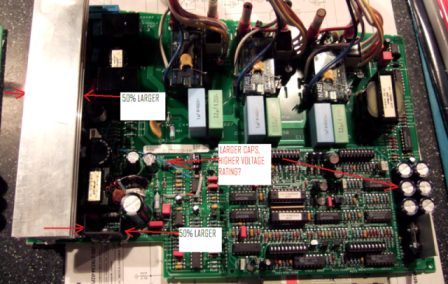
not sure what Scott means by tiny bit easier but I had that one customer who's HDM's, both early model 08P and standard 07P, would do this after 1 hour on short retrace only. Definitely heat related as you could make it come and go with a blowdryer. It only did it in this set so YRMV.
Anyway, second pic shows how the VDC HDM is diferent than even the early model "Ultra 08P" versions.
|
|
| Back to top |
|
|
draganm
Joined: 08 Mar 2006
Posts: 8990
Location: Colorado
|
| Posted: Fri Jul 22, 2011 9:37 pm Post subject: |
|
|
VDC HDM late model 08P. Not sure what the hell is wrong the forum engine but this is the biggest file I could upload.
| Description: |
|
| Filesize: |
357.5 KB |
| Viewed: |
9505 Time(s) |
|
|
|
| Back to top |
|
|
AnalogRocks
Forum Moderator

Joined: 08 Mar 2006
Posts: 26706
Location: Toronto, Ontario, Canada
TV/Projector: Sony 1252Q, AMPRO 4000G
|
| Posted: Fri Jul 22, 2011 10:40 pm Post subject: |
|
|
Keep it to 1024x768 and use a little more JPEG compression
_________________
Tech support for nothing
CRT.
HD done right!
|
|
| Back to top |
|
|
HK-Steve
Joined: 15 Jul 2006
Posts: 849
Location: Switzerland
TV/Projector: Marquee 9500, Epson 8100
|
| Posted: Sat Jul 23, 2011 6:24 am Post subject: |
|
|
For Brent's scan problem, I would be looking at the deflection processor board.
The heatsink was a big improvement for the 08p HDM, runs a lot cooler, I wouldn't run a Marquee without one,
Cheers
_________________

|
|
| Back to top |
|
|
draganm
Joined: 08 Mar 2006
Posts: 8990
Location: Colorado
|
| Posted: Sun Jul 24, 2011 5:52 pm Post subject: |
|
|
| AnalogRocks wrote: | | Keep it to 1024x768 and use a little more JPEG compression |
not sure what that is, I don't see it under the MS office pic manager? (sorry, computer dolt here) 
| HK-Steve wrote: | For Brent's scan problem, I would be looking at the deflection processor board.
The heatsink was a big improvement for the 08p HDM, runs a lot cooler, I wouldn't run a Marquee without one,
Cheers |
are you saying the larger heat sink pictured above can be purchased separately and installed on older HDM's? Even if it's available as a raw extrusion I would certainly do that and add the holes for bolting on the PCB + silicone tape.
Note that the older 08 HDM's use the same sink as the 07's. The pic above is a very late model 2003 board (Nash's longbow 8500)
|
|
| Back to top |
|
|
|
|





