| Author |
Message |
CRT-rocks
Joined: 01 Jun 2009
Posts: 4
|
| Posted: Mon Jun 01, 2009 6:59 pm Post subject: Barco tubes retrofit into Marquee |
|
|
I’ve been searching these forms for the answer to my question for 3-hours… Why can’t I ever get the search engine to work properly???
My question… what pins do I need to change to use a Barco 180DVB22 tube into a Marquee 8500 projector… I understand that I have to use 1000 volt rated wire, and I have excellent soldering skills… But what wires do I have to change???
Thanks in advance for the help
Pat
|
|
| Back to top |
|
 |
zGman
Joined: 22 May 2006
Posts: 599
|
| Posted: Mon Jun 01, 2009 7:05 pm Post subject: |
|
|
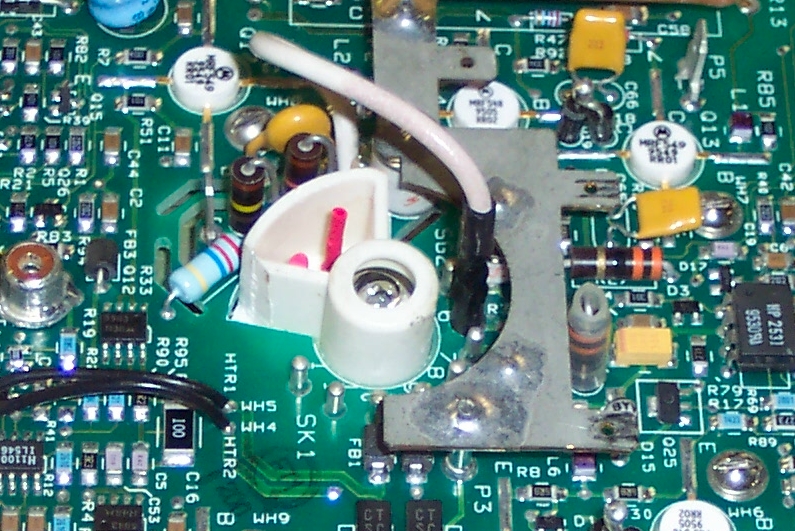
Remove the pin socket at pin 6 & Drill out to about 4mm.
This will allow you to attach the white flying G2 lead to
pin six on the tube. It is a good idea to put heatshrink
on the tube pins 1 & 2 - this will prevent an error down
the road. You will also need to transfer the Marquee
grounding foil and wires from the tube bell. This is a lot
easier if you use a heat gun (or hair drier) to soften the
adhesive. Be careful and slow - the foil is fragile.
G
|
|
| Back to top |
|
|
Curt Palme
CRT Tech
Joined: 08 Mar 2006
Posts: 24396
Location: Langley, BC
TV/Projector: All of them!
|
| Posted: Mon Jun 01, 2009 7:06 pm Post subject: |
|
|
Tie pins 2 and 6 together for switching the G2 to the right pin.
Done.
I don't cut the one pin off. I tried soldering pins 2 and 6 together on an old test tube, and I've done maybe 4 conversions to DMB tubes with no issues at all.
Label the CRT sockets as having been modified though, in case you ever sell the set. Mind you, leaving pins 2 and 6 connected, you have the option later to install either tube without further mods.
|
|
| Back to top |
|
|
zGman
Joined: 22 May 2006
Posts: 599
|
| Posted: Mon Jun 01, 2009 7:27 pm Post subject: |
|
|
If you pry the white socket guide off the back of the tube, you will run a significant risk
of cracking the vacuum nub = that little whistle noise will indicate the end of your tube.
Safer and easier to mod the Marquee neckboard.
G
|
|
| Back to top |
|
|
Curt Palme
CRT Tech
Joined: 08 Mar 2006
Posts: 24396
Location: Langley, BC
TV/Projector: All of them!
|
| Posted: Mon Jun 01, 2009 7:32 pm Post subject: |
|
|
I don't do it that way though. I jumper pin 6 to pin 2 on the CRT socket. Lift up the plastic cover that hides pin 2, run a wire down to the PC board and solder it to pin 6 on the board.
Yep, trying to take off the plastic CRT guide is asking for trouble! Sorry if I wasn't clear... and I guess I wasn't.
|
|
| Back to top |
|
|
CRT-rocks
Joined: 01 Jun 2009
Posts: 4
|
| Posted: Mon Jun 01, 2009 8:01 pm Post subject: |
|
|
I get... both ways seem like a good fix, will try Curts first so that I can use DMB in the future as needed...
Yup I already moved the grounding foil, it moved easy enough then conered it with metal foil tape like they have on the barco tubes to keep it down...
Thanks for the answers, I will try to fire it up tonight and let you know the results
Pat
|
|
| Back to top |
|
|
zGman
Joined: 22 May 2006
Posts: 599
|
| Posted: Mon Jun 01, 2009 8:14 pm Post subject: |
|
|
OK - maybe Curt is talking about Barco neckboards....That is
interesting - I will try it, could save some time....thx
The Marquee neckboards have a ~350K Ohm surface mount
resistor to ground from pin six - Even if you are drilling out
the pin hole for the G2 lead, it would be best to pop off the
little resistor to avoid any possibility of a G2 short to ground.
There isn't a pin 2 connection on the Marquee, it uses the
"flying" white wire with a pin connector and black heat shrink.
G
|
|
| Back to top |
|
|
Curt Palme
CRT Tech
Joined: 08 Mar 2006
Posts: 24396
Location: Langley, BC
TV/Projector: All of them!
|
| Posted: Mon Jun 01, 2009 8:30 pm Post subject: |
|
|
Sorry, I'm speedreading again. Yes I was talking about Marquee into Barcos, sorry!
Do what zGman says.
Ignore me, I'm an idiot! 
|
|
| Back to top |
|
|
draganm

Joined: 08 Mar 2006
Posts: 8990
Location: Colorado
|
| Posted: Mon Jun 01, 2009 9:01 pm Post subject: |
|
|
|
It looks like on a normal Marquee pin 6 and 7 are tied together and both grounded. So, with pin 6 missing doesn't pin 7 need to grounded to the spark arrestor cage? I know this is standard for LUG's but it seems like that would be a good idea with DVB's too?
|
|
| Back to top |
|
|
zGman
Joined: 22 May 2006
Posts: 599
|
| Posted: Mon Jun 01, 2009 9:35 pm Post subject: |
|
|
There's no connection in the tube for pin 7 except on LUG tubes...
Marquee grounds unused pins through surface mount resistors,
apparently Barco does not, since Curt is jumping #6 to #2 w/ no
problems.
G
|
|
| Back to top |
|
|
CRT-rocks
Joined: 01 Jun 2009
Posts: 4
|
| Posted: Mon Jun 01, 2009 10:01 pm Post subject: |
|
|
Ok so I am NOT going to do what Curt says to do.... Instead I will drill out pin #6... then remove the surface mount resistor that was connected to pin 6... and last hook up the flying G2 wire now to pin #6
That sounds easy...
Last I can put heatshrink on the tube pins 1 & 2 but that’s mainly so you don’t mix up G2 wire in the future (if I am reading this correct)
OK I will try to post a picture or two later upon my success...
Pat
|
|
| Back to top |
|
|
zGman
Joined: 22 May 2006
Posts: 599
|
| Posted: Mon Jun 01, 2009 10:06 pm Post subject: |
|
|
OK Pat - that sounds good - I will have a pic for you up here in a few minutes -
with any luck....
G
|
|
| Back to top |
|
|
Curt Palme
CRT Tech
Joined: 08 Mar 2006
Posts: 24396
Location: Langley, BC
TV/Projector: All of them!
|
| Posted: Mon Jun 01, 2009 10:07 pm Post subject: |
|
|
Yes, for those dyslexic here, follow my steps. FOr all others, follow zGman. 
FYI, Barco does not tie pin 2 to anything, it's floating within the CRT socket with nothing connected to that pin.
|
|
| Back to top |
|
|
zGman
Joined: 22 May 2006
Posts: 599
|
| Posted: Mon Jun 01, 2009 10:41 pm Post subject: |
|
|
Pic maybe
| Description: |
|
| Filesize: |
451.48 KB |
| Viewed: |
5070 Time(s) |
|
|
|
| Back to top |
|
|
zGman
Joined: 22 May 2006
Posts: 599
|
| Posted: Mon Jun 01, 2009 10:44 pm Post subject: |
|
|
It is actually easier to push the pin thru the pcb with a hot solder tip,
and then drill out the small pin hole in pcb to 0.156" or 4mm.
G
|
|
| Back to top |
|
|
CRT-rocks
Joined: 01 Jun 2009
Posts: 4
|
| Posted: Tue Jun 02, 2009 2:07 am Post subject: |
|
|
Sweeeeeeeeeeeet
It works great...!
This was very easy to do, no crackles, snaps or pops...
I think putting a Barco tube into a Marquee is easier than the other way around.
Thanks again for the help
Pat
|
|
| Back to top |
|
|
Curt Palme
CRT Tech
Joined: 08 Mar 2006
Posts: 24396
Location: Langley, BC
TV/Projector: All of them!
|
| Posted: Tue Jun 02, 2009 2:19 am Post subject: |
|
|
|
Do yourself a favor and label the metal cases that cover the CRT sockets with 'modified G2 pin' with Brother label tape. that way if you forget in a drunken stupor to put the white wire on the right pin, you'll have a reminder.
|
|
| Back to top |
|
|
|
|





