| Author |
Message |
Joemarzen
Joined: 23 Mar 2007
Posts: 66
Location: Edgerton, Wi (Near Madison)
|
| Posted: Sun May 31, 2009 2:49 am Post subject: Marquee 8110 h.fail |
|
|
|
Well this doesn't seem good. When I turn on my projector I get no picture unless I unplug all the sources. In that case I can navigate all the menus and what not. When I plug it in to something I get a red light in the diagnostic area on that back that says h.fail. Does this mean the end of my projector?
|
|
| Back to top |
|
 |
draganm

Joined: 08 Mar 2006
Posts: 8990
Location: Colorado
|
| Posted: Sun May 31, 2009 3:02 am Post subject: Re: Marquee 8110 h.fail |
|
|
| Joemarzen wrote: | | Well this doesn't seem good. When I turn on my projector I get no picture unless I unplug all the sources. In that case I can navigate all the menus and what not. When I plug it in to something I get a red light in the diagnostic area on that back that says h.fail. Does this mean the end of my projector? |
no, what gives you crazy thoughts like that? IT just means the horizontal module is losing synch at higher resolutions most likely
|
|
| Back to top |
|
|
Joemarzen
Joined: 23 Mar 2007
Posts: 66
Location: Edgerton, Wi (Near Madison)
|
| Posted: Sun May 31, 2009 3:04 am Post subject: |
|
|
Well, if fixing it means me doing something technical inside the outlook isn't good. That link directed me to a page with electrical diagrams. 
|
|
| Back to top |
|
|
Joemarzen
Joined: 23 Mar 2007
Posts: 66
Location: Edgerton, Wi (Near Madison)
|
| Posted: Sun May 31, 2009 3:10 am Post subject: |
|
|
|
This really sucks. I am driven to drink. Is it possible I am doing something dumb or is that light a definite indication of internal problems?
|
|
| Back to top |
|
|
Curt Palme
CRT Tech
Joined: 08 Mar 2006
Posts: 24396
Location: Langley, BC
TV/Projector: All of them!
|
| Posted: Sun May 31, 2009 4:35 am Post subject: |
|
|
Try this: Set your source to 480p and see if that works without an H fail. I had one set that simply wouldn't work over 480p, and it turned out that one of the tiny white wire jumpers on the motherboard under the focus and H board had broken loose. I spent hours changing boards onlt to find that one broken wire.
Sounds like you might have the same issue.
|
|
| Back to top |
|
|
draganm
Joined: 08 Mar 2006
Posts: 8990
Location: Colorado
|
| Posted: Sun May 31, 2009 4:52 am Post subject: |
|
|
| Joemarzen wrote: | | Well, if fixing it means me doing something technical inside the outlook isn't good. That link directed me to a page with electrical diagrams. |
that's a link to my Marquee electronics upgrade package. However you're better off working with Curt and repairing the machine before doing any upgrades.
the problem is either on the Horizontal board or control module, both are easy to remove and send out for repair.
|
|
| Back to top |
|
|
Joemarzen
Joined: 23 Mar 2007
Posts: 66
Location: Edgerton, Wi (Near Madison)
|
| Posted: Sun May 31, 2009 5:16 am Post subject: |
|
|
Really? 'Cause nothing I am trying works. Always with the h fail light. How much would that cost?
Last edited by Joemarzen on Sun May 31, 2009 5:39 am; edited 1 time in total
|
|
| Back to top |
|
|
Joemarzen
Joined: 23 Mar 2007
Posts: 66
Location: Edgerton, Wi (Near Madison)
|
| Posted: Sun May 31, 2009 5:34 am Post subject: |
|
|
|
Now it won't even put up the menus...
|
|
| Back to top |
|
|
Joemarzen
Joined: 23 Mar 2007
Posts: 66
Location: Edgerton, Wi (Near Madison)
|
| Posted: Sun May 31, 2009 6:18 am Post subject: |
|
|
|
I FIXED IT! HA! Actually I just reseated the board. What happened? Is it going to happen again?
|
|
| Back to top |
|
|
draganm
Joined: 08 Mar 2006
Posts: 8990
Location: Colorado
|
| Posted: Sun May 31, 2009 6:52 am Post subject: |
|
|
hard to say. That board and a few others should at the very least be pulled out and have their contact pins wiped with Caig deoxit contact cleaner.
http://store.caig.com/s.nl/sc.2/category.188/.f
you should also consider my re-build package if you have the budget for it.
|
|
| Back to top |
|
|
Joemarzen
Joined: 23 Mar 2007
Posts: 66
Location: Edgerton, Wi (Near Madison)
|
| Posted: Sun May 31, 2009 9:37 pm Post subject: Back to the drawing board |
|
|
|
So I came into the room a minute ago and the picture was all jittery and weird. I turned off the projector and turned it on again and the problem was resolved for the time being. Do you think that this is a problem with corroded connectors or is the board itself going?
|
|
| Back to top |
|
|
Nashou66

Joined: 12 Jan 2007
Posts: 16171
Location: West Seneca NY
|
| Posted: Sun May 31, 2009 9:50 pm Post subject: |
|
|
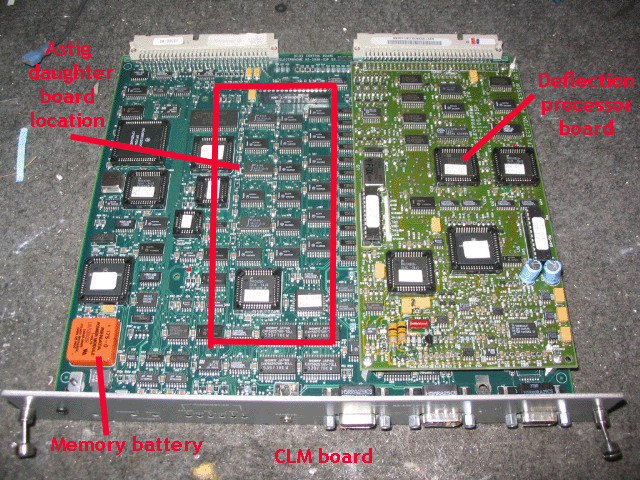
most likely the chips on the CLm and the attached smaller board called the DPB.
here is apost i had on AVS for a 8110 that flikered.
http://www.avsforum.com/avs-vb/showthread.php?t=1079352&highlight=8110
Probably a good cleaning and reseating of all the boards is what's needed.
Here is a link to parts and boards of the Marquee. Reseating of the Focus board and HDM is just pulling it out and putting in in a few times to clean the contacts, you dont have to remove any connections to do this. Just pull up and put back in a few times. http://www.curtpalme.com/ElectrohomeMarquee_Layout1.shtm
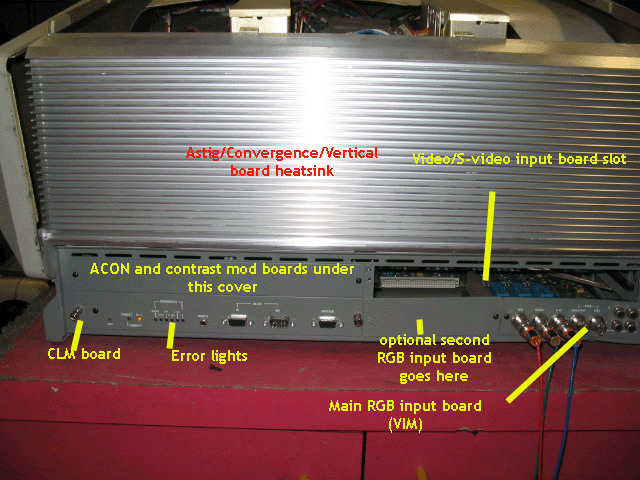
Location of FCM and HDM.

on the hdm their is a daughter board that also need to be removed and reconected.
HDM Pic

Next on the CLM there are some chips that can be taken out from their
sockets, do one at a time. you will need a IC puller from radio shack to do this.
Location of CLM:
CLM out of Set showing chips.
chip puller pic:

Clean all chips with some contact cleaner or Denatured Alcohol.
I use DeOxit:
[IMG]http://store.caig.com/core/media/media.nl?id=1491&c=ACCT113328&h=e3c3a4a7806d4b7935fd[/IMG]
Do one chip at a time and remember how it came out so you put it back in the same way.
Athanasios
_________________
Don't blame your underwear for your crooked ass~ unknown Greek philosopher
"Republicans believe every day is the Fourth of July, but the Democrats believe every day is April 15." --- President Reagan
One Smart Dog!!!
Marquee High Performance Bellows now shipping!!
Marquee Modifications and Performance Enhancement
Marquee C-element and Bellow removal
|
|
| Back to top |
|
|
|
|




