| Author |
Message |
modus2
Joined: 29 Jul 2007
Posts: 9
|
| Posted: Wed May 27, 2009 5:16 pm Post subject: H size control on Barco 1209s |
|
|
Have a problem with my Barco -- the blue H size is slightly larger than red and green, about 1" on each side on a 131" diag. screen. Currently I use convergence to force the blue in, but this can hardly be the right way as evident from non-linear geometrical behavior on the sides and especially the corners. Have been digging around for info how to solve it the correct way, but so far have come up short. According to the guides on the site there are pots for H and V shift and V size, but not for H size? So am I to use some menu control, have only managed to alter size for all three colors at the same time? Feels like I am missing something obvious here 
Regards
Andreas
|
|
| Back to top |
|
 |
Tom.W

Joined: 09 Mar 2006
Posts: 6635
|
|
| Back to top |
|
|
RVonse

Joined: 09 Mar 2006
Posts: 3152
|
| Posted: Sat May 30, 2009 3:25 am Post subject: Re: H size control on Barco 1209s |
|
|
| modus2 wrote: | Have a problem with my Barco -- the blue H size is slightly larger than red and green, about 1" on each side on a 131" diag. screen. Currently I use convergence to force the blue in, but this can hardly be the right way as evident from non-linear geometrical behavior on the sides and especially the corners. Have been digging around for info how to solve it the correct way, but so far have come up short. According to the guides on the site there are pots for H and V shift and V size, but not for H size? So am I to use some menu control, have only managed to alter size for all three colors at the same time? Feels like I am missing something obvious here
Regards
Andreas |
The blue deflection yoke is probably not an equal distance to the crt bell relevant to the red or green yokes. And this is easy to check and fix, just loosen the holding screw of the blue yoke and either push it forward or pull it further back as necessary to make blue width perfectly linear with the 2 other colors.
|
|
| Back to top |
|
|
zGman
Joined: 22 May 2006
Posts: 599
|
| Posted: Sat May 30, 2009 3:59 am Post subject: |
|
|
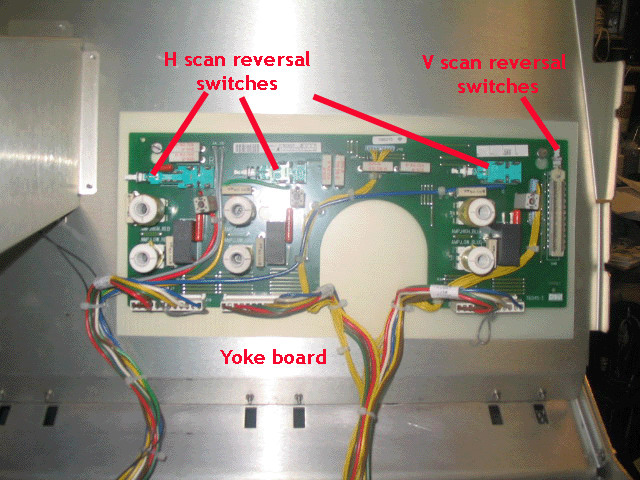
I think Tom was trying to point him to the H-width coils on the deflection board.
The manual also gives a good description of matching the raster widths.
Although it is true that the deflection yoke position affects width, in general they
are designed to be pushed all the way forward to the tube bell.
G
|
|
| Back to top |
|
|
Tom.W
Joined: 09 Mar 2006
Posts: 6635
|
| Posted: Sat May 30, 2009 5:01 am Post subject: |
|
|
I was hoping Andreas would figure it out for himself with a few hints...... 
Note: Do not use a metallic screwdriver to adjust these coils !
|
|
| Back to top |
|
|
|
|