| Author |
Message |
mkmertz99
Joined: 13 Apr 2009
Posts: 28
Location: Palo Alto CA
|
| Posted: Sat Apr 18, 2009 8:44 pm Post subject: Need G70 EXPERT for code 30 except... |
|
|
Just bought a like new G70 with about 1500 hours on it. Demo'd it twice, seemed perfect. Absolutely stunning unit. Got it home, installing on floor - power it up and all seems well, except polarity. Change the polarity switch - instant code 30 and pwr down. Change it back, all OK, except upside-down image. Change the polarity switch AND connectors - All seems OK, for about a minute. Correct Image. Then code 30. power it down, power up. All OK for about 5 seconds, then code 30. Test all 4 combo's of Polarity switch and Connectors - code 30 every time, EXCEPT WHEN CONFIGURED FOR CEILING INSTALL. Then it works great.
HELP! I can't do a ceiling install in my room.
PS - I do get code 10 to show for about 2 seconds every time, even in the "good" positions.
|
|
| Back to top |
|
 |
AFryia

Joined: 09 Mar 2006
Posts: 965
Location: S.E. Michigan VPH-G70Q
|
| Posted: Sat Apr 18, 2009 10:25 pm Post subject: |
|
|
code 10 briefly at start up was normal for PJs with early firmware.
stupid question, is the PJ off when you change the polarity switches?
I don't have my manual in front of me, what is an error code 30?
_________________
My Volt Blog
|
|
| Back to top |
|
|
mkmertz99
Joined: 13 Apr 2009
Posts: 28
Location: Palo Alto CA
|
| Posted: Sat Apr 18, 2009 10:28 pm Post subject: Need G70 EXPERT for code 30 except... |
|
|
oh yes, pwr off to open the lid. cord disconnected too. Error 30 is DC bd error. To quote the manual:
30 DC Abnormality of the power line on the DC board
|
|
| Back to top |
|
|
Zebu Fellenz
Joined: 21 Dec 2006
Posts: 2567
|
| Posted: Sat Apr 18, 2009 10:45 pm Post subject: |
|
|
|
I think I had this before, try messing with the shift control. Not sure if it will help but it seems stuck in my head that it solved my problem. Also try reseating boards.
|
|
| Back to top |
|
|
mkmertz99
Joined: 13 Apr 2009
Posts: 28
Location: Palo Alto CA
|
| Posted: Sun Apr 19, 2009 2:15 am Post subject: |
|
|
|
Thanks Zebu - I can try that. Can you be a bit more specific? The unit pwrs down almost immediately in any config except Front/Ceiling. I'm thinking I might set it all up upside down and THEN try to flip the image... ??
|
|
| Back to top |
|
|
Zebu Fellenz
Joined: 21 Dec 2006
Posts: 2567
|
| Posted: Sun Apr 19, 2009 2:25 am Post subject: |
|
|
I'm honestly not sure if this was the error I was getting so take any advice with a grain of salt. What I did was mess with the V shift so when the picture inverted it would be within the boundries of the tubes. I also reduced the size controls before I switched the cable positions.
This could also be a loose DC board that came loose during transport. I'm not sure what the DC board is but you should pop the cover and find, reseat it. I've had things like this happen where an error will come seemingly out of the blue and reseating the board will fix it.
|
|
| Back to top |
|
|
mkmertz99
Joined: 13 Apr 2009
Posts: 28
Location: Palo Alto CA
|
| Posted: Sun Apr 19, 2009 3:17 am Post subject: |
|
|
|
yeah - I can't find a ref. to "DC board" in the manual. Also just thumbed through Curt's intro/setup on the site here and again no ref. to "DC board"
|
|
| Back to top |
|
|
draganm

Joined: 08 Mar 2006
Posts: 8990
Location: Colorado
|
| Posted: Sun Apr 19, 2009 3:54 am Post subject: |
|
|
|
DC convergence board is one of the upright cards between the tubes, the other is the E-board. Flipping the image is probably pushing the convergence into a distressed position. Try re-setting all the convergence points to 128? (neutral if I remember correctly?). See if that helps. IF not send the DC board to Curt, he fixes them all the time.
|
|
| Back to top |
|
|
mkmertz99
Joined: 13 Apr 2009
Posts: 28
Location: Palo Alto CA
|
| Posted: Sun Apr 19, 2009 5:43 am Post subject: |
|
|
Do you mean registration? (I searched the manual for "convergence" but did not find that word...) Sorry I am a real CRT newbie. The manual pages 107-108 talk about resetting the data. There is a "Factory Data Reset" and a
"128 data reset (ZONE only)
Resets the ZONE adjustment data to 128." But it just gives an example for resetting the Red Registration...
The manual states that the default factory setup up is for Front/Floor config with a 120" screen - which is EXACTLY my setup. So I'm hoping that there is a simple "1-click Restore Factory Defaults" button somewheres....
|
|
| Back to top |
|
|
KellenerSptM5
Joined: 08 Mar 2009
Posts: 198
|
| Posted: Sun Apr 19, 2009 12:55 pm Post subject: |
|
|
DC board is the middle board in the set of three main boards. It is shown as the convergence board in Curt's pictures here: http://www.curtpalme.com/SonyG70_Layout4.shtm .
To reset the settings, hold down the orange reset button on the remote until it asks you if you wish to reset to factory defaults. That will reset the convergence, raster size and everything else...
|
|
| Back to top |
|
|
AFryia
Joined: 09 Mar 2006
Posts: 965
Location: S.E. Michigan VPH-G70Q
|
| Posted: Sun Apr 19, 2009 6:01 pm Post subject: |
|
|
I can't remember but switching from ceiling to floor involved the invert switches and I thought the three connectors had to change position.
I wouldn't suspect a DC board if the image is clean and stable when configured for ceiling mount.
I second the reset to 128 for all settings. IMO factory reset only really works if most of the set is virgin (no replacement parts boards, tubes).
_________________
My Volt Blog
|
|
| Back to top |
|
|
mkmertz99
Joined: 13 Apr 2009
Posts: 28
Location: Palo Alto CA
|
| Posted: Sun Apr 19, 2009 6:15 pm Post subject: |
|
|
|
thanks. the manual seems to indicate I need to be in Pic Control, Size and Shift modes to do this... but I know more now than I did then. Also thanks on the layout thread - extremely helpful.
|
|
| Back to top |
|
|
mkmertz99
Joined: 13 Apr 2009
Posts: 28
Location: Palo Alto CA
|
| Posted: Sun Apr 19, 2009 6:19 pm Post subject: |
|
|
| AFryia wrote: | I can't remember but switching from ceiling to floor involved the invert switches and I thought the three connectors had to change position.
I wouldn't suspect a DC board if the image is clean and stable when configured for ceiling mount.
I second the reset to 128 for all settings. IMO factory reset only really works if most of the set is virgin (no replacement parts boards, tubes). |
Thanks for this - is this the "ZONE only" reset as mentioned on install manual p. 107?
"There are three ways to reset the data, as shown below.
-Factory data reset
Resets to the factory preset data saved in the factory data block.
-Service data reset
Resets to the data saved in the service data block.
-128 data reset (ZONE only)
Resets the ZONE adjustment data to 128."
|
|
| Back to top |
|
|
KellenerSptM5
Joined: 08 Mar 2009
Posts: 198
|
| Posted: Sun Apr 19, 2009 7:58 pm Post subject: |
|
|
I guess I missed the part where he said he was using replacement boards etc... 
Factory Reset would work best in his case and it certainly did in my case. Factory reset was system wide on my sets and gave me a much better base line to start configuring from.
Why wouldn't you suspect the DC board when the error code relates to the DC board? Kinda makes the error codes worthless then...
| AFryia wrote: | I can't remember but switching from ceiling to floor involved the invert switches and I thought the three connectors had to change position.
I wouldn't suspect a DC board if the image is clean and stable when configured for ceiling mount.
I second the reset to 128 for all settings. IMO factory reset only really works if most of the set is virgin (no replacement parts boards, tubes). |
|
|
| Back to top |
|
|
mkmertz99
Joined: 13 Apr 2009
Posts: 28
Location: Palo Alto CA
|
| Posted: Sun Apr 19, 2009 8:31 pm Post subject: |
|
|
So, sorry for the intensely newbie question but I'm assuming that means the "Factory Data Reset" mentioned on p. 107.
outside of the ZONE ONLY 128 reset, I don't see anything in the manual describing "the reset to 128 for all settings."
BTW, this is a pristine, like-new machine, 1555 hours, no replacement anything, so says the original owner. And it looks that way too. He had it installed in Front/Ceiling config, and it still works perfectly with polarity switch and connectors in the UPPER/UPPER positions
|
|
| Back to top |
|
|
KellenerSptM5
Joined: 08 Mar 2009
Posts: 198
|
| Posted: Sun Apr 19, 2009 8:36 pm Post subject: |
|
|
Exactly.
| mkmertz99 wrote: | So, sorry for the intensely newbie question but I'm assuming that means the "Factory Data Reset" mentioned on p. 107.
outside of the ZONE ONLY 128 reset, I don't see anything in the manual describing "the reset to 128 for all settings."
BTW, this is a pristine, like-new machine, 1555 hours, no replacement anything, so says the original owner. And it looks that way too. He had it installed in Front/Ceiling config, and it still works perfectly with polarity switch and connectors in the UPPER/UPPER positions |
|
|
| Back to top |
|
|
Curt Palme
CRT Tech
Joined: 08 Mar 2006
Posts: 24396
Location: Langley, BC
TV/Projector: All of them!
|
| Posted: Sun Apr 19, 2009 8:46 pm Post subject: |
|
|
I'm guessing the DC board is bad. Keep in mind that these sets are now 10+ years old, hour count has little to do with reliability at this point. Same with a car with 10K miles on it that is 12 years old. Hoses and gaskets will give way due to age, just like electronic stuff will.
If nothing works, email me and I'll get you to send me the DC board.
Cheers!
|
|
| Back to top |
|
|
mkmertz99
Joined: 13 Apr 2009
Posts: 28
Location: Palo Alto CA
|
| Posted: Sun Apr 19, 2009 11:38 pm Post subject: Edit to my Post re: Resetting the values |
|
|
I'm editing this post because after reading the manual and playing with the remote I think this means "reset ALL values on each of these screens to 128." Sorry that was not obvious to me. Let me know if that's the wrong conclusion.
(I didn't notice the words "Cut Off" on the remote - it does help to dig in to the manual a bit before proceeding! (:->)
Also, I assume that for "Adjusting the CRT Conversion Angle" when it says "Reset the green red and blue centering" that means also to reset the center values (Hc, Hf, Vc, Vf) for all three guns (?) to 128.
Thanks for all the help for the rank newbie!
============================
Thanks Curt - I was dubious but turns out that reseating the DC board did the trick.
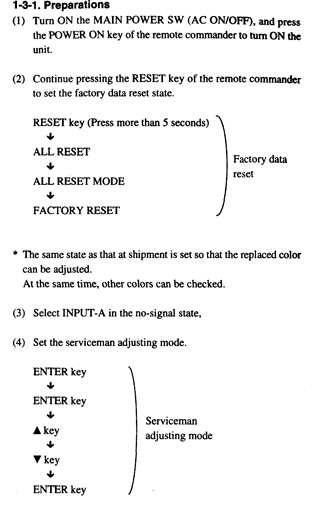
Now my question is - How the Heck do you do a system reset on this thing? I am, luckily, trying to set this up exactly as default - Front/Floor PJ with 120" diagonal screen. The manual is VERY light on this topic, and I've found a lot of references to it on numerous threads on your site, but no "How-To".
On an earlier thread Axatax suggested "hit each registration button on the bottom of the remote, from CENT to ZONE, and return each setting to 128 manually. KEY and PIN have an extra page of settings that can be accessed by pressing either KEY or PIN a second time."
It's very non-obvious how to do that. 128 what? Is this a reference to a binary value in some register? When I try using the RESET button, I see "Centering Green" no matter which Reg setting I try to reset. Pressing the RGB buttons adds to the confusion.
Maybe I have to cycle through all reg settings, then it will auto kick up to the next gun? I'm a bit stuck here... reluctant to go much further lest I end up in some dark corner of tweak hell.
It dawns on me that I have to go through the Adjusting the CRT Conversion Angle (p. 21), as the former owner had 78" (horiz) 16:9 screen and I noticed when I reset the DC board that the Gold Adjustment screws are in the holes for 60-300, not 120 as would be the factory default.
But to add to my confusion... a quick scan of the instructions shows that Step 4 in that proc says "Reset the green, red and blue Centering".. and refers back to the woefully oblique instructions on p. 107.
HELP!
|
|
| Back to top |
|
|
KellenerSptM5
Joined: 08 Mar 2009
Posts: 198
|
| Posted: Mon Apr 20, 2009 1:42 am Post subject: |
|
|
Per the FSM on how to reset to factory defaults...
| Description: |
|
| Filesize: |
85.66 KB |
| Viewed: |
9633 Time(s) |
|
|
|
| Back to top |
|
|
AFryia
Joined: 09 Mar 2006
Posts: 965
Location: S.E. Michigan VPH-G70Q
|
| Posted: Mon Apr 20, 2009 2:20 am Post subject: Re: Edit to my Post re: Resetting the values |
|
|
| mkmertz99 wrote: | On an earlier thread Axatax suggested "hit each registration button on the bottom of the remote, from CENT to ZONE, and return each setting to 128 manually.
|
If your PJ hours are true then you may have a completely original chassis. In that case I would do a factory reset, not a reset to 128.
| mkmertz99 wrote: | KEY and PIN have an extra page of settings that can be accessed by pressing either KEY or PIN a second time."
|
Yes, there is KEY and KEY Balance along with Pin and Pin Balance. Tap the button a second time to toggle between the two settings.
| mkmertz99 wrote: | It's very non-obvious how to do that. 128 what? Is this a reference to a binary value in some register?
|
128 is the mid value of 0-256 for every setting in theory, I believe you're right its 8bit.
| mkmertz99 wrote: | I see "Centering Green" no matter which Reg setting I try to reset. Pressing the RGB buttons adds to the confusion.
|
Read Brian Hampton's G70 setup guide and do more research. There is a lot to obsorb and I feel you are getting a little overwhelmed.
|
|
| Back to top |
|
|
|
|





