| Author |
Message |
Widescreen
Joined: 20 May 2008
Posts: 28
Location: Allen, TX
|
| Posted: Sat Mar 14, 2009 7:08 am Post subject: Sony 1272 Blue tube issue |
|
|
I bought my 1272 from Curt in 8/2001. It's been in regular use since then and the only tinkering I've done with it is to replace the green tube. About 3 weeks ago, a problem appeared that I've never had before. Shortly after turning the set on, the blue will shift upward (see attached image). It doesn't slowly adjust - it snaps to that location. After a few minutes it will usually correct itself - again, just snapping back into the correct position. Generally the problem only lasts about 10 minutes or so and then once it fixes itself, it doesn't happen again until the next time I power the set on. I know it's a problem internal to the 1272 because it happens when displaying the internal test patterns. Any idea what the problem is and what I can do to fix it? Thanks.
| Description: |
|
| Filesize: |
147.02 KB |
| Viewed: |
2935 Time(s) |
|
|
|
| Back to top |
|
 |
Halo1963

Joined: 18 Apr 2006
Posts: 54
Location: Brisbane Australia
|
| Posted: Sat Mar 14, 2009 11:20 pm Post subject: |
|
|
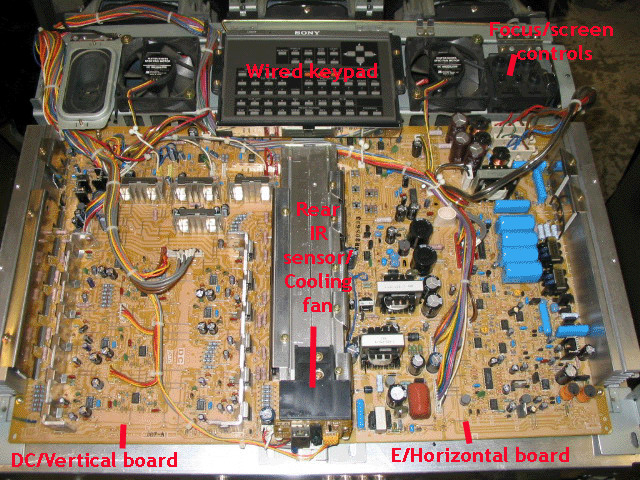
My guess would be dry solder joints on the transistors on the E and DC boards
The ones on the heat sink that joins these two big boards it is a known common fault
However reseat all boards and check all the connections (can not hurt)
_________________
Regards Halo1963
|
|
| Back to top |
|
|
Widescreen
Joined: 20 May 2008
Posts: 28
Location: Allen, TX
|
| Posted: Sun Mar 15, 2009 5:02 am Post subject: |
|
|
|
Thanks for the response. That makes sense. Is there an easy way to identify the location to check? I haven't opened up the PJ in several years and don't really know my way around although I feel reasonably confident I can solder if I know where to look. Thanks.
|
|
| Back to top |
|
|
Halo1963
Joined: 18 Apr 2006
Posts: 54
Location: Brisbane Australia
|
| Posted: Sun Mar 15, 2009 7:45 am Post subject: |
|
|
This is from the set up and tips section
Hard to see if they are faulty
You would have to solder from the under side
| Description: |
|
| Filesize: |
184.9 KB |
| Viewed: |
2879 Time(s) |
|
_________________
Regards Halo1963
|
|
| Back to top |
|
|
Widescreen
Joined: 20 May 2008
Posts: 28
Location: Allen, TX
|
| Posted: Fri Mar 27, 2009 7:32 pm Post subject: |
|
|
|
I noticed that if I whack the side of the projector, it can fix it. Sometimes it takes several whacks. Not the best way to treat a projector I realize but it's just another piece of the puzzle. I hope this means I can just reseat some stuff to fix it. I'm going to try this weekend.
|
|
| Back to top |
|
|
ecrabb
Forum Moderator

Joined: 13 Mar 2006
Posts: 15909
Location: Utah
TV/Projector: JVC RS40, Epson 5010
|
| Posted: Fri Mar 27, 2009 7:42 pm Post subject: |
|
|
Whacking it in the side might work in the short term, but it's likely to cause you even more problems... probably sooner than later. Bite the bullet and pull it apart and try re-seating the connectors. If that doesn't work, then you'll have to get into the re-flowing solder joints (or just sending the boards back to Curt to repair/trade.)
SC
|
|
| Back to top |
|
|
|
|




