| Author |
Message |
eekyle
Joined: 12 Nov 2008
Posts: 14
Location: South Dakota
|
| Posted: Wed Feb 04, 2009 2:29 pm Post subject: Barco 1208 very close to working |
|
|
After hours of trial and error, I'm finally close to actually seeing a 720P/1080i picture on my Barco 1208.
However, the picture is not stable. Every once in a while I see a great 1080i (locked at 33.6kHz/60 I believe) picture. This is after setting and resetting my DVD player from 480P, then lock in 720P, then finally at 1080i.
I'm thinking in the main issue is the sync the projector is seeing. Unless I lock a signal at 480P and then use my DVD player to progress through to 1080i, the projector switches between 120Hz and 60Hz frame rate and the picture at 120Hz is a split screen (when turning on the player at 1080i and just starting a movie).
The Barco works fine using Port 2 SVHS at 480P. Solid operation and signal.
My configuration is:
Upconverting DVD player (source) > 1.5M Monster 400 series HDMI to DVI cable > HD Fury > Box 1020 > 5 BNC breakout cable > Port 5 on the Barco
I do have a PSU on the HD Fury.
The Box 1020 is set to neg. sync.
All PSUs are working.
My questions are this.
Would Port 3 seemingly work better than Port 5 for my stability issue?
Is there an issue with my Barco? If yes, I'd like to know what to get repaired or what to adjust.
Last a 101 question. Please confirm that the white BNC connector on the breakout box is the H sync and the black BNC connector is the V sync.
I'm very much stuck at this point and don't really know what to do next to stabilize the picture.
Any advise is greatly appreciated.
|
|
| Back to top |
|
 |
jkruger

Joined: 24 Oct 2007
Posts: 2435
Location: Carlsbad, CA
|
| Posted: Wed Feb 04, 2009 2:36 pm Post subject: |
|
|
|
Have you tried swapping the H and V connectors?
|
|
| Back to top |
|
|
eekyle
Joined: 12 Nov 2008
Posts: 14
Location: South Dakota
|
| Posted: Wed Feb 04, 2009 2:56 pm Post subject: |
|
|
At some point I did but lost track in all my switching.
I have white BNC to H sync and black BNC to V sync. Is this the typical way it's supposed to be?? Looking up the typical configuration on the Internet suggested that this was the nominal color coding.
If I can get confirmation on this, I can work on this angle as I've had to move the jumpers (all three) on my 1020 Box to exactly the opposite of how they came from X-vue (X-vue did change them to the normal settings for a Barco per their thread).
|
|
| Back to top |
|
|
jkruger
Joined: 24 Oct 2007
Posts: 2435
Location: Carlsbad, CA
|
| Posted: Wed Feb 04, 2009 2:59 pm Post subject: |
|
|
|
Sounds like you need to set all the jumpers back to the original settings first.
|
|
| Back to top |
|
|
eekyle
Joined: 12 Nov 2008
Posts: 14
Location: South Dakota
|
| Posted: Wed Feb 04, 2009 3:04 pm Post subject: |
|
|
|
I've tried that several times in working with the 1020 box. The only way I can get any sort of picture is to put the jumpers in this configuration. I have an e-mail out to X-vue telling them my situation to see what they have to say.
|
|
| Back to top |
|
|
jkruger
Joined: 24 Oct 2007
Posts: 2435
Location: Carlsbad, CA
|
| Posted: Wed Feb 04, 2009 3:29 pm Post subject: |
|
|
|
Please post this question in the X-Vue products forum, it will get proper attention there.
|
|
| Back to top |
|
|
eekyle
Joined: 12 Nov 2008
Posts: 14
Location: South Dakota
|
| Posted: Wed Feb 04, 2009 3:41 pm Post subject: |
|
|
OK. I'll try X-vue again.
Could you please confirm color coding for BNC breakout connectors? I understand it as White H sync. and Black V sync. (typical)
I would really help my quest.
|
|
| Back to top |
|
|
jkruger
Joined: 24 Oct 2007
Posts: 2435
Location: Carlsbad, CA
|
| Posted: Wed Feb 04, 2009 3:51 pm Post subject: |
|
|
|
I have seen cables with the black and white ends that are incorrect. Try swapping the H and V connections to the PJ.
|
|
| Back to top |
|
|
eekyle
Joined: 12 Nov 2008
Posts: 14
Location: South Dakota
|
| Posted: Wed Feb 04, 2009 4:23 pm Post subject: |
|
|
I'll give switching BNCs another round.
Are you using BNCs yourself or are you using port 3 on your Runco (assuming it has the same inputs)?
|
|
| Back to top |
|
|
jkruger
Joined: 24 Oct 2007
Posts: 2435
Location: Carlsbad, CA
|
| Posted: Wed Feb 04, 2009 4:39 pm Post subject: |
|
|
|
I'm using port 5 with the breakout cable from the original hdfury. I do not recall how it is hooked up right now, I could check it later today.
|
|
| Back to top |
|
|
jkruger
Joined: 24 Oct 2007
Posts: 2435
Location: Carlsbad, CA
|
| Posted: Wed Feb 04, 2009 5:00 pm Post subject: |
|
|
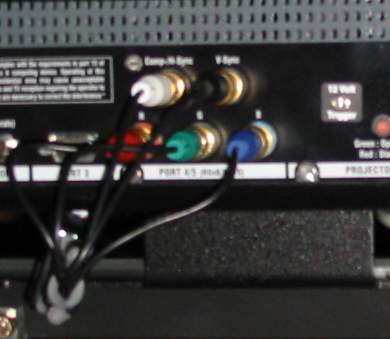
I found a picture of it here at work, the white is connected to H.
| Description: |
|
| Filesize: |
14.86 KB |
| Viewed: |
4066 Time(s) |
|
|
|
| Back to top |
|
|
eekyle
Joined: 12 Nov 2008
Posts: 14
Location: South Dakota
|
| Posted: Wed Feb 04, 2009 5:07 pm Post subject: |
|
|
Great. I also heard from X-vue and he confirmed the same thing.
Since my Barco is switching between 120Hz and 60Hz all the time, I believe it is the source of my issues. In e-mailing X-vue, I may need a longer sync pulse for my particular projector. It sounds reasonable to me since it keeps switching back and forth. I would also explain some of my picture instability issues.
I'll work with X-vue as I'm now starting to suspect signal timing issues that can be solved with the 1020 and I just have a picky 1208.
I'm also going to try Port 3 and make myself a cable to see if that port is any better.
Thanks for all the help.
|
|
| Back to top |
|
|
jkruger
Joined: 24 Oct 2007
Posts: 2435
Location: Carlsbad, CA
|
| Posted: Wed Feb 04, 2009 6:07 pm Post subject: |
|
|
|
I pulled the port 3 board out of my 1209s and am running 1080i only thru the hdfury in to port 5. The Wii is the only lower res source I have and it is upscaled to 1080i.
|
|
| Back to top |
|
|
|
|




