| Author |
Message |
tonyinbreckenridge
Joined: 04 Feb 2009
Posts: 6
|
| Posted: Wed Feb 04, 2009 12:53 am Post subject: 2006 LN-S series Samsung LCD as a monitor for my Macbook Pro |
|
|
-TV is a 2006 LN-S series Samsung LCD that has dual HDMI/DVI input jacks that "do not support computer video connections" (per the Samsung owner's manual).
-The TV does have a 15-pin VGA (RGB) input specified for PC connections.
-Laptop is a 2008 Macbook Pro with a GeForce 8600M GT graphics card and a Color LCD screen with a 1440 x 900 resolution. The video connection is DVI.
-Will the HDFury DVI to VGA (RGB) converter *blue edition* (standard edition), connected to the TV PC input, connected to the laptop with a VGA cable (male to male), enable me to use the TV as a monitor for my laptop?
P.S. I already have the audio connected between the two.
Thanks!
|
|
| Back to top |
|
 |
AnalogRocks
Forum Moderator

Joined: 08 Mar 2006
Posts: 26706
Location: Toronto, Ontario, Canada
TV/Projector: Sony 1252Q, AMPRO 4000G
|
| Posted: Wed Feb 04, 2009 1:43 am Post subject: |
|
|
Hi Tony,
Give us the exact model number of your TV and if you have it, a link to the owners manual and we'll have a look.
_________________
Tech support for nothing
CRT.
HD done right!
|
|
| Back to top |
|
|
tonyinbreckenridge
Joined: 04 Feb 2009
Posts: 6
|
| Posted: Wed Feb 04, 2009 1:47 am Post subject: |
|
|
|
TV model is LN-S4695D... working on a link!
|
|
| Back to top |
|
|
AnalogRocks
Forum Moderator
Joined: 08 Mar 2006
Posts: 26706
Location: Toronto, Ontario, Canada
TV/Projector: Sony 1252Q, AMPRO 4000G
|
| Posted: Wed Feb 04, 2009 1:50 am Post subject: |
|
|
Take your time
_________________
Tech support for nothing
CRT.
HD done right!
|
|
| Back to top |
|
|
macgyver655
Joined: 22 Aug 2007
Posts: 8508
|
| Posted: Wed Feb 04, 2009 2:25 am Post subject: |
|
|
|
Already looked at your manual. You should be able to direct connect your laptop to the display. The vga port will accept up to 1080p. Connect your laptop vga to vga and read pages 76-83 of your user manual.
|
|
| Back to top |
|
|
macgyver655
Joined: 22 Aug 2007
Posts: 8508
|
| Posted: Wed Feb 04, 2009 2:27 am Post subject: |
|
|
Oh, and dont run over 60 refresh at 1080p.
Pg 76 gives you display modes. 1440 X 900 is not supported.
|
|
| Back to top |
|
|
macgyver655
Joined: 22 Aug 2007
Posts: 8508
|
| Posted: Wed Feb 04, 2009 2:41 am Post subject: |
|
|
|
If your laptop doesn't have a vga out, is it a regular DVI or is it the mini DVI?
|
|
| Back to top |
|
|
tonyinbreckenridge
Joined: 04 Feb 2009
Posts: 6
|
| Posted: Wed Feb 04, 2009 2:52 am Post subject: |
|
|
| macgyver655 wrote: | | If your laptop doesn't have a vga out, is it a regular DVI or is it the mini DVI? |
regular DVI
|
|
| Back to top |
|
|
tonyinbreckenridge
Joined: 04 Feb 2009
Posts: 6
|
| Posted: Wed Feb 04, 2009 2:58 am Post subject: |
|
|
it appears as though i was, clearly, over-thinking this set-up! you guys(gals?) will have saved me some jing-a-ling. thank-you! 
|
|
| Back to top |
|
|
macgyver655
Joined: 22 Aug 2007
Posts: 8508
|
| Posted: Wed Feb 04, 2009 3:02 am Post subject: |
|
|
| tonyinbreckenridge wrote: | | macgyver655 wrote: | | If your laptop doesn't have a vga out, is it a regular DVI or is it the mini DVI? |
regular DVI |
Should be able to use a DVI to VGA adapter.
|
|
| Back to top |
|
|
AnalogRocks
Forum Moderator
Joined: 08 Mar 2006
Posts: 26706
Location: Toronto, Ontario, Canada
TV/Projector: Sony 1252Q, AMPRO 4000G
|
|
| Back to top |
|
|
perisoft

Joined: 29 Aug 2007
Posts: 2920
Location: Ithaca, NY
|
| Posted: Wed Feb 04, 2009 3:02 pm Post subject: |
|
|
| Quote: | | that has dual HDMI/DVI input jacks that "do not support computer video connections" |
Heh. I wonder what miracle technology was supposed to be in there that could tell the difference between a 1080p signal generated by the microprocessor in a PS3, X360, or cable box, and the 1080p signal generated by a PC... 
_________________

|
|
| Back to top |
|
|
ecrabb
Forum Moderator

Joined: 13 Mar 2006
Posts: 15909
Location: Utah
TV/Projector: JVC RS40, Epson 5010
|
| Posted: Wed Feb 04, 2009 4:23 pm Post subject: |
|
|
Peri, it should have been written as "Even though the LCD display might, Samsung the company does not support computer video connections."
I know exactly why they do that, too. If they didn't, every Tom, Dick and Harry that wanted to hook up Sally's laptop for the party would call Samsung for support and invariable it would turn to video card issues, driver issues, software issues, performance issues.... "What do you mean my 1.4 ghz Centrino won't play Blu-rays?!?!!?"
tonyinbreckenridge, I think the MacBook Pros still come with DVI-VGA adapters - my '07 17" MBP did, and my old man's brand new 15" did. Might want to check your box - free is better than cheap!
It's part no. M8754G and it looks like this:
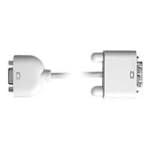
If you have to buy one, Monoprice is super, super cheap on that kind of stuff - as in a few dollars.
SC
|
|
| Back to top |
|
|
tonyinbreckenridge
Joined: 04 Feb 2009
Posts: 6
|
| Posted: Thu Feb 05, 2009 5:56 pm Post subject: |
|
|
|
i do have the DVI-VGA adapter. just have to buy the cable when monoprice has them back in stock. thanks for the help!!
|
|
| Back to top |
|
|
ecrabb
Forum Moderator
Joined: 13 Mar 2006
Posts: 15909
Location: Utah
TV/Projector: JVC RS40, Epson 5010
|
| Posted: Thu Feb 05, 2009 6:20 pm Post subject: |
|
|
Tony,
You might also consider a DVI to HDMI cable. That way, you'd get a digital connection. There are potential issues, but it could end up looking better/sharper if it works.
Just an idea.
SC
|
|
| Back to top |
|
|
tonyinbreckenridge
Joined: 04 Feb 2009
Posts: 6
|
| Posted: Mon Feb 09, 2009 6:20 pm Post subject: |
|
|
| ecrabb wrote: | Tony,
You might also consider a DVI to HDMI cable. That way, you'd get a digital connection. There are potential issues, but it could end up looking better/sharper if it works.
Just an idea.
SC |
oh i definitely had that idea, only, my TV's HDMI inputs "don't support PC connections." bummer.
|
|
| Back to top |
|
|
AnalogRocks
Forum Moderator
Joined: 08 Mar 2006
Posts: 26706
Location: Toronto, Ontario, Canada
TV/Projector: Sony 1252Q, AMPRO 4000G
|
| Posted: Mon Feb 09, 2009 7:04 pm Post subject: |
|
|
If you can set your Mac for the native/supported resolution of the TV it will.
_________________
Tech support for nothing
CRT.
HD done right!
Last edited by AnalogRocks on Mon Feb 09, 2009 7:10 pm; edited 1 time in total
|
|
| Back to top |
|
|
jkruger

Joined: 24 Oct 2007
Posts: 2435
Location: Carlsbad, CA
|
| Posted: Mon Feb 09, 2009 7:07 pm Post subject: |
|
|
| tonyinbreckenridge wrote: | | it appears as though i was, clearly, over-thinking this set-up! you guys(gals?) will have saved me some jing-a-ling. thank-you! |
There are ways of donating to the website if you feel compelled to show your appreciation. 
|
|
| Back to top |
|
|
|
|




