| Author |
Message |
6pence
Joined: 26 Jun 2008
Posts: 20
Location: Denver, NC
|
| Posted: Sun Jan 25, 2009 7:03 pm Post subject: TAW HD800 (Marquee 8500) Red Tube Drift? |
|
|
I bought this projector from Phil in 2001 and have been quite pleased. Dave Harper has been down here twice over the last 7 years to calibrate the pj. In the last year I have noticed that every time I turn on the pj, the red tube has drifted so that white lettering has a slight red shadow. I can use the guided convergence on the remote to converge the red back over the green and make it watchable again, but I find myself having to do this every time I reboot the beast. The blue seems quite stable and doesn't require a reset. I am quite at a loss as to how to reset the red and have it stable for a longer period. Any advice appreciated.
_________________
home theater provided by soft drink industry
|
|
| Back to top |
|
 |
Tom.W

Joined: 09 Mar 2006
Posts: 6635
|
| Posted: Sun Jan 25, 2009 7:43 pm Post subject: |
|
|
|
Are you giving the projector a 30 minute or so warm up period before adjusting the convergence ?
|
|
| Back to top |
|
|
Nashou66

Joined: 12 Jan 2007
Posts: 16171
Location: West Seneca NY
|
|
| Back to top |
|
|
draganm

Joined: 08 Mar 2006
Posts: 8990
Location: Colorado
|
| Posted: Sun Jan 25, 2009 11:05 pm Post subject: |
|
|
|
if it's consistently drifting in the same direction every time then it's likely a damaged convergence yoke that happened during re-tubing. It doesn't take much, simply pulling the coil off the original tube and having it catch on a piece of the white cloth tape is enough to knock part of the winding out of position.
|
|
| Back to top |
|
|
6pence
Joined: 26 Jun 2008
Posts: 20
Location: Denver, NC
|
| Posted: Mon Jan 26, 2009 10:41 pm Post subject: Novice with TAW based on Marquee 8500 |
|
|
(Dope slap upon forehead) No, I'm not letting it warm up before converging. When I fire it up, the red drift is so noticable, I silently weep, then converge it, with no warm up. I remember, now you've reminded me, that warm up = good idea.
I've never had it retubed, as I don't watch all that much in the theater room, just weekends for a few hours. It had been run some before I bought it from Phil at TAW, I believe.
_________________
home theater provided by soft drink industry
|
|
| Back to top |
|
|
draganm
Joined: 08 Mar 2006
Posts: 8990
Location: Colorado
|
| Posted: Tue Jan 27, 2009 12:14 am Post subject: |
|
|
|
15 to 20 minutes is all it should take for the convergence to come in. If it keeps dirfting then bump this post back up.
|
|
| Back to top |
|
|
6pence
Joined: 26 Jun 2008
Posts: 20
Location: Denver, NC
|
| Posted: Mon Feb 02, 2009 10:15 pm Post subject: |
|
|
I've experimented with the convergence now for a week. I allowed 20-30 minutes for warm up and then did a convergence. I still get the red drift (and not blue), but I noticed that it is now primarily in the center of the screen, with the edges needing no adjustment. But the center of the picture is drifted too far to be watchable without doing another convergence of the center section prior to viewing. Please advise.
_________________
home theater provided by soft drink industry
|
|
| Back to top |
|
|
draganm
Joined: 08 Mar 2006
Posts: 8990
Location: Colorado
|
| Posted: Mon Feb 02, 2009 10:30 pm Post subject: |
|
|
well here's a couple of things I would look for
1) high hours, check the Utilites menu, service- pass-code 0901 , and then hours. If the hours are super low or really high then the capacitors could be dried out on the Convergence board
2) The stainless steel clips on the rear heat sinks, there should be 3 holding the Converegnce Amplifier (CVA) in place.
You could also try having the CVA upgraded. the Marquee's are actually very stable in this regard but their age is a factor now at 10 years average. I have found that putting in higher quality capacitors and resistors really brings the convergence performance back to where it should be.
|
|
| Back to top |
|
|
Tim in Phoenix

Joined: 21 Oct 2006
Posts: 4409
Location: Phoenix
|
| Posted: Tue Feb 03, 2009 12:01 am Post subject: |
|
|
| 6pence wrote: | | I've experimented with the convergence now for a week. I allowed 20-30 minutes for warm up and then did a convergence. I still get the red drift (and not blue), but I noticed that it is now primarily in the center of the screen, with the edges needing no adjustment. But the center of the picture is drifted too far to be watchable without doing another convergence of the center section prior to viewing. Please advise. |
Hello
Center convergence, a.k.a. static convergence correction, is provided through the horizontal deflection board for side-side alignment, and through the vertical deflection board for up-down correction, so which direction is the drift occurring?
.
|
|
| Back to top |
|
|
6pence
Joined: 26 Jun 2008
Posts: 20
Location: Denver, NC
|
| Posted: Tue Feb 03, 2009 10:57 pm Post subject: |
|
|
1)" high hours, check the Utilites menu, service- pass-code 0901 , and then hours. If the hours are super low or really high then the capacitors could be dried out on the Convergence board "
--When accessing the utility menu, entering the 0901 passcode, there is no option for "hours" visible on the menu--
2."Center convergence, a.k.a. static convergence correction, is provided through the horizontal deflection board for side-side alignment, and through the vertical deflection board for up-down correction, so which direction is the drift occurring?"
--the red-drift seems to be primarily vertical--
_________________
home theater provided by soft drink industry
|
|
| Back to top |
|
|
draganm
Joined: 08 Mar 2006
Posts: 8990
Location: Colorado
|
| Posted: Tue Feb 03, 2009 11:32 pm Post subject: |
|
|
| 6pence wrote: | | --When accessing the utility menu, entering the 0901 passcode, there is no option for "hours" visible on the menu-- |
after pass-code 0901 choose 6-diagnostics and then 3-hours of use
|
|
| Back to top |
|
|
Nashou66
Joined: 12 Jan 2007
Posts: 16171
Location: West Seneca NY
|
| Posted: Wed Feb 04, 2009 12:11 am Post subject: |
|
|
If it "seams" to be going vertical then id say what Draganm said the CVA caps and resistors and possible do the same on the VDM just to be safe.
If for SURE its going in the up or down direction then Id say it definitely is the VDM like Tim is suggesting by asking that question, in which case it could be any of the op amps or mosfets/transistors on it, in which case id send it to Curt or Tim to fix.
Athanasios
_________________
Don't blame your underwear for your crooked ass~ unknown Greek philosopher
"Republicans believe every day is the Fourth of July, but the Democrats believe every day is April 15." --- President Reagan
One Smart Dog!!!
Marquee High Performance Bellows now shipping!!
Marquee Modifications and Performance Enhancement
Marquee C-element and Bellow removal
|
|
| Back to top |
|
|
6pence
Joined: 26 Jun 2008
Posts: 20
Location: Denver, NC
|
| Posted: Wed Feb 04, 2009 12:37 am Post subject: |
|
|
"If it "seams" to be going vertical then id say what Draganm said the CVA caps and resistors and possible do the same on the VDM just to be safe.
If for SURE its going in the up or down direction then Id say it definitely is the VDM like Tim is suggesting by asking that question, in which case it could be any of the op amps or mosfets/transistors on it, in which case id send it to Curt or Tim to fix.
--Just checked again today. The major drift is vertical, but there is a slight horizontal component, about 1/5th that of the vertical error
" high hours, check the Utilites menu, service- pass-code 0901 , and then hours. If the hours are super low or really high then the capacitors could be dried out on the Convergence board "
--When accessing the utility menu, entering the 0901 passcode, following your directions = 2990 hrs of use--
_________________
home theater provided by soft drink industry
|
|
| Back to top |
|
|
Tim in Phoenix
Joined: 21 Oct 2006
Posts: 4409
Location: Phoenix
|
| Posted: Wed Feb 04, 2009 12:52 am Post subject: |
|
|
| 6pence wrote: |
2."Center convergence, a.k.a. static convergence correction, is provided through the horizontal deflection board for side-side alignment, and through the vertical deflection board for up-down correction, so which direction is the drift occurring?"
--the red-drift seems to be primarily vertical-- |
Hello
You might try swapping red and green yoke plugs at the vertical board (rear heatsink) and see if the problem moves to green. those are the yellow/green wire pairs.
.
|
|
| Back to top |
|
|
draganm
Joined: 08 Mar 2006
Posts: 8990
Location: Colorado
|
| Posted: Wed Feb 04, 2009 1:36 am Post subject: |
|
|
| 6pence wrote: | | = 2990 hrs of use-- |
those are low hours, but if they were accrued in the first few years and then it sat for a long time unused then caps do go bad. It's hard to say but it souds like it's drifting both ways. My 8500 was doing this also recently, both Red and blue in both directions and re-capping the board fixed it.
I think the factory caps they used were crappy, they were rated for 85 Celsius and i'm sure that the rear heat sink area gets much hotter than that. As in the mainetance thread, I think it's always a good idea to put in some nice 105C caps then it's good for another 10 years.
|
|
| Back to top |
|
|
Tim in Phoenix
Joined: 21 Oct 2006
Posts: 4409
Location: Phoenix
|
| Posted: Wed Feb 04, 2009 5:58 pm Post subject: |
|
|
Hello
Another possibility is that the magnetics are poorly aligned. Push CONV, 1, 1 and if red is not positioned near green then the red magnetics may need attention.
.
|
|
| Back to top |
|
|
1031

Joined: 22 Mar 2006
Posts: 657
Location: Finland
|
| Posted: Wed Feb 04, 2009 6:57 pm Post subject: |
|
|
i´m also with Tim. If whole raster moves, then it has to be HDM or badly centered raster. So if raster is centered wrongly with focus yoke then electronic raster centering circuit (in HDM) has to do more "job" by pushing more current to deflection yoke. Usually those circuits are not 100% stable when there is heavy corrections made, and then circuits also needs more time to get stable.
you can test if electronic raster shift is "off center" by pushing conv->guided->enter->then use arrow keys to move red raster up and down. There should be same amout of movement, also same for left/right. If raster move Ie. 4" up and 6" down that means "mechanical" raster centering is wrongly set, and there is then more "electric" correction.
Edit: also if deflection yoke is not pushed against tube tight enougt (should be glued) can do whole raster shifting.
_________________
Marquee 9500LC (Frankenyokes / Thomas electric tubes / HD-10L / +many mod´s)
DVDO VP-50
New hobby, Rally
http://www.youtube.com/watch?v=vX2Rtpr1njs
http://www.youtube.com/watch?v=6ZP9FEFXV5c
http://www.youtube.com/watch?v=j065vei6j6s
http://www.facebook.com/pages/JTS-Racing-team/204443719572685
|
|
| Back to top |
|
|
draganm
Joined: 08 Mar 2006
Posts: 8990
Location: Colorado
|
| Posted: Wed Feb 04, 2009 7:05 pm Post subject: |
|
|
| 1031 wrote: | | you can test if electronic raster shift is "off center" by pushing conv->guided->enter->then use arrow keys to move red raster up and down. There should be same amout of movement, also same for left/right. |
or you can go into convergence, push zero, and see where the raster is on the tube face. Since his grid is drifting alternately on the outside of the image and then the center I doubt it's VDM but it's easy enough to check like Tim pointed out by swapping the V leads around.
|
|
| Back to top |
|
|
6pence
Joined: 26 Jun 2008
Posts: 20
Location: Denver, NC
|
| Posted: Sat Feb 07, 2009 12:09 am Post subject: Rotten Raster |
|
|
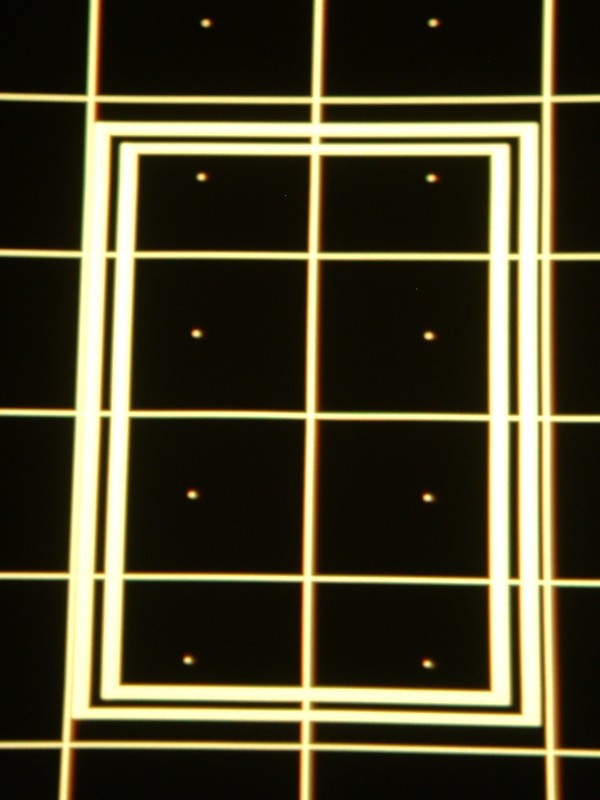
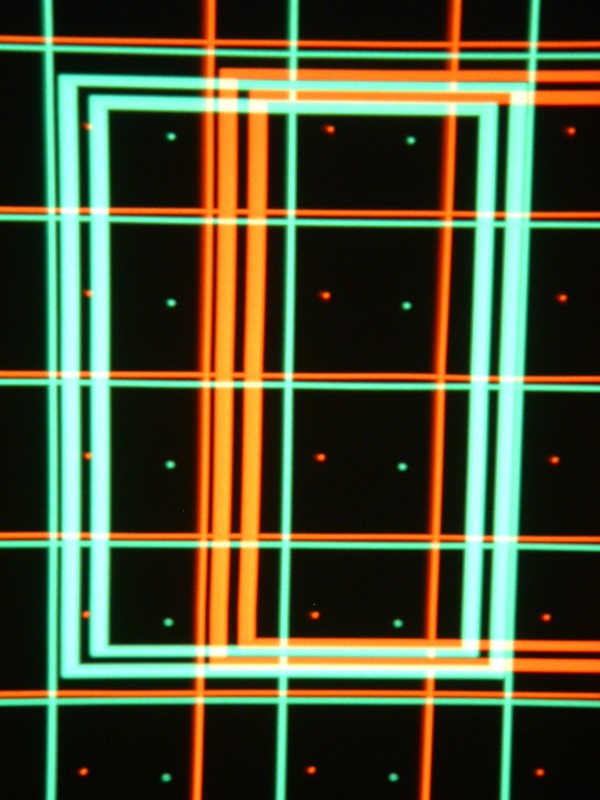
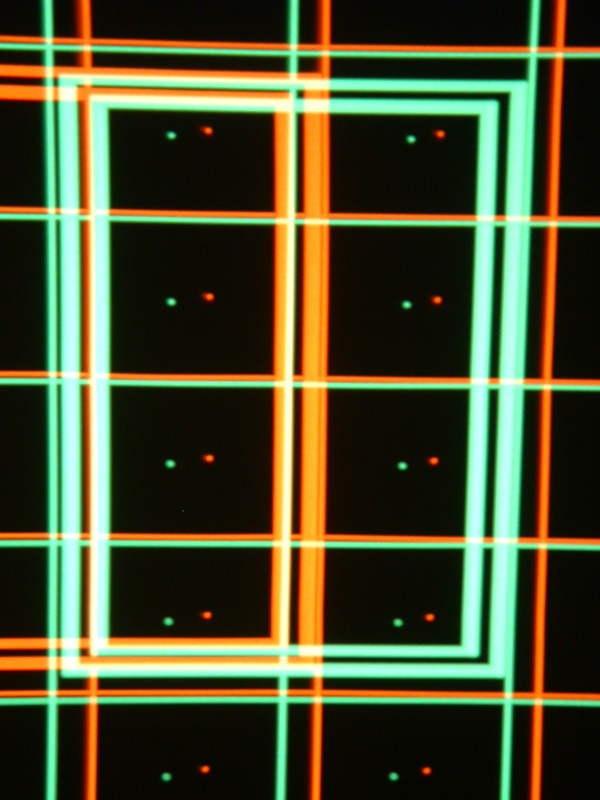
I'll try to attach my photo attempts to see if you can tell what's wrong
Photos are:
| Description: |
|
| Filesize: |
78.46 KB |
| Viewed: |
9135 Time(s) |
|
| Description: |
| Red moved to right max (seemed to go equal distance in both) |
|
| Filesize: |
102.2 KB |
| Viewed: |
9134 Time(s) |
|
| Description: |
|
| Filesize: |
95.3 KB |
| Viewed: |
9134 Time(s) |
|
| Description: |
| Red moved maximum down (didn't seem to go down) |
|
| Filesize: |
86.73 KB |
| Viewed: |
9134 Time(s) |
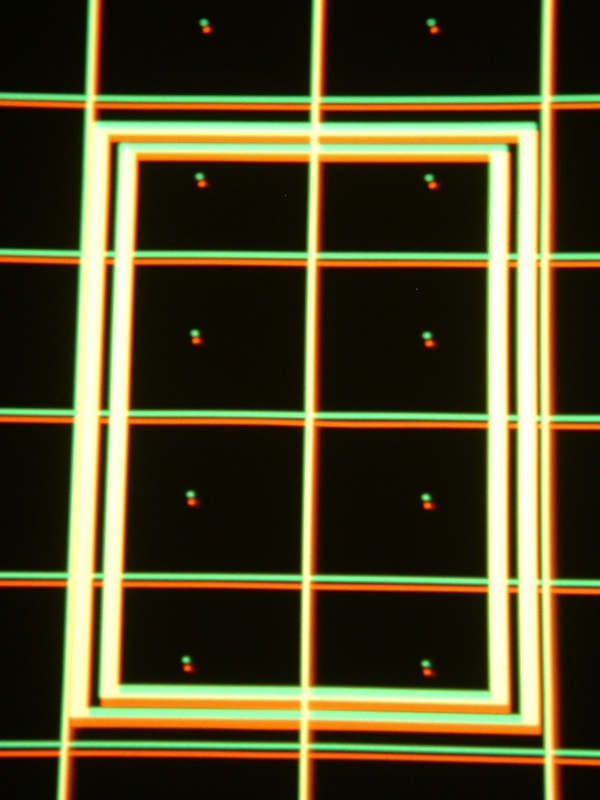
|
| Description: |
|
| Filesize: |
96.49 KB |
| Viewed: |
9134 Time(s) |
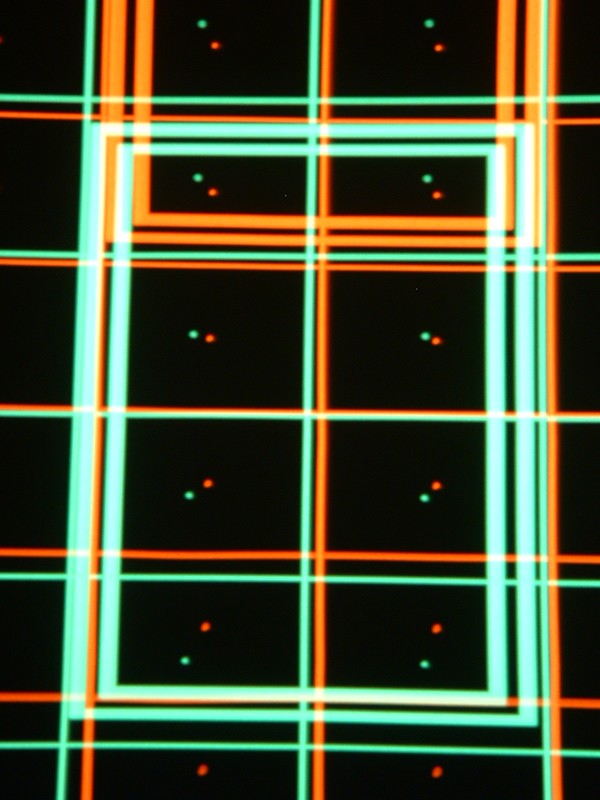
|
| Description: |
| Center of guided convergence after 30 min warmup |
|
| Filesize: |
85.15 KB |
| Viewed: |
9133 Time(s) |
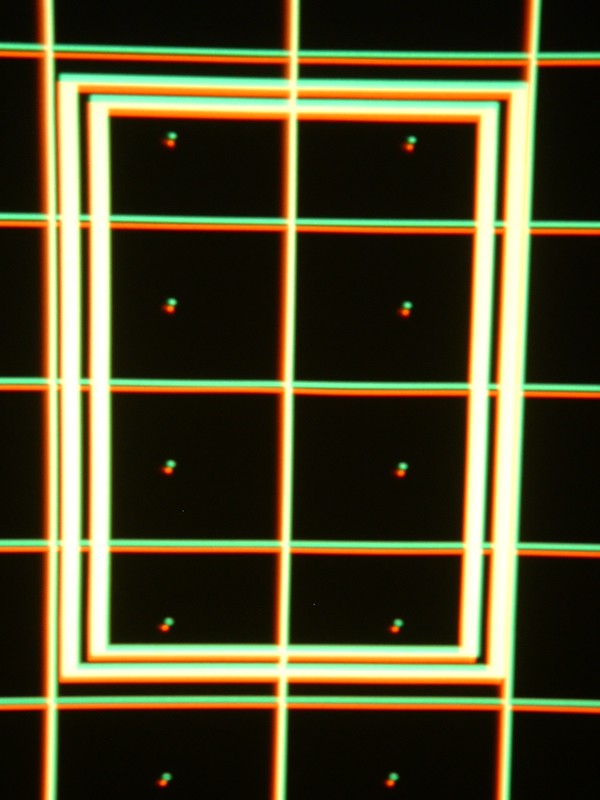
|
_________________
home theater provided by soft drink industry
|
|
| Back to top |
|
|
Nashou66
Joined: 12 Jan 2007
Posts: 16171
Location: West Seneca NY
|
| Posted: Sat Feb 07, 2009 12:35 am Post subject: |
|
|
We need a pic of all the grids up after a complete re initialization, this will erase all you memories but it will allow us to see what's up with your magnetic set up.
if the static magnetic set up is done right then the grids in the horizontal plane should all line up close to the same horizon. the verticals might not be as well lined up, but this ca be all adjusted through the on screen guide, now thinking about it also the up and down placement too. But the re initialization will tell us if the grids are level at least, if they are not on top of each other you can go into the guided mechanical set up and start all over. for your set up. to re initialize its done in the service menu, not sure where. But since the red doesn't move the same up or down I think it might be a set up issue finally taking its toll on the electronics. If the red grid was not at the same horizon level as the other colors form the start then over time the reds convergence and Vertical scan had to work harder to keep it in line. this would then be fixed by the proper set up, if it still persists then you need the CVA and VDM recapped most likely like Dragnm suggested.
Athanasios
_________________
Don't blame your underwear for your crooked ass~ unknown Greek philosopher
"Republicans believe every day is the Fourth of July, but the Democrats believe every day is April 15." --- President Reagan
One Smart Dog!!!
Marquee High Performance Bellows now shipping!!
Marquee Modifications and Performance Enhancement
Marquee C-element and Bellow removal
|
|
| Back to top |
|
|
|
|




