| Author |
Message |
NewbieDAN

Joined: 09 Mar 2006
Posts: 319
Location: Bunbury Western Australia
|
| Posted: Thu Jan 01, 2009 4:30 pm Post subject: BG1209s with DVE test pattern at 1080 too wide. |
|
|
Guys (happy new year)....
I just popped in my Digital video essentials disc with a 1920x1080 grid to check the convergence with a source as opposed to a gen locked pattern, and I was surprised to see that the 1080 pattern was 'folded' in the active video area...but still in the normal raster. If i use H Phase I can see that the grid is too large for the active video area, and can move it about left or right to see it 'unfold'...you can actually see it fold back on itself only on the right of screen, at the left it just disappears.
I'm using my Toshiba XE-1 HDMI into John's DVI card in my PC-3000 switcher then out 5bnc to the Barco.
Can someone help me make my source material display properly.
Thanks again, as I'm stumped.
Cheers Daniel
_________________
Sorting the fly sh*t from the pepper
|
|
| Back to top |
|
 |
r.bauer
Joined: 08 Apr 2006
Posts: 280
Location: The Netherlands
|
| Posted: Thu Jan 01, 2009 5:10 pm Post subject: |
|
|
Put your BG1209s in high-scanning mode, and all your problems are solved.
The pot for adjusting the scan-switch frequency is located on the Vert-defl board.
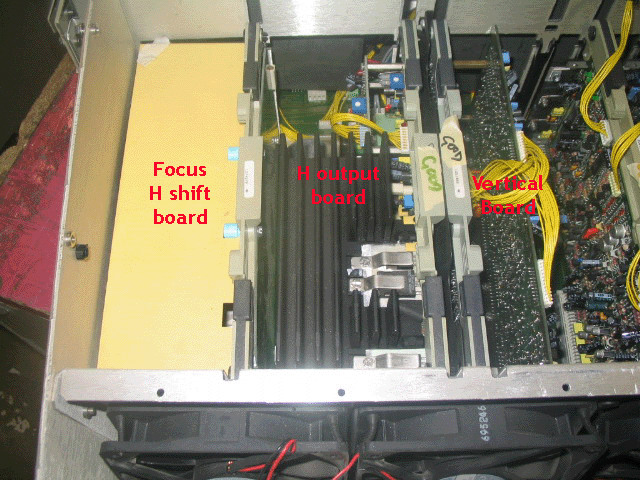
The pot is located on the daughter board, just under the 'd' from Vertical board in the picture.
The pot can be adjusted while displaying a picture.
After setting the pot, adjust the second set of H-width coils on the scan-switch board located under the front top-cover.

|
|
| Back to top |
|
|
NewbieDAN
Joined: 09 Mar 2006
Posts: 319
Location: Bunbury Western Australia
|
| Posted: Fri Jan 02, 2009 12:14 am Post subject: |
|
|
Thanks!
I'll give that a try tonight. 
_________________
Sorting the fly sh*t from the pepper
|
|
| Back to top |
|
|
NewbieDAN
Joined: 09 Mar 2006
Posts: 319
Location: Bunbury Western Australia
|
| Posted: Fri Jan 02, 2009 3:34 pm Post subject: |
|
|

Mr Bauer, in which direction do I turn the pot. I tried it both ways and it didn't seem to make a difference. 
_________________
Sorting the fly sh*t from the pepper
|
|
| Back to top |
|
|
r.bauer
Joined: 08 Apr 2006
Posts: 280
Location: The Netherlands
|
| Posted: Fri Jan 02, 2009 11:29 pm Post subject: |
|
|
With the potentiometer you can adjust the scan-switch frequency between 60 an 90 kHz.
With the projector projecting 1080p @60hz, it should be running at 66/67kHz. Check that first by pressing the TEXT button on you remote twice.
Now adjust the pot all the way to one end (don't know which way) and it should start to switch to the high-scanning range.
If you hesitate to do it while powered on, adjust the pot all the way to one end while powered down.
As the scan-switch system has a hysteresis of 4kHz and you don't get it to switch, go to an internal test pattern of say 90 or even 132kHz and you can be sure it will switch to high-scanning mode. Observe the behavior during switching, so you can recognize it. If you have seen it once, you will be able to recognize it later on immediately.
Now switch back to your input displaying 1080p@60 and see if your projector stays in high-scanning mode.
720p60 or 1080p50 signals cannot be displayed in high-scanning mode as these scan-frequencies are simply to low. 1080p60 is a requirement.
|
|
| Back to top |
|
|
huggy
Joined: 02 Aug 2008
Posts: 927
Location: Melbourne,Australia
|
| Posted: Sat Jan 03, 2009 1:28 am Post subject: |
|
|
Dan
I had the same issue but was able to resolve it via adjusting porch setting from the vp50,can't you do the same?
Dave
|
|
| Back to top |
|
|
NewbieDAN
Joined: 09 Mar 2006
Posts: 319
Location: Bunbury Western Australia
|
| Posted: Sat Jan 03, 2009 2:19 am Post subject: |
|
|
THANKS
R.Bauer your spot on. By forcing the 1209s into High frequency mode at 1080p@60 the test patterns display correctly now! if anything I had to reduce the horizontal image width the fit it all on the tube face, no more folding of the DVE test pattern, and now I'm able to resolve and display correctly the 1920x1080 grid. Couldn't be happier 
Dave, I'm sure you could reduce the porches to resolve the image, BUT (I'll quote the service manual here)
Scan Coil Switching (762457)
Each horizontal deflection yoke consists of two horizontal windings which may be connected in either a series or parrallel configuration. The inductance of the parallel connection is obviously lower than the series configuration (parallel and series inductance uses the same formular as resistance) therefore they are connected in parallel for the "high" frequency mode. The lower inductance in the parallel configuration causes the resonant frequency of the flyback pulse to increase, thereby producing a more rapid horizontal retrace.
There's no need to muck about with the porch settings on the VP50 (well for this anyway) the 1209s will display a 1080p@60 perfectly straight out of the box in High frequency mode.
_________________
Sorting the fly sh*t from the pepper
|
|
| Back to top |
|
|
huggy
Joined: 02 Aug 2008
Posts: 927
Location: Melbourne,Australia
|
| Posted: Sat Jan 03, 2009 3:08 am Post subject: |
|
|
Oh.....I see.....I'll give this a try now.
edit: why don't I have the pot on my v/board? all I have are the V/size/shift pots.
Dave
|
|
| Back to top |
|
|
zGman
Joined: 22 May 2006
Posts: 599
|
| Posted: Sat Jan 03, 2009 5:09 am Post subject: |
|
|
Sorry Dave, this is the one feature that Runco left off on the 1101.
It could be added, but if you are getting good results with porch settings....
You did get color filtered c-elements though, which are not stock on
BG1209S, and probably more important to getting a nice picture....
(and possibly considerably harder to find now than Barco parts)
G
|
|
| Back to top |
|
|
NewbieDAN
Joined: 09 Mar 2006
Posts: 319
Location: Bunbury Western Australia
|
| Posted: Sat Jan 03, 2009 5:32 am Post subject: |
|
|
| zGman wrote: | Sorry Dave, this is the one feature that Runco left off on the 1101.
It could be added, but if you are getting good results with porch settings....
You did get color filtered c-elements though, which are not stock on
BG1209S, and probably more important to getting a nice picture....
(and possibly considerably harder to find now than Barco parts)
G |
I did read somewhere that some Runco's didn't have the high scan mode. If he's got the two sets of pots on the yoke board would be an easy way to check.
...I got me some colour filtered c-elements...boo-yarh
_________________
Sorting the fly sh*t from the pepper
|
|
| Back to top |
|
|
r.bauer
Joined: 08 Apr 2006
Posts: 280
Location: The Netherlands
|
| Posted: Sat Jan 03, 2009 6:50 am Post subject: |
|
|
High-scanning mode is only available in the Barco Graphics 1200 series, not in the Barco Data 1209s. In fact it is what separates the 1200 Graphics series from the 808 series/ It is also available on the Sony G70, G90, 1292 and Marquee. But I don't know if the scan-switch frequency is adjustable on non-Barco models.
It enables one to display 1080p6- directly from a BD player or even 1080p72 from a scaler!
|
|
| Back to top |
|
|
r.bauer
Joined: 08 Apr 2006
Posts: 280
Location: The Netherlands
|
| Posted: Sat Jan 03, 2009 6:56 am Post subject: |
|
|
Here are some numbers regarding retrace time:
]BG1209s
Minimal retrace time
Horizontal:
< 2.5 μs in range 15-90 kHz
< 1.25 μs in range 64-135 kHz
(switching point adjustable
between 64 and 94 kHz)
Vertical: < 200 μs[/td]
Cine9
Minimal retrace time
Horizontal: < 1.8 μs
Vertical: < 300 μs[/td]
BG808s
Minimal retrace time
Horiz.: < 2.5 μs
Vert.: < 300 μs[/td]
909
Horizontal:
< 1.1 μs in range 90-180 kHz
< 1.8 μs in range 30-130 kHz
(switching point adjustable
between 90 and 130 kHz)
Vertical: < 200 μs[/td][/tr][/table]
This table shows us that even the Cine9 or 909 cannot display 1080p fully directly from a BD player because the lowest adjustable switchover frequency is too high!
|
|
| Back to top |
|
|
AnalogRocks
Forum Moderator

Joined: 08 Mar 2006
Posts: 26706
Location: Toronto, Ontario, Canada
TV/Projector: Sony 1252Q, AMPRO 4000G
|
| Posted: Sat Jan 03, 2009 8:05 am Post subject: |
|
|
Then how well would an 808s handle 1080P, resolving it completly aside, will it sync and not shoot of the tubes face?
_________________
Tech support for nothing
CRT.
HD done right!
|
|
| Back to top |
|
|
huggy
Joined: 02 Aug 2008
Posts: 927
Location: Melbourne,Australia
|
| Posted: Sat Jan 03, 2009 12:04 pm Post subject: |
|
|
| zGman wrote: | Sorry Dave, this is the one feature that Runco left off on the 1101.
It could be added, but if you are getting good results with porch settings....
You did get color filtered c-elements though, which are not stock on
BG1209S, and probably more important to getting a nice picture....
(and possibly considerably harder to find now than Barco parts)
G |
Hi Galen
Yes my runco came with coloured C elements as well as lugs much to my surprize,I've gotten very good results via porch settings and have no complaints regarding PQ ,I think I'm just bored and looking for something else to tweak. 
Now I understand why you guy's are always tweaking,it's more about the hobby than PQ.
I think I should buy an Ampro...I'll be tweaking like forever
Dave
|
|
| Back to top |
|
|
dankon
Joined: 05 Jan 2009
Posts: 2
|
| Posted: Tue Jan 13, 2009 9:24 pm Post subject: |
|
|
|
Would I have to put my 1208s in high scan mode to display a 1080i source?
|
|
| Back to top |
|
|
|
|




