| Author |
Message |
ROFLmaker
Joined: 05 Jun 2008
Posts: 40
|
| Posted: Mon Dec 29, 2008 4:19 am Post subject: HD fury ? PS3? |
|
|
| Description: |
|
| Filesize: |
124.57 KB |
| Viewed: |
7171 Time(s) |
|
|
|
| Back to top |
|
 |
WanMan

Joined: 19 Mar 2006
Posts: 10270
|
| Posted: Mon Dec 29, 2008 11:57 am Post subject: |
|
|
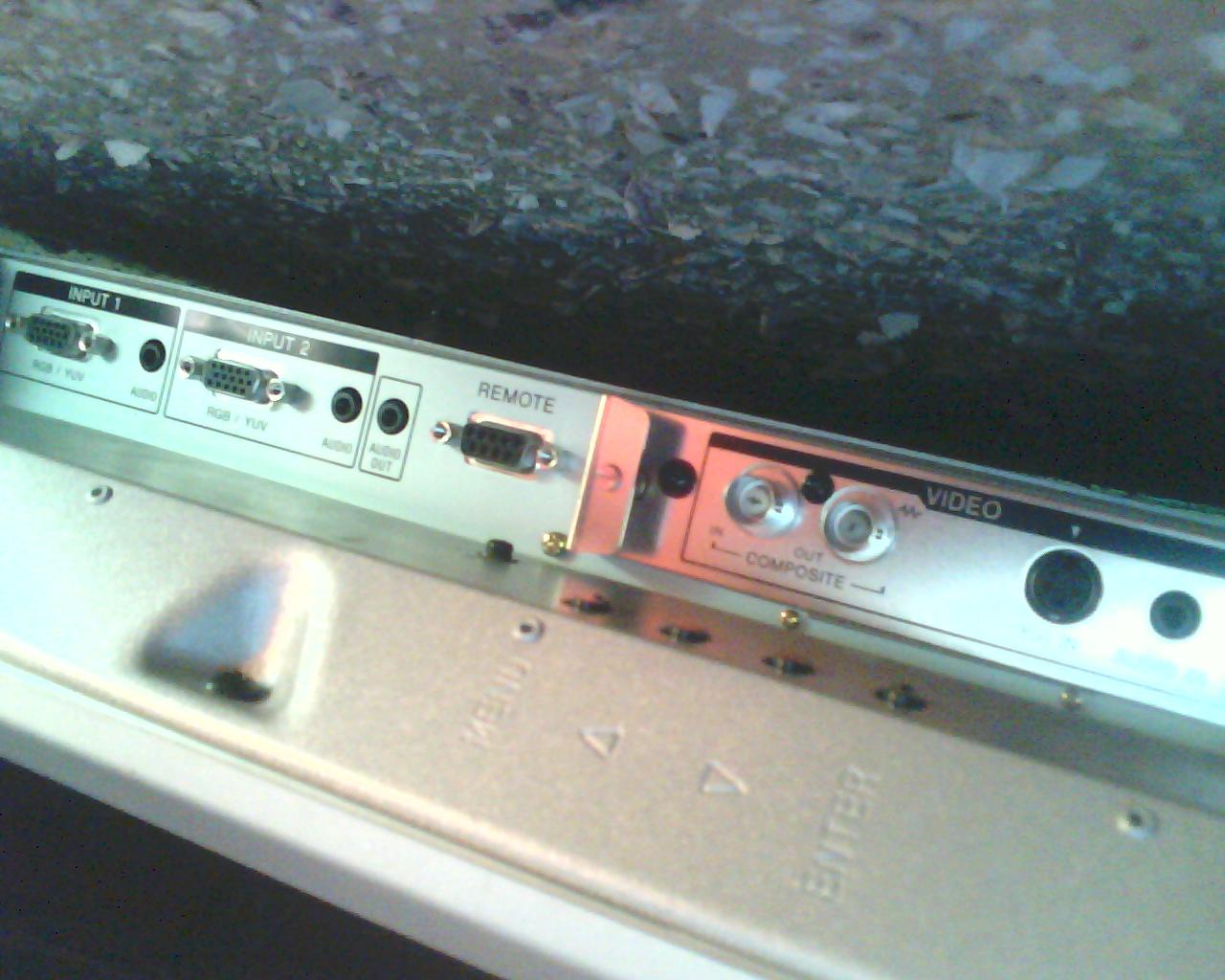
Both inputs #1 and #2 will support RGB signals, but the maximum resolution the monitor will support will define the limit the PS3 should be outputting in terms of pixel resolution. Find out what the maximum pixel resolution is of the monitor.
_________________
Trust no one. Absolutely no one. Advice of the board.
|
|
| Back to top |
|
|
ROFLmaker
Joined: 05 Jun 2008
Posts: 40
|
| Posted: Mon Dec 29, 2008 1:55 pm Post subject: |
|
|
|
Its 1080/60I
|
|
| Back to top |
|
|
ROFLmaker
Joined: 05 Jun 2008
Posts: 40
|
|
| Back to top |
|
|
WanMan
Joined: 19 Mar 2006
Posts: 10270
|
| Posted: Mon Dec 29, 2008 2:34 pm Post subject: |
|
|
Then I see no reason why you cannot use the HDfury to take a 1080i signal from the PS3, have it strip the HDCP, and convert the signal from digital to analog to feed the display.
_________________
Trust no one. Absolutely no one. Advice of the board.
|
|
| Back to top |
|
|
ROFLmaker
Joined: 05 Jun 2008
Posts: 40
|
| Posted: Mon Dec 29, 2008 4:06 pm Post subject: |
|
|
|
Ok I was pretty sure it would work but the last thing I wanted to do was buy this and have it not work. So I don't need the HDFury2 do I? Some one at another forum said I did but I couldn't figure out why...Would the HDFury Gamer's cord work or no?
|
|
| Back to top |
|
|
WanMan
Joined: 19 Mar 2006
Posts: 10270
|
| Posted: Mon Dec 29, 2008 4:38 pm Post subject: |
|
|
Honestly, I only am aware of the basic functionality of the HDfury. Have you posted this in the HDfury-specific forum?
_________________
Trust no one. Absolutely no one. Advice of the board.
|
|
| Back to top |
|
|
ROFLmaker
Joined: 05 Jun 2008
Posts: 40
|
| Posted: Mon Dec 29, 2008 4:45 pm Post subject: |
|
|
|
yea...no help as of yet ill try reposting though.
|
|
| Back to top |
|
|
ROFLmaker
Joined: 05 Jun 2008
Posts: 40
|
| Posted: Mon Dec 29, 2008 5:06 pm Post subject: |
|
|
|
Surprisingly I cant find what the HDFury input is some say HDMI and others say DVI....Which is it?
|
|
| Back to top |
|
|
Zebu Fellenz
Joined: 21 Dec 2006
Posts: 2567
|
| Posted: Mon Dec 29, 2008 5:43 pm Post subject: |
|
|
|
HDfury 1 is DVI in and RGBHV out, HDfury 2 is HDMI in and RGBHV/component with audio options, I think the HDF1 will work for you but it would help if you could post the TV model as the 1080i input may only be component and not RGBHV.
|
|
| Back to top |
|
|
WanMan
Joined: 19 Mar 2006
Posts: 10270
|
| Posted: Mon Dec 29, 2008 5:54 pm Post subject: |
|
|
DVI as a physical interface can transport both RGB and Component in digital form. While I always applied my HDfury for use with going from RGB-->RGBhv (digital to analog forms of RGB), and to strip HDCP, I never bothered to investigate if it'll accept digital Component and hand back analog Component.
_________________
Trust no one. Absolutely no one. Advice of the board.
|
|
| Back to top |
|
|
ROFLmaker
Joined: 05 Jun 2008
Posts: 40
|
| Posted: Mon Dec 29, 2008 6:52 pm Post subject: |
|
|
|
sure its a sony model #: PMF 42B2....a google search doesnt show anything but thats whats on the back
|
|
| Back to top |
|
|
ROFLmaker
Joined: 05 Jun 2008
Posts: 40
|
| Posted: Mon Dec 29, 2008 7:12 pm Post subject: |
|
|
|
Currently I have our cable which is HD running to the TV through the 1st RGB input. When I was on that input and hit display on the remote it showed : "1080/60I".
|
|
| Back to top |
|
|
|
|




