|
As this forum is rarely used anymore, we've locked it. Feel free to browse and read. Questions? Please reach out to us directly. Cheers! |

|
 |
|
|
| Author |
Message |
perisoft

Joined: 29 Aug 2007
Posts: 2920
Location: Ithaca, NY
|
| Posted: Sun Dec 07, 2008 3:59 am Post subject: Another astig redo! Yaaay! |
|
|
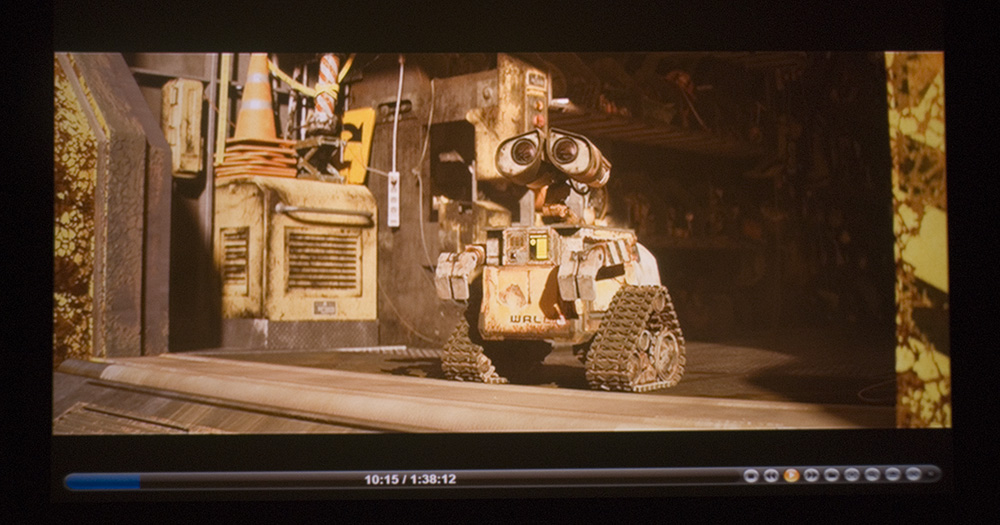
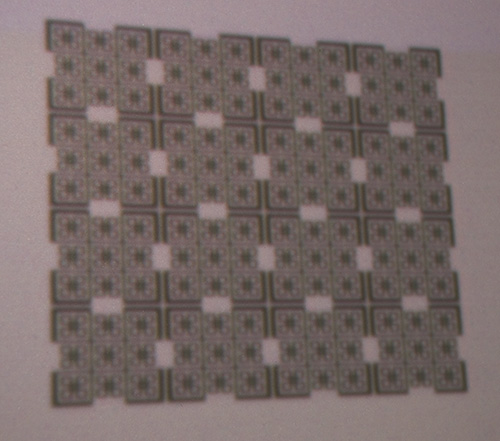
So, based on some generously written advice from zGman, I did another round of astig tonight. Results - a res hatch and a really rough (ie: color not set up and hand-held) shot from WALL-E (which is fantastic, by the way). 1440x960p48, the WALL-E shot is SD.
Gettin' there... 
| Description: |
|
| Filesize: |
183.46 KB |
| Viewed: |
5307 Time(s) |
|
| Description: |
|
| Filesize: |
60.26 KB |
| Viewed: |
5307 Time(s) |
|
_________________

|
|
| Back to top |
|
 |
rabies_70

Joined: 15 Feb 2007
Posts: 1189
Location: Carlsbad, CA
TV/Projector: Sony G70Q
|
| Posted: Sun Dec 07, 2008 4:24 am Post subject: |
|
|
Is there any chance of sharing the generous zGman's writings?
_________________
Ray
I am an iconoclast
|
|
| Back to top |
|
|
Gary M.
Guest
|
| Posted: Sun Dec 07, 2008 5:11 am Post subject: |
|
|
PJ?
-Gary
|
|
| Back to top |
|
|
perisoft
Joined: 29 Aug 2007
Posts: 2920
Location: Ithaca, NY
|
| Posted: Sun Dec 07, 2008 1:30 pm Post subject: |
|
|
BG808s, Gary. I keep forgetting that my club membership expired so it doesn't say anymore. I'd re-up, but you know... sub-prime and all... 
I'll have to grab a shot of the difference between 48p and 72p. 72p has tons of ringing, streaking, is fuzzy... 48p is flawless. But my understanding is that the 808s should have plenty of bandwidth for 960p72.
And for some reason the thing won't work with interlaced resolutions at ALL - I get either no vsync or only the top half of the image, no matter what sync polarities, etc, I try. It's odd, because I ran 960i for a bit when I was playing around with the PJ before.
Still, it just keeps looking better and better. My parents came over to watch WALL-E the other night, before the latest round of tweaks... the first time they'd seen this setup. They're movie nuts but just watch SD on a 32" LCD TV right now. I've been trying to convince them to do at LEAST some kind of HTIB and upscaling thing (though I think my dad's gonna get bluray soon) but they said, no, no, it's just fine...
...Well, they only live a couple hundred yards from us, and now they're saying, "Oh, we should come down and watch movies here..." 
_________________
|
|
| Back to top |
|
|
akajester

Joined: 09 Jul 2008
Posts: 934
Location: Wisconsin
|
| Posted: Mon Jun 08, 2009 2:08 pm Post subject: |
|
|
perisoft, the internal astig is something I haven't messed with yet on my bg808. I'm looking at the layout pics that curt has, can you get to the astig rings easy enough while powered on? do you recommend any tools?
also do you have any particular 16x9 patterns you use while adjusting or do you use internal patterns?
thanks!
|
|
| Back to top |
|
|
perisoft
Joined: 29 Aug 2007
Posts: 2920
Location: Ithaca, NY
|
| Posted: Mon Jun 08, 2009 6:09 pm Post subject: |
|
|
| akajester wrote: | perisoft, the internal astig is something I haven't messed with yet on my bg808. I'm looking at the layout pics that curt has, can you get to the astig rings easy enough while powered on? do you recommend any tools?
also do you have any particular 16x9 patterns you use while adjusting or do you use internal patterns?
thanks! |
Yeah, you can reach them, but you have to be careful. No tools are useful since you have to grab the knobs by hand, obviously.
-Have something to stand on so you can reach up comfortably.
-KEEP ONE HAND IN YOUR POCKET. This prevents your instinctively grabbing the metal side of the projector to steady yourself as your other hand touches +30kv, thus giving you a free, permanent, heart attack.
-Practice motions with the PJ off (and having been off for a few hours) until they're second nature, before you go poking around in there with everything on.
-Go very slowly. If you haven't got enough time, wait until you do. This helps with both results and survival.
If I hadn't swapped the tubes, I don't know if I'd worry too much about astig - unless there's a really significant reason to mess with it, there are usually a lot of other factors with a greater effect on performance that are easier / safer to mess with.
As for test patterns, I use Nokia Monitor Test - never internal patterns, particularly for astig on the Barco, which sees fit to display a dot pattern two pixels wide rather than one, thus making usage for astig settings next to impossible...
_________________
|
|
| Back to top |
|
|
grogthegreat
Joined: 16 May 2007
Posts: 166
Location: San Diego, CA
|
| Posted: Tue Jun 09, 2009 11:13 pm Post subject: |
|
|
Go Zoomplayer!
Looks like you have some sort of gamma adjustment. That movie really needs the gamma in some scenes to bring out all the detail.
Good luck!
-Greg
BTW: If you lick your fingers before putting them inside the pj, they conduct electricity much better. You'll be fine. You have to be trying to get yourself shocked.
_________________
First projector: Sony 1252q with 3500 hours
Second projector: NEC 9PG+
current projector: Sony G90
100" 3:4 draper screen.
I must keep upgrading till the voices stop!!
"I CAN HAZ CRT PRUJEKTER."
-Curt Palme
|
|
| Back to top |
|
|
Mark_A_W
Joined: 15 Mar 2006
Posts: 3068
Location: Sunny Melbourne Australia
|
| Posted: Wed Jun 10, 2009 2:56 am Post subject: |
|
|
"And for some reason the thing won't work with interlaced resolutions at ALL - I get either no vsync or only the top half of the image, no matter what sync polarities, etc, I try. It's odd, because I ran 960i for a bit when I was playing around with the PJ before. "
If you are running an ATi card you need to put the card in "interlaced mode" by selecting 1080i 60hz/50hz in the Catalyst Control Centre, then tweak with Powerstrip.
Otherwise you will get only the top half of the image.
If this doesn't apply....sorry to butt in...
|
|
| Back to top |
|
|
NewbieDAN

Joined: 09 Mar 2006
Posts: 319
Location: Bunbury Western Australia
|
| Posted: Wed Jun 10, 2009 6:45 am Post subject: |
|
|
| rabies_70 wrote: | | Is there any chance of sharing the generous zGman's writings? |
Ditto on zMans astig insights....gotta link?
_________________
Sorting the fly sh*t from the pepper
|
|
| Back to top |
|
|
zGman
Joined: 22 May 2006
Posts: 599
|
| Posted: Wed Jun 10, 2009 3:55 pm Post subject: Unedited bg808s setup tips |
|
|
OK - be careful what you ask for!
Here's a couple pages of e-mails - someone who is quicker with word
processing could possibly make better sense out of it, but my morning
is shot already.
G
>>>>>>>>>>>>>>>>>>>>>>>>>>>>>>>>>>>>>>>>>>>>>>>>>>>>
I haven't tried 'rubber' gloves, I think if they were thick enough
to be insulating against >1000 volts, then probably be so bulky
that it would make the fine adjustments improssible.
Working around the neckboards doing the cpc magnets
is tricky, but it only hurts for a short time - main thing is
not to bash into something else when reacting to the hit!
The various trim pots are easy to access, radioshack
has some little trim tools. The width coils however
MUST not use metallic screwdriver, they are easy to
turn, just grind a tip on a 3/16 hardwood dowel and
glue to a handle. Biggest danger is to PJ, be careful
not to short components, and be very care to UNPLUG,
before any service work. After you see the spark its usually
too late. Also - extemely important to be certainly that
the very small edgge connector on the neckboard is completely
inserted, it will take a small tool to press each side, no finger access.
If you do get G2 runaway - DO NOT turnoff or unplug machine
until it shuts downs automatically from HV protect circuit.
Focus coils should be closer/closest to the tube face for best results
Flicker in tube is likely poor anode connection - scotchbrite small brass
end and be certain fully twisted and locked. Ground first before touch.
Streaking = drive(gain) is set too high. Also, must reset G2 levels.
Focus is a very very very strong function of cpc magnet adjustment - must get this right!
(settings for old tubes definitely not correct, and highly unlikely that they would be.)
This is all normal for tube swap - it is difficult. I have done several times = never easy.
In general the output won't be much until everything is dialed in. I have seen this many times,
the picture has nothing until astig and focus are set - that's just the way it is = no shortcuts.
Sounds like the G2 is too high if you are seeing the background lit up. Best to go thru the
G2 setup procedure - I am assuming you have downloaded the manual?? Its pretty easy,
and can be fine tuned later when you are doing grey scale.
Just move the focus blocks all the way forward toward the tube face and snug clamps.
Be certain the deflection yokes are fully foward also, and be very certain all ground wires
are connected. (one from tube bell from the grounding assembly that you transferred,
and one from the clamps on the yokes - both going to the black wires on the neckboards)
Best to scotchbrite all the HV connectors going into the splitter, including the input from the Quad.
Check the smaller HV wires going into the small spliiter on the G2/Diagnostic board. You can
slide their little boots up the wires to confirm the connectors are fully engaged. These run about
1000 volts. Thats the highest voltage on the neckboard, but it goes directly to the socket.
G2 and G1 are a little less. The neckboard location does make the cpc adjust more difficult.
The cpc magnets are the little fellows that go between the neckboard socket and the neckboard
support clamp, and they need to be as far foward as possible. The little knurled handles
can rotate to move the magnet rings relative to each other, and can also move the magnet rings
together around the tube long axis. The front pair is usually the main (2-pole) adjustment,
with which you will find the best focus/astig/energy distribution. This is tricky on a good day,
but it is the most important step in setting up a CRT PJ. The most important - completely
fundamental to how everything else will work - therefore needs to be done first and done right.
The second pair will also control shape and focus. Set main Focus to mid and individual focus in all
zones to midpoint - on all colors. We are looking to create the best round spot with no flare
that doesn't move when main focus is adjusted. The spot should go from a blurry dot with energy
centered in the middle to a big blurry very round doughnut as you run Main Focus above and
below midpoint. The part about not moving is also very important, a small dot of blue painters
tape placed on the dot helps a lot.
Agree about high res for geometry, final focus, and convergence - but think
this initial work would be best done at 1024x1280 set up to 4:3. The zone controls
for stig and focus are more effective at 4:3, and dots are easier to work with also.
It is also possible that the stock tubes may not do 1080P so well, although the
chassis certainly will. In my several conversions using the P16 hi res tubes, 1080P
worked quite nicely. With your computer you will easily be able to try 960P and 864P,
and decide for yourself. As you said - it's a lot of fun, and the perfect wintertime hobby!
Try Gain R=55, B=50, G=70, cut-off(bias) R=61, B=29, G=53.
Brightness=42, Contrast=72, Reset Gamma to factory defaults.
Check that someone has not swapped focus coils around on you beforehand.
the Green should have a G at the end - KxxxxG, this is important.
Typically they should run closest to tube face, and set Focus to 50, and then work the
cpc, try rotation around tube neck, say every 30 degrees, and at each point rotate the
knurled knob to sweep the opposing magnets. eventually you will notice a pattern, and then
you should be able to iterate a solution. This can be frustrating, but there's no reason
why you can't get it - just one of those things that takes some time. It will "pop" in once
you get close, then start in with the 2nd set. Just as an aside, all the clamps should be toward the rear
Except(!) for the clamp on the neckboard support, which should be forward.
The knurled knob rotates about its own axis, which runs a tiny rack and pinion
which rotates the two opposing rings relative to each other. The knurled knob also acts as
a handle, and can be moved around the tube long axis (centerline) You will notice
this will swing the raster in a large arc - try the find the center of the arc.
twirling the knob will also swing a smaller arc - try to find the center of this arc also.
somewhere during the rotation about the centerline you will see focus start to come in.
Stop here, and twirl the knob, find arc center, look for best focus - iterate until hungry.
Have a nice warm sandwich. Work with the rear knob, same method - iterate until dinner.
Have some soup. Start looking at focus vs spot shape - try running main focus up and down.
Try to make the raster not move and still get best focus and spot shape. iterate - iterate- iterate &
have midnight snack - maybe have a relaxing beverage. Wake in morning and try some more.
At some point this will all make sense and you will get great focus and spot shape and no movement.
Then it's time for zone astig - which iterates with zone focus. This will also make sense after a while.
I will not tell you how fast Terry can do this stuff, but he will still spend a lot of time on it, because it is key
to a great setup. I can get things pretty darn nice, but the whole "have a sandwich, dinner and snack" story
is about how it works for me!
Once you get back into the cpc's there's couple things that might be
helpful beyond my earlier volume's of info.....One is that sometimes
if the perfect focus and shape are elusive, an ~180' rotation may be a better
point to start. This can be complicated by the neckboard overhang.
Second, the spot's energy distribution must be perfect for best focus across
the screen. This also affects convergence, because if the raster moves
when the beam is squeezed during zone focus, then the convergence
circuits have to work that much harder, which affects stability, etc, etc..
And check if the clamp on the cpc magnets is snug - it wouldn't be the first time
(who me??) that the whole darn thing was rotating....hohoho!
One reason I keep endlessly repeating the mantra of cpc and focus and astig first,
is that all these will ultimately affect raster position, color balance etc....
That being said - much of the basic setup on the 808 is handled with small
trim pots - there's a good guide on Curts, with pics.
You will need to reset all mids before getting into these adjustments. The whole point
of them is to avoid any use of electronics, eg convergence/geometry, in the basic setup.
V shift and size, and H shift are pots, as is H lin. At some point you should check
the 17.2 volt output on the smps - this will affect everything, and there is a max width pot
on the smps that controls max width, which need to be set at the max freq, say 1080P @72Hz.
H width matching is handled by small coils, this is where you should use the wooden screwdriver tip
mentioned previously.
When you start to get things dialed in, it time to go to the Coarse Conv menu. This provides
very powerful tools to set H lin for red and blue and also key balance for red and blue,
However, they did not name it that way, but you will see how it works. There are some
subtle details as regards keeping track of where you are in the tube face, and where your center
point lines up. You will have to sort this out for yourself, but trust me when I tell you these
adjustments are crucial to getting the best possible and most stable setup.
|
|
| Back to top |
|
|
|
|
|
|
|
You cannot post new topics in this forum
You cannot reply to topics in this forum
You cannot edit your posts in this forum
You cannot delete your posts in this forum
You cannot vote in polls in this forum
You cannot attach files in this forum
You can download files in this forum
|
Forum powered by phpBB © phpBB Group
|
|



