| Author |
Message |
PaulB
Joined: 26 Oct 2007
Posts: 359
Location: Bonnie (but rainy) Scotland
|
| Posted: Sat Aug 02, 2008 2:14 pm Post subject: Marquee remote working but not controlling pj!? |
|
|
Hi,
Well, just picked the wireless remote to power up the pj and found that the pj wasn't switching on when I pressed the power button. Tried the wired remote and the pj switched on just fine.
Press a few keys on the wireless reomte and the pj comes up with "projector 000 ON" (or OFF depending on what I'm doing). Pressed the # button but the projector said "Input Source 7" instead of displaying a test pattern - WTF??
So, the pj is seeing the wireless remote, its just not accepting its commands or more precisely it interprets them as something else! Tried Proj * etc, checked that pj was accepting commands from A in the remote setup but just can't seem to track down why the remote isn't doing what its supposed to.
Any ideas guys?
Paul
_________________
Paul
Last edited by PaulB on Sat Aug 02, 2008 9:09 pm; edited 1 time in total
|
|
| Back to top |
|
 |
Tom.W

Joined: 09 Mar 2006
Posts: 6635
|
| Posted: Sat Aug 02, 2008 6:38 pm Post subject: |
|
|
|
You did try putting in new battery's right ?
|
|
| Back to top |
|
|
draganm

Joined: 08 Mar 2006
Posts: 8990
Location: Colorado
|
| Posted: Sat Aug 02, 2008 8:49 pm Post subject: |
|
|
| Tom.W wrote: | | You did try putting in new battery's right ? |
weak battery's will do this for sure. The one other time I had a wired remote work perfectly and the IR totally screwed up turned out to be a bad back-plane. that kinda sucked and took forever to figure out but I eventually swapped everything including the motherboard over to a new chassis/back-plane
|
|
| Back to top |
|
|
PaulB
Joined: 26 Oct 2007
Posts: 359
Location: Bonnie (but rainy) Scotland
|
| Posted: Sat Aug 02, 2008 9:08 pm Post subject: |
|
|
Yep, new batteries inserted, even reinitialised the pj, problem still there 
Bloody annoying this is.
_________________
Paul
|
|
| Back to top |
|
|
J Kildare
Joined: 28 Sep 2006
Posts: 164
|
| Posted: Sat Aug 02, 2008 9:24 pm Post subject: |
|
|
I had a similar problem a while back, but cannot remember the exact buttons that would not work. Replaced batteries with no luck. Re-attached the cable and it worked perfect.
In the end I replaced the IR sensor and all has been fine ever since.
I took off the red tube side panels and managed to replace the cable with the use of needlenose plyers.
Jim
|
|
| Back to top |
|
|
PaulB
Joined: 26 Oct 2007
Posts: 359
Location: Bonnie (but rainy) Scotland
|
| Posted: Sun Aug 03, 2008 5:33 am Post subject: |
|
|
I'll give that a try Jim, many thanks.
_________________
Paul
|
|
| Back to top |
|
|
Nashou66

Joined: 12 Jan 2007
Posts: 16171
Location: West Seneca NY
|
| Posted: Sun Aug 03, 2008 6:40 am Post subject: |
|
|
Paul I just had this happen to me with some one else CLM i had after I loaded my setting to it so i could do some work on it, well it didt work and I realized he uses a wired remote and had it set in the prefrences. so what you do is hit the * button and it will show you proj 001 off change it to on and your good to go.
Athanasios
_________________
Don't blame your underwear for your crooked ass~ unknown Greek philosopher
"Republicans believe every day is the Fourth of July, but the Democrats believe every day is April 15." --- President Reagan
One Smart Dog!!!
Marquee High Performance Bellows now shipping!!
Marquee Modifications and Performance Enhancement
Marquee C-element and Bellow removal
|
|
| Back to top |
|
|
PaulB
Joined: 26 Oct 2007
Posts: 359
Location: Bonnie (but rainy) Scotland
|
| Posted: Sun Aug 03, 2008 8:20 am Post subject: |
|
|
Nah, just tried and it didn't work. 
I'll try taking off the IR sensor lead later today and see if that resets it or something. Absolutely no idea how this happened, maybe I stood on the remote or something - very strange and very annoying!
_________________
Paul
|
|
| Back to top |
|
|
AnalogRocks
Forum Moderator

Joined: 08 Mar 2006
Posts: 26706
Location: Toronto, Ontario, Canada
TV/Projector: Sony 1252Q, AMPRO 4000G
|
| Posted: Sun Aug 03, 2008 5:21 pm Post subject: |
|
|
There's a general fix that workd for some IR remotes.
Remove the batteries then proced to push each button on the remote one after the next. Replace the batteries and see if it works. I've "fixed" a cople of remotes that way.
_________________
Tech support for nothing
CRT.
HD done right!
|
|
| Back to top |
|
|
Curt Palme
CRT Tech
Joined: 08 Mar 2006
Posts: 24396
Location: Langley, BC
TV/Projector: All of them!
|
| Posted: Sun Aug 03, 2008 6:28 pm Post subject: |
|
|
|
THere's also two sets of remote codes. Jumper wires in the battery covers set the code used. Check the 'tips' section of the Marquee section, I think the details are there.
|
|
| Back to top |
|
|
Elaine Benes
Joined: 25 Apr 2006
Posts: 1416
|
| Posted: Sun Aug 03, 2008 8:18 pm Post subject: |
|
|
Some Marquee remotes have the buttons for later version ECP remotes as well, they are simply covered by a different plastic overlay. Choosing which remote it acts as is done with the jumpers found in the battery compartment. It could be this issue, perhaps its configured as a later version ECP remote via the jumpers?
The other two issues are also somewhat jumper related. Check through the Marquee documentation to find the remote setting pages and confirm your jumpers are set correctly, then confirm your remote is set to the correct protocol for your projector(either through jumper or keypad).
There are also remote specific changes made via keystroke on the remote that are actually stored in the remote itself, there is a button sequence to reset the remote to default values, I think its something like *, followed by "Detail" then arrow up or something like that. That too is detailed in the Marquee literature, I can't remember where though...sorry...
|
|
| Back to top |
|
|
Tim in Phoenix

Joined: 21 Oct 2006
Posts: 4409
Location: Phoenix
|
| Posted: Sun Aug 03, 2008 8:26 pm Post subject: |
|
|
| Elaine Benes wrote: | Check through the Marquee documentation to find the remote setting pages and confirm your jumpers are set correctly, then confirm your remote is set to the correct protocol for your projector(either through jumper or keypad).
There are also remote specific changes made via keystroke on the remote that are actually stored in the remote itself, there is a button sequence to reset the remote to default values, I think its something like *, followed by "Detail" then arrow up or something like that. That too is detailed in the Marquee literature, I can't remember where though...sorry... |
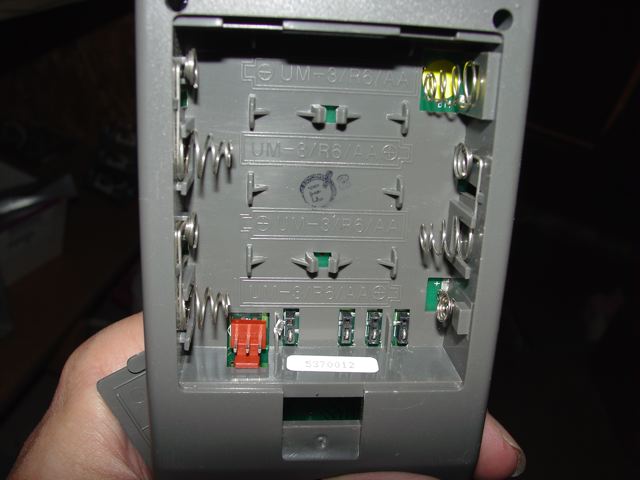
Confirm your battery compartment jumpers are "down-down-down-up" and try new batteries. On the back of the projector, the "C" diagnostic led should flash if it is seeing the IR stream. You also could have a bad IR sensor or a control board problem. Try reseating CLM IC U16 and cleaning the contacts.
The jumpers are seen in the picture.
.
| Description: |
|
| Filesize: |
40.33 KB |
| Viewed: |
5690 Time(s) |
|
|
|
| Back to top |
|
|
PaulB
Joined: 26 Oct 2007
Posts: 359
Location: Bonnie (but rainy) Scotland
|
| Posted: Mon Aug 04, 2008 1:30 pm Post subject: |
|
|
Thanks for all the great advice guys, there is plenty for me to try out. I'll get back as soon as I can with the results (busy with other things at the moment - fingers crossed!
_________________
Paul
|
|
| Back to top |
|
|
PaulB
Joined: 26 Oct 2007
Posts: 359
Location: Bonnie (but rainy) Scotland
|
| Posted: Sat Aug 09, 2008 9:14 am Post subject: |
|
|
| AnalogRocks wrote: | There's a general fix that workd for some IR remotes.
Remove the batteries then proced to push each button on the remote one after the next. Replace the batteries and see if it works. I've "fixed" a cople of remotes that way. |
It worked!! I worked through a couple of suggestions but no luck, tried the above almost as a last resort and the remote is back to controlling the pj again 
My thanks to all who replied and especially to AnalogRocks, thank you, thank you, thank you!
_________________
Paul
|
|
| Back to top |
|
|
|
|




