| Author |
Message |
esl_57
Joined: 18 Jul 2008
Posts: 28
|
| Posted: Fri Jul 18, 2008 10:36 pm Post subject: NEC PG6 Symptom |
|
|
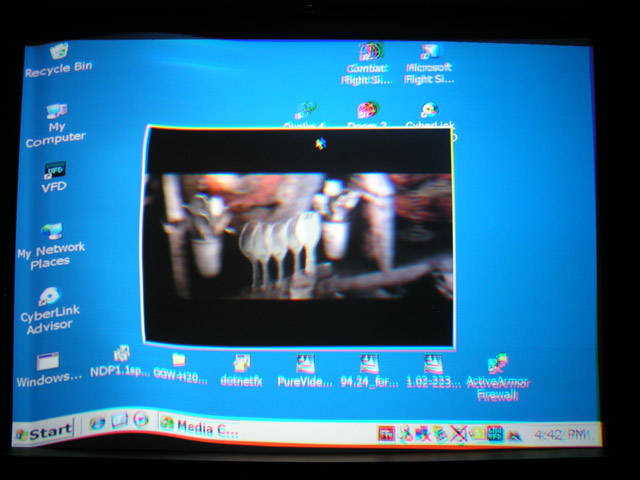
I'm new to CRT projectors. I managed to set up the NEC by following the instructions but the PJ has developed a symptom to which i don't have the experience to diagnose. It usually manifests itself after the first several minutes of run time and may, or may not, clear itself over time.
I snapped a picture of it... lets see if i can post it with this text.
Shutter speed was slow so there is a great deal of blur but the symptom is clearly visible. You see the left side of the screen? There is a big wave in the picture. Just like you'd draw a flag in the wind. All three colours are involved.
Any ideas on where to look?
Thanks!
Bill
| Description: |
|
| Filesize: |
69.23 KB |
| Viewed: |
5128 Time(s) |
|
|
|
| Back to top |
|
 |
dbaisey
Joined: 09 Mar 2006
Posts: 821
Location: Southern Cal LA / Seattle WA
|
| Posted: Fri Jul 18, 2008 10:53 pm Post subject: |
|
|
|
This will be the tilt phase but by the look of it this looks like 480P so check your source settings first. They may have changed. Doug
|
|
| Back to top |
|
|
esl_57
Joined: 18 Jul 2008
Posts: 28
|
| Posted: Fri Jul 18, 2008 11:41 pm Post subject: |
|
|
|
The resolution is 1024 x 768. It only looks odd because i use a larger font.
|
|
| Back to top |
|
|
Brooklyn

Joined: 17 Sep 2007
Posts: 494
Location: Morgan Hill, CA
|
| Posted: Sat Jul 19, 2008 12:08 am Post subject: |
|
|
|
Try the phase adjustment.
|
|
| Back to top |
|
|
esl_57
Joined: 18 Jul 2008
Posts: 28
|
| Posted: Sat Jul 19, 2008 12:39 am Post subject: |
|
|
I have 2 of these PJs. The one that i use is badged as a GE Imager and it does not have the Phase menu. The other, badged as an NEC, does. The system boards of each seem to have proms with different revisions. The NEC badged one seems to be a later revision then the GE badged unit.
Is the Pase menu only found on later revisions?
Could my GE be updated to have the phase menu?
It is a fun toy. PS3 on a 100 inch screen is awesome. The neighbors get motion sick playing Grand Tourismo.
|
|
| Back to top |
|
|
deronmoped
Joined: 03 Nov 2006
Posts: 1154
Location: San Diego
|
| Posted: Sat Jul 19, 2008 4:15 am Post subject: |
|
|
What are your convergence settings? I wonder if you could be driving something too hard.
Deron.
|
|
| Back to top |
|
|
esl_57
Joined: 18 Jul 2008
Posts: 28
|
| Posted: Sat Jul 19, 2008 5:49 pm Post subject: |
|
|
|
The only convergence setting that i felt was excessive was the tilt/skew on the Blue... and i thought it odd because i did set the horizontal portion of the blue cross hair pattern to be horizontal, by twisting the tube itself.
|
|
| Back to top |
|
|
macgyver655
Joined: 22 Aug 2007
Posts: 8508
|
| Posted: Sat Jul 19, 2008 5:53 pm Post subject: |
|
|
How about a picture of an internal test pattern with that input?
And a picture of the info screen?
|
|
| Back to top |
|
|
Curt Palme
CRT Tech
Joined: 08 Mar 2006
Posts: 24396
Location: Langley, BC
TV/Projector: All of them!
|
| Posted: Sat Jul 19, 2008 6:18 pm Post subject: |
|
|
|
Disconnect the convergence board completely and see if it goes away. Curious if this is a deflection problem or convergence related.
|
|
| Back to top |
|
|
dbaisey
Joined: 09 Mar 2006
Posts: 821
Location: Southern Cal LA / Seattle WA
|
| Posted: Sat Jul 19, 2008 8:37 pm Post subject: |
|
|
When you post on a PG series we need to know the full model number. PG6-9000, 6-9100 or 6-9200. It should be on the paper sticker on the back and also on the paper sticker thats on the side metal chassis.
If you have a PG6-9000 look at the point phase settting if it has one and put the hump centered on the vertical line. If you first bring up the input does it say 'unregistered signal' If it does you will need to input the signal or find out why it isn't entered or if the properties are different.
The pre boards (card cage) should not be interchanged between model numbers. I agree with Mac that the info screen will help sort it out esp if the freqs dont match the output resolution set in the software.
Also ramp H position or check the source processing for being centered before sending to the projector.
Last re-enter the signal if the signal properties are correct, use temporary as a test.
|
|
| Back to top |
|
|
esl_57
Joined: 18 Jul 2008
Posts: 28
|
| Posted: Sun Jul 20, 2008 12:13 am Post subject: |
|
|
I have two more 12 hour shifts ahead of me, so I'll collect the data you requested in the next couple of days and post.
Thanks guys!
Bill
|
|
| Back to top |
|
|
esl_57
Joined: 18 Jul 2008
Posts: 28
|
| Posted: Wed Jul 23, 2008 4:31 am Post subject: |
|
|
I managed to get through a couple of movies before the symptom turned up again. It lasted about 1 minute before the projector shut down. It's flashing an F8 error code.
I haven't collected the rest of the requested data yet.
While watching King Kong, the newer movie, i managed to tweak the colour controls in the video cards software.
The detail in the black is AWESOME!
|
|
| Back to top |
|
|
Brooklyn
Joined: 17 Sep 2007
Posts: 494
Location: Morgan Hill, CA
|
| Posted: Wed Jul 23, 2008 4:45 am Post subject: |
|
|
|
F8 is convergence stop. The convergence board is suspect.
|
|
| Back to top |
|
|
esl_57
Joined: 18 Jul 2008
Posts: 28
|
| Posted: Wed Jul 23, 2008 8:21 pm Post subject: |
|
|
I've been trying to swap the convergence boards between my two units in an attempt to isolate the problem but those little Phillips screws (#1 i think) that hold the board in are stuck in there pretty good! I don't want to go at them to hard with Home Depot screw drivers for fear of stripping the heads so for now, i'll let some WD40 soak through from the bottom pan and bring better tools from work tomorrow.
I reseated all the connectors to the board before trying to remove it but when i powered it up the static convergance had shifted down and to the right a little, on both the red and blue.
|
|
| Back to top |
|
|
esl_57
Joined: 18 Jul 2008
Posts: 28
|
| Posted: Wed Jul 23, 2008 11:20 pm Post subject: |
|
|
I think i let the magic smoke out 
Anyone know were the fuses are located?
|
|
| Back to top |
|
|
|
|




