| Author |
Message |
fanon
Joined: 03 Jul 2008
Posts: 5
Location: Belgium
|
| Posted: Thu Jul 03, 2008 1:00 pm Post subject: Question regarding Pioneer PDP LX508D |
|
|
Hi,
I own a Pioneer PDP LX508D which I want to calibrate (3 months ago straight out of the box on the wall so I guess it 's about time) . Browsing on the Net brought me to this thread which I find very interesting indeed as the HCFR software seems to do a bit more then the Spider TV software I have. I do have a question though:
The display controls in the main menu of the LX508D comprise of sharpness, tint, colour, brightness and contrast - so far so good. In a second menu called colour management you find 6 slider bars for Red , Yellow, Green, Cyan, Blue and Magenta ranging from -30 to + 30
But where do I find the RGBHighEnd en RGBLowEnd controls which are referred to in the HCFR calibration software?
Are the RGB controls the hi-end and YCM controls the low-end? or visa versa? or is there still a hidden menu which I have overlooked? (or don't have access to ..)
many thanks for helping me out as I really would like to have a go with this cal soft.
Fanon
|
|
| Back to top |
|
 |
fanon
Joined: 03 Jul 2008
Posts: 5
Location: Belgium
|
| Posted: Thu Jul 03, 2008 3:58 pm Post subject: |
|
|
found the answer on the website of HCFR - someone did a calibration on the 435XDE - did a very comprehensive report on his findings - menu was somewhat hidden.
rgds
Fanon
|
|
| Back to top |
|
|
Turbe
Joined: 31 Jul 2008
Posts: 4
|
| Posted: Thu Jul 31, 2008 4:35 pm Post subject: |
|
|
Greetings,
You can use ControlCAL and the Pioneer Display Profiles to access your Displays ISFccc Interface and activate the two ISF Day/ISF Night Memories per Input. The ISFccc Interface has all the Controls available in the Display.
Let me know and I can get you the Profiles.
www.ControlCAL.com
Regards
Shawn
|
|
| Back to top |
|
|
fanon
Joined: 03 Jul 2008
Posts: 5
Location: Belgium
|
| Posted: Thu Jul 31, 2008 5:07 pm Post subject: |
|
|
Hi Dawn,
I am a bit out of my wits here - sort of newby. Do I understand correctly that I can access my pioneer 8G Kuro via an RS 232 cable from my PC running this software? How do I activate this in the Pioneer or is it auto sensed?
Also, does this programm run alongside the HCFR software (using the 1eye color meter) as that is my current setup.
Mind you I am not an ISF professional, more a pur soul bitten by the HT virus ....
Thanks for responding
Fanon
|
|
| Back to top |
|
|
Turbe
Joined: 31 Jul 2008
Posts: 4
|
| Posted: Thu Jul 31, 2008 5:15 pm Post subject: |
|
|
| Quote: | | Do I understand correctly that I can access my pioneer 8G Kuro via an RS 232 cable from my PC running this software? |
correct
| Quote: | | How do I activate this in the Pioneer or is it auto sensed? |
ControlCAL will Activate the ISFccc Interface. The ISFccc Interface is not accessed through the Service Menu (and these Options are not available in the Service Menu).
| Quote: | | Also, does this programm run alongside the HCFR software (using the 1eye color meter) as that is my current setup. |
Yes, many of our Users have ColorHCFR and/or CalMAN. Several Professionals use other packages as well with ControlCAL.
If you want, I will give you access to the Private Threads (soon to be Public since ControlCAL RC1 has been released) and you can read what other Users have posted with the Pioneer 8G Models with the ISFccc Feature.
-Shawn
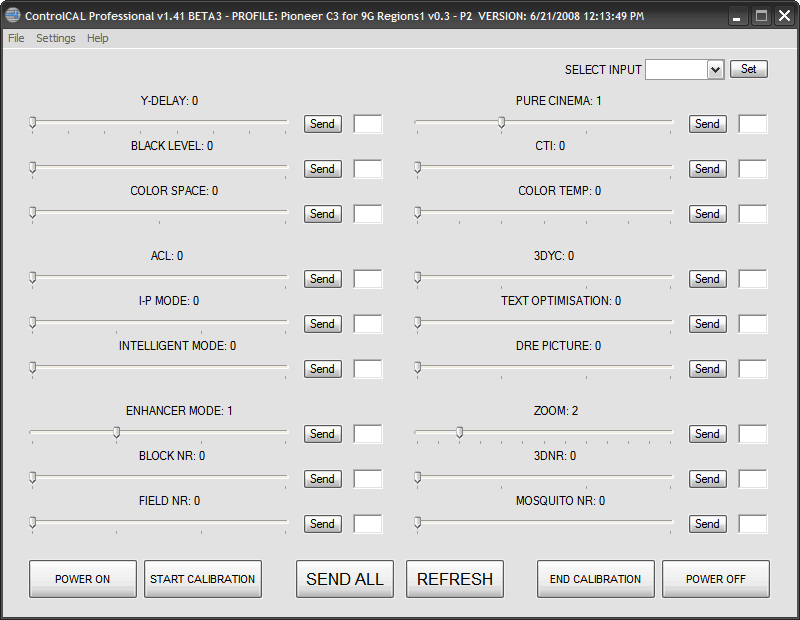
These are pics of the 9G Profiles (the 8G's do not have the ISF Auto Memory):
PROFILE: Pioneer_9G_C3_Regions1_v0-3_P1
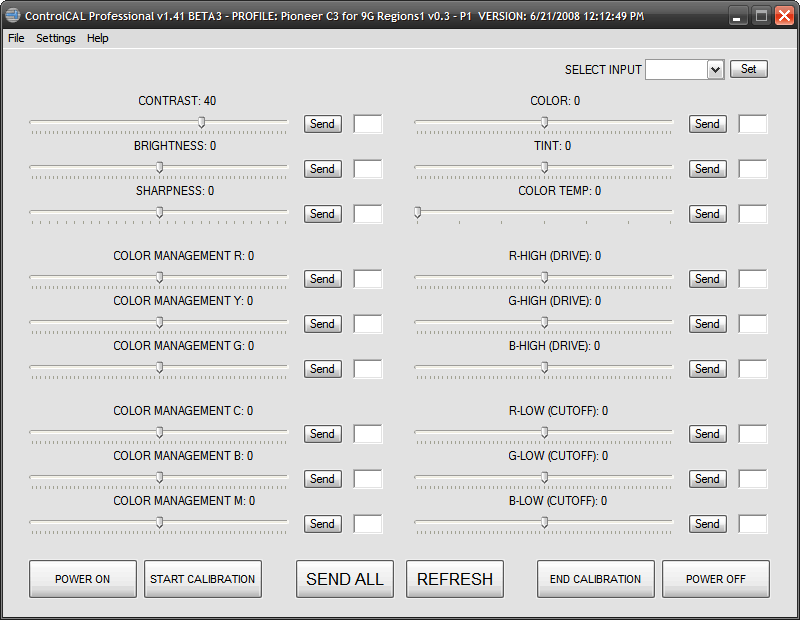
PROFILE: Pioneer_9G_C3_Regions1_v0-3_P2
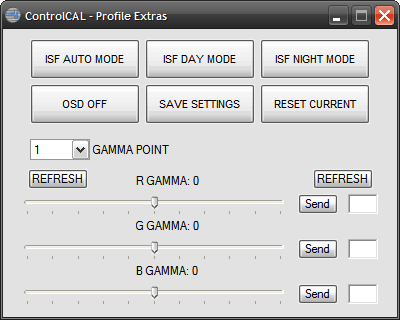
Some Models only Support ISF Day/ISF Night and the Profile Extras Window in Post #1 above would be used.
|
|
| Back to top |
|
|
fanon
Joined: 03 Jul 2008
Posts: 5
Location: Belgium
|
| Posted: Thu Jul 31, 2008 5:30 pm Post subject: |
|
|
Dawn
Yes please. Question what does Regions1 mean here?
PROFILE: Pioneer_9G_C3_Regions1_v0-3_P1
I ve got a Pioneer PDP LX508D and I live in Europe (region 2) - or is this something totally different?
ths
Fanon
|
|
| Back to top |
|
|
Turbe
Joined: 31 Jul 2008
Posts: 4
|
| Posted: Thu Jul 31, 2008 5:57 pm Post subject: |
|
|
Danon 
Regions1 is 1 of 2 Profile Sets for the Pioneer 9G's, the 8G's (which yours is) only has one Profile Set for all Models with the ISFccc Interface (All Regions).
-Shawn (aka Dawn?)
|
|
| Back to top |
|
|
fanon
Joined: 03 Jul 2008
Posts: 5
Location: Belgium
|
| Posted: Thu Jul 31, 2008 6:58 pm Post subject: |
|
|
So Sorry ... it's a wee bit too hot today here ... I do apologize ..... 
grateful if you could give me access and if you want me to beta test too, let me know
Fanon
|
|
| Back to top |
|
|
Gino

Joined: 22 Apr 2006
Posts: 1363
Location: Trinity Beach, AUSTRALIA
|
| Posted: Fri Aug 01, 2008 12:24 am Post subject: |
|
|
Wow, nice program! I'll have to use it to do my LX608A
Do you know if its possible to set the default aspect mode to 'Dot by Dot'? I like this to get 1:1 pixel mapping, but every time I turn the plasma off and on it selects 'Wide' mode.
_________________
( B ) ( G ) ( R ) Blendzilla Down Under ( R ) ( G ) ( B ) - Tubes of Fury
|
|
| Back to top |
|
|
Turbe
Joined: 31 Jul 2008
Posts: 4
|
| Posted: Fri Aug 01, 2008 5:08 pm Post subject: |
|
|
|
All those controls can be saved to the ISF Memories (individually) per Input (ISF Day/ ISF Night) if the Input supports that Control. Of course, you would have to select either ISF Day or Night for an Input in the menu.
|
|
| Back to top |
|
|
beaverme
Joined: 15 Dec 2008
Posts: 1
|
| Posted: Mon Dec 15, 2008 11:27 am Post subject: |
|
|
| fanon wrote: | found the answer on the website of HCFR - someone did a calibration on the 435XDE - did a very comprehensive report on his findings - menu was somewhat hidden.
rgds
Fanon |
Hi,
Please could you post a link to the report on the 435XDE calibration, or just give me a clue where to search for it?
Many thanks,
Lee
|
|
| Back to top |
|
|
zzkazu
Joined: 13 Jan 2009
Posts: 2
|
| Posted: Tue Jan 13, 2009 9:10 pm Post subject: |
|
|
|
I am seeking that reference also..
|
|
| Back to top |
|
|
|
|




