| Author |
Message |
richmond5
Joined: 17 Aug 2007
Posts: 48
Location: Toronto, Canada
|
| Posted: Tue Jun 24, 2008 12:15 pm Post subject: |
|
|
| LastButNotLeast wrote: | | Quote: |
Ok, odd. Yes, I see the white window. What are other users doing to get around this? What's the right procedure? I was using LCD myself for the longest time but everyone told me that CRT was the right mode to use for CRT displays so I changed the guide.
Kal |
When I was using LCD mode, I would put the sensor in a black felt bag for calibration. In CRT mode, it asks for a white screen, so I put up a 100% white window from the same test DVD I'm using. The white box on the computer is just in the way, so I ignore it.
Great results, by the way. Many thanks, again.
Michael |
Have you try with a crt front projector? I tried with the sensor facing the tubes and the screen, still failed. The only way it will work is following the HCFR instructions, with a diffuser facing the tube and I make all the subsequence measurements that way with a diffusor facing the tube. Based on the result picture, I am pretty happy! Thank for all the inputs and help!

|
|
| Back to top |
|
 |
LastButNotLeast
Joined: 15 May 2008
Posts: 13
Location: 08077
|
| Posted: Wed Jun 25, 2008 12:28 am Post subject: |
|
|
| richmond5 wrote: | Have you try with a crt front projector?
|
Sorry, should have specified. Using an RPCRT (which is why I tried LCD mode first, as per the original instructions). Of course, if someone would care to LEND me a projector, I'll be happy to bring out the i1 again. 
|
|
| Back to top |
|
|
joikd
Joined: 22 Jun 2008
Posts: 4
|
| Posted: Fri Jun 27, 2008 6:51 pm Post subject: |
|
|
I posted this in the AVS thread. Any help would be appreciated.
Has anyone had any trouble because of an anti-glare screen? I have a Mits. RPTV (65813) that I directly attached the Eye-One probe to the anti-glare screen. Well, the HCFR software is way off on color and tint. I ended up adjusting by eye with AVIA. HCFR showed me being totally off even though I know I was pretty darn close.
When I tried adjusting the primaries with my Lumagen HDP, I was unable to get the x/y's correct no matter what I tried. Again, I used AVIA for blue, red, and green saturation and hue, and just eyed-it. It came out pretty close, but HCFR said that it was way off.
Maybe I should try putting the probe on a tripod? It doesn't make sense to me to take the anti-glare screen off, do the measurements, then put the anti-glare screen back on. This would affect the picture. Correct?
|
|
| Back to top |
|
|
The_Snowman
Joined: 15 Jun 2008
Posts: 4
Location: Saudi Arabia
|
| Posted: Sat Jun 28, 2008 5:07 pm Post subject: Any Aussies following this thread, and............. |
|
|
...............where did you buy the X-Rite Eye-One Display LT ??? I was going to get it as recommended by the links to AMAZON but it comes up with this amazing quote for shipping?
Items: AUD 151.69
Shipping & Handling: AUD 157.24
Total Before Tax: AUD 308.93
CRIKEY !!!  What's up with that? What's up with that? 
Any suggestions where to buy this in OZ??? Thanks, John
_________________
Canadian by birth, Australian by choice
|
|
| Back to top |
|
|
usul

Joined: 23 Jun 2008
Posts: 6
|
| Posted: Sat Jun 28, 2008 11:09 pm Post subject: Re: Any Aussies following this thread, and............. |
|
|
| The_Snowman wrote: | ...............where did you buy the X-Rite Eye-One Display LT ??? I was going to get it as recommended by the links to AMAZON but it comes up with this amazing quote for shipping?
Items: AUD 151.69
Shipping & Handling: AUD 157.24
Total Before Tax: AUD 308.93
CRIKEY !!! What's up with that?
Any suggestions where to buy this in OZ??? Thanks, John |
I did a lot of searching for availability in Oz and every place was way too expensive (cheapest was more than AUD 500 as I recall)! So bought mine from B&H Photo Video (follow the link in the guide). Using today's conversion rate:
- Eye-one: AUD 156.00
- Shipping: AUD 37.56
- Total: AUD 193.56
Took a couple of weeks to arrive in Oz and I didn't cop any customs charge.
Cheers.
|
|
| Back to top |
|
|
Nashou66

Joined: 12 Jan 2007
Posts: 16171
Location: West Seneca NY
|
| Posted: Sun Jun 29, 2008 12:28 am Post subject: |
|
|
Kal I think you should change the guide back again for LCD use for CRT front projectors it is causing a lot of confusion and even the HCFR guy I am pretty sure recomend useing LCD for CRT front Projectors. One reason is that not always does the sensor calibrate or read the CRT refresh rate of the Projecotr i have done many tests and its not conclusive I get about a 50% success rate in reading the CRT refresh rate. Also visually I get better results using LCD setting for front Projector CRT's Have you tried it Facing the PJ with CRT mode set and doing the greyscale? Doing it this way I also used the Diffusor, but I thinkl your original way using LCD no Diffusor is the most accurate.
Athanasios
_________________
Don't blame your underwear for your crooked ass~ unknown Greek philosopher
"Republicans believe every day is the Fourth of July, but the Democrats believe every day is April 15." --- President Reagan
One Smart Dog!!!
Marquee High Performance Bellows now shipping!!
Marquee Modifications and Performance Enhancement
Marquee C-element and Bellow removal
|
|
| Back to top |
|
|
The_Snowman
Joined: 15 Jun 2008
Posts: 4
Location: Saudi Arabia
|
| Posted: Sun Jun 29, 2008 2:18 am Post subject: Re: Any Aussies following this thread, and............. |
|
|
| usul wrote: | | The_Snowman wrote: | ...............where did you buy the X-Rite Eye-One Display LT ??? I was going to get it as recommended by the links to AMAZON but it comes up with this amazing quote for shipping?
Items: AUD 151.69
Shipping & Handling: AUD 157.24
Total Before Tax: AUD 308.93
CRIKEY !!! What's up with that?
Any suggestions where to buy this in OZ??? Thanks, John |
I did a lot of searching for availability in Oz and every place was way too expensive (cheapest was more than AUD 500 as I recall)! So bought mine from B&H Photo Video (follow the link in the guide). Using today's conversion rate:
- Eye-one: AUD 156.00
- Shipping: AUD 37.56
- Total: AUD 193.56
Took a couple of weeks to arrive in Oz and I didn't cop any customs charge.
Cheers. |
a big THANK YOU for the information, I have it ordered and on the way!!  Total $193.78 by the way. Checkout was very through, sure wish PayPal would verify addresses in Australia, could not use it...... and they want to make it mandatory for sellers to accept it? Or make it the only way to pay in Australia soon? Anyway, yes, no import customs on anyhting less than $1,000, common knowledge..... Total $193.78 by the way. Checkout was very through, sure wish PayPal would verify addresses in Australia, could not use it...... and they want to make it mandatory for sellers to accept it? Or make it the only way to pay in Australia soon? Anyway, yes, no import customs on anyhting less than $1,000, common knowledge.....
Thanks again, John
See my Home Theatre pictures here http://home-and-garden.webshots.com/album/562844006XLzTfe?vhost=home-and-garden
_________________
Canadian by birth, Australian by choice
|
|
| Back to top |
|
|
kal
Forum Administrator

Joined: 06 Mar 2006
Posts: 18114
Location: Ottawa, Canada
TV/Projector: JVC DLA-NZ7
|
|
| Back to top |
|
|
usul
Joined: 23 Jun 2008
Posts: 6
|
| Posted: Fri Jul 04, 2008 12:27 am Post subject: |
|
|
| kal wrote: | Hey guys!
I've been playing around with a new software calibration tool over the last few weeks and like what a see! It's called:

Kal |
I downloaded the demo to have a play/learn and it's already helped me out with my previous issue:
http://www.curtpalme.com/forum/viewtopic.php?p=125871#125871
It was my colour temperature (makes sense in hindsight). Using the 'Greyscale & Colour Calibration for Dummies' guide and suggestions from the forum (I forgot to heed that axiom "on the internet, nobody knows you're a dog" ) I set my colour temperature to Neutral. Working through the CalMAN software (in basic mode) and following the basic calibration workflow, I found that my colour temperature setting was best set to Warm2. I'll soon be placing my order for CalMAN!
Cheers
|
|
| Back to top |
|
|
kal
Forum Administrator
Joined: 06 Mar 2006
Posts: 18114
Location: Ottawa, Canada
TV/Projector: JVC DLA-NZ7
|
| Posted: Fri Jul 04, 2008 2:07 am Post subject: |
|
|
| usul wrote: | | kal wrote: | Hey guys!
I've been playing around with a new software calibration tool over the last few weeks and like what a see! It's called:
Kal |
I downloaded the demo to have a play/learn and it's already helped me out with my previous issue:
http://www.curtpalme.com/forum/viewtopic.php?p=125871#125871
It was my colour temperature (makes sense in hindsight). Using the 'Greyscale & Colour Calibration for Dummies' guide and suggestions from the forum (I forgot to heed that axiom "on the internet, nobody knows you're a dog" ) I set my colour temperature to Neutral. Working through the CalMAN software (in basic mode) and following the basic calibration workflow, I found that my colour temperature setting was best set to Warm2. I'll soon be placing my order for CalMAN!
Cheers |
Glad you're liking it! It's a pretty polished product and takes the guesswork out of a lot of things. Not to knock my own guide but I'm definitely *not* at the same level as the guys behind CalMAN. After using CalMAN I'm finding more and more how I basically just skim the surface of what's involved in my guide, and no, I'm not going to expand it any further... It's long enough as it is. 
Kal
_________________

Support our site by using our affiliate links. We thank you!
My basement/HT/bar/brewery build 2.0
|
|
| Back to top |
|
|
StephenDjordj
Joined: 08 Jul 2008
Posts: 1
Location: UK
|
| Posted: Thu Jul 10, 2008 9:49 am Post subject: Gamma - when is best |
|
|
Hi all.
Firstly a massive thank you to everyone who has contributed to this guide, the HCFR software chaps, recommendations for the Eye-One, the guys over at GetGrey and all at AVS and AV Forums - slowly but surely this calibration stuff is beginning to make sense. Hope I don't begin to test everyones patience and manage to stay on topic.
Had a few calibration attempts on the following equipment following your guide Kal - absolutely excellent - nothing made sense to me before this :
Pioneer 4280
Denon 2900 connected via component - 576p out
Eye-One Display 2
HCFR
I know this is generally a CRT forum so I don't expect specifics about the Pioneer panel.
Sorry about the next bit but just in case not many people have the Denon...............
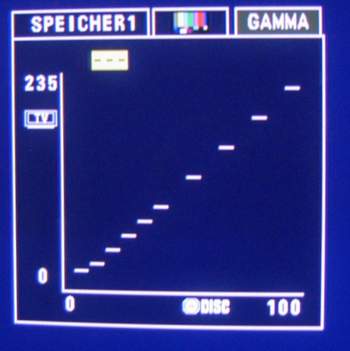
The Denon has gamma adjustment. The vertical axis runs from 0 - 235 TV (digital RGB I think this is called). The horizontal axis runs 0 - 100 Disc (Wonder if this is IRE steps). There are ten divisions along the 0- 100 Disc line with each of these points adjustable up and down the 0 - 235 scale. The lowest can go to 16 and the highest to 235. The first six of these steps are bunched evenly across roughly 0 - 40 with the remaining 4 steps evenly distributed from 40 - 100. These divisions cannot be changed - only 16 -235 for each point.
I don't quite get the connection between performing greyscale adjustment and gamma adjustment (it's probably in the guide but I get so rammeled up I miss things that are obvious).
What sequence would be best to follow - gamma first then greyscale (always changes the gamma) or greyscale first then gamma (seems to always change the greyscale)?
Haven't yet mastered submitting charts from HCFR but will practice if this would to understand what I'm asking.
Any comments I will do my upmost to follow and comprehend
Thanks chaps
[/list]
| Description: |
|
| Filesize: |
12.21 KB |
| Viewed: |
172 Time(s) |
|
|
|
| Back to top |
|
|
kal
Forum Administrator
Joined: 06 Mar 2006
Posts: 18114
Location: Ottawa, Canada
TV/Projector: JVC DLA-NZ7
|
| Posted: Thu Jul 10, 2008 3:31 pm Post subject: Re: Gamma - when is best |
|
|
| StephenDjordj wrote: | | What sequence would be best to follow - gamma first then greyscale (always changes the gamma) or greyscale first then gamma (seems to always change the greyscale)? |
Hi!
I would leave gamma alone for the first pass, get greyscale close to perfect as possible, then adjust gamma and re-measure. It's a very itterative process and both affect each other so it really doesn't matter which you do first since you'll be doing the entire loop through many times.
Glad you liked the guide!
Kal
_________________
Support our site by using our affiliate links. We thank you!
My basement/HT/bar/brewery build 2.0
|
|
| Back to top |
|
|
dropzone7

Joined: 12 Jun 2007
Posts: 1069
Location: Charlotte, NC
|
| Posted: Thu Jul 10, 2008 6:36 pm Post subject: |
|
|
Wow, I tried the little video setup that comes on the Disney Blu Ray movies last night and with those flashing greyscale patterns I finally saw just how badly my HD Fury is clipping the whites and crushing the blacks. The effect on the white side is much more apparent and I can recover the blacks somewhat through gamma adjustment. I want to run through your guide once again Kal but I'm thinking it may be futile until I get a better HDMI solution like the XG-FULLHD card or the EXT-FULLHD box. It's funny that with DVE, Avia and everything else I have around here, it took this Disney video setup thing for me to finally notice!
_________________
"Coffee is for Closers."
|
|
| Back to top |
|
|
rajdude
Joined: 10 Mar 2006
Posts: 65
|
| Posted: Fri Jul 11, 2008 4:54 pm Post subject: |
|
|
Folks, I have tried to search but could not find the answer here.
What test disk to use for standard definition grayscale patterns?
I have the standard DVE but it does not have the full set of labelled grayscale patterns. 10% steps .
It only has a subset.
I have heard of Getgrey but the very first line on their website says:
| Quote: | | This calibration disc designed specifically for fixed pixel devices (NOT CRT's). |
I have a Sony G70 to calibrate. What to do?
Is there any free test disk? all I really need is the full set of grayscale patterns in 10% steps.[/url][/quote]
_________________
-Rajiv
|
|
| Back to top |
|
|
garyfritz

Joined: 08 Apr 2006
Posts: 12088
Location: Fort Collins, CO
|
| Posted: Fri Jul 11, 2008 6:01 pm Post subject: |
|
|
|
GetGray is IMHO the best SD calibration disk, certainly the best for setting grayscale. They say it's not for CRTs because it doesn't have patterns for checking for bloom, overdrive, things like that. It works great for grayscale.
|
|
| Back to top |
|
|
rajdude
Joined: 10 Mar 2006
Posts: 65
|
| Posted: Fri Jul 11, 2008 6:14 pm Post subject: |
|
|
Ok, Thanks Gary!
I just sent them the money. Lots of people say it is good, should be too! 
_________________
-Rajiv
|
|
| Back to top |
|
|
JTT
Joined: 19 Jul 2008
Posts: 5
|
| Posted: Sat Jul 19, 2008 10:39 am Post subject: |
|
|
Hi,
I am just about to but an eye-one LT to setup my Panasonic 50PZ70 Plasma using grayscale and colour calibration for dummies guide.
I have aquestion about which DVE disk to buy.
The Panasonic has different settings for SD and HD sources. Do I need to buy the Sd DVD and blu-ray version of DVE to setup my screen, or can I just buy the standard SD DVD version of DVE, and then upscale it to 1080p using my PS3 to do the HD calibration?
Thanks,
|
|
| Back to top |
|
|
rajdude
Joined: 10 Mar 2006
Posts: 65
|
| Posted: Sat Jul 19, 2008 1:53 pm Post subject: |
|
|
For HD, the DVE - HD blu-ray version is fine.
For SD, get the GetGray DVD. The SD version of DVE does not have all the test patterns needed for greyscale calibration.
From what I understand you will have to calibrate for both SD and HD sources.....seperately.
| JTT wrote: | Hi,
I am just about to but an eye-one LT to setup my Panasonic 50PZ70 Plasma using grayscale and colour calibration for dummies guide.
I have aquestion about which DVE disk to buy.
The Panasonic has different settings for SD and HD sources. Do I need to buy the Sd DVD and blu-ray version of DVE to setup my screen, or can I just buy the standard SD DVD version of DVE, and then upscale it to 1080p using my PS3 to do the HD calibration?
Thanks, |
_________________
-Rajiv
|
|
| Back to top |
|
|
LastButNotLeast
Joined: 15 May 2008
Posts: 13
Location: 08077
|
| Posted: Sat Jul 19, 2008 2:18 pm Post subject: |
|
|
| rajdude wrote: | For HD, the DVE - HD blu-ray version is fine.
For SD, get the GetGray DVD. The SD version of DVE does not have all the test patterns needed for greyscale calibration.
From what I understand you will have to calibrate for both SD and HD sources.....seperately.
|
Or start with the free ones, here:
http://www.avsforum.com/avs-vb/showthread.php?t=948496
|
|
| Back to top |
|
|
JTT
Joined: 19 Jul 2008
Posts: 5
|
| Posted: Sat Jul 19, 2008 3:11 pm Post subject: |
|
|
Thanks,
I'm a bit new to this calibration lark. Once I''ve done the calibration for Sd and HD, this will have calibrated SD and HD sources from my PS3 correct? But what about my Sky HD box, which is 75% of my viewing, will these settings be right for Sky source (through the same HMDI cable from receiver)
Cheers,
| rajdude wrote: | For HD, the DVE - HD blu-ray version is fine.
For SD, get the GetGray DVD. The SD version of DVE does not have all the test patterns needed for greyscale calibration.
From what I understand you will have to calibrate for both SD and HD sources.....seperately.
| JTT wrote: | Hi,
I am just about to but an eye-one LT to setup my Panasonic 50PZ70 Plasma using grayscale and colour calibration for dummies guide.
I have aquestion about which DVE disk to buy.
The Panasonic has different settings for SD and HD sources. Do I need to buy the Sd DVD and blu-ray version of DVE to setup my screen, or can I just buy the standard SD DVD version of DVE, and then upscale it to 1080p using my PS3 to do the HD calibration?
Thanks, |
|
|
|
| Back to top |
|
|
|
|




