|
As this forum is rarely used anymore, we've locked it. Feel free to browse and read. Questions? Please reach out to us directly. Cheers! |

|
 |
|
|
| Author |
Message |
k.berger
Joined: 16 Mar 2006
Posts: 84
|
| Posted: Tue Mar 18, 2008 2:08 am Post subject: Ampro 4200 - lines on the image? |
|
|
Hi guys,
I recently acquired the Ampro originally owned (and worked-on) by RAIDUDE.
I know... don't laugh!  It actually works, and quite well for that matter, in large part due to all the effort he put into it initially (and all the help he has gotten from you guys!!!). It actually works, and quite well for that matter, in large part due to all the effort he put into it initially (and all the help he has gotten from you guys!!!).
I have it set-up temporarily on the movable cart (since I wanted to try bigger screen than the one I use with my Marquee 8000, which is 96"x54").
Except for usual learning curve - getting used to #/code combinations and such, I didn't have any major issues with it so far...
I run it experimentally at 1080i60 from Cable DVR, and Toshiba A1, through Dtronics DVI-RGBHV converter.
It's not as sharp as I would expect, but quite watchable, and of course I am far from final set-up, so it's too early to tell anyway.
Now for the question/problem: I do have very faint horizontal lines, visible specially on white/bright areas. They seem to be grouped in bunches maybe 2" - 3" high, with intensity pulsating at the rate of about 5 times a second, or so. They are only really visible from maybe 2 feet away, but still, they shouldn't be there...
No difference between the sources.
I did the search, and came-up with one thread which looked like describing this same anomaly, but it didn't end in any conclusive answer... I tried suggestions there, like playing with blanking, lowering brightness and contrast, and putting the PJ on the common circuit with the sources to avoid ground loop, but I didn't notice any difference (except of course that they were less visible with brightness/contrast turned down, but I would say proportionally).
Anybody has any other ideas?
Oh, I forgot: this same source set-up (with and without LumagenHDP in the chain) produces clean image on Marquee.
Thanks,
Kris
|
|
| Back to top |
|
 |
tse
Joined: 03 May 2006
Posts: 1014
Location: Sweatbucket, Fl.
|
| Posted: Wed Mar 19, 2008 12:10 am Post subject: |
|
|
Hey Kris,
You've managed to come up with a good one. I'm not sure that I've ever seen quite what you are describing. Do these lines move? Do they cover the whole screen? Does anything change if you look at one color? Look at one color and turn registration off (55 code)?
I've been using a 4200 for a couple of years now and don't see what you are talking about. There was some noise in the form of horizontal lines that constantly moved up, then down, then stood still for a while. It turned out to be caused by the registration on green. I took it off and the noise went away. So I'm running the projector without it now.
Scott
_________________
"Were we directed from Washington when to sow and when to reap, we would soon want bread."
Thomas Jefferson
|
|
| Back to top |
|
|
Curt Palme
CRT Tech
Joined: 08 Mar 2006
Posts: 24396
Location: Langley, BC
TV/Projector: All of them!
|
| Posted: Wed Mar 19, 2008 1:55 am Post subject: |
|
|
|
My guess is blanking. It's possible to see light retrace lines in the video image if the blanking isn't engaged on all sides at least a bit.
|
|
| Back to top |
|
|
Ray Cendroski
Joined: 22 Apr 2006
Posts: 68
Location: Concord, Ohio
|
| Posted: Wed Mar 19, 2008 2:29 am Post subject: |
|
|
Hey Scott,
I remember way back when you first got your 4200 and we we discussing the "phantom" line issue with Rajdude, I think over at the other AVS forum. My 4200 has always had the same problem. The lines are faint, flicker at hi speed, and move up/down the screen.
Mine never had the Converge on Green option, but I has a spare registration board (with COG) and swapped every single piece, and still couldn't get it to go away. I could never find anything over the years to make it stop. Wonderfull projector except for that problem.
Ray
|
|
| Back to top |
|
|
k.berger
Joined: 16 Mar 2006
Posts: 84
|
| Posted: Wed Mar 19, 2008 2:34 am Post subject: |
|
|
Hi Scott,
your master touch never fails! They go away with reg. off! Why didn't I think about checking it? 
Funny, just before I found your suggestion, I played around with it, trying to find out if there is maybe faulty connection or such, since they (the lines) definitely looked to me like some kind of interference/noise. (I think you described the same thing in your post).
In the process, I toggled 75 Ohm termination for Video input (just above Vsynch connector), and the noise disappeared (at least I thought so, they are so faint, sometimes I am not sure I see them...). Then I toggled it back, and they came back, but few seconds later I heard soft pop/click, and they disappeared again... I thought maybe card connector was dirty and was about to try to clean it, then I fund your answer! 
Now, what can I do, other than minimizing usage of dynamic adjustments? Is it sign of faulty board? (I don't think this machine has Reg. on Green option installed - how can I find out?).
Thanks again,
Kris
PS on the different subject: what's the most practical way to move centering rings? Any tool or something? They are VERY hard to reach (at least safely ), and difficult to turn...
K.
|
|
| Back to top |
|
|
k.berger
Joined: 16 Mar 2006
Posts: 84
|
| Posted: Wed Mar 19, 2008 2:40 am Post subject: |
|
|
Hi Curt,
they weren't blanking related - I tried that before posting (all sides, all values, including extreme...). I think Scott nailed it, so I may be in for replacement reg. board? ?
Ray,
thanks for chiming in, hopefully there will be some kind of solution, you are right: it's very nice machine, definitely unfairly treated by some...
Kris
|
|
| Back to top |
|
|
tse
Joined: 03 May 2006
Posts: 1014
Location: Sweatbucket, Fl.
|
| Posted: Wed Mar 19, 2008 2:54 am Post subject: |
|
|
Ray,
Most likely the "lines" are actually an instability in the position of the scan lines. For instance, say the 100th scan line from the top moves up half the thickness of a scan line. During the next frame it is the 99th scan line that moves. Over several frames this will look like a "line" moving up the picture. Probably happening in many different areas of the picture at the same time. This will probably not be in sync with the frames so will move. At times it might Sync up and will look still. Line displacement noise. It's not noise in the video it is noise in the raster. Put up a video format where you can easily see the scan lines, just one color. Look closely at one line and see if it doesn't move up or down relative to the scan line near it.
So if this is what's happening, and it almost always is, start looking at the things that can move the raster. Vertical deflection. Vertical registration. The magnetic focus can cause movement. Noise/ripple in the anode voltage causes movement. Low voltage power supply noise getting into any of the above can cause the problem. Narrow it down by turning off registration. Disconnect the focus magnet from the amplifier. I think you must also disconnect power from the amp or a resistor smokes. If the focus changes so much that you can't tell if there is a noise change you can connect a DC power supply to the magnet winding and adjust focus by putting the correct current through the windings. There are many things to be checked.
Scott
_________________
"Were we directed from Washington when to sow and when to reap, we would soon want bread."
Thomas Jefferson
|
|
| Back to top |
|
|
tse
Joined: 03 May 2006
Posts: 1014
Location: Sweatbucket, Fl.
|
| Posted: Wed Mar 19, 2008 3:09 am Post subject: |
|
|
Kris,
A regular registration bd will have two small daughter bds mounted on the right side. They are about 2.5" x 6". If there are three then the middle one is for registration on green. I think these bds do the corner pin and key funtions. There might be a much larger daughter bd mounted in the middle of the main bd.
The smaller daughter bds can be removed and the I2C errors that result can be eliminated by closing SW2 on the 4 position DIP sw located on the CPU card. The noise might be coming from them. Be careful when messing with this stuff. Turn power off and let sit for a few minutes. Discharge static electricity by touching something grounded before touching the circuit cards.
Scott
_________________
"Were we directed from Washington when to sow and when to reap, we would soon want bread."
Thomas Jefferson
|
|
| Back to top |
|
|
k.berger
Joined: 16 Mar 2006
Posts: 84
|
| Posted: Wed Mar 19, 2008 3:26 am Post subject: |
|
|
Scott,
just like I thought - there is no "third" board there... so, no reg. on green...
Do you suggest removing those other 2 just as test if they cause the problem, and if so, to replace them later? Otherwise I would loose those corner adjustments, wouldn't I? (I don't think I could fully converge the image without those...)
Thanks for warnings, I do PC hardware an software for living, so I am familiar with those dangers... What I don't do is board-level troubleshooting and repairs... (except for some kid's stuff from ages ago...
Kris ).
Thanks again for thorough explanations! Your willingness to help, and your knowledge is exceptional!
Kris
|
|
| Back to top |
|
|
Ray Cendroski
Joined: 22 Apr 2006
Posts: 68
Location: Concord, Ohio
|
| Posted: Wed Mar 19, 2008 11:48 am Post subject: |
|
|
Hi Scott,
The "line displacement instability" explanation sounds exactly like what I see.
Like Kris said, I forget to mention that the movement did go away when I shut registration off. I too, was amazed that I never thought to try that before. I'm pretty sure the problem is somewhere on the main registration board. I was able to swap the daughter boards, and power supply that were common to a 2000 convergance board that I had on hand. I swapped the main registration amp board in front of the convergance board and it didn't help either.
Over the years I also swapped or replaced pretty much all the other boards and didn't see any difference. I also put in a 3600 HVPS when the original unit died. I even re-capped the LVPS. It made a big difference in line stability and resolution at the time.
The thing I like the best about the 4200 is that it shares so many of the 2000 series cards which are available.
My next project is that I found some Ampro centering magnets on the back of some old 2000 deflection yokes I had forgotten about. I'm going to try to mount them to my 4600 yokes like we had all talked about last year. I also need to add some 10 meg ohm ground resistors to the neckboards for the LUG tube mod, and also want to try your phase centering cap change from a couple of weeks ago. We're converting our basement over and everything is in drydock at the moment.
Thanks,
Ray
|
|
| Back to top |
|
|
Robert A. Hill
Joined: 19 May 2006
Posts: 182
Location: Simpsonville, SC
|
| Posted: Wed Mar 19, 2008 10:09 pm Post subject: |
|
|
Ray,
What do those Ampro 2000 "centering rings" look like? I thought the 2000 only had the standard 2/4 pole astig rings. Scott sent me some actual centering rings last year that I tried on my 3600 with success. I was able to center my blue while minimizing the use of static vertical reg.
Scott,
Could the scan line instability be related to the available horizontal blanking period or bandwidth on the 4200? If so , they should be frequency or reolution dependent?
You explained in another thread how these were important to prevent banding:
"There is a definite requirement with CRT projectors that the horizontal blanking period (front porch + sync +back porch) be long enough to cover the horizontal deflection retrace time. With a magnetic deflection system this means the retrace time will be 15 to 25% of the total line time. 1/horizontal frequency = total line time. The digital displays don't need this as there is no physical retrace involved. The unfortunate thing about needing so much time for retrace is that it puts the picture time in a smaller portion and that raises the required bandwidth for video so there is a benefit from making the blanking time short. So leave generous blanking time for your CRT.
|
|
| Back to top |
|
|
Person99
Joined: 09 Mar 2006
Posts: 4899
Location: Flower Mound, TX
|
| Posted: Wed Mar 19, 2008 10:17 pm Post subject: |
|
|
I will never get over the people that complain about their Ampro image. Dude--its an Ampro! Thank god you have an image at all! 
_________________
Dave
A train station is where the train stops. A bus station is where the bus stops. On my desk, I have a work station....
|
|
| Back to top |
|
|
Ray Cendroski
Joined: 22 Apr 2006
Posts: 68
Location: Concord, Ohio
|
| Posted: Wed Mar 19, 2008 11:13 pm Post subject: |
|
|
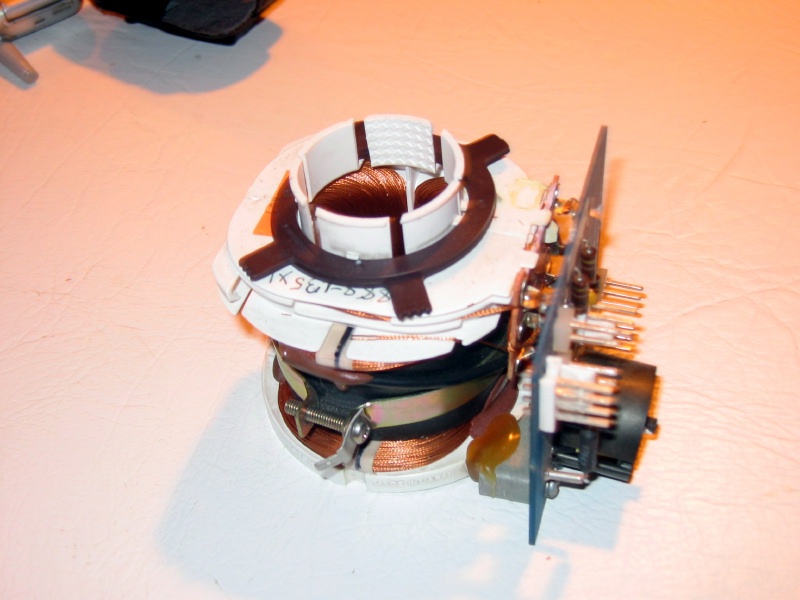
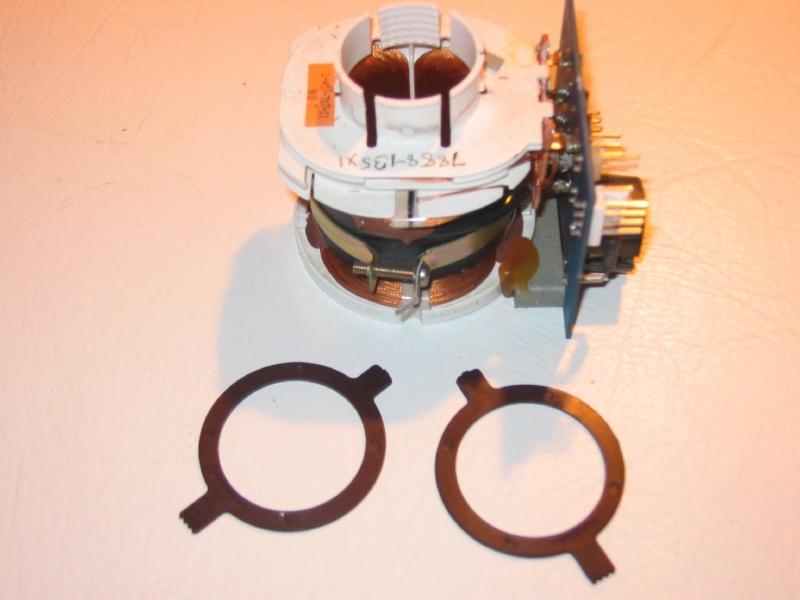
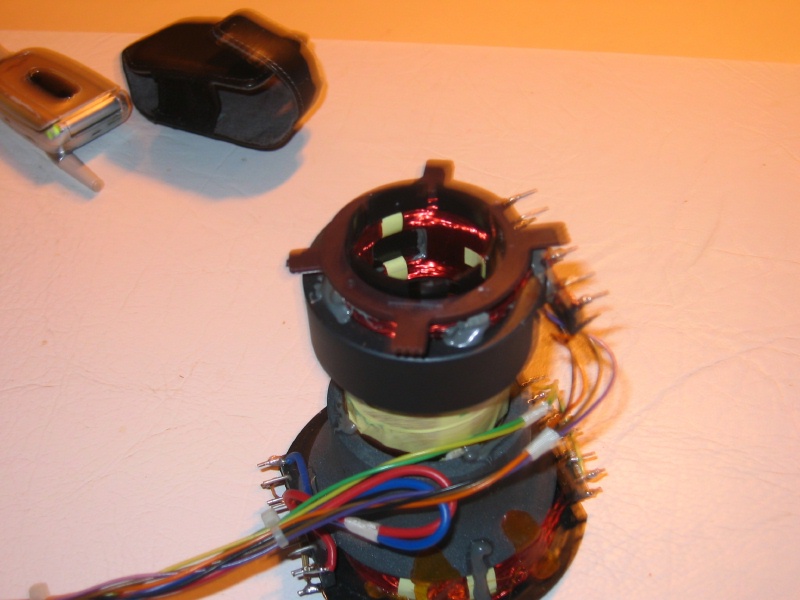
[quote="Robert A. Hill"]Ray,
What do those Ampro 2000 "centering rings" look like? I thought the 2000 only had the standard 2/4 pole astig rings. Scott sent me some actual centering rings last year that I tried on my 3600 with success. I was able to center my blue while minimizing the use of static vertical reg.
Here's a couple of pictures Bob. I don't even remember where I got them, or exactly what 2000 model they were from. They are plastic coated. I haven't tried them out on the 4600 yet. I got a set from Scott that he magnetized, but haven't tried them yet either.
Ray
| Description: |
|
| Filesize: |
141.02 KB |
| Viewed: |
8676 Time(s) |
|
| Description: |
|
| Filesize: |
126.17 KB |
| Viewed: |
8676 Time(s) |
|
| Description: |
|
| Filesize: |
133.99 KB |
| Viewed: |
8676 Time(s) |
|
|
|
| Back to top |
|
|
k.berger
Joined: 16 Mar 2006
Posts: 84
|
| Posted: Wed Mar 19, 2008 11:48 pm Post subject: |
|
|
Hi Rey,
interesting, that in your case (as opposed to Scotts) the lines didn't disappeared even after you exchanged all those boards... By the way, what was that thing you did to LVPS? I would gladly do it too (don't know if I am capable though  ). ).
Do you guys think it makes sense to ask Curt if he has replacement Registration Board? I would be willing to try if it helps - those lines really bother me (funny you really realize how much they impact quality, when they are gone - with registration OFF...).
Kris
|
|
| Back to top |
|
|
Ray Cendroski
Joined: 22 Apr 2006
Posts: 68
Location: Concord, Ohio
|
| Posted: Thu Mar 20, 2008 12:32 am Post subject: |
|
|
| k.berger wrote: | Hi Rey,
By the way, what was that thing you did to LVPS? I would gladly do it too (don't know if I am capable though ).
Do you guys think it makes sense to ask Curt if he has replacement Registration Board? I would be willing to try if it helps - those lines really bother me (funny you really realize how much they impact quality, when they are gone - with registration OFF...).
Kris |
Kris,
"Re-capped" = unsolder and replace all the electrolytic capacitors in the Low Voltage Power Supply. Over time the caps can dry out, change value and not filter the dc voltages as well as originally designed. It wasn't too hard to do, and cost about $60 in parts. I got them at www.digikey.com. I also got shocked quite a few times because I kept forgetting the caps can hold a charge long after the power is removed. I can't exactly describe the finished image effect other than that it looked tighter and crisper.
I don't know if Curt would have a 4200 registration board. I have to believe they are pretty rare.
Ray
|
|
| Back to top |
|
|
k.berger
Joined: 16 Mar 2006
Posts: 84
|
| Posted: Thu Mar 20, 2008 1:52 am Post subject: |
|
|
Rey,
thanks for clarification! I will keep it in mind as one of the projects for the future. I think of getting spare LVPS and HVPS anyway, so then I would be able to do it while still running the PJ.
Let me know, if you figure out easy way to rotate those centering rings - I have them on my 4200, but they are nearly impossible to move and they are near those relatively high voltages... I found out the hard way !
Kris
|
|
| Back to top |
|
|
tse
Joined: 03 May 2006
Posts: 1014
Location: Sweatbucket, Fl.
|
| Posted: Thu Mar 20, 2008 2:41 am Post subject: |
|
|
| k.berger wrote: | Rey,
thanks for clarification! I will keep it in mind as one of the projects for the future. I think of getting spare LVPS and HVPS anyway, so then I would be able to do it while still running the PJ.
Let me know, if you figure out easy way to rotate those centering rings - I have them on my 4200, but they are nearly impossible to move and they are near those relatively high voltages... I found out the hard way !
Kris |
The best way to deal with the centering rings is to first pick all the silicon off. It always gets in the way and will keep the ring from sitting where you need it. If the rings bind up too much you might break the ring and that effs them up. The best tool for adjusting them is your fingers. I have seen people use plastic knitting needles, though.
Scott
_________________
"Were we directed from Washington when to sow and when to reap, we would soon want bread."
Thomas Jefferson
|
|
| Back to top |
|
|
Robert A. Hill
Joined: 19 May 2006
Posts: 182
Location: Simpsonville, SC
|
| Posted: Thu Mar 20, 2008 3:00 am Post subject: |
|
|
Kris,
What are the registration board numbers for the 4200? Wouldn't they be similar to the 2000?
|
|
| Back to top |
|
|
k.berger
Joined: 16 Mar 2006
Posts: 84
|
| Posted: Thu Mar 20, 2008 3:27 am Post subject: |
|
|
Scott,
fingers, heh? I was afraid of it....
Seriously - thanks, as you know, fingers ARE amazing tools really... I will try again!
Do you think it's worth to try and replace registration board?
Robert,
as per Scott's (if I remember correctly) they should be white stickers with numbers starting with "8". Here is what I found - tray itself has sticker on edge: #80946. Card itself has (among others) # 80893.
Also, I think by Scott's info, (he IS real, and I mean REAL EXPERT), there are many similarities between 2000 and 4200. If they apply to reg. board, I don't know. I am new to Ampro, and don't really feel very comfortable (YET!... I hope... )
Thanks guys again,
Kris
|
|
| Back to top |
|
|
tse
Joined: 03 May 2006
Posts: 1014
Location: Sweatbucket, Fl.
|
| Posted: Thu Mar 20, 2008 3:36 am Post subject: |
|
|
| k.berger wrote: | Rey,
thanks for clarification! I will keep it in mind as one of the projects for the future. I think of getting spare LVPS and HVPS anyway, so then I would be able to do it while still running the PJ.
Let me know, if you figure out easy way to rotate those centering rings - I have them on my 4200, but they are nearly impossible to move and they are near those relatively high voltages... I found out the hard way !
Kris |
The best way to deal with the centering rings is to first pick all the silicon off. It always gets in the way and will keep the ring from sitting where you need it. If the rings bind up too much you might break the ring and that effs them up. The best tool for adjusting them is your fingers. I have seen people use plastic knitting needles, though.
Scott
_________________
"Were we directed from Washington when to sow and when to reap, we would soon want bread."
Thomas Jefferson
|
|
| Back to top |
|
|
|
|
|
|
|
You cannot post new topics in this forum
You cannot reply to topics in this forum
You cannot edit your posts in this forum
You cannot delete your posts in this forum
You cannot vote in polls in this forum
You cannot attach files in this forum
You can download files in this forum
|
Forum powered by phpBB © phpBB Group
|
|




