| Author |
Message |
DaveInVA
Joined: 12 Apr 2007
Posts: 15
|
| Posted: Sat Mar 15, 2008 10:54 pm Post subject: New Moome Ext - Weird colors all inputs |
|
|
I just received my 2nd batch ext Moome a few days ago but I am having a problem with it. The colors are all messed up no matter what input or source is used. I've tried a Directv H20 HD receiver and a Toshiba A2 HD-DVD player and NeuNeo DVD player. I've tried both HDMI inputs and the Component input and several cables. Also tried hooking it to a IBM computer monitor.
What I get always is a screen that looks like an old CRT monitor that desperately needs major degaussing. There is a green tint to everything and red tints in spots. Again, every input does this and same thing on 2 video displays. Also, if you shut the Moome box off and on again you have to select through the inputs several times to get it to pass a signal from any input. The Gamma adjustment has no effect on this problem. When there is text on the screen there are horizontal bars the same height as the text that follow the text and extent across the screen.
Is this thing defective or am I just overlooking something?
Thanks,
Dave
|
|
| Back to top |
|
 |
DaveInVA
Joined: 12 Apr 2007
Posts: 15
|
| Posted: Sun Mar 16, 2008 8:54 pm Post subject: |
|
|
Welp, thought I found the problem but it was not meant to be. I opened the unit up and examined it very carefully and found that on the RED BNC jack the ground wire had backed out of its hole on the pcb and was not connected or soldered. A quick check with the ohm meter verified that. The little wire had scrunched up inside and under the jack so I had to unslober the entire red bnc jack, straighten the wire and put it back on the board and reslober it. The wire tried to do the same thing again but got it through the eyelet ok. Though all the bnc jacks all ground to the same ground plane I was hoping that maybe with that one not connected it might have been causing a ground loop causing the color problems. Put it all back together and guess what? Same problem!
After more inspection it seems to be mainly a streaking problem but it does it on a computer monitor also. Whenever something like text or blocky shapes are on the screen they streak horizontally to the right of them across the screen screwing up the colors?
Any ideas?
Thanks,
Dave
P.S. - For grins I tried changing it to composite sync but same problem....
|
|
| Back to top |
|
|
kal
Forum Administrator

Joined: 06 Mar 2006
Posts: 18114
Location: Ottawa, Canada
TV/Projector: JVC DLA-NZ7
|
|
| Back to top |
|
|
Joust
Joined: 05 May 2006
Posts: 2429
Location: Almonte, Ontario, Canada
TV/Projector: Marquee 8501LC
|
| Posted: Mon Mar 17, 2008 12:02 am Post subject: |
|
|
if you put up something white and pull two colour BNC plugs, do you get the right colours?
Test each one individually.
|
|
| Back to top |
|
|
DaveInVA
Joined: 12 Apr 2007
Posts: 15
|
| Posted: Mon Mar 17, 2008 12:15 am Post subject: |
|
|
Yes, green is green, red is red etc. Its a problem like something is being overdriven. White text displays white etc but there will be major streaking to the right of it horizontally. Also, there seems to be a band of green hue horizontally across the pic. The colors are right otherwise in the video...
I even tried a different bnc cable in case the one I was using had to much capacitance for the Moome box but made no difference,,
Dave
|
|
| Back to top |
|
|
Joust
Joined: 05 May 2006
Posts: 2429
Location: Almonte, Ontario, Canada
TV/Projector: Marquee 8501LC
|
| Posted: Mon Mar 17, 2008 12:42 am Post subject: |
|
|
that is strange.
I'd pull out the O-scope and poke around.
If you want to send it to me I can try and figure it out. But Kal is right, the very first step is to send a mail to moomefix@curtpalme.com.
write up as much detail as you can and screen shots would help. A picture is worth 1000 words.
|
|
| Back to top |
|
|
DaveInVA
Joined: 12 Apr 2007
Posts: 15
|
| Posted: Mon Mar 17, 2008 7:04 pm Post subject: |
|
|
For now I've ordered new HDMI cables and a new RGBHV bnc cable set. Though I've tried 2 of each already and the bncs work with the old set up using the Extron/Samsung 360 just fine I just want to totally rule out anything external causing the problems. The 2 HDMI cables I currently have are just cheapies that came with things. I've ordered some nicer ones. I'll update when they arrive and I find out what, if any changes occur...
Dave
|
|
| Back to top |
|
|
DaveInVA
Joined: 12 Apr 2007
Posts: 15
|
| Posted: Wed Mar 19, 2008 9:14 pm Post subject: |
|
|
I got my new cables today and it still does the same thing. Also does it using the component inputs. Guess its time to email Moome..
Dave
|
|
| Back to top |
|
|
DaveInVA
Joined: 12 Apr 2007
Posts: 15
|
| Posted: Thu Mar 20, 2008 8:48 pm Post subject: |
|
|
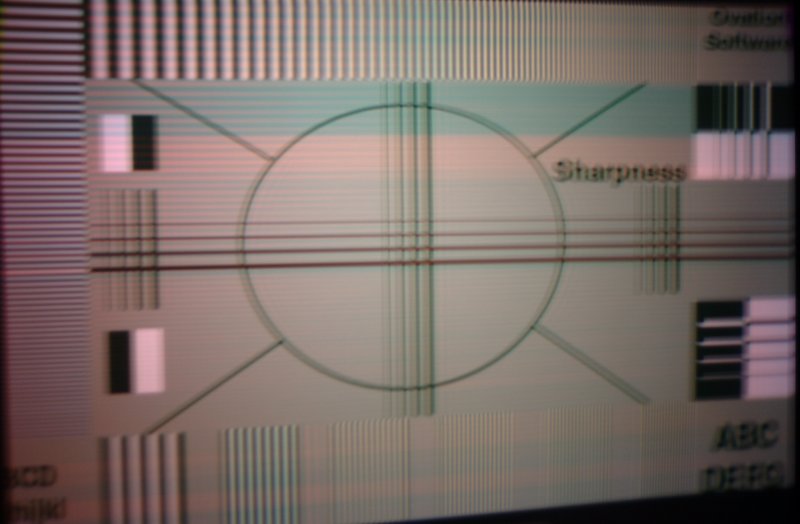
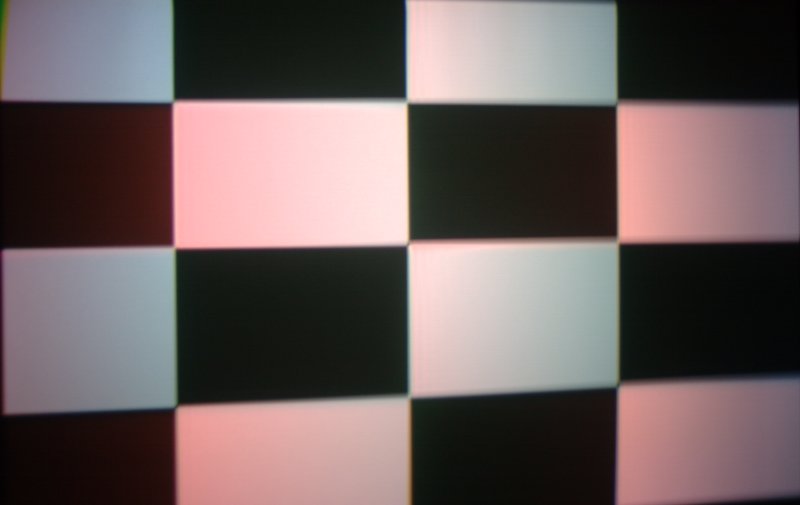
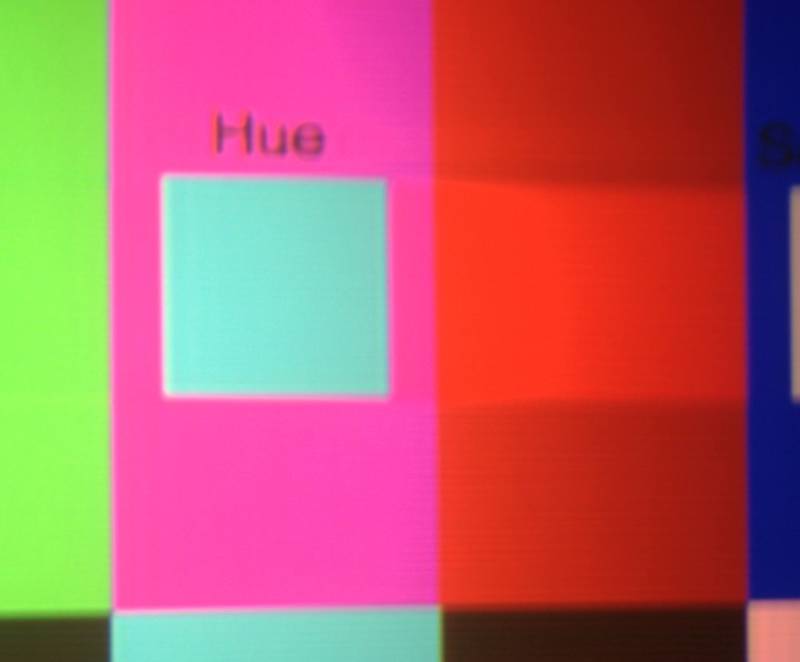
Here are some pics of what I am getting on all sources (including component). These are shots off the Avia DVD. Except for the color chart one all the test patterns are supposed to be B&W only. The color chart one shows the streaking. I have tried all new high quality cables and it does it with a computer monitor also. Does same thing from Directv H20 HD receiver and Toshiba A2 HD-DVD.
Dave
| Description: |
| Notice the streak and color blotches.. |
|
| Filesize: |
46.56 KB |
| Viewed: |
10774 Time(s) |
|
| Description: |
| This is supposed to be B&W.... |
|
| Filesize: |
22.28 KB |
| Viewed: |
10774 Time(s) |
|
| Description: |
| Streaking on AVIA color chart.. |
|
| Filesize: |
20.56 KB |
| Viewed: |
10774 Time(s) |
|
|
|
| Back to top |
|
|
kal
Forum Administrator
Joined: 06 Mar 2006
Posts: 18114
Location: Ottawa, Canada
TV/Projector: JVC DLA-NZ7
|
| Posted: Tue Mar 25, 2008 3:19 pm Post subject: |
|
|
| Joust wrote: | But Kal is right, the very first step is to send a mail to moomefix@curtpalme.com.
write up as much detail as you can and screen shots would help. A picture is worth 1000 words. |
Yes, Moome's said that anyone that has colour problems (or other problems) should email him with complete details.
Best to send him the photos too instead of linking him to the forum as he has problems accessing this site reliably for some reason.
Kal
_________________

Support our site by using our affiliate links. We thank you!
My basement/HT/bar/brewery build 2.0
|
|
| Back to top |
|
|
DaveInVA
Joined: 12 Apr 2007
Posts: 15
|
| Posted: Tue Mar 25, 2008 3:29 pm Post subject: |
|
|
I emailed Moome and he had me try a couple things that didn't change the problem and asked me to send it back to him and he will replace/repair it and return it. I am probably going to buy a HD Fury first as I will have no way to watch tv or dvds without the Moome. I've already upgraded to the newer Directv HD receiver that has no rgb output and am now using a Toshiba A2 HD DVD player which also has no rgb output. I have no other TVs in the house except a computer monitor which is only rgb also. I have a Barco 1100 but its got to many problems to use reliably and its waiting for replacement stuff from Curt...
Dave
|
|
| Back to top |
|
|
Bert Randolph
Joined: 03 Jul 2007
Posts: 81
Location: Germany
|
| Posted: Sat Mar 29, 2008 11:37 am Post subject: |
|
|
Dave,
what resolution did you use?
I see similar effects when feeding 1080p from my ep30 HDDVD. I think it has to do with the porches. I also have wrap around on both edges. With 1080i and 720p all is fine.
Daniel.
|
|
| Back to top |
|
|
|
|




