| Author |
Message |
scotha
Joined: 27 Mar 2006
Posts: 167
Location: Lilburn, Ga.
|
| Posted: Tue Mar 04, 2008 1:35 am Post subject: Barco data 600 |
|
|
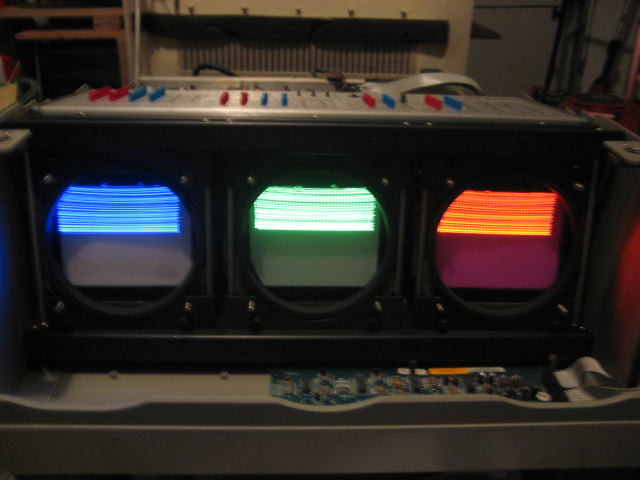
Hello all, I have 600 that I picked up a couple years ago and it has this problem: The image is on just the top half of the tube. It's set up table top, if I set it to ceiling the image moves to the bottom half of the tube. Verticle amp works but just on the half that the image is on it will not expand the image below the middle of the tube face. The horizontal shift pots dont work could this be related or another problem? Picture attached. Thanks for any input.
| Description: |
|
| Filesize: |
143.12 KB |
| Viewed: |
14514 Time(s) |
|
_________________
pj. BD808s, BD801s
Last edited by scotha on Tue Mar 04, 2008 10:39 pm; edited 1 time in total
|
|
| Back to top |
|
 |
macgyver655
Joined: 22 Aug 2007
Posts: 8508
|
| Posted: Tue Mar 04, 2008 3:54 pm Post subject: |
|
|
|
First guess it appears to be a vertical sweep problem. Are you sending it a signal in that pic or something else?
|
|
| Back to top |
|
|
Fujifrontier

Joined: 20 Oct 2007
Posts: 354
Location: San Antonio, Texas
|
| Posted: Tue Mar 04, 2008 4:08 pm Post subject: |
|
|
|
wtf
|
|
| Back to top |
|
|
scotha
Joined: 27 Mar 2006
Posts: 167
Location: Lilburn, Ga.
|
| Posted: Tue Mar 04, 2008 10:35 pm Post subject: |
|
|
Thanks for the reply. That is the internal test pattern but it does the same with a video signal.
_________________
pj. BD808s, BD801s
|
|
| Back to top |
|
|
macgyver655
Joined: 22 Aug 2007
Posts: 8508
|
| Posted: Tue Mar 04, 2008 11:35 pm Post subject: |
|
|
|
Well about all I can tell you is if you dont have any experience in electronics or you dont have another board to try then your only option is to send your board to Curt for testing along with any other board he feels maybe connected with this problem. Good luck.
|
|
| Back to top |
|
|
Curt Palme
CRT Tech
Joined: 08 Mar 2006
Posts: 24396
Location: Langley, BC
TV/Projector: All of them!
|
| Posted: Wed Mar 05, 2008 12:09 am Post subject: |
|
|
It may well be a V board issue. When you invert the image, the same portion of the V board is working, you just invert it on the tube. So the yokes are OK (never had one fail), but if the one 1/2 of the V board isn't amplifying, you'd most likely lose sync and only get 1/2 the image.
Frankly, why not find a good but burnt tube ECP chassis to put those 600 tubes into? The 600s are REALLY flaky now, but if the tubes are good, the ECP chassis would be a more reliable set.
|
|
| Back to top |
|
|
scotha
Joined: 27 Mar 2006
Posts: 167
Location: Lilburn, Ga.
|
| Posted: Wed Mar 05, 2008 1:32 am Post subject: |
|
|
Thanks, I'm not putting any money into this just hoping to get it going if not into the garbage. I have tried a different Verticle board, horizontal shift board, rgb input,test pattern, video rgb, convergence and control panel with no change.
_________________
pj. BD808s, BD801s
|
|
| Back to top |
|
|
macgyver655
Joined: 22 Aug 2007
Posts: 8508
|
| Posted: Wed Mar 05, 2008 1:59 am Post subject: |
|
|
|
Aside from the vert board I wouldn't expect any of the other boards you tried to make a difference. More possibly the SMPS. But like you said maybe better off selling the tubes and bailing the rest. Oh well !!!
|
|
| Back to top |
|
|
scotha
Joined: 27 Mar 2006
Posts: 167
Location: Lilburn, Ga.
|
| Posted: Wed Mar 05, 2008 2:46 am Post subject: |
|
|
Tried different smps and they both keep blowing the f3 fuse. The machine actually sounds like it's powering normaly for a second and then the fuse blows. Short on the motherboard maybe?
_________________
pj. BD808s, BD801s
|
|
| Back to top |
|
|
macgyver655
Joined: 22 Aug 2007
Posts: 8508
|
| Posted: Wed Mar 05, 2008 3:06 pm Post subject: |
|
|
|
F3 is the -17 volt source line. There are a few components on the SMPS that could cause it to blow but if the same fuse blew on 2 different supplies then its not on there. That line feeds the Focus module, video input and convergence generator, Verticle deflection and sync module, N.S. correction and horz shift module and the convergence module. If you wanted to play you could disconnect these modules and see if F3 still blows. If it doesnt then connect 1 module at a time until it does and that board has a problem. Not sure about mother board but I'll look at the schematic.
|
|
| Back to top |
|
|
macgyver655
Joined: 22 Aug 2007
Posts: 8508
|
| Posted: Wed Mar 05, 2008 3:19 pm Post subject: |
|
|
|
I'm not seeing anything on the mother board that can cause F3 to blow, however, possibilities are: Loose screw lodged under the mother board, Someone ran a screw up into the mother board or if a pin in one of the board sockets got bent over and is touching another pin when the board is installed.
|
|
| Back to top |
|
|
scotha
Joined: 27 Mar 2006
Posts: 167
Location: Lilburn, Ga.
|
| Posted: Thu Mar 06, 2008 12:59 am Post subject: |
|
|
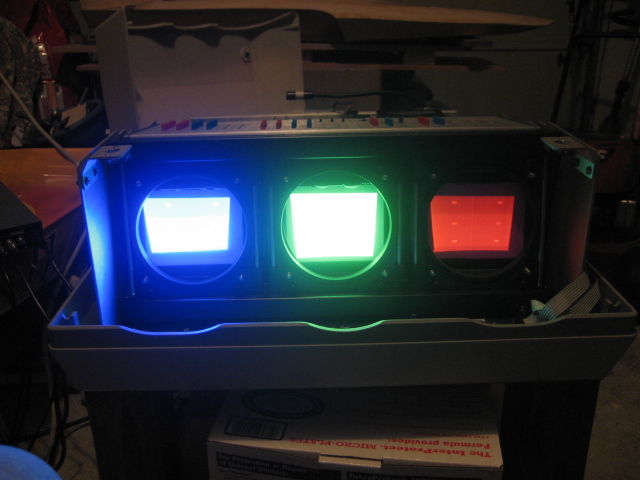
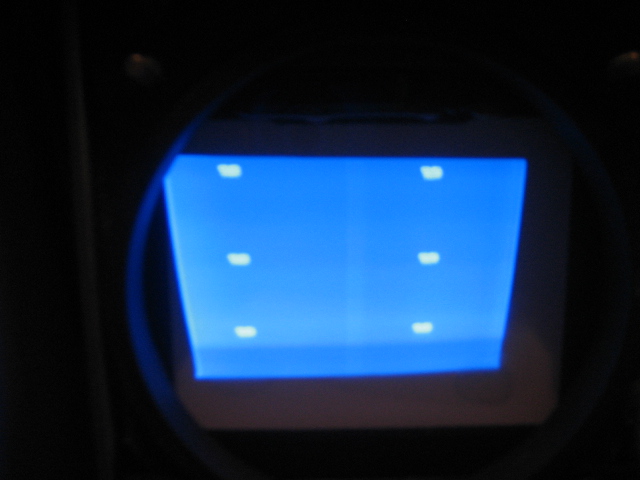
OK, I've made progress on this beast. The problem I was having was caused by a jumper wire on the bottom of the motherboard making contact with an adjacent pin so my smps no longer blows fuses and the image is filling the crt face. Now the problem is jumpy video on the internal test pattern, and with 480p rgb negative sync I get multiple images. The attached picture shows 6 white spots each one of these says DVD and there is only supposed to be 1. Thanks for the help.
| Description: |
|
| Filesize: |
133.66 KB |
| Viewed: |
14377 Time(s) |
|
| Description: |
|
| Filesize: |
96.63 KB |
| Viewed: |
14377 Time(s) |
|
_________________
pj. BD808s, BD801s
|
|
| Back to top |
|
|
scotha
Joined: 27 Mar 2006
Posts: 167
Location: Lilburn, Ga.
|
| Posted: Fri Mar 07, 2008 1:41 am Post subject: |
|
|
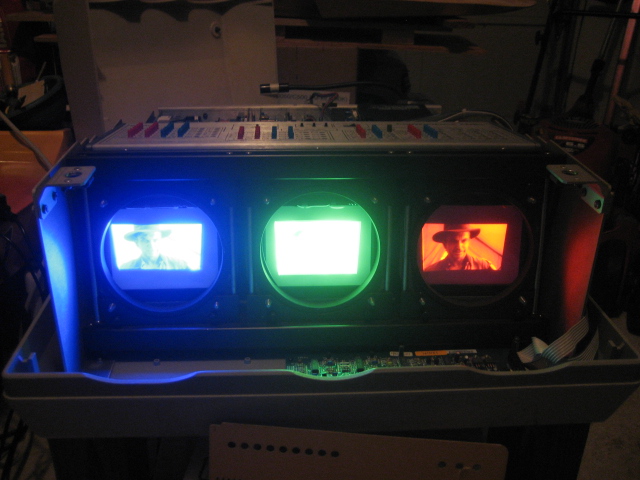
It's alive! Finally got an image displayed. Now the only problem left is I have no horizontal control. I have tried 3 horizontal shift boards and they all work the same I can control the geometry but not the position or the size pots. Is there any other board that would prevent the shift from working? You can see both red and blue are shifted in the same direction and about the same amount. Thanks.
| Description: |
|
| Filesize: |
142 KB |
| Viewed: |
14339 Time(s) |
|
_________________
pj. BD808s, BD801s
|
|
| Back to top |
|
|
macgyver655
Joined: 22 Aug 2007
Posts: 8508
|
| Posted: Fri Mar 07, 2008 2:06 am Post subject: |
|
|
|
Are you saying when you turn the pots for red, green or blue Horz shift or Horz width on the N-S Corrections + Horizontal Shift board nothing happens?
|
|
| Back to top |
|
|
Curt Palme
CRT Tech
Joined: 08 Mar 2006
Posts: 24396
Location: Langley, BC
TV/Projector: All of them!
|
| Posted: Fri Mar 07, 2008 2:15 am Post subject: |
|
|
|
If that is what you're saying, I'd say the DC voltages going to the H shift chips on the H shift board isn't there. It's a DC offset that shifts the image from what I can remember.
|
|
| Back to top |
|
|
scotha
Joined: 27 Mar 2006
Posts: 167
Location: Lilburn, Ga.
|
| Posted: Fri Mar 07, 2008 2:42 am Post subject: |
|
|
The trimpots on the top edge of the horizontal board that control keystone and pincushion work. The three trimpots toward the rear on the top edge that control horizontal raster position and the yellow coils under those trimpots that I believe are the size coils do not work. Thanks
_________________
pj. BD808s, BD801s
|
|
| Back to top |
|
|
macgyver655
Joined: 22 Aug 2007
Posts: 8508
|
| Posted: Fri Mar 07, 2008 3:15 am Post subject: |
|
|
|
You need to check fuses F5 and F6 in the SMPS.
|
|
| Back to top |
|
|
scotha
Joined: 27 Mar 2006
Posts: 167
Location: Lilburn, Ga.
|
| Posted: Fri Mar 07, 2008 3:37 am Post subject: |
|
|
Yep, f5 and 6 are blown. Thanks. I used 3 amp should be 4 amp.
_________________
pj. BD808s, BD801s
|
|
| Back to top |
|
|
scotha
Joined: 27 Mar 2006
Posts: 167
Location: Lilburn, Ga.
|
| Posted: Fri Mar 07, 2008 10:22 pm Post subject: |
|
|
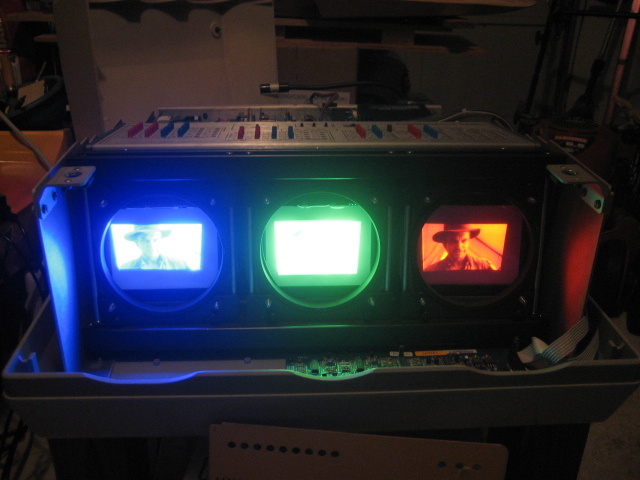
Ok, the proper fuses corrected the horizontal shift problem. Now what's left is the verticle size of the red and blue they are both shorter than the green. Is there a verticle height adjust for each tube? Thanks for all the help. You can see in the attachment how the red and blue image is shorter than the green
| Description: |
|
| Filesize: |
142 KB |
| Viewed: |
14279 Time(s) |
|
_________________
pj. BD808s, BD801s
|
|
| Back to top |
|
|
scotha
Joined: 27 Mar 2006
Posts: 167
Location: Lilburn, Ga.
|
| Posted: Sat Mar 08, 2008 3:57 pm Post subject: |
|
|
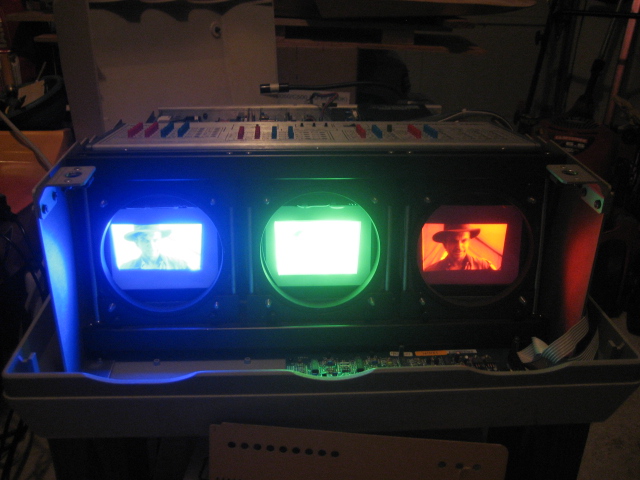
Does anyone know how to adjust the verticle height of the individual tubes? I either need to make the green shorter or the red and blue taller. Right now the green is so much taller that I cannot converge the image. Thanks
| Description: |
|
| Filesize: |
142 KB |
| Viewed: |
14255 Time(s) |
|
_________________
pj. BD808s, BD801s
|
|
| Back to top |
|
|
|
|





