| Author |
Message |
WWJD5502
Joined: 29 Feb 2008
Posts: 17
|
| Posted: Fri Feb 29, 2008 8:38 am Post subject: Sony VPH-1271QM Supadata EX |
|
|
Hi Folks,
I have a Sony CRT VPH-1271 and I have been happily using it for the last three years hassle free after I purchased it 2nd hand with brand new guns. However, lately it hasn't been starting up. When I press the power button on the remote, you can hear it power up but after about two secs. it powers down. I left it for about a week and it started up fine, but it has reverted back to the same problem. Power Supply maybe? 
|
|
| Back to top |
|
 |
mike calcott
Joined: 18 May 2006
Posts: 307
Location: Australia
|
| Posted: Fri Feb 29, 2008 8:46 am Post subject: |
|
|
What error message is there
_________________
Old dog learning new tricks
|
|
| Back to top |
|
|
WWJD5502
Joined: 29 Feb 2008
Posts: 17
|
| Posted: Fri Feb 29, 2008 8:49 am Post subject: |
|
|
How do I remove the Hood to see the error message?
Last edited by WWJD5502 on Fri Feb 29, 2008 9:33 am; edited 2 times in total
|
|
| Back to top |
|
|
mike calcott
Joined: 18 May 2006
Posts: 307
Location: Australia
|
| Posted: Fri Feb 29, 2008 9:29 am Post subject: |
|
|
Undo two screws under the contol panel flap and remove the top panel, you will then see two more screws that hold the uper casing in place. remove the front panel, this just clips in place, you can then remove the uper casing. You will then see a lcd panel on the side of the projector which will display the error message.
Regards Mike
_________________
Old dog learning new tricks
|
|
| Back to top |
|
|
WWJD5502
Joined: 29 Feb 2008
Posts: 17
|
| Posted: Fri Feb 29, 2008 9:31 am Post subject: |
|
|
Thanks Mike, Finally got the Hood off and the error message is 20.
What would this mean?  Cheers, Mark. Cheers, Mark.
|
|
| Back to top |
|
|
mike calcott
Joined: 18 May 2006
Posts: 307
Location: Australia
|
| Posted: Fri Feb 29, 2008 9:37 am Post subject: |
|
|
Refer to Curt's manuals and downloads where there is a error message section
_________________
Old dog learning new tricks
|
|
| Back to top |
|
|
WWJD5502
Joined: 29 Feb 2008
Posts: 17
|
| Posted: Fri Feb 29, 2008 9:40 am Post subject: |
|
|
All it says is a 'Y' under the power down column and that's exactly what it does.
There is a dash under all the other columns. Sounds Serious?
|
|
| Back to top |
|
|
Sonynut

Joined: 08 Aug 2006
Posts: 367
Location: Bradford,PA
|
| Posted: Fri Feb 29, 2008 1:50 pm Post subject: |
|
|
It should be showing another code before the 20.. Make sure all of your fans are spinning. If any one of them isn't(besides the tiny one behind the rear status light), the machine will power down.
_________________
1272 Stack coming soon:)
|
|
| Back to top |
|
|
WWJD5502
Joined: 29 Feb 2008
Posts: 17
|
| Posted: Fri Feb 29, 2008 8:37 pm Post subject: |
|
|
Yes, very quickly it flashed 13 - 80 - then it sat at 20.
There are two fans under neath which were spinning and one to the side which was also spinning.
The unit looks a bit dusty around the fans etc.
|
|
| Back to top |
|
|
tony359

Joined: 04 Aug 2006
Posts: 378
|
| Posted: Tue Mar 04, 2008 11:43 pm Post subject: |
|
|
|
error 80 does not exist, you're reading it upside. It's error 08, 1E (?) and 02 perhaps...
|
|
| Back to top |
|
|
ecrabb
Forum Moderator

Joined: 13 Mar 2006
Posts: 15909
Location: Utah
TV/Projector: JVC RS40, Epson 5010
|
| Posted: Wed Mar 05, 2008 12:10 am Post subject: |
|
|
Hmm.. I'd say that's a good call Tony (08 makes sense - 80 does not), but 20 is indeed power-down, which is where it should sit after power-down.
If Curt doesn't chime in, PM him and I'm sure he can help you diagnose it and repair the PSU if necessary.
Guys, does the big fan on the PSU have a sensor on it?
SC
|
|
| Back to top |
|
|
tony359
Joined: 04 Aug 2006
Posts: 378
|
| Posted: Wed Mar 05, 2008 12:14 am Post subject: |
|
|
All fans have sensors but the small one in the rear.
Ciao
A
|
|
| Back to top |
|
|
WWJD5502
Joined: 29 Feb 2008
Posts: 17
|
| Posted: Wed Mar 05, 2008 11:56 pm Post subject: |
|
|
Hey guy's I think you're right. I have the blinkin thing mounted on my ceiling, therefore it must be upside down!!
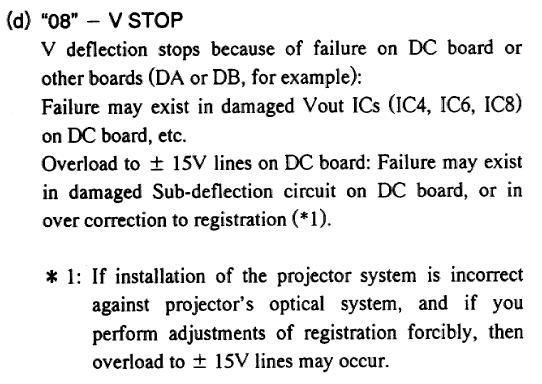
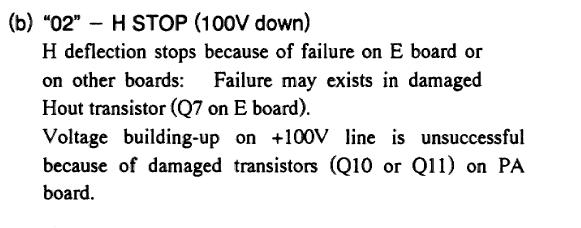
So it would be 08 then 02? What do you think. This would make it a V-Stop and a (H Stop) 100v down ??
But the unit does power down after displaying the 20 / 02. Thanks for your help. Mark.
|
|
| Back to top |
|
|
Sonynut
Joined: 08 Aug 2006
Posts: 367
Location: Bradford,PA
|
| Posted: Thu Mar 06, 2008 2:13 pm Post subject: |
|
|
Error 08 is a problem with the DC board usually..
Error 02 can be on the E board, the P board, and sometimes the HV splitter between the green and blue tube necks..
Here are a couple of clips from the service manual, along with a link to the layout/downloads section on this site.. The components on the boards are marked to help you find them.
Error 08 can also be over adjustment of convergence controls, but unlikely if the set just quit while running, and not being set up.
http://www.curtpalme.com/Sony125x_Layout1.shtm
http://www.curtpalme.com/Sony125x_Downloads.shtm
Best of luck 
| Description: |
|
| Filesize: |
43.3 KB |
| Viewed: |
6522 Time(s) |
|
| Description: |
|
| Filesize: |
23.59 KB |
| Viewed: |
6522 Time(s) |
|
_________________
1272 Stack coming soon:)
|
|
| Back to top |
|
|
Motobias

Joined: 08 Jul 2008
Posts: 163
Location: Osnabrueck, Germany
|
| Posted: Thu Dec 15, 2011 2:28 pm Post subject: |
|
|
mine does e1 c3 errors and the shuts off, power supply doing a squealing sound for the time it's trying to start...
i suspect some diodes in the psu because area around them has change color slightly !
_________________
Most peope talk about HD without knowing the meaning and how to do it RIGHT !
FIGHTING STUPIDITY SINCE 1983
|
|
| Back to top |
|
|
|
|





