| Author |
Message |
rabies_70

Joined: 15 Feb 2007
Posts: 1189
Location: Carlsbad, CA
TV/Projector: Sony G70Q
|
| Posted: Mon Feb 25, 2008 9:30 pm Post subject: How to test PreAmp and Amp outputs |
|
|
I am clueless in this area. Can anybody get me pointed in the right direction? I am trying to track down a gremlin and want to test the output on the front channel of my preamp, and then the out put of the amp. I do not have a scope, but will buy one if I need to. I do have a decent multimeter. And a hammer. 
_________________
Ray
I am an iconoclast
|
|
| Back to top |
|
 |
Curt Palme
CRT Tech
Joined: 08 Mar 2006
Posts: 24396
Location: Langley, BC
TV/Projector: All of them!
|
| Posted: Mon Feb 25, 2008 10:29 pm Post subject: |
|
|
You can probably narrow down what you're seeking by simply flipping preamp outputs. (ie left to right, right to left).
If you flip the preamp outputs going to the power amp, and hte same channel stays wonky, then it's in the power amp. If the problem channel flips, then it's in the preamp.
Don't forget to check bad cables, connections, dirty switches and pots, etc.
What exactly is the problem?
|
|
| Back to top |
|
|
Moose
Joined: 09 Mar 2006
Posts: 788
Location: Minnesota
|
| Posted: Mon Feb 25, 2008 11:12 pm Post subject: |
|
|
This is probably obvious, but be certain to turn off the amplifier before switching connectors, else you may end up with more things wrong than you started with.
_________________
In the real world, I am alan halvorson, King of the Wild Frontier and Swell Guy.
|
|
| Back to top |
|
|
rabies_70
Joined: 15 Feb 2007
Posts: 1189
Location: Carlsbad, CA
TV/Projector: Sony G70Q
|
| Posted: Mon Feb 25, 2008 11:57 pm Post subject: |
|
|
Thanks moose that would suck, it did occur to me.
Thanks Curt, You know the problem is wacked. It has happened on each of three now Lexicon processors, DC1, DC2 and now MC1. The front left channel will intermittantly stop producing. I have switched amps, switched outputs, switched wires, replaced wires, switched speakers. The only thing I haven't done is rewire the in wall wiring to the front left channel, and the only reason I haven't done that yet besides the PIA factor, is that I bypassed all those wires and processing (Lexicon-Behringer 8024 in RTA mode, I like the pretty jumping lights-Amp-speaker) and the problem is still sometimes there sometimes not. The speaker works, the amp is good, both channels.
It just seems to me if it was a short in the wiring, something else would pop. The speaker, the amp, the 8024. Why only the Front Left channel. I guess I am trying to see how to measure if any signal at all is coming out of the processor. Thanks Curt. I appreciate the help.
_________________
Ray
I am an iconoclast
|
|
| Back to top |
|
|
AnalogRocks
Forum Moderator

Joined: 08 Mar 2006
Posts: 26706
Location: Toronto, Ontario, Canada
TV/Projector: Sony 1252Q, AMPRO 4000G
|
| Posted: Tue Feb 26, 2008 12:03 am Post subject: |
|
|
| rabies_70 wrote: | Thanks moose that would suck, it did occur to me.
Thanks Curt, You know the problem is wacked. It has happened on each of three now Lexicon processors, DC1, DC2 and now MC1. The front left channel will intermittantly stop producing. I have switched amps, switched outputs, switched wires, replaced wires, switched speakers. The only thing I haven't done is rewire the in wall wiring to the front left channel, and the only reason I haven't done that yet besides the PIA factor, is that I bypassed all those wires and processing (Lexicon-Behringer 8024 in RTA mode, I like the pretty jumping lights-Amp-speaker) and the problem is still sometimes there sometimes not. The speaker works, the amp is good, both channels.
It just seems to me if it was a short in the wiring, something else would pop. The speaker, the amp, the 8024. Why only the Front Left channel. I guess I am trying to see how to measure if any signal at all is coming out of the processor. Thanks Curt. I appreciate the help. |
Hope some critter hasn't chewed your wires in the wall. Had that happen to a neighbours TV cable.
_________________
Tech support for nothing
CRT.
HD done right!
|
|
| Back to top |
|
|
Joust
Joined: 05 May 2006
Posts: 2429
Location: Almonte, Ontario, Canada
TV/Projector: Marquee 8501LC
|
| Posted: Tue Feb 26, 2008 1:09 am Post subject: |
|
|
|
its easy to string temporary wiring as a test.
|
|
| Back to top |
|
|
rabies_70
Joined: 15 Feb 2007
Posts: 1189
Location: Carlsbad, CA
TV/Projector: Sony G70Q
|
| Posted: Tue Feb 26, 2008 1:17 am Post subject: |
|
|
I hope its not a critter too. Don't think it is though.
And the funny thing is joust, the problem is intermittent. Sometimes when the whole system is hooked up, its fine other times, only front L channel drops out. The source is irrelevant. Other times with temporary wiring it works fine too other times no.
I guess I'm just trying to see if the op amp is failing by checking the output at the L front with a tool, I just have no clue what I should be looking for and I'm sure I'm not even using the correct terms. I just think there should be some sort of voltage coming out of there and thought maybe there is a standard way of checking it that one of you guru's know since I am pretty ignorant in these matters and google searching was leading me in circles of noy quite what I was looking for. Thanks again for the help.
_________________
Ray
I am an iconoclast
|
|
| Back to top |
|
|
Curt Palme
CRT Tech
Joined: 08 Mar 2006
Posts: 24396
Location: Langley, BC
TV/Projector: All of them!
|
|
| Back to top |
|
|
AnalogRocks
Forum Moderator
Joined: 08 Mar 2006
Posts: 26706
Location: Toronto, Ontario, Canada
TV/Projector: Sony 1252Q, AMPRO 4000G
|
| Posted: Tue Feb 26, 2008 2:42 am Post subject: |
|
|
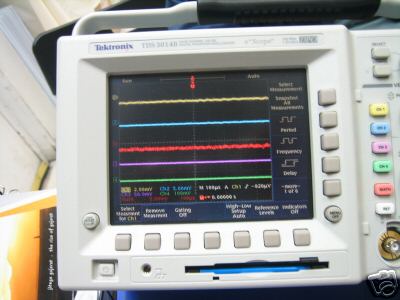
Gawersh dat's purdy.
| Description: |
|
| Filesize: |
22.59 KB |
| Viewed: |
27753 Time(s) |
|
_________________
Tech support for nothing
CRT.
HD done right!
|
|
| Back to top |
|
|
paw

Joined: 08 Mar 2006
Posts: 1176
Location: Arvada, CO
|
| Posted: Tue Feb 26, 2008 6:27 pm Post subject: |
|
|
| AnalogRocks wrote: |
Gawersh dat's purdy. |
What kind of memory card does that thing use? I don't think I've ever seen one that big. 
I guess ebay would be the place to find those 3.5" floppies also.
_________________
Aubrey
|
|
| Back to top |
|
|
nuttall_chris
Joined: 08 Mar 2006
Posts: 832
Location: Ottawa, Ontario, Canada
|
| Posted: Tue Feb 26, 2008 6:46 pm Post subject: |
|
|
| AnalogRocks wrote: |
Gawersh dat's purdy. |
I have a similar one to that. Mine is the TDS3052. Its the 500Mhz 2 channels version. 
Chris
|
|
| Back to top |
|
|
rabies_70
Joined: 15 Feb 2007
Posts: 1189
Location: Carlsbad, CA
TV/Projector: Sony G70Q
|
| Posted: Tue Feb 26, 2008 6:50 pm Post subject: |
|
|
OK curt, after staying up late last night and cramming everything I could find on o scopes into my brain, will the 20mHz really be good enough for me and my desire to always have the right tool "just in case", or will I be better off getting a 100mHz scope. I see a bunch of the TEKTRONIX 465. Is that because they common, or because they are to old, or junk, or....
I understand from what I read that the 20mHz would certainly fill the bill to test my problem, but will that bandwidth limit me in a way as of yet unknown. Personal rudimentary electronics testing is apparently going to be in my toolbox soon and I don't want to limit its usefulness
_________________
Ray
I am an iconoclast
|
|
| Back to top |
|
|
Curt Palme
CRT Tech
Joined: 08 Mar 2006
Posts: 24396
Location: Langley, BC
TV/Projector: All of them!
|
| Posted: Tue Feb 26, 2008 8:17 pm Post subject: |
|
|
With audio, you're only measuring up to 20 Khz, not Mhz, so the frequency response of the scope is way higher than what you're measuring. For video, 5Mhz is all you really need (watch Person99 come in and argue that one..)
That is of course unless you're Mike PArker and are engineering better video circuits. For troubleshooting, something basic and generic is fine.
I am personally not big on Tek or HP. They are usually way overdesigned, but that makes servicing a bitch as well. My main scope is a 35 Mhz Leader that I bought for $1200 in 1982 or so. Came with a free Fluke 73 multimeter. It's died once, a bad solder joint on the power supply board. I use it weekly, usually daily. I have a higher end 100Mhz dual trace scope, but I'm so used to the Leader that the newer scope sits on my audio bench, used once in a blue moon.
Buy a 20Mhz scope for now, buy something higher end if you really want to, but it's not required. Unless you're designing something, with troubleshooting, you're almost always just looking to see if a waveform is there or not, you're not looking for stuff like risetimes which would need a higher end scope for.
|
|
| Back to top |
|
|
rabies_70
Joined: 15 Feb 2007
Posts: 1189
Location: Carlsbad, CA
TV/Projector: Sony G70Q
|
| Posted: Tue Feb 26, 2008 8:29 pm Post subject: |
|
|
SWEET thanks curt....ray
Oh yeah, check your paypal account....Lunch is on me today. I appreciate the help
_________________
Ray
I am an iconoclast
|
|
| Back to top |
|
|
rabies_70
Joined: 15 Feb 2007
Posts: 1189
Location: Carlsbad, CA
TV/Projector: Sony G70Q
|
| Posted: Sat Mar 08, 2008 8:17 am Post subject: |
|
|
Hey. Anybody knowing about O scopes. Can I use any BNC type probes for my 20MHz scope, i.e. can I use a set of 100MHz probes for a 20MHz scope. Thanks...
_________________
Ray
I am an iconoclast
|
|
| Back to top |
|
|
lyd
Joined: 15 Sep 2007
Posts: 390
Location: Lake Mills, Wi
|
| Posted: Sat Mar 08, 2008 11:34 am Post subject: |
|
|
| rabies_70 wrote: | | Hey. Anybody knowing about O scopes. Can I use any BNC type probes for my 20MHz scope, i.e. can I use a set of 100MHz probes for a 20MHz scope. Thanks... |
I was just looking into this last night, having received my ebay-purchased scope and found it to be missing the probes. (Grr, ebay sellers.)
It looks like you can, you just need to make sure the probe has the trim pot to adjust impedance. Most apparently do, but I came across a few that were fixed. Then you just calibrate the probe using the facilities of your scope intended for that purpose. See the second heading here, and/or your probe manual.
That's what I've got so far, anyway. I'm waiting for a response from the seller about the missing stuff before I order probes for mine.
lyd
_________________
de gustibus non disputandum
|
|
| Back to top |
|
|
paw
Joined: 08 Mar 2006
Posts: 1176
Location: Arvada, CO
|
|
| Back to top |
|
|
rabies_70
Joined: 15 Feb 2007
Posts: 1189
Location: Carlsbad, CA
TV/Projector: Sony G70Q
|
| Posted: Mon Mar 10, 2008 4:38 am Post subject: |
|
|
THATS what I'm talking about! Already have those guys, all I have to build is that thing. THANKS!!!!!
_________________
Ray
I am an iconoclast
|
|
| Back to top |
|
|
mrbud

Joined: 23 Feb 2008
Posts: 15
Location: Mo.
|
| Posted: Mon Mar 10, 2008 1:31 pm Post subject: |
|
|
Ray,
1. Do you have a " toner " ?
If so.. do this...
1. Attach a cable to the preamp output on your amplifier.. then with your toner at the other end of the cable you will be able to hear ( through the toner ) the output from the preamp... The reason you are attaching a cable is to get away from the back of the unit a bit.. The toner will tend to pick up signals from about 12-18 inches away depending on the strength of the signal...
I would do this when the ouput goes away .. this will tell you if it is truly the ouput from the preamp or something else.
Another thing that could be going on is...
When your speaker hits a lower bass note ( mains set to large for example ) then the speaker could actually be showing a short to the amp. which then could be cutting off the output.. Resetting after it doesn't see the short again.. and then working till it sees that low bass note again....
You can check this with a multimeter.. check speaker at rest .. should be around 4-8 ohms ( depending on speaker ) .. with meter in place .. gently push cone for " woofer " in and see if meter goes to a short reading or still shows resistance..
Hope this helps,
MrBud
_________________
Beer !!!!! Sometimes you can have it for breakfast and it's ok.....
|
|
| Back to top |
|
|
rabies_70
Joined: 15 Feb 2007
Posts: 1189
Location: Carlsbad, CA
TV/Projector: Sony G70Q
|
| Posted: Mon Mar 10, 2008 5:21 pm Post subject: |
|
|
All of these tips have helped tremendously. I am looking forward to the next time something funky happens 
_________________
Ray
I am an iconoclast
|
|
| Back to top |
|
|
|
|




