| Author |
Message |
royuk
Joined: 28 Dec 2007
Posts: 41
|
| Posted: Sat Feb 09, 2008 10:50 pm Post subject: Tubes: vertical shadow line |
|
|
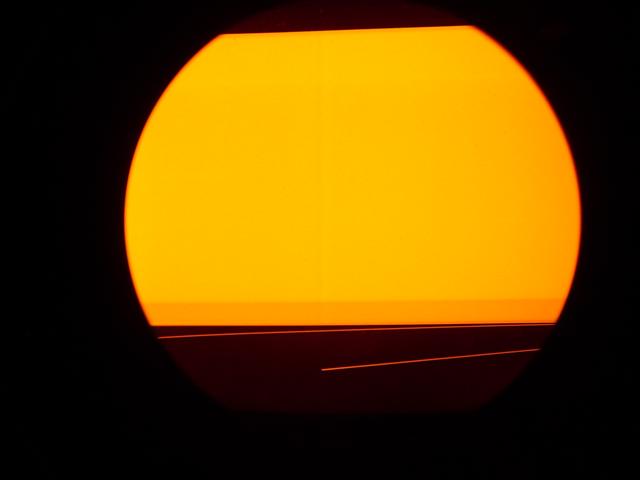
It's my Barco 1209s.
This line can be seen, from top to bottom, left of center on red and blue tube. I think the green also!
Shows on screen, especially in light coloured/movement scenes as a dark/light shadow like line.
Anything to do with the pj previously having an smps short/controller cable/some picture cable getting nicked on hinge cover?
or is it a phosphor tube burn?
In researching, a similar issue was caused by the line doubler, not applicable here and an 'earth' problem with the hinge cover?
| Description: |
|
| Filesize: |
22.19 KB |
| Viewed: |
10223 Time(s) |
|
|
|
| Back to top |
|
 |
Ile

Joined: 09 Mar 2006
Posts: 1491
Location: Jyväskylä, Finland
|
| Posted: Mon Feb 11, 2008 9:05 am Post subject: |
|
|
I don't think this is related to your other problem.
Have you tested with other source or other resolution?
What happen if you adjust Hphase?
I understanded that problem is bigger in red/blue, so problem might have something to do with too much convergence adjustment for red/blue.
Can this line be seen when convergence adjustments are zeroed? How about geometry adjustments?
Maybe raster widths just need adjustment from coils...
How good horizontal linearity looks with grids?
|
|
| Back to top |
|
|
royuk
Joined: 28 Dec 2007
Posts: 41
|
| Posted: Mon Feb 11, 2008 10:11 pm Post subject: |
|
|
Hello Ile,
Thanks for replying!!
Firstly, i have tried with std dvd over component and hd/blu-ray hdmi through hd fury. All sources into the pj via the rgb inputs. They all show the same line.
When you adjust Hphase the pic moves but line stays in the same place.
The line is visible on ALL colour tubes.
I have been able to make the line a bit less visible by re-adjusting/centering the raster and active picture within that as well as physically moving the pj as it was previously off by a few inches.
However i can't get rid of the line. Tried adjusting geometry with no effect. The line doesn't line-up/match with any of the convergence grid lines.
As for adjusting raster widths from the coils i would need guidance to do that.
From the above info would it make any difference?
I changed horizontal/vertical linearity, again no effect.
At this point i have run out of electronic adjustments i can think of to adjust!
If the pj was used previous in a blend set-up would this have done anything? eg. to the tubes.
The only other option is something wrong with the vertical board or the rgb input stage perhaps.
Hopefully in April if all goes to plan a professional calibrater will be helping me set the pj up from scratch which could help. Then again it may make it worse!
If you have any other ideas i will try them out!!
Regards
|
|
| Back to top |
|
|
macgyver655
Joined: 22 Aug 2007
Posts: 8508
|
| Posted: Tue Feb 12, 2008 2:21 am Post subject: |
|
|
|
Is the line there on the identification screen or internal menu screens?
|
|
| Back to top |
|
|
royuk
Joined: 28 Dec 2007
Posts: 41
|
| Posted: Tue Feb 12, 2008 7:13 pm Post subject: |
|
|
Hi
Thanks for showing interest, as i'm running out of options fast and apart from this 'line' the barco is showing a fantastic image.
As far as i can tell the line isn't visible on any barco menu or the Blu-ray logo screen from the player.(though this is blue so it may be harder to see it?)
However the line is obviously more visible on light coloured backgrounds and especially movement (screen pans).
When there is a static image and depending on colours in the scene it's hardly noticeable but then as soon as the pic moves and runs into lighter backgrounds the line hits you and that is the problem.
One minute you are lost in the movie and then all is ruined when the line shows.
The line is static and does not move, its the picture that moves across it!!
hope this helps!
|
|
| Back to top |
|
|
Curt Palme
CRT Tech
Joined: 08 Mar 2006
Posts: 24396
Location: Langley, BC
TV/Projector: All of them!
|
| Posted: Tue Feb 12, 2008 7:21 pm Post subject: |
|
|
Try this:
1) Pull the convergence board and see if the line goes away. The set will be out of convergence, but the line might be gone.
2) Bad yoke/scan reversal board (I doubt it)
3) Bad H output board if the convergence board doesn't fix it.
I have not seen this problem before, but I have all of the spare parts you need.
|
|
| Back to top |
|
|
royuk
Joined: 28 Dec 2007
Posts: 41
|
| Posted: Tue Feb 12, 2008 9:39 pm Post subject: |
|
|
Hi Curt,
Priveleged to have your help!
Just finished trying out something and might have made what i prey is an important discovery!!!!
I tried using s-video from the blu-ray player.
The line was there as usual but after close inspection i found out something which i was able to check and confirm with the convergence grid on this input.
Unlike the std dvd component and blu-ray hi def convergence grids, one of the off center convergence grid lines on the s-video input matches exactly the position of the 'line' i'm seeing. YES, matches and when looking at the line on screen from this input i can see red, green and blue (spaced more from the other colours) faint vertical lines . It seems they are making the 'line' on screen, inparticular the green which is making the bulk of the line as it's thicker.
Hadn't time but should i perhaps converge this s-video input to see if it has an effect.
I do not have the s-video cable normally connected so without it, the line still shows on screen.
If i have this correct, what next??
|
|
| Back to top |
|
|
picree
Joined: 31 Mar 2006
Posts: 351
Location: Johnson City, TN
|
| Posted: Wed Feb 13, 2008 1:16 am Post subject: |
|
|
I sort of scanned this thread and thought of a problem Curt's forum helped me with recently. Part of the troubleshooting included flipping the switches inside the projector from ceiling mount to floor mount to see if the problem switched from slightly on the left to slightly on the right.
That will isolate the problem as a problem in the source video chain 
_________________
MAIN THEATER: (JVC RS2000; Yamaha UDP-LX500; Yamaha RX-V2400; Lumagen Radiance Pro, Vertex)
SECOND WII-ATER: (BG808; WII; Oppo 971H; Moome external box; BG-DVI transcoder; tse gamma box; Extron)
|
|
| Back to top |
|
|
AnalogRocks
Forum Moderator

Joined: 08 Mar 2006
Posts: 26706
Location: Toronto, Ontario, Canada
TV/Projector: Sony 1252Q, AMPRO 4000G
|
|
| Back to top |
|
|
royuk
Joined: 28 Dec 2007
Posts: 41
|
| Posted: Wed Feb 13, 2008 8:53 pm Post subject: |
|
|
Picree, I can try this out but will take another day or so before i get time.
 Analogrocks, i'm glad i didn't find that in there!!! Analogrocks, i'm glad i didn't find that in there!!! 
|
|
| Back to top |
|
|
JAM
Joined: 11 Mar 2006
Posts: 13
Location: Finland
|
| Posted: Fri Feb 15, 2008 10:20 pm Post subject: |
|
|
I have same kind issue in my 808s.
| Ile wrote: | | How good horizontal linearity looks with grids? |
My looks like ...hit (persiillään). Both sides of that vertical "shadow" grid is very narrow and left/right edges are wide...
I haven't done any experimenting yet.
Jope
|
|
| Back to top |
|
|
royuk
Joined: 28 Dec 2007
Posts: 41
|
| Posted: Sun Feb 17, 2008 4:51 pm Post subject: |
|
|
Sorry, i know it's taken a few days but i have just flicked the horizontal scan reversal switches and the line has moved to being more on the right side now. With the picture being out of convergence i can clearly see a red and green vertical line where the line is showing. Same as when looking at the s-video input.
So what can we conclude from this?
Is it a 'burnt-in scan line'?
Do i still need to pull the convergence board?
|
|
| Back to top |
|
|
Ile
Joined: 09 Mar 2006
Posts: 1491
Location: Jyväskylä, Finland
|
| Posted: Sun Feb 17, 2008 7:22 pm Post subject: |
|
|
| royuk wrote: | Sorry, i know it's taken a few days but i have just flicked the horizontal scan reversal switches and the line has moved to being more on the right side now. With the picture being out of convergence i can clearly see a red and green vertical line where the line is showing. Same as when looking at the s-video input.
So what can we conclude from this?
Is it a 'burnt-in scan line'?
Do i still need to pull the convergence board? |
Tubes should be fine, since line moved.
Pull the convergence board and check if it help.
|
|
| Back to top |
|
|
royuk
Joined: 28 Dec 2007
Posts: 41
|
| Posted: Sun Feb 17, 2008 10:44 pm Post subject: |
|
|
Thanks Ile,
I really hope the tubes are ok. This has been my biggest worry.
Will try the convergence board tomorrow.

|
|
| Back to top |
|
|
royuk
Joined: 28 Dec 2007
Posts: 41
|
| Posted: Mon Feb 18, 2008 8:45 pm Post subject: |
|
|
Things are looking up i hope!
Removed the convergence tray and the line has gone!!
What next?
Is there anything i can get checked by a test engineer at my place of work where we assemble circuit boards?
And Thanks so far to everyone for their help!!! 
|
|
| Back to top |
|
|
Ile
Joined: 09 Mar 2006
Posts: 1491
Location: Jyväskylä, Finland
|
| Posted: Mon Feb 18, 2008 10:19 pm Post subject: |
|
|
Probably convergence driver board is causing that problem. It could just need calibration, but that is bit tricky and takes long time. Convergence tray need to be placed to riser board, so it can be scoped and adjusted while projector is running.
Could be just easier to buy one. 808 and many 120* projectors use same R762518 board, so those would be easily available.
|
|
| Back to top |
|
|
charlez
Joined: 16 Nov 2006
Posts: 78
Location: Belgium
|
|
| Back to top |
|
|
JAM
Joined: 11 Mar 2006
Posts: 13
Location: Finland
|
| Posted: Tue Feb 19, 2008 7:15 pm Post subject: |
|
|
Not exactly...
It is same kind shadow line like here in first post pic, on left of center.
Test grid linearity (vertical) is narrow near this center shadow line and both (left/right) sides are wider.
This shows circle thiner in middle and fatter on lef/right.
I try to figure this on this week.
And this is retro G808s... not so easy to check boards without re-convergence...
For now it is in daily TV use.
Jope
|
|
| Back to top |
|
|
dbaisey
Joined: 09 Mar 2006
Posts: 821
Location: Southern Cal LA / Seattle WA
|
| Posted: Tue Feb 19, 2008 7:22 pm Post subject: |
|
|
|
I don't know Barco's but you might check if the line moves out of the way when changing side blanking. I have seen wide rasters reflect back into the image. Doug
|
|
| Back to top |
|
|
royuk
Joined: 28 Dec 2007
Posts: 41
|
| Posted: Tue Feb 19, 2008 10:59 pm Post subject: |
|
|
Thanks yet again Ile!!
Waiting for a reply on cost/availability of the R762518 board.
Have one thing to try out in the meantime.
Doug (dbaisey). Interesting suggestion. Can try it out.
|
|
| Back to top |
|
|
|
|