| Author |
Message |
jmayes
Joined: 27 Jan 2008
Posts: 116
|
| Posted: Sat Mar 01, 2008 1:13 am Post subject: |
|
|
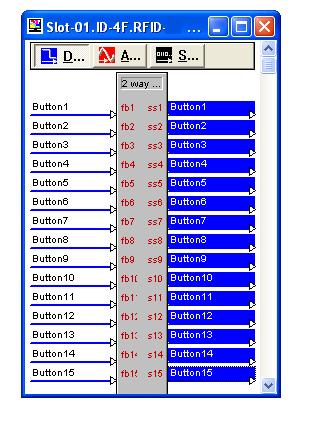
I just thought of another thing you need to do with the STX panel too, in Simpl there will be a "IN" and "Out" line (Feedback and Press) on it's Symbol. For now put the same signal name on both of them. IE: if your using Button1 to Button999 on the out's, put the same Button1 to Button999 on the in's too. That will create the loop it needs to show your button press's on the screen. Without any feedback input you can hit a button and it will work but the graphic under your finger will not move- that is the 2-way.
Again, Good luck,
JM
|
|
| Back to top |
|
 |
Tom.W

Joined: 09 Mar 2006
Posts: 6635
|
| Posted: Sat Mar 01, 2008 2:25 am Post subject: |
|
|
Did you get a chance to test the IR blasters you have ?
Thanks, Tom
|
|
| Back to top |
|
|
KES

Joined: 13 May 2007
Posts: 94
Location: Iowa
|
| Posted: Sat Mar 01, 2008 2:31 am Post subject: |
|
|
OK, JM Got Buttons on both sides. I got the programming cables, but they have RJ11 ends. I do have a RJ11 to cresnet adapter, however, it is the larger type. Can I just substitute the smaller plug as long as I keep the wires straight?
_________________
What does not kill you, makes you stronger.
|
|
| Back to top |
|
|
jmayes
Joined: 27 Jan 2008
Posts: 116
|
| Posted: Sat Mar 01, 2008 2:39 am Post subject: |
|
|
| KES wrote: | | OK, JM Got Buttons on both sides. I got the programming cables, but they have RJ11 ends. I do have a RJ11 to cresnet adapter, however, it is the larger type. Can I just substitute the smaller plug as long as I keep the wires straight? |
Yes, I think you will be ok, only the 4 center pins are used. But unless you have done up a program in pro-e for the panel you don't have anything to put in the panel yet. Simpl just program's the controller. Are there any screens in the panel now? If you try to use that cable you most likely will erase what is in the TP now.
JM
|
|
| Back to top |
|
|
jmayes
Joined: 27 Jan 2008
Posts: 116
|
| Posted: Sat Mar 01, 2008 2:43 am Post subject: |
|
|
| Tom.W wrote: | Did you get a chance to test the IR blasters you have ?
Thanks, Tom |
Sorry, I got busy this week and forgot but AZ says they will work ok so I will get you one off monday in the mail. Did you try any more of your devices yet?
JM
|
|
| Back to top |
|
|
KES
Joined: 13 May 2007
Posts: 94
Location: Iowa
|
| Posted: Sat Mar 01, 2008 2:45 am Post subject: |
|
|
Yes the TP has screens. Perhaps I am confused  I thought hooking up the TP to the MP2 would let me use the Test Manager to tie the SIMPL program we have done to the TP? I thought hooking up the TP to the MP2 would let me use the Test Manager to tie the SIMPL program we have done to the TP?
_________________
What does not kill you, makes you stronger.
|
|
| Back to top |
|
|
jmayes
Joined: 27 Jan 2008
Posts: 116
|
| Posted: Sat Mar 01, 2008 2:48 am Post subject: |
|
|
| KES wrote: | | Yes the TP has screens. Perhaps I am confused I thought hooking up the TP to the MP2 would let me use the Test Manager to tie the SIMPL program we have done to the TP? |
No, the Touchpanel will work wireless to the controller (via the STXGWY) even in test manager. There will be no need to use any cables on the TP untill it's time to change the screens in it.
JM
|
|
| Back to top |
|
|
KES
Joined: 13 May 2007
Posts: 94
Location: Iowa
|
| Posted: Sat Mar 01, 2008 2:49 am Post subject: |
|
|
Question: If I have more than one device on the same IR on the MP2. How do I feed the signals?
_________________
What does not kill you, makes you stronger.
|
|
| Back to top |
|
|
KES
Joined: 13 May 2007
Posts: 94
Location: Iowa
|
| Posted: Sat Mar 01, 2008 2:50 am Post subject: |
|
|
OK, I got buttons on the status window, but no incoming signals.
_________________
What does not kill you, makes you stronger.
|
|
| Back to top |
|
|
jmayes
Joined: 27 Jan 2008
Posts: 116
|
| Posted: Sat Mar 01, 2008 3:01 am Post subject: |
|
|
| KES wrote: | | OK, I got buttons on the status window, but no incoming signals. |
Since your STRFGWX is not built in like the ST-SP's CNRFGWA it may not be on it's default Cresnet ID. In viewport under diagnostics there is a "Report Network devices". Use that option and see what Cresnet ID the gwy is on and be sure you have it at that position in the device tree. One weakness in the Crestron programming is that un-found network devices are not reported- it just seems like things don't work. They instead want you to put stuff in the program to see if a device is on-line which is not for beginners.
If you confirm the gwy is at the right address, then I assume you checked the address of your touchscreen by putting in it setup mode??
JM
|
|
| Back to top |
|
|
KES
Joined: 13 May 2007
Posts: 94
Location: Iowa
|
| Posted: Sat Mar 01, 2008 3:10 am Post subject: |
|
|
Yes, the gwy is set to 4F and the TP is RFID-07, which I got from the TP.
hmmm... the report network devices shows only mp2
_________________
What does not kill you, makes you stronger.
|
|
| Back to top |
|
|
jmayes
Joined: 27 Jan 2008
Posts: 116
|
| Posted: Sat Mar 01, 2008 3:16 am Post subject: |
|
|
| KES wrote: | Yes, the gwy is set to 4F and the TP is RFID-07, which I got from the TP.
hmmm... the report network devices shows only mp2 |
There be the problem, the gwy is not reporting. Make sure it's wired ok, reboot everything (the crestron box's, not the computer).
If the gwy is not reporting, you don't really know what address it's set at, once you get it working you need to confirm it's on 4F. there is another function in viewport to change a device's ID on the network- any device can be any ID- there is some config memory in each device that holds the setting.
JM
|
|
| Back to top |
|
|
KES
Joined: 13 May 2007
Posts: 94
Location: Iowa
|
| Posted: Sat Mar 01, 2008 3:24 am Post subject: |
|
|
I have the cresnet wired so: MP2 to CNTBLOCK to STRFGWX
CNTBLOCK to Keypad
CNTBLOCK to AMP-2X60
Is this an acceptable wiring?
The STRFGWX shows a green power light, but no other indicators are lit
_________________
What does not kill you, makes you stronger.
|
|
| Back to top |
|
|
jmayes
Joined: 27 Jan 2008
Posts: 116
|
| Posted: Sat Mar 01, 2008 3:30 am Post subject: |
|
|
| KES wrote: | I have the cresnet wired so: MP2 to CNTBLOCK to STRFGWX
CNTBLOCK to Keypad
CNTBLOCK to AMP-2X60
Is this an acceptable wiring?
The STRFGWX shows a green power light, but no other indicators are lit |
That sounds right but all those devices should be showing in the network report. For now just leave the gwy connected and unplug the rest. If you still don't get it to report, wire it stright to the mp2 without the block. Once you get it working you can add the other devices one by one and make sure things stay working as you go.
One guess is the four wires could be backward?? Are there LED's on the CNTblock, they should be on.
Are there any lights on the keypad?, if no I bet the wires need reversed.
JM
|
|
| Back to top |
|
|
KES
Joined: 13 May 2007
Posts: 94
Location: Iowa
|
| Posted: Sat Mar 01, 2008 3:35 am Post subject: |
|
|
Horrah! Connected the gwy straight to the MP2...Now it is reporting and the NET is lit. Should any of the SIG indicators on the gwy light up when a TP button is pushed? Got to go for the night. Thanks for all the help JM
KES
_________________
What does not kill you, makes you stronger.
|
|
| Back to top |
|
|
jmayes
Joined: 27 Jan 2008
Posts: 116
|
| Posted: Sat Mar 01, 2008 3:58 am Post subject: |
|
|
| KES wrote: | Horrah! Connected the gwy straight to the MP2...Now it is reporting and the NET is lit. Should any of the SIG indicators on the gwy light up when a TP button is pushed? Got to go for the night. Thanks for all the help JM
KES |
Ok, one step closer. I think there should be a light when you hit a button but don't know that for sure.
If the system is working and you have the buttons duplicated on both sides of the symbol you will see the button move under your finger on the TP. See the attached pix to confirm what I am talking about.
Got to run too, good luck, more tomorrow,
JM
| Description: |
|
| Filesize: |
37.52 KB |
| Viewed: |
9821 Time(s) |
|
|
|
| Back to top |
|
|
stefuel

Joined: 07 Mar 2006
Posts: 3353
Location: Green Harbor MA USA
|
| Posted: Sat Mar 01, 2008 6:54 am Post subject: |
|
|
Well, I finally got that UPS mounted in the new rack and correctly connected to it's own circuit. Tomorrow I'll make a temporary control cable and see if I can gain full control of it with my PC and Crestron. Right now it's in stand-by and the batteries are charging.
_________________
Chip
A Barco is only a AmPro with training wheels
Card carrying member of the AVS chain gang.
|
|
| Back to top |
|
|
mrbud

Joined: 23 Feb 2008
Posts: 15
Location: Mo.
|
| Posted: Sat Mar 01, 2008 5:04 pm Post subject: Crestron toolbox |
|
|
Kes,
I see you have an mp2.. is a mp2 or a mp2e ( ethernet based )
If in fact it is a MP2E.. you can set it up on your network and access and upload programs via your home network .. This way is much faster for uploading the program and for graphics. than the serial option via viewport... Of course only matters if you have the E version and if you have toolbox...
_________________
Beer !!!!! Sometimes you can have it for breakfast and it's ok.....
|
|
| Back to top |
|
|
KES
Joined: 13 May 2007
Posts: 94
Location: Iowa
|
| Posted: Sat Mar 01, 2008 5:07 pm Post subject: |
|
|
Unfortunately it's an MP2. You got a spare MP2E? 
_________________
What does not kill you, makes you stronger.
|
|
| Back to top |
|
|
jmayes
Joined: 27 Jan 2008
Posts: 116
|
| Posted: Sat Mar 01, 2008 5:14 pm Post subject: Re: Crestron toolbox |
|
|
| mrbud wrote: | | Kes, Of course only matters if you have the E version and if you have toolbox... |
Yes, Ethernet is Great! I am using it via. Viewport without problems with my Enet+ enabled Pro. The MP2 also has advanced hardware (video switching, Audio Switching, IR) which will lend to a new thread once we get over the baby steps.
JM
|
|
| Back to top |
|
|
|
|




