| Author |
Message |
Tom.W

Joined: 09 Mar 2006
Posts: 6635
|
| Posted: Fri Feb 08, 2008 6:17 am Post subject: |
|
|
Hi Guys,
Would like to thank Jeff for all his hard work on this Crestron reverse programming primer. Will continue soon...
Hell if iI can do this anyone can ! 
|
|
| Back to top |
|
 |
stefuel

Joined: 07 Mar 2006
Posts: 3353
Location: Green Harbor MA USA
|
| Posted: Sat Feb 16, 2008 1:23 am Post subject: |
|
|
It's to damn quiet around here. What happened to our student 
_________________
Chip
A Barco is only a AmPro with training wheels
Card carrying member of the AVS chain gang.
|
|
| Back to top |
|
|
jmayes
Joined: 27 Jan 2008
Posts: 116
|
| Posted: Sat Feb 16, 2008 1:27 am Post subject: |
|
|
| stefuel wrote: | | It's to damn quiet around here. What happened to our student |
Not sure but I have been down with the flu, tonight is the first night in 3 that I have been alive, and will not be too much longer. Hopefully will get back at this in a day or two.
JM
|
|
| Back to top |
|
|
Tom.W
Joined: 09 Mar 2006
Posts: 6635
|
| Posted: Sat Feb 16, 2008 1:54 am Post subject: |
|
|
Back to the Crestron ....
Hi Jeff,
Back to your last instructions and I'm good till I hit steps 6 and 7. Not sure what I need to do here. Can you explain again what these two steps do and what is auto name ? Hope your feeling better !
Thanks
Tom
|
|
| Back to top |
|
|
jmayes
Joined: 27 Jan 2008
Posts: 116
|
| Posted: Sat Feb 16, 2008 2:15 am Post subject: Programming our first symbol, follow up to part-1 |
|
|
| Tom.W wrote: | Back to the Crestron ....
Hi Jeff,
Back to your last instructions and I'm good till I hit steps 6 and 7. Not sure what I need to do here. Can you explain again what these two steps do and what is auto name ? Hope your feeling better !
Thanks
Tom |
Ok,
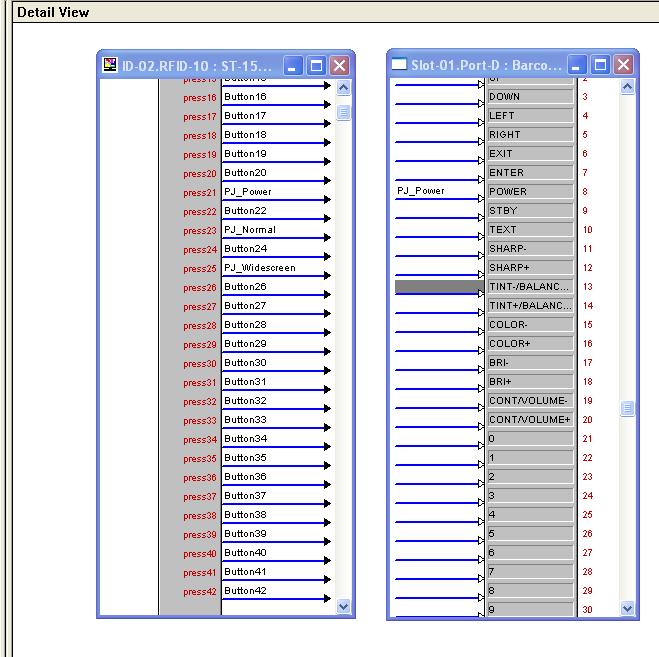
Lets start back at step 5. What I want you do is align the two symbols you have (the Touchpanel and the Barco) Put them side by side so that the connections are facing each other. See attached pix.
Now on step 6a use the scroll bar on the Touchpanel symbol and move it up/down until you locate Press21, it should now have the signal "PJ_Power" (from step 2)
Next on step 6b scroll the Barco symbol until you locate the "Power" line (since there are few connects on this symbol you can expand it all the way so all signals show, that may be easier for you.)
On Step 7, we are dragging the "PJ_Power" signal over to the Barco "Power" empty slot, when your done your symbols should look like my picture.
Step 8 and beyond, you will have to do some decision making to determine the best buttons to put on each signal of the Barco and try to fill it completely. After your finished we are ready to download and test, you can of course make changes at any time so after you play on the Touchpanel you may decide to change how the buttons function, just make paper notes while your playing and use your notes to make the program changes. Initially you may not know exactly how some of the functions will behave so it will take some trial and error to get things down. This is the area where we will have to do a little programming, download and test, and repeat until happy. I usually do things one device at a time.
Good luck!
JM
| Description: |
|
| Filesize: |
80.47 KB |
| Viewed: |
14983 Time(s) |
|
|
|
| Back to top |
|
|
Tom.W
Joined: 09 Mar 2006
Posts: 6635
|
| Posted: Sat Feb 16, 2008 2:53 am Post subject: |
|
|
|
Ok I think I should be ready to transfer the program. How exactly should I do that. Click on symbol 18 from the left ? (transfer the current program to the control system)
|
|
| Back to top |
|
|
jmayes
Joined: 27 Jan 2008
Posts: 116
|
| Posted: Sat Feb 16, 2008 3:27 am Post subject: |
|
|
| Tom.W wrote: | | Ok I think I should be ready to transfer the program. How exactly should I do that. Click on symbol 18 from the left ? (transfer the current program to the control system) |
Do it the same as last time, use icon 17 "convert/compile" Also don't forget to save your program!
Good luck...........
JM
|
|
| Back to top |
|
|
Tom.W
Joined: 09 Mar 2006
Posts: 6635
|
| Posted: Sat Feb 16, 2008 4:15 am Post subject: |
|
|
|
Should I see any change on the screen of the touch panel ?
|
|
| Back to top |
|
|
jmayes
Joined: 27 Jan 2008
Posts: 116
|
| Posted: Sat Feb 16, 2008 4:25 am Post subject: |
|
|
| Tom.W wrote: | | Should I see any change on the screen of the touch panel ? |
No, your not sending any programming to the panel itself, but the barco buttons that you mapped should be alive and working now, get a STrip (flasher) plugged into the correct port and put it on the barco IR window and try that power button!
JM
|
|
| Back to top |
|
|
Tom.W
Joined: 09 Mar 2006
Posts: 6635
|
| Posted: Sat Feb 16, 2008 4:37 am Post subject: |
|
|
|
No go on the power or any other buttons. No IR signal but if I hit a few other buttons already programmed but not by me I do see the IR emitter flashing with my video camera set for infrared mode.
|
|
| Back to top |
|
|
Tom.W
Joined: 09 Mar 2006
Posts: 6635
|
| Posted: Sat Feb 16, 2008 7:30 am Post subject: |
|
|
Here are some of the errors reported.
WARNING(CMCVT102)
Signal "PJ_POWER" has no driving source.
WARNING(CMCVT102)
Signal "INP1" has no driving source.
WARNING(CMCVT102)
Signal "TEXT" has no driving source.
NOTICE (CMCVT103)
Signal "button1" has no destination.
NOTICE (CMCVT103)
Signal "button2" has no destination.
NOTICE (CMCVT103)
Signal "button3" has no destination.
NOTICE (CMCVT103)
Signal "button4" has no destination.
NOTICE (CMCVT103)
Signal "button6" has no destination.
NOTICE (CMCVT103)
Signal "button7" has no destination.
NOTICE (CMCVT103)
Signal "button8" has no destination.
NOTICE (CMCVT103)
Signal "button9" has no destination.
NOTICE (CMCVT103)
|
|
| Back to top |
|
|
stefuel
Joined: 07 Mar 2006
Posts: 3353
Location: Green Harbor MA USA
|
| Posted: Sat Feb 16, 2008 11:55 am Post subject: |
|
|
I have not followed the step by step instructions here but the "button press" is the driving source. If you have PJ_POWER on the correct touch panel join number and you drag "PJ_POWER" to the correct location in the Barco IR driver, save, convert/compile and transfer, it should work. Ooops, I think I just figure it out. I don't think you've correctly transfered your program. When you download a new program the old one is deleted. If you still get activity from previously programmed buttons after your download and not your programmed buttons, the download did not take. Are you sure your interconnect cable is wired correctly?
_________________
Chip
A Barco is only a AmPro with training wheels
Card carrying member of the AVS chain gang.
|
|
| Back to top |
|
|
Tom.W
Joined: 09 Mar 2006
Posts: 6635
|
| Posted: Sat Feb 16, 2008 4:26 pm Post subject: |
|
|
Will recheck the cable. Will add that I always get the following program transfer pop up screen;
The selected program needs:
-OPS version 4.01 or greater; this system has 4.00.29
upgrading to update package [UPZ]4.01.01 or greater is recommended.
continue anyway?
I just click yes.
|
|
| Back to top |
|
|
Tom.W
Joined: 09 Mar 2006
Posts: 6635
|
| Posted: Sat Feb 16, 2008 5:05 pm Post subject: |
|
|
Thanks Chip. I redid the cable although it looked right. Re-transferred the program and now get an IR visual from the STIRP IR emitter for each programmed button but no response from the Barco. Wonder if this could be a projector IR address issue although I thought it was set to 0 which should respond to all addresses. Will check that out...
Update,
Projector is set for address 0. Looks like the program took but still no response to the Crestron IR emitter which is sending visual IR signals ? 
|
|
| Back to top |
|
|
stefuel
Joined: 07 Mar 2006
Posts: 3353
Location: Green Harbor MA USA
|
| Posted: Sat Feb 16, 2008 10:04 pm Post subject: |
|
|
Which Barco are you trying to control and what IR protocol are you trying to control it with. You may be using the wrong code. If you have DEAL (and I think you do) , you could look in Remote Central for the exact learned code for a Pronto in a .CCF format. DEAL can convert the .CCF codes to Crestron. Do you have the original remote for your Barco? IF so, what mod# is it? jtnfoley aka Heywood Jablom'e has a collection of Barco remotes. If he has yours, I can learn it and e-mail you the file.
_________________
Chip
A Barco is only a AmPro with training wheels
Card carrying member of the AVS chain gang.
|
|
| Back to top |
|
|
Tom.W
Joined: 09 Mar 2006
Posts: 6635
|
| Posted: Sun Feb 17, 2008 2:10 am Post subject: |
|
|
|
I also have several spare Barco remotes and all work fine. I'm Using both a Barco 808 and 1209s. Both are set to address 0 and and share the same IR codes. I did send Jeff the remote codes from remote central for the 1208 but the 8XX series codes were already in the Crestron data base so we used those. The 12xx and 8XX series projectors all use the same IR codes as far as I know.
|
|
| Back to top |
|
|
stefuel
Joined: 07 Mar 2006
Posts: 3353
Location: Green Harbor MA USA
|
| Posted: Sun Feb 17, 2008 7:59 am Post subject: |
|
|
It wouldn't be the first time a IR file from the Crestron data base didn't work. I suggest you convert on of those .CCF files and try again. I'll look in my user file and see if I have a alternate saved.
_________________
Chip
A Barco is only a AmPro with training wheels
Card carrying member of the AVS chain gang.
|
|
| Back to top |
|
|
stefuel
Joined: 07 Mar 2006
Posts: 3353
Location: Green Harbor MA USA
|
| Posted: Sun Feb 17, 2008 9:24 pm Post subject: |
|
|
Also, make sure you have the immitter stuck onto the correct location on the projector.
_________________
Chip
A Barco is only a AmPro with training wheels
Card carrying member of the AVS chain gang.
|
|
| Back to top |
|
|
ecrabb
Forum Moderator

Joined: 13 Mar 2006
Posts: 15909
Location: Utah
TV/Projector: JVC RS40, Epson 5010
|
| Posted: Mon Feb 18, 2008 2:06 am Post subject: |
|
|
Guys,
I hate to spam your thread, but I have this old Crestron equipment I know nothing at all about... and obviously you guys at least know what you're looking at. Might be a usable for a project if you know what you're doing. I'll take any reasonable offer. If nobody here wants it, I'll fleabay it.
http://www.curtpalme.com/forum/viewtopic.php?p=102076
As you were.
Thanks,
SC
|
|
| Back to top |
|
|
Tom.W
Joined: 09 Mar 2006
Posts: 6635
|
| Posted: Mon Feb 18, 2008 3:11 am Post subject: |
|
|
|
Chip the IR emitter is correctly placed. You could be right about the wrong IR codes though. Perhaps Jeff has a few thoughts on this ?
|
|
| Back to top |
|
|
|
|





