| Author |
Message |
jmayes
Joined: 27 Jan 2008
Posts: 116
|
| Posted: Fri Mar 07, 2008 3:13 am Post subject: Barco Serial cable |
|
|
The serial cable is almost exactly the same as the PC cable (if not exactly), you will have the RJ11 on one side and the DB9 on the other- 3 wires should do it. I need to know if the barco has a male or female DB9 and we need to know if the cable needs to be "stright" or "reversed". I think you pointed to a manual on line, if it has the serial pinout info I need to look it up.
Once working you will get all functions, even more then what I have seen in the IR codes, you will be much better off.
JM
|
|
| Back to top |
|
 |
stefuel

Joined: 07 Mar 2006
Posts: 3353
Location: Green Harbor MA USA
|
| Posted: Fri Mar 07, 2008 3:29 am Post subject: |
|
|
Tom,
What model # is the remote for the barco? If John Foley has one, I have a learner and will try that for you?
Hey, wait a minute. Didn't that Crestron stuff come with a Barco, and wasn't it set up for serial control? When you press any button on the remote for the PJ, does any of the lights flash on the front of the controller? Something is fishy here.
Are you trying to stuff IR codes into a serial module
_________________
Chip
A Barco is only a AmPro with training wheels
Card carrying member of the AVS chain gang.
|
|
| Back to top |
|
|
jmayes
Joined: 27 Jan 2008
Posts: 116
|
| Posted: Fri Mar 07, 2008 3:34 am Post subject: |
|
|
| stefuel wrote: | Tom,
What model # is the remote for the barco? If John Foley has one, I have a learner and will try that for you?
Hey, wait a minute. Didn't that Crestron stuff come with a Barco, and wasn't it set up for serial control? When you press any button on the remote for the PJ, does any of the lights flash on the front of the controller? Something is fishy here.
Are you trying to stuff IR codes into a serial module |
I have tried all the stock IR codes on an ST-CP here at my place and they will not work, the box crashes with 3rd party codes and gives no response with the database codes. Serial is now Tom's best option. Something about the ST-CP does not like those codes, they may very well work with other crestron series stuff.
JM
|
|
| Back to top |
|
|
stefuel
Joined: 07 Mar 2006
Posts: 3353
Location: Green Harbor MA USA
|
| Posted: Fri Mar 07, 2008 3:55 am Post subject: |
|
|
Well, I seem to remember when Tom and I first dicussed the equipment he had, that it came with a Barco Projector. I'm just wondering if he's already got or had serial programming in the processor
_________________
Chip
A Barco is only a AmPro with training wheels
Card carrying member of the AVS chain gang.
|
|
| Back to top |
|
|
jmayes
Joined: 27 Jan 2008
Posts: 116
|
| Posted: Fri Mar 07, 2008 4:33 am Post subject: |
|
|
| stefuel wrote: | | Well, I seem to remember when Tom and I first dicussed the equipment he had, that it came with a Barco Projector. I'm just wondering if he's already got or had serial programming in the processor |
There are barco serial drivers in the database, also a nice barco 1208 module to go with the serial drivers so I think it will be pretty stright forward to go serial. Not all barco models were no-carrier IR, I would assume they work ok. I am just not having any luck with the no-carrier IR codes.
Nite-nite time 
JM
|
|
| Back to top |
|
|
KES

Joined: 13 May 2007
Posts: 94
Location: Iowa
|
| Posted: Fri Mar 07, 2008 3:39 pm Post subject: |
|
|
Great, been waiting to get to the serial side of connecting the Barco. The Barco has a male com port.
_________________
What does not kill you, makes you stronger.
|
|
| Back to top |
|
|
stefuel
Joined: 07 Mar 2006
Posts: 3353
Location: Green Harbor MA USA
|
| Posted: Sun Mar 09, 2008 12:01 pm Post subject: |
|
|
| jmayes wrote: | | stefuel wrote: | Ahhh you waskewie wabbit. It was that pesky"Y" that was holding it down. Now that I have signal to those two power mode buttons, I can use the "fb" signal from battery mode to build upon for my timed safe shut-down. One odd note: I just discovered that I had left out one "text change detector" and it made no difference. the polled text associated with that signal still appears in the correct boarder.
I'll add it tonight just in case it makes a difference somewhere else. Thanks, |
That is what I was saying earlier, the "text change detector" is not needed, all it does it stop a real slight flicker of the data on the touch screen during the polling process. In usual Crestron fashion they were being ultra picky when doing up the program.
I found a much better way to add the "Y" command to each polling cycle but it not a 1 byte hack like the other one. I will add and test it to my module and post the updated module.
Glad you got it going!
JM. |
JM,
Did the new location of the "Y" command work for you? I'm going to spend some time today cleaning up my touch screen pages (22 pages). I've changed too much hardware over the last couple of months. I'm going to add UPS power status indicators to all my device pages so I'll know when I'm on back-up power, then take out the trash. Right now, I'm at 80% of the tp's memory. The family picture on my opening screen sucks up bookoo memory.
_________________
Chip
A Barco is only a AmPro with training wheels
Card carrying member of the AVS chain gang.
|
|
| Back to top |
|
|
Tom.W

Joined: 09 Mar 2006
Posts: 6635
|
| Posted: Sun Mar 09, 2008 2:32 pm Post subject: |
|
|
Been a bad few days. A funeral for a good friend and my mom broke her hip.... 
Anyways heres the info on the Barco com port.
D9 male connector on the rear of the Barco. Pins are as follows:
Pin 1- CD
Pin 2-RXD
Pin 3-TXD
Pin 4-OTR
Pin 5-GND
Pin-6-DSR
Pin 7-RTS
Pin 8-CTS
Pin 9-R1
|
|
| Back to top |
|
|
Tom.W
Joined: 09 Mar 2006
Posts: 6635
|
| Posted: Sun Mar 09, 2008 2:44 pm Post subject: |
|
|
| stefuel wrote: | | Well, I seem to remember when Tom and I first dicussed the equipment he had, that it came with a Barco Projector. I'm just wondering if he's already got or had serial programming in the processor |
I tried the Crestron with the 1209s when I first got it and no it didn't work. Not sure what projector it was controlling but it wasn't the 1209...
|
|
| Back to top |
|
|
stefuel
Joined: 07 Mar 2006
Posts: 3353
Location: Green Harbor MA USA
|
| Posted: Sun Mar 09, 2008 5:08 pm Post subject: |
|
|
Sorry to hear about your friend. I'm sure Mom will be OK.
_________________
Chip
A Barco is only a AmPro with training wheels
Card carrying member of the AVS chain gang.
|
|
| Back to top |
|
|
KES
Joined: 13 May 2007
Posts: 94
Location: Iowa
|
| Posted: Mon Mar 10, 2008 11:51 pm Post subject: |
|
|
FYI Tom, crestron serial cable 15' for Barco1209 on Ebay. Search CNSP-121. It's what the crestron cable database says works for the 1208's and 1209's.
_________________
What does not kill you, makes you stronger.
|
|
| Back to top |
|
|
Tom.W
Joined: 09 Mar 2006
Posts: 6635
|
| Posted: Tue Mar 11, 2008 12:08 am Post subject: |
|
|
|
I need a D9 to RJ11 cable. the CNSP-121 is D9 to D9 is it not. Got the item number ?
|
|
| Back to top |
|
|
KES
Joined: 13 May 2007
Posts: 94
Location: Iowa
|
| Posted: Tue Mar 11, 2008 12:17 am Post subject: |
|
|
Yep, D9 to D9. Not sure there is a D9 to RJ11. Saw 2 listings doing a search. Will try to see if such a cable is in the database. The database lists only IR and COM connectors.
_________________
What does not kill you, makes you stronger.
Last edited by KES on Tue Mar 11, 2008 12:23 am; edited 1 time in total
|
|
| Back to top |
|
|
Tom.W
Joined: 09 Mar 2006
Posts: 6635
|
| Posted: Tue Mar 11, 2008 12:23 am Post subject: |
|
|
|
The STCP uses an RJ11 on the PC port.
|
|
| Back to top |
|
|
stefuel
Joined: 07 Mar 2006
Posts: 3353
Location: Green Harbor MA USA
|
| Posted: Thu Mar 13, 2008 12:21 am Post subject: |
|
|
It's getting awfull quiet here again. Is it time to start a GUI thread just to spice things up a bit? 
_________________
Chip
A Barco is only a AmPro with training wheels
Card carrying member of the AVS chain gang.
|
|
| Back to top |
|
|
Tom.W
Joined: 09 Mar 2006
Posts: 6635
|
| Posted: Thu Mar 13, 2008 12:26 am Post subject: |
|
|
|
Jeff should be here shortly ...
|
|
| Back to top |
|
|
jmayes
Joined: 27 Jan 2008
Posts: 116
|
| Posted: Thu Mar 13, 2008 1:21 am Post subject: |
|
|
Here, Here, Tom, you take away all the surprise 
Onward, upward....
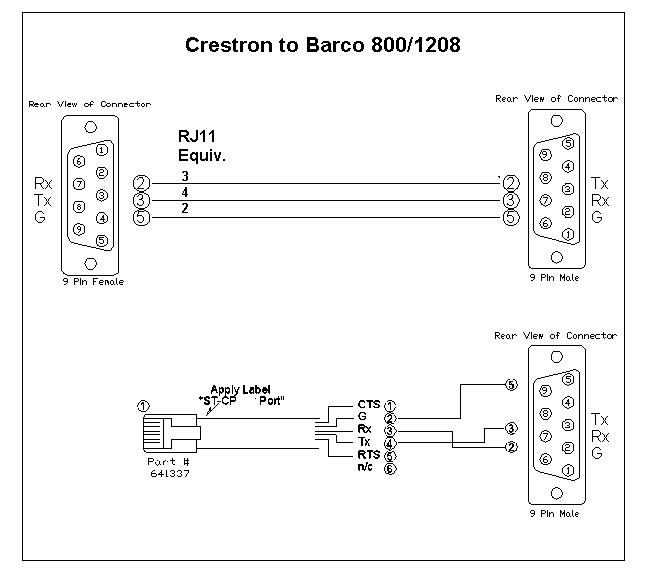
here is the barco cable drawing, I started with the DB9 to DB9 in the in the database and transferred it to the RJ11 type. According to crestron we only need the 3 wires.
Basically it's a educated 50/50 shot, if it's wrong then reverse pins 2 & 3 (at the barco end) but I vote for right first time out of the gate
Will go over the driver change in abit
As usual, good luck!
JM
| Description: |
|
| Filesize: |
42.21 KB |
| Viewed: |
27764 Time(s) |
|
|
|
| Back to top |
|
|
jmayes
Joined: 27 Jan 2008
Posts: 116
|
| Posted: Thu Mar 13, 2008 1:23 am Post subject: |
|
|
| stefuel wrote: | | It's getting awfull quiet here again. Is it time to start a GUI thread just to spice things up a bit? |
Yes, I was just thinking the same thing- Tom is running out of buttons 8)
Perhaps by the weekend I can find some time to start the setup post(s)
JM
|
|
| Back to top |
|
|
Tom.W
Joined: 09 Mar 2006
Posts: 6635
|
| Posted: Fri Mar 14, 2008 11:32 pm Post subject: |
|
|
|
Cable should be ready to go....
|
|
| Back to top |
|
|
stefuel
Joined: 07 Mar 2006
Posts: 3353
Location: Green Harbor MA USA
|
| Posted: Mon Mar 17, 2008 12:04 am Post subject: |
|
|
It's been awfull quiet here so I thought I'd post a up-date on my APC project. Today I had some spare time so I decided to finish it up the way I hope to do it. The master plan was to provide back-up power and surge protection to my home theater. Originally I only intended to use the back-up power to keep things running long enough to manually shut down the system. However, I quickly discovered that these giant APC Smart UPS's can do way more than that as they can communicate via RS232 to a PC or if you're handy with home automation programming can be configured to automatically protect your expensive HT equipment. I've had the APC module installed and running in my program for a couple of weeks but that's it, it was just existing there and not doing anything. Today I made it do something. Using the two [fb] signals (battery mode) and (line mode) along with three logic symbols "set re-set latch", "delay" and "or", I was able to trigger a master power off command to all the equipment in the theater when power has been off for 8 minutes. If the power is restored during that time the 8 minute timer is re-set and the system stays on. Any time after the master power off has occured and power is restored, the system polls for line power for 5 minutes then triggers a master power on command. If the power even flickers during that 5 minute trial period the 5 minute timer is re-set. In the event of a long power outtage, the UPS will continue to run providing power to the cnmsx-pro until 1. the power is restored or 2. the batteries are reduced to 15% if their charge. When power is restored, the UPS comes back to life and the cnmsx-pro re-boots. After the pro has re-booted, it begins polling for line power. If no further problems are detected after a 5 minute trial period, a master power on command is issued and everything comes back to life. The best thing is I got it right the first time and everything works perfectly. Very cool even if I do say so my self
_________________
Chip
A Barco is only a AmPro with training wheels
Card carrying member of the AVS chain gang.
|
|
| Back to top |
|
|
|
|




