| Author |
Message |
justtaint
Joined: 21 May 2007
Posts: 191
Location: Chicago
|
| Posted: Mon Jan 14, 2008 3:35 am Post subject: Xbox 360 and Sony 1031 |
|
|
I bought a cheap 1031 a few months ago in hopes I could set it up so my brother could play video games on it. I finally got around to going over to my parents house tonight and I performed a quick setup of the 1031. Using the internal crosshatch I converged it as best as I could for a quick 15 minute setup.
I was going to try and follow this guide: http://www.eboyztoyz.net/article.php?ncat=00132
However I didn't have the proper connections, so I hooked up my brother's Xbox 360 via composite. It was a bit blurry and quickly gave me a headache. I'm hoping that's a result of using the composite signal and a poor convergence/setup. Plus I was also projecting onto a semi-wrinkled bed sheet, everything was just about the worst case scenario. I'll bring a laptop and the proper cables next time so I can follow the guide.
Next time I want to be prepared.
I have:
Xbox 360 VGA cable
Xbox 360 Component cable
KD-CTCA3 Transcoder
VGA-BNC cable
The 1031 has two RGB inputs, one looks like a 15 pin male connection, the other one has an Extron RGB+S breakout cable connected to it.
What's the best way to hookup the 360 to the 1031?
What's the best resolution to try for?
What's the optimal screen size?
|
|
| Back to top |
|
 |
justtaint
Joined: 21 May 2007
Posts: 191
Location: Chicago
|
| Posted: Mon Jan 14, 2008 3:46 am Post subject: |
|
|
|
I guess I should have read more of that guide. It tells me the 1031 requires a non-standard VGA connector. Hopefully the Extron breakout cable can be of some use to me, at least to hookup a PC to the projector. Does anyone make the non-standard vga connector?
|
|
| Back to top |
|
|
Brooklyn

Joined: 17 Sep 2007
Posts: 494
Location: Morgan Hill, CA
|
| Posted: Mon Jan 14, 2008 5:12 am Post subject: |
|
|
You may just need something that converts RGBHV to RGB-S. Then you could use the Xbox 360 VGA cable with the RGBHV breakout cable. I also think the 1031 needs negative sync, so you may need a negative sync converter. The highest resolution you can run with the VGA cable is 640x480. Any higher for even a few seconds WILL burn out the projector.
-OR- you can use your transcoder and your Xbox 360 component cables. Output 1080i from the 360 into the transcoder, so it outputs 1080i on VGA. Then again convert VGA->RGBHV->RGB-S. You may need a negative sync convertor for this route as well. This way will give a better quality picture at 1080i.
I think you may also need to hook up your source before you do any convergence settings. Electronic and mechanical focus should be the same for all inputs.
|
|
| Back to top |
|
|
justtaint
Joined: 21 May 2007
Posts: 191
Location: Chicago
|
| Posted: Mon Jan 14, 2008 3:01 pm Post subject: |
|
|
If I hook up a PC to the 1031 and use powerstrip, would I need to buy a negative sync converter? I'd like to get it up and running before I buy any additional parts. It only cost me $50, so I guess I don't feel bad spending a little more, but I don't want to spend too much if it turns out the tubes are shot.
_________________
Thomas
Sony 1272
|
|
| Back to top |
|
|
jkruger

Joined: 24 Oct 2007
Posts: 2435
Location: Carlsbad, CA
|
| Posted: Mon Jan 14, 2008 3:19 pm Post subject: |
|
|
|
Maybe the first thing to do is pull the lenses and look at the tubes.... if it has some bad burn then don't spend any more money on it.
|
|
| Back to top |
|
|
justtaint
Joined: 21 May 2007
Posts: 191
Location: Chicago
|
| Posted: Mon Jan 14, 2008 3:24 pm Post subject: |
|
|
From the blurry image I got when connecting the 360 via composite, the picture looked okay. I couldn't see any wear. My concern is more that the tubes have high hours but no wear and would be "soft", is that the correct term? Is there an hours meter on the 1031?
Can I just buy a BNC T adapter and combine the H+V signals into one?
|
|
| Back to top |
|
|
justtaint
Joined: 21 May 2007
Posts: 191
Location: Chicago
|
| Posted: Mon Jan 14, 2008 3:30 pm Post subject: |
|
|
My plan is to buy the BNC T adapter, I assume radioshack sells them (for an inflated price of course). I hope that will allow me to use the transcoder, and the transcoder will allow me to use both the 360 and a PC to connect to the 1031.
If that isn't the case I'll look into buying an Extron RGB converter.
The RGB cable for the 1031, can I buy a gender changer and just use normal VGA cables? (maybe by using a HD15F-DB9M adapter plus a DB9F-DB25F adapter with the RGB2 or a HD15F-HD15F adapter with RGB1??)
|
|
| Back to top |
|
|
Nitmoe

Joined: 10 Jan 2008
Posts: 60
Location: Iowa, USA
|
| Posted: Tue Jan 15, 2008 3:55 am Post subject: |
|
|
|
Running the transcoder with a T into thr RGB+S cable should be fine, provided everything is working correctly. Make sure you have the XBOX set at 1080i, if you try to run 720p you will quickly fry that 1031. A composite signal is always going to look terrible on these, unless you run it through a line doubler. Be sure to check the electronic focus, located under the case on the side of the PJ, just make sure not to turn the G2 controls. Also, there is a resistor on the neck board on these that tends to go bad, especially on the blue tube. Look at the connections for t he big white resistor, and see if it looks burnt. This will cause a dramatic loss of focus, and you may want to replace it, or at least re-solder it. Also, when you hok up the XBOX, be ready to make some adjusts to he circuit board underneath the one with all of the convergance controls. There will be one screw and a clip holding it down, then there is one screw holding down a prop-rod that will hold up the convergance board. You may need to adjust the high-frequency pot to get the signal to sync up, and use the low freq. pot to fine tune. You will also need to adjust the vertical size pot all the way down, or close to it, depending on the set. If you are having trouble with the image syncing up, try playing with the pots on that board.
|
|
| Back to top |
|
|
Nitmoe
Joined: 10 Jan 2008
Posts: 60
Location: Iowa, USA
|
| Posted: Tue Jan 15, 2008 3:59 am Post subject: |
|
|
|
BTW, if you have this all set up for a widescreen signal, like your XBOX 360, you will not be able to run a standard PC signal to it, unless it is set at a widescreen resolution (I find that 720i looks the best, which can be produced by powerstrip)
|
|
| Back to top |
|
|
Nitmoe
Joined: 10 Jan 2008
Posts: 60
Location: Iowa, USA
|
| Posted: Tue Jan 15, 2008 4:05 am Post subject: |
|
|
|
One more note, if for some reason the vga cable you have is no good, no can make a new one. All you need is a vga cable with either a male or female end, depending on your needs, an old parrallel printer cable, and a 25-pin female to femnale gender changer which can be had from www.monoprice.com I can't remember the pinouts off hand, but if you can't find them, I can let you know, just make sure when you wire it up, combine the H + V together.
|
|
| Back to top |
|
|
justtaint
Joined: 21 May 2007
Posts: 191
Location: Chicago
|
| Posted: Tue Jan 15, 2008 4:06 am Post subject: |
|
|
My brother wasn't running this into a HDTV, just a plain old 27" TV, so the xbox 360 was set to 480i.
This weekend or sooner I'll try all this stuff out. I've gone over the EboyzToyz website as much as I can without having set in front of me. I can't wait to actually mess with the focus pots, I didn't see them the first time.
_________________
Thomas
Sony 1272
|
|
| Back to top |
|
|
Nitmoe
Joined: 10 Jan 2008
Posts: 60
Location: Iowa, USA
|
| Posted: Tue Jan 15, 2008 4:11 am Post subject: |
|
|
|
the XBOX will allow you to change the signal to 1080i while you are connected to a composite device, such as a TV. If for any reason the 1080i does not work out, when you re-connect through the composite out it will still be set at 480i, just in case you were wondering.
|
|
| Back to top |
|
|
justtaint
Joined: 21 May 2007
Posts: 191
Location: Chicago
|
| Posted: Tue Jan 15, 2008 4:42 pm Post subject: |
|
|
One thing I did notice, the lens are really dusty on the outer face. I tried wiping it off with a tissue, but its caked on in places. Is it safe to use a glass cleaner, or should I stick to plain ol' water?
_________________
Thomas
Sony 1272
|
|
| Back to top |
|
|
justtaint
Joined: 21 May 2007
Posts: 191
Location: Chicago
|
| Posted: Tue Jan 15, 2008 4:44 pm Post subject: |
|
|
Nevermind, a quick google search turned up this link, lol, I guess I should have looked harder...
http://www.curtpalme.com/Lens_Cleaning.shtm
_________________
Thomas
Sony 1272
|
|
| Back to top |
|
|
AnalogRocks
Forum Moderator

Joined: 08 Mar 2006
Posts: 26706
Location: Toronto, Ontario, Canada
TV/Projector: Sony 1252Q, AMPRO 4000G
|
| Posted: Tue Jan 15, 2008 5:21 pm Post subject: |
|
|
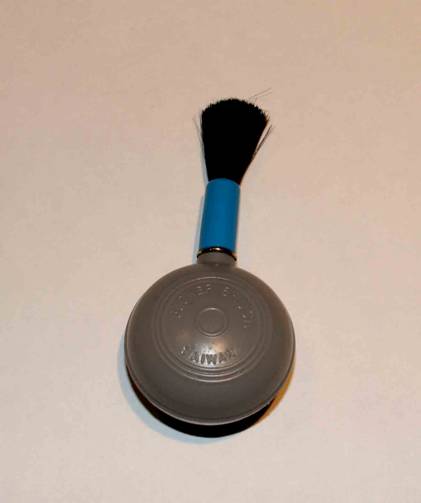
Yep goto a camera store and get some lens isue and a blower brush. Apply the cleaning solution to the tisue, not the lens. You don't want the liquid seeping around to the back side of the lens. Use each tisue for a single pass. Clean as lightly as possible and use the blower brush to do the final dust off.
| Description: |
|
| Filesize: |
10.67 KB |
| Viewed: |
7293 Time(s) |
|
| Description: |
|
| Filesize: |
6.42 KB |
| Viewed: |
7293 Time(s) |

|
_________________
Tech support for nothing
CRT.
HD done right!
|
|
| Back to top |
|
|
justtaint
Joined: 21 May 2007
Posts: 191
Location: Chicago
|
| Posted: Fri Jan 18, 2008 8:59 pm Post subject: |
|
|
I'm about to go over to my parent's house tonight and start the setup of the 1031 again. I noticed one typo in the otherwise thorough guide I linked above. It says in order to adjust the image for a screen ratio of 16:9, you have to get to the DA board. It lists page 11 in the service manual, but page 11 has no such explanation. I tried looking elsewhere in the service manual, but I must be missing it.
Does anyone know the page # of how to adjust "V.Size" on the 1031 in the service manual?
"If your screen ratio is 16:9 you will probably also have to adjust the "V.Size" Master Height pot in order to squeeze the image down to its proper size. The "V.Size" pot is located on the DA circuit board beneath the DB Circuit board. Refer to page 11 in the Service Manual for instructions on how to access this board. "
_________________
Thomas
Sony 1272
|
|
| Back to top |
|
|
|
|




