| Author |
Message |
garyfritz

Joined: 08 Apr 2006
Posts: 12088
Location: Fort Collins, CO
|
| Posted: Thu Jan 10, 2008 5:00 pm Post subject: Halos on G70 |
|
|
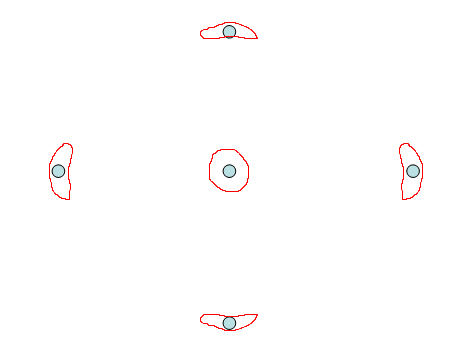
I've noticed that my G70 is showing faint "halos" on the green. As far as I can tell I've set up all the magnetics properly (CPC, 2PA/2PH, 4PA/4PH, AQP/DQP). With MG-ALL at 0 I get nice round blobs, with MG-ALL at 100 the flare is in the center. Dots are nice and sharp, the focus pattern is nice and sharp, scanlines are quite visible at 720p. But each dot has a dim halo around it. I haven't noticed this in any actual video material, but you can definitely see it in test patterns.
In the center, the halos are basically round. At the edges they are sort of "squished" so they form arcs around the center -- see attached sketch for a rough approximation.
What might cause this? I replaced the green tube in this set. I'm wondering if maybe I replaced the coils wrong somehow? Maybe the coil spacing is wrong or something like that?
Thanks!
Gary
| Description: |
|
| Filesize: |
3.52 KB |
| Viewed: |
4564 Time(s) |
|
|
|
| Back to top |
|
 |
Joust
Joined: 05 May 2006
Posts: 2429
Location: Almonte, Ontario, Canada
TV/Projector: Marquee 8501LC
|
| Posted: Thu Jan 10, 2008 5:41 pm Post subject: |
|
|
Nice screenshot. 
|
|
| Back to top |
|
|
garyfritz
Joined: 08 Apr 2006
Posts: 12088
Location: Fort Collins, CO
|
| Posted: Thu Jan 10, 2008 11:23 pm Post subject: |
|
|
Har de har har.  Now does anybody have a USEFUL response!?? Now does anybody have a USEFUL response!?? 
|
|
| Back to top |
|
|
Joust
Joined: 05 May 2006
Posts: 2429
Location: Almonte, Ontario, Canada
TV/Projector: Marquee 8501LC
|
| Posted: Thu Jan 10, 2008 11:59 pm Post subject: |
|
|
usually, AFAIK, Halos are caused by the gap between the tube face and the lens.
I would look to ensure that the lens is mounted exactly correct. It seems to me that it may not be mounted quite flush in its mounting position.
Sorry for that, couldn't resist.
|
|
| Back to top |
|
|
garyfritz
Joined: 08 Apr 2006
Posts: 12088
Location: Fort Collins, CO
|
| Posted: Fri Jan 11, 2008 12:15 am Post subject: |
|
|
Remember this is a G70 -- it's LC. So the lens doesn't sit right on the tube face. Could that still cause problems? I'll check it when I get a chance.
The halos you see on AC projectors are usually pretty large rings, maybe 1/4 - 1/3 of screen width. These are quite small, maybe 1/2 - 3/4" across, and they're solid blobs instead of rings.
|
|
| Back to top |
|
|
NewbieDAN

Joined: 09 Mar 2006
Posts: 319
Location: Bunbury Western Australia
|
| Posted: Fri Jan 11, 2008 12:24 am Post subject: |
|
|
Fresh glycol?
_________________
Sorting the fly sh*t from the pepper
|
|
| Back to top |
|
|
Joust
Joined: 05 May 2006
Posts: 2429
Location: Almonte, Ontario, Canada
TV/Projector: Marquee 8501LC
|
| Posted: Fri Jan 11, 2008 12:41 am Post subject: |
|
|
I know the G70 is LC. Halo is exclusively a light bouncing thing. Check lens seating.
if its electrical or magnetic influence then thats some thing else altogether. you would be able to see it on the tube face without the lens on. Check that.
|
|
| Back to top |
|
|
Zebu Fellenz
Joined: 21 Dec 2006
Posts: 2567
|
| Posted: Fri Jan 11, 2008 12:55 am Post subject: |
|
|
A screenshot is worth a thousand words.
I think I may know what you are talking about though, is it like a small bright ring around a mouse pointer. It looks like a very minor halo and I believe it is caused because the LC only reduces halo (to almost nothing) but does not get rid of it completely.
Is it occurring on all colors?
Erik
|
|
| Back to top |
|
|
Mark_A_W
Joined: 15 Mar 2006
Posts: 3068
Location: Sunny Melbourne Australia
|
| Posted: Fri Jan 11, 2008 3:09 am Post subject: |
|
|
Is it contrast related?
Does it disappear as the contrast is reduced?
My XG does something similar on green as contrast goes above 80.
|
|
| Back to top |
|
|
garyfritz
Joined: 08 Apr 2006
Posts: 12088
Location: Fort Collins, CO
|
| Posted: Fri Jan 11, 2008 4:33 am Post subject: |
|
|
Dan, it's a near-new tube, so the glycol is fresh.
Barry, I really don't think this is optical/bouncing. Maybe I shouldn't have called it "halos" because that might give the wrong impression. It looks like flare around the dots. Especially given the shapes they form in the corners -- it looks like magnetic- or astig-related stuff, not reflective artifacts.
Zebu, unfortunately my wife has the camera, and she's on her way to Australia, so no screen shots unless I borrow a camera. And I think it will be very tough to capture this in a screenie.
It appears only on green. Red is razor sharp, no halo. Blue is defocused but no halo.
Mark, the halos get brighter/darker with contrast, but they don't go away with lower contrast.
I was sure it wasn't the lens being seated wrong -- the G70 has mounting pins so that you can't even get the screws in unless you've got it seated right. But I pulled and reseated the lens twice and both times the halos were still there. I can't see any halos on the tube face, even with magnification, but that may be because it's too small and dim.
But I'm 99% sure it's magnetic. I just discovered the halos in the center change shape slightly when I adjust the 2PH (2 pole horiz) setting. As I move the raster to the right with 2PH, the halo tends to point back toward the center.
I think I have the magnetic adjustment right. I have the 4PH/4PV (4-pole) settings at 128 because I adjusted the 4-pole CPC mags for optimum flare with 4PH/4PV at 128 to reduce the load on the circuitry. The AQP/DQP settings are for astig but those don't apply in the center. In the center I have no astig problems -- the dots, defocused flares, AND halos are all round.
So, looking just at the center: the 2-pole adjustments just center the raster. The 4-pole adjustments are good -- as I said, the flare and blob are nice and round/centered. What else could cause a round blob around dots in the center??
|
|
| Back to top |
|
|
|
|





