| Author |
Message |
ecrabb
Forum Moderator

Joined: 13 Mar 2006
Posts: 15909
Location: Utah
TV/Projector: JVC RS40, Epson 5010
|
| Posted: Wed Jan 09, 2008 9:01 pm Post subject: |
|
|
It is hilarious! It's actually hard to believe somebody is so unbelievably lazy that they'll actually take the time to write an email asking a question which could easily be found... and include a line about themselves being lazy. My gawd, if you're really that damn lazy, just go to the theater to watch a movie.
I'm pretty sure I couldn't do Curt's job, because I'd piss people off left and right when I wrote back snarky emails in response to messages like that... In fact, my response would probably look like that sentence about about just going to the damn theater.
Just... Wow.
SC
|
|
| Back to top |
|
 |
AnalogRocks
Forum Moderator

Joined: 08 Mar 2006
Posts: 26706
Location: Toronto, Ontario, Canada
TV/Projector: Sony 1252Q, AMPRO 4000G
|
| Posted: Wed Jan 09, 2008 11:48 pm Post subject: |
|
|
I'm far to lazy to click on a few links or do a google seach but I'll open my web brower or email client, log in, enter your email address ( which he probably had to get from the contact page anyways ) write you an email asking you to do all the work for me and THEN say I'm lazy.
LMFAZZO V V
_________________
Tech support for nothing
CRT.
HD done right!
|
|
| Back to top |
|
|
Curt Palme
CRT Tech
Joined: 08 Mar 2006
Posts: 24396
Location: Langley, BC
TV/Projector: All of them!
|
| Posted: Thu Jan 10, 2008 12:39 am Post subject: |
|
|
WEll I linked him to this thread, and haven't heard back from him.
I'm not really offended, but that's what the site is here for. Self serve people!
|
|
| Back to top |
|
|
kal
Forum Administrator

Joined: 06 Mar 2006
Posts: 18114
Location: Ottawa, Canada
TV/Projector: JVC DLA-NZ7
|
| Posted: Mon Jan 28, 2008 9:41 pm Post subject: |
|
|
Ok!
The new "How to hook it all up" information is now online. I basically rewrote a lot of the stuff and merged in what was already there. I tried to focus more on adding digital devices since likely 95%+ of people reading it already *HAVE* CRT projector or other setups and just want to know how to get into HD-DVD and Blu-ray.
I also added some pros/cons for each of the 10 sample setups though it's far from perfect. I don't quite understand some of the setups and why anyone would do something that way, but that's just me. I like to keep things simple (example: Not having both an SD-DVD player and HD player).
It's certainly better than before, but still far from perfect.
I think the best part is just the first page that explains the various signal types. People get really confused about that.
See: http://www.curtpalme.com/CRTPrimer_17.shtm
I stuck a direct link to this page from page 1 of the primer too since I bet most people just want to jump to this 'meat' a lot of the times.
The link on the front page of the site also has a direct link now as well to the "Hook it all up" section of the primer. (As if the main page wasn't busy enough). 
Kal
_________________

Support our site by using our affiliate links. We thank you!
My basement/HT/bar/brewery build 2.0
|
|
| Back to top |
|
|
ecrabb
Forum Moderator
Joined: 13 Mar 2006
Posts: 15909
Location: Utah
TV/Projector: JVC RS40, Epson 5010
|
| Posted: Mon Jan 28, 2008 11:17 pm Post subject: |
|
|
Kal, that looks sweet! Those graphics area REALLY kick-ass. Just kidding. Seriously, there's some excellent info, there. VERY comprehensive, but still a pretty easy read.
Hey, I just saw your post about the mistake in figure 4 - I see you fixed it - sorry about that. I'd be more than happy to send you the original file(s) - do you have Illustrator? If not, I can fix you up.
SC
|
|
| Back to top |
|
|
kal
Forum Administrator
Joined: 06 Mar 2006
Posts: 18114
Location: Ottawa, Canada
TV/Projector: JVC DLA-NZ7
|
|
| Back to top |
|
|
jask

Joined: 17 Mar 2006
Posts: 10187
Location: kamloops BC
|
| Posted: Tue Jan 29, 2008 4:17 am Post subject: |
|
|
|
Wow, nice job!! under cons on example 10 you could also include the need for a REALLY good remote!
|
|
| Back to top |
|
|
perisoft

Joined: 29 Aug 2007
Posts: 2920
Location: Ithaca, NY
|
| Posted: Tue Jan 29, 2008 4:42 am Post subject: |
|
|
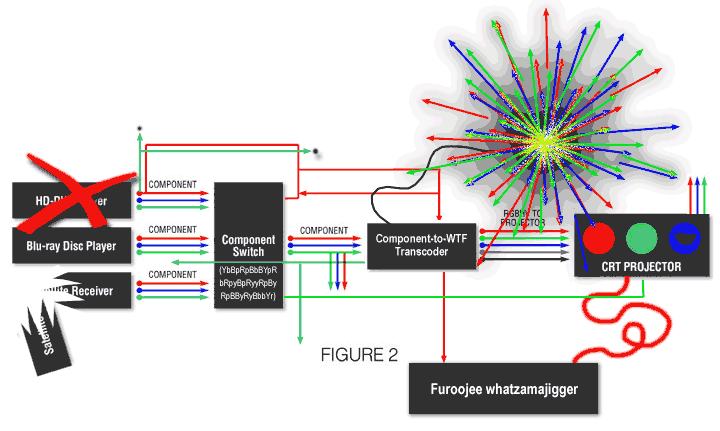
I just thought I'd throw some ideas into the ring. Hope this is helpful.
| Description: |
|
| Filesize: |
30.13 KB |
| Viewed: |
7831 Time(s) |
|
_________________

|
|
| Back to top |
|
|
jask
Joined: 17 Mar 2006
Posts: 10187
Location: kamloops BC
|
| Posted: Tue Jan 29, 2008 4:55 am Post subject: |
|
|
|
Peri that is a lot like my set up!!! looks like your blue tube has a little spot burn, and it is hard to tell through all the" magic smoke" but ...is that a digital projector on the top right?
|
|
| Back to top |
|
|
ecrabb
Forum Moderator
Joined: 13 Mar 2006
Posts: 15909
Location: Utah
TV/Projector: JVC RS40, Epson 5010
|
| Posted: Tue Jan 29, 2008 5:13 am Post subject: |
|
|
| jask wrote: | | ...is that a digital projector on the top right? |
THAT'S F'ING CLASSIC!!!
Peri, I was laughing my ass off looking at your diagram. Love the 'component to WTF transcoder'.
SC
|
|
| Back to top |
|
|
AnalogRocks
Forum Moderator
Joined: 08 Mar 2006
Posts: 26706
Location: Toronto, Ontario, Canada
TV/Projector: Sony 1252Q, AMPRO 4000G
|
| Posted: Tue Jan 29, 2008 6:59 am Post subject: |
|
|
Ahhh that's a great laugh at 2 am, bet the neighbours are pissed at me  
_________________
Tech support for nothing
CRT.
HD done right!
|
|
| Back to top |
|
|
timbo
Joined: 22 Jul 2007
Posts: 82
Location: Brampton, Ontario
|
| Posted: Tue Jan 29, 2008 7:24 am Post subject: |
|
|
Furoojee whatzamajigger,,, that's funny!.......I just bought one the other day.
O.K....must stop laughing now....Furoojee whatzamajigger ...O.K.....Now!
_________________
intrepid enthusiast
|
|
| Back to top |
|
|
Curt Palme
CRT Tech
Joined: 08 Mar 2006
Posts: 24396
Location: Langley, BC
TV/Projector: All of them!
|
| Posted: Tue Jan 29, 2008 3:02 pm Post subject: |
|
|
Kal, we really need to add that to the beginning of that part of the FAQ, with some header of 'do all of these signals have you confused'...
|
|
| Back to top |
|
|
ecrabb
Forum Moderator
Joined: 13 Mar 2006
Posts: 15909
Location: Utah
TV/Projector: JVC RS40, Epson 5010
|
| Posted: Tue Jan 29, 2008 4:56 pm Post subject: |
|
|
Peri, I just noticed you X'ed out the HD-DVD player... ya bastard. 
SC
|
|
| Back to top |
|
|
perisoft
Joined: 29 Aug 2007
Posts: 2920
Location: Ithaca, NY
|
| Posted: Tue Jan 29, 2008 4:58 pm Post subject: |
|
|
| ecrabb wrote: | Peri, I just noticed you X'ed out the HD-DVD player... ya bastard.
SC |
I calls 'em like I sees 'em. 
_________________
|
|
| Back to top |
|
|
Axatax

Joined: 01 Nov 2006
Posts: 403
TV/Projector: Sony VPH-G70Q (aka Barco Cine8 Onyx)
|
| Posted: Tue Jan 29, 2008 6:03 pm Post subject: |
|
|
|
Very informative... BUT, none of these examples take into account that most scalers/VPs made in the last 5 years have some sort of digital input (DVI, HDMI, SDI, etc.). I guess the assumption being that most modern devices have some sort of built-in scaler, which is true, but the write-up also assumes that anyone using a VP will being using an antique. I won't try to espouse the merits of the VP here, but, consider at the very least, a scaler with digital inputs can *really* simplify a lot of that spaghetti, and make complex switching much more tame.
|
|
| Back to top |
|
|
kal
Forum Administrator
Joined: 06 Mar 2006
Posts: 18114
Location: Ottawa, Canada
TV/Projector: JVC DLA-NZ7
|
|
| Back to top |
|
|
perisoft
Joined: 29 Aug 2007
Posts: 2920
Location: Ithaca, NY
|
| Posted: Wed Jan 30, 2008 8:20 pm Post subject: |
|
|
Hahah, excellent. I'm always glad to help out.  My setup is pretty boring, too. HTPC => RGBHV => Projector. It'd make a lousy diagram! My setup is pretty boring, too. HTPC => RGBHV => Projector. It'd make a lousy diagram!
The *audio* setup, on the other hand...
[PS: I just noticed that you actually removed the HD-DVD player from the real setup... Hmmmm....]
_________________
|
|
| Back to top |
|
|
kal
Forum Administrator
Joined: 06 Mar 2006
Posts: 18114
Location: Ottawa, Canada
TV/Projector: JVC DLA-NZ7
|
|
| Back to top |
|
|
ecrabb
Forum Moderator
Joined: 13 Mar 2006
Posts: 15909
Location: Utah
TV/Projector: JVC RS40, Epson 5010
|
| Posted: Wed Jan 30, 2008 9:10 pm Post subject: |
|
|
I tried to be format neutral when I did the illustrations. Some had HD DVD, some had BD, one or two just said HD player I think, and several had Xbox 360 and/or PS3 game machines. My system has all of the above.
SC
|
|
| Back to top |
|
|
|
|