| Author |
Message |
derfla

Joined: 11 Mar 2006
Posts: 547
Location: eastern ohio
|
| Posted: Wed Dec 05, 2007 4:46 am Post subject: XG streaking, worth fixing? |
|
|
OK, you may have seen my other recent post where I could not get my xg to work with the pc control software. So I got a remote from Billm on this forum "great guy by the way thanks Bill".
I got it set up for the first time not perfect, but not to bad for a first time. This is my first NEC by the way. I have had, and setup a few previous projectors sony, barco, mitsubishi, and my trusty marquee 8500. I found that these XG's do have a learning curve.I am trying to run it at 1080p with a hdfury I know this may be to high but it seams to resolve it fairly well "the same source I use for my marquee"
Is streaking a common XG thing or can it be caused by improper setup?
Could this be an easy fix or should I steal the HD 145's for the marquee and say hell with the rest?
|
|
| Back to top |
|
 |
derfla
Joined: 11 Mar 2006
Posts: 547
Location: eastern ohio
|
| Posted: Wed Dec 05, 2007 4:59 am Post subject: |
|
|
|
OOPS forgot the tell you it is a XG 1100 is that helps any.
|
|
| Back to top |
|
|
Curt Palme
CRT Tech
Joined: 08 Mar 2006
Posts: 24396
Location: Langley, BC
TV/Projector: All of them!
|
| Posted: Wed Dec 05, 2007 5:10 am Post subject: |
|
|
|
Do the internal menus streak? Unless a video boardis bad, I have not seen XGs streak.
|
|
| Back to top |
|
|
Torsten
Joined: 21 Mar 2006
Posts: 13
|
| Posted: Wed Dec 05, 2007 9:20 am Post subject: |
|
|
derfla,
perhaps you used too much point convergence?
The "ab"-use of point convergance causes something that looks likes streaking on an XG in the upper and lower quarter of the picture. If you have used point a lot, it may be a good idea to delete all point settings for test purpose.
Regards
Torsten
|
|
| Back to top |
|
|
Bert Randolph
Joined: 03 Jul 2007
Posts: 81
Location: Germany
|
| Posted: Wed Dec 05, 2007 10:22 am Post subject: |
|
|
My XG streaks when I set brightness to high on either the PJ or the source. Therefore I keep it low, looks better anyway 
A high gamma-value on the source can cause it too.
Daniel.
|
|
| Back to top |
|
|
derfla
Joined: 11 Mar 2006
Posts: 547
Location: eastern ohio
|
| Posted: Wed Dec 05, 2007 2:31 pm Post subject: |
|
|
| Curt Palme wrote: | | Do the internal menus streak? Unless a video boardis bad, I have not seen XGs streak. |
The menus don't streak at all curt. only the video and mainly a kind of light and a weird "dark" streaking
| Torsten wrote: | derfla,
perhaps you used too much point convergence?
The "ab"-use of point convergance causes something that looks likes streaking on an XG in the upper and lower quarter of the picture. If you have used point a lot, it may be a good idea to delete all point settings for test purpose.
Regards
Torsten |
This sounds like it may have something to do with it. I did use more point than I would have liked. I will give this a try and get back to you.
| Bert Randolph wrote: | My XG streaks when I set brightness to high on either the PJ or the source. Therefore I keep it low, looks better anyway
A high gamma-value on the source can cause it too.
Daniel. |
Yes when I lower the brightness say from 50 to down to 20 it does reduce the streaking a little. If I figure my problem out it may help you as well.
|
|
| Back to top |
|
|
Fujifrontier

Joined: 20 Oct 2007
Posts: 354
Location: San Antonio, Texas
|
| Posted: Wed Dec 05, 2007 2:55 pm Post subject: |
|
|
pics 
|
|
| Back to top |
|
|
deronmoped
Joined: 03 Nov 2006
Posts: 1154
Location: San Diego
|
| Posted: Wed Dec 05, 2007 4:26 pm Post subject: |
|
|
Like you said the NEC's have a bit more of a learning curve. Get the PJ set up closer to ideal and you will end up using almost no point, if any at all.
Deron.
|
|
| Back to top |
|
|
Bert Randolph
Joined: 03 Jul 2007
Posts: 81
Location: Germany
|
| Posted: Wed Dec 05, 2007 5:02 pm Post subject: |
|
|
| Quote: | | Yes when I lower the brightness say from 50 to down to 20 it does reduce the streaking a little. If I figure my problem out it may help you as well. |
I have brightness at 58. I normally do not see streaking with this setting. But this is also dependent on video-quality: The less good the source material is, the more it streaks. Good HD-material doesn't streak at all, because of its good contrast and dynamic range. Bad material often has a bad black level (more greyish), which is where you see the streaking.
Daniel.
|
|
| Back to top |
|
|
Z-Photo

Joined: 07 Mar 2006
Posts: 2749
Location: Huntsville - Alabama
|
| Posted: Wed Dec 05, 2007 5:59 pm Post subject: |
|
|
This problem can be fixed by one simply step
Buy an AMPRO. Presto no streaking (or light output)
You only real problem is that you chose a projector that has a history of actually working.
_________________
Engineer by Day
Photographer by Night
My Portfolio
The Only GOOD AMPRO - is a Dead AMPRO.
wait - are they not all DEAD already?
|
|
| Back to top |
|
|
AnalogRocks
Forum Moderator

Joined: 08 Mar 2006
Posts: 26706
Location: Toronto, Ontario, Canada
TV/Projector: Sony 1252Q, AMPRO 4000G
|
| Posted: Thu Dec 06, 2007 12:54 am Post subject: |
|
|
Wow that's 2.
_________________
Tech support for nothing
CRT.
HD done right!
|
|
| Back to top |
|
|
papalek

Joined: 08 Mar 2006
Posts: 1536
Location: Longs SC
|
| Posted: Thu Dec 06, 2007 1:23 am Post subject: |
|
|
Dammm, Pete must be feeling better......... He has been throwing out Ampro bashing pretty regular now.
_________________
My current list of PJ's AmPro 1 1/2-4600,4200, 1/2-3600,2600.
I do love my AmPro's
|
|
| Back to top |
|
|
derfla
Joined: 11 Mar 2006
Posts: 547
Location: eastern ohio
|
| Posted: Thu Dec 06, 2007 4:10 am Post subject: |
|
|
OK I redid the setup and your right in by the time you get to the point conv. there is little to nothing that needs it. But this did not fix my problem. It is a little better but not to much.
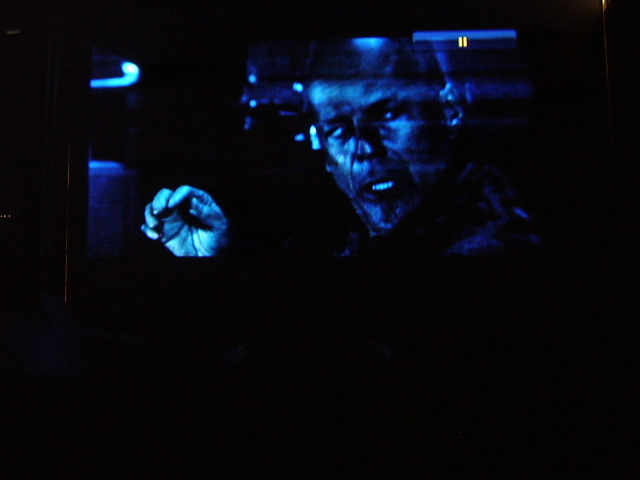
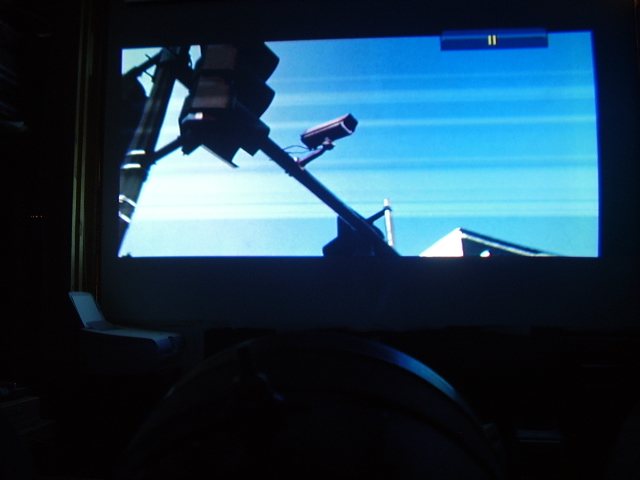
After watching a few movies on it with the kids I have come to the conclusion that it is not streaking but stripes that run right to left and of a slightly darker shad than what should be there. More like Noise that moves with the image and can be affected by the brightness or darkness of the image. And are affected by any object that enters stage right. or when the image pans up or down. So any ideas? I will try to capture an image of it to post.
|
|
| Back to top |
|
|
derfla
Joined: 11 Mar 2006
Posts: 547
Location: eastern ohio
|
| Posted: Thu Dec 06, 2007 4:14 am Post subject: |
|
|
|
But on the bright side the color on the screen is outstanding. Oh and one more thing the brightness control does not work if it does it makes very little change to the image. I am stumped CURT help me out.
|
|
| Back to top |
|
|
dbaisey
Joined: 09 Mar 2006
Posts: 821
Location: Southern Cal LA / Seattle WA
|
| Posted: Thu Dec 06, 2007 5:18 am Post subject: |
|
|
|
Make sure the test - normal switch is set to normal. Its on the video out board (tiny) if its in the test position it defeats brightness and you have alot of work to do. Doug
|
|
| Back to top |
|
|
jask

Joined: 17 Mar 2006
Posts: 10187
Location: kamloops BC
|
| Posted: Thu Dec 06, 2007 7:36 am Post subject: |
|
|
|
I had something similar with my PG that turned out to be a bad cable connection on the rgbhv to vga at the computer, try testing the connections while playing from the same source to see if the image changes.
|
|
| Back to top |
|
|
derfla
Joined: 11 Mar 2006
Posts: 547
Location: eastern ohio
|
| Posted: Thu Dec 06, 2007 7:45 pm Post subject: |
|
|
| dbaisey wrote: | | Make sure the test - normal switch is set to normal. Its on the video out board (tiny) if its in the test position it defeats brightness and you have alot of work to do. Doug |
Doug, I checked the video board and saw three switches all are on the normal setting.
Here are a few screen shots keep in mind that the camera really screwed up the color and exposure but the stripes in the image are what I wanted you to see not the bad photography and total lack of color calibration.
| Description: |
|
| Filesize: |
144.33 KB |
| Viewed: |
7689 Time(s) |
|
| Description: |
|
| Filesize: |
141.31 KB |
| Viewed: |
7689 Time(s) |
|
|
|
| Back to top |
|
|
Tinman

Joined: 09 Mar 2006
Posts: 1326
Location: Carson City Nevada
|
| Posted: Thu Dec 06, 2007 8:09 pm Post subject: |
|
|
I have seen this caused by line mismatch/termination issues. I had a coby progressive dvd player that looked good on any other RGBHV display but on NONE of the NEC's. The projectors just refused to get along with it. Never figured it out since I moved on to 1080i long ago.
May try to insert inline terminators and see what it does. Odd that it's on a fury, though. Try a 5 volt powersupply with it?
Marc
_________________
This space for rent.
|
|
| Back to top |
|
|
dbaisey
Joined: 09 Mar 2006
Posts: 821
Location: Southern Cal LA / Seattle WA
|
| Posted: Thu Dec 06, 2007 8:34 pm Post subject: |
|
|
Brightness not working:
I think your looking at the wrong board (Osc) ?. The test- norm switch is tiny and will be under the wire connector but look on the decal for test-norm AKB SW at the video out board. Doug
Streaking:
Is this on all three colors the same?
|
|
| Back to top |
|
|
derfla
Joined: 11 Mar 2006
Posts: 547
Location: eastern ohio
|
| Posted: Thu Dec 06, 2007 9:10 pm Post subject: |
|
|
|
I will look for the switch in a min. YES it is on all three colors.
|
|
| Back to top |
|
|
|
|




