| Author |
Message |
derfla

Joined: 11 Mar 2006
Posts: 547
Location: eastern ohio
|
| Posted: Tue Nov 20, 2007 2:08 am Post subject: Nec xg remote |
|
|
|
Where can I get a set up remote for this Xg 110 I just drug in today? I have the (RC-6320) But I don't have the Full function remote (RC-6321). What a confusing projector. Nothing like my 8500. I do see how the lenses on the xg do focus very well compared to my hd 8 on the Quee. but I can't get it set up without the remote.
|
|
| Back to top |
|
 |
macgyver655
Joined: 22 Aug 2007
Posts: 8508
|
| Posted: Tue Nov 20, 2007 3:04 am Post subject: |
|
|
You could use a PC to control and set it up until you find a remote.
Check here:http://www.curtpalme.com/NECXG_PCControl.shtm
|
|
| Back to top |
|
|
telescope29
Joined: 09 Nov 2007
Posts: 2
Location: Upstate New York
|
| Posted: Tue Nov 20, 2007 3:38 am Post subject: |
|
|
|
Every once in a while one comes up on Ebay. The going price is upwards of $100.
|
|
| Back to top |
|
|
derfla
Joined: 11 Mar 2006
Posts: 547
Location: eastern ohio
|
| Posted: Tue Nov 20, 2007 7:37 pm Post subject: |
|
|
|
OK guys I got the cable made and the software installed. I can adjust the contrast, change input I even get the source info. but when I try most commands i get a "Command ACK not Received" this happens when I try to bring up a test pattern or change to table/front. I have tried little more in fear of messing up the projector settings. I checked the pin connection of the 9 to 15 pin adapter with a meter all is good.any ideas?
|
|
| Back to top |
|
|
macgyver655
Joined: 22 Aug 2007
Posts: 8508
|
| Posted: Tue Nov 20, 2007 10:08 pm Post subject: |
|
|
|
Hang on. Let me go fire mine up and see what I have for settings. Which port do you have your cable in?
|
|
| Back to top |
|
|
stefuel

Joined: 07 Mar 2006
Posts: 3353
Location: Green Harbor MA USA
|
| Posted: Tue Nov 20, 2007 10:56 pm Post subject: |
|
|
Do you have a Pronto remote. I'm sure the code can be found at www.remotecentral.com
_________________
Chip
A Barco is only a AmPro with training wheels
Card carrying member of the AVS chain gang.
|
|
| Back to top |
|
|
derfla
Joined: 11 Mar 2006
Posts: 547
Location: eastern ohio
|
| Posted: Tue Nov 20, 2007 10:58 pm Post subject: |
|
|
|
I have it in the option port. But like I was saying I can turn it on and off with the software but most functions give me the "Command ACK not Received" message on my PC
|
|
| Back to top |
|
|
derfla
Joined: 11 Mar 2006
Posts: 547
Location: eastern ohio
|
| Posted: Tue Nov 20, 2007 11:00 pm Post subject: |
|
|
what pronto will work I don't need a 600.00 one do I
|
|
| Back to top |
|
|
macgyver655
Joined: 22 Aug 2007
Posts: 8508
|
| Posted: Tue Nov 20, 2007 11:10 pm Post subject: |
|
|
|
Do you have it set for standalone in the settings? Baud rate at 9600 bps? I remember I had a similar problem but it was just a setting. With the projector still running, exit the control software then restart it. It should rerecognize the projector. Since you just made your connection wire I would double check the correct order of the pin connections. The software is telling you the projector didnot receive the command or acknowledge it.
|
|
| Back to top |
|
|
derfla
Joined: 11 Mar 2006
Posts: 547
Location: eastern ohio
|
| Posted: Tue Nov 20, 2007 11:17 pm Post subject: |
|
|
|
I have the baud rate set on 9600. I don't see any stand alone setting. the computer does recognize the Projector and I can turn it on and off with the software. I can adjust contrast. I can look at the input list files. I can change thge input to rgb then to s video. I can't however make it table top/ front projection ( It is currently set to celling front) I can't bring up test patterns.
|
|
| Back to top |
|
|
derfla
Joined: 11 Mar 2006
Posts: 547
Location: eastern ohio
|
| Posted: Tue Nov 20, 2007 11:23 pm Post subject: |
|
|
|
OK I found the stand alone setting. It was already set to stand alone.
|
|
| Back to top |
|
|
derfla
Joined: 11 Mar 2006
Posts: 547
Location: eastern ohio
|
| Posted: Tue Nov 20, 2007 11:35 pm Post subject: |
|
|
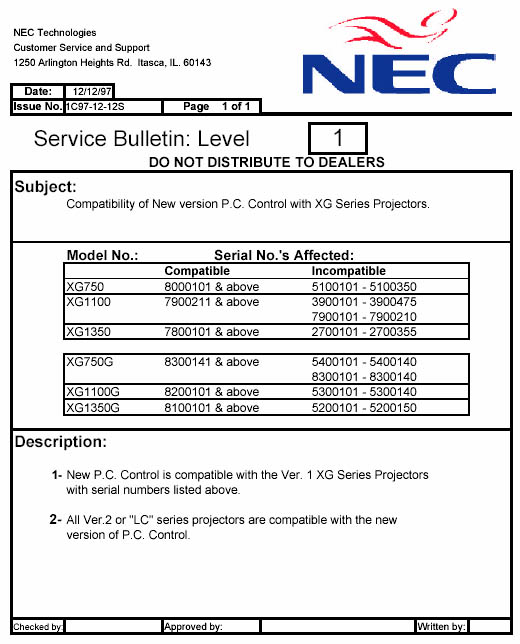
Dos this have anything to do with my control problem? My serial no is 3900217 A XG 1100
| Description: |
|
| Filesize: |
84.68 KB |
| Viewed: |
7968 Time(s) |
|
|
|
| Back to top |
|
|
stefuel
Joined: 07 Mar 2006
Posts: 3353
Location: Green Harbor MA USA
|
| Posted: Tue Nov 20, 2007 11:37 pm Post subject: |
|
|
I think he needs to type in the service code and I can't remember it 
It's been so long since I played with a NEC.
_________________
Chip
A Barco is only a AmPro with training wheels
Card carrying member of the AVS chain gang.
|
|
| Back to top |
|
|
derfla
Joined: 11 Mar 2006
Posts: 547
Location: eastern ohio
|
| Posted: Tue Nov 20, 2007 11:41 pm Post subject: |
|
|
| dbaisey wrote: | Curt,
When you find a chance the passcode is 3151 for all XG's except version 3 and that is 315151 not 13151. Doug |
I have used this code and it does unlock more functions in the software. if this is what you are talking about.
|
|
| Back to top |
|
|
macgyver655
Joined: 22 Aug 2007
Posts: 8508
|
| Posted: Tue Nov 20, 2007 11:49 pm Post subject: |
|
|
|
Did the passcode give you all the functions? I turn off the passcode feature so I dont have to enter it each time I change menu's.
|
|
| Back to top |
|
|
derfla
Joined: 11 Mar 2006
Posts: 547
Location: eastern ohio
|
| Posted: Tue Nov 20, 2007 11:54 pm Post subject: |
|
|
|
When I try to turn off the passcode it will not accept 3151 as the code to turn it off. is shows 0012 as the "current passcode" when i try to use that code "0012" it gives me the "Command ACK not Received" message.
|
|
| Back to top |
|
|
macgyver655
Joined: 22 Aug 2007
Posts: 8508
|
| Posted: Wed Nov 21, 2007 12:17 am Post subject: |
|
|
|
Did you check your port settings in your PC? If thats ok then it maybe the software is not compatible as the bulletin states for your serial number.
|
|
| Back to top |
|
|
macgyver655
Joined: 22 Aug 2007
Posts: 8508
|
| Posted: Wed Nov 21, 2007 12:24 am Post subject: |
|
|
|
Just curious but do you have a signal running into the projector?
|
|
| Back to top |
|
|
derfla
Joined: 11 Mar 2006
Posts: 547
Location: eastern ohio
|
| Posted: Wed Nov 21, 2007 1:28 am Post subject: |
|
|
|
I did not check the port settings in the pc. How would one do this? I do have a signal running to the projector the kids have been watching flushed away on it, though it is an upside down miss converged image.
|
|
| Back to top |
|
|
macgyver655
Joined: 22 Aug 2007
Posts: 8508
|
| Posted: Wed Nov 21, 2007 1:54 am Post subject: |
|
|
|
To check PC port settings go control panel,system,hardware,device manager,double click ports, right click com 1, select properties,port settings tab and make sure that Bits per Sec is 9600, data bits is 8, parity is odd(none also works), stop bits is 1 and flow control is none. Then exit out and try again.
|
|
| Back to top |
|
|
|
|





