| Author |
Message |
Mark_A_W
Joined: 15 Mar 2006
Posts: 3068
Location: Sunny Melbourne Australia
|
| Posted: Tue Nov 13, 2007 7:30 am Post subject: |
|
|
LOL, I did half of it just to troll Oliverg.
But I'm no expert on these matters, as I don't have the golden eyes, that go with the golden ears of the audiophool.
And like I care if I tread on a few precious toes. Go back to AVS if you need a nanny moderator.
Mark
Card carrying member of the "I spent 20% to get 80% of the quality" club. And let's face it, a G90 is only 20% better than an XG LC anyway, brighter yes, but only 20% sharper/more depth...or maybe I haven't watched a G90 for enough weeks (years?) to be worthy of forming an opinion 
|
|
| Back to top |
|
 |
jask

Joined: 17 Mar 2006
Posts: 10187
Location: kamloops BC
|
| Posted: Tue Nov 13, 2007 9:58 am Post subject: |
|
|
I just wanted to call him a banker.
I enjoyed the original subject and direction of the thread but really disliked the hijack and attitude you brought Oliver.We all enjoy good gear,and most of us would gladly enjoy better-but that was not the original subject.
I think you have made some good points with regards to VP image enhancement.I would guess that a large number of forum members would still spend the same money on a new projector/HDFury/HDsource before a processor.Not surprisingly many members are techy types that enjoy tweaking as much as useing theater gear,some are push a button types...this thread was not for them,it was for HTPC guys.
P.S. I would have pm'd this to you but you said you wouldn't answer my love letters.
back to the subject at hand...
I have tried a few times to order the LG through NCIX but they still are not allowing the orders to enter,are there any other sources?
|
|
| Back to top |
|
|
oliverg

Joined: 15 May 2007
Posts: 800
Location: Melbourne, Australia
TV/Projector: Sony G90 X2 - Vidikron Vision 1
|
| Posted: Tue Nov 13, 2007 10:44 am Post subject: |
|
|
| Mark_A_W wrote: | LOL, I did half of it just to troll Oliverg.
|
How very mature of you.
_________________
( R ) G ( G ) 9 ( B ) 0 ( R ) G ( G ) 9 ( B ) 0
( R ) G ( G ) 9 ( B ) 0 ( R ) G ( G ) 9 ( B ) 0
|
|
| Back to top |
|
|
Chuchuf
Joined: 11 Mar 2006
Posts: 548
|
| Posted: Tue Nov 13, 2007 1:27 pm Post subject: |
|
|
| oliverg wrote: |
On the nvidia forums, its been brought up several times. If you don't have a HDCP compliant display, the video card wont output. I've just hooked up the component adapter on my 8800GTX and it wont output 1080P - only 1080i. Is this different with ATI/AMD cards?
I just tried VGA too, but 1080P isn't even an option that appears.
|
I didn't read this entire thread, but couldn't help but notice this statement.
I and friends/customers run NVidia 8800 and 8600 series cards and DO output 1080P via VGA using PowerDVD 7.x when playing back HD-DVD and BlyRay. Heck that is the point of all this to output the native resolution if you have a PJ that can handle it.
Personally my card is an 8800GTS by EVGA running the combo LG drive.
Terry
|
|
| Back to top |
|
|
oliverg
Joined: 15 May 2007
Posts: 800
Location: Melbourne, Australia
TV/Projector: Sony G90 X2 - Vidikron Vision 1
|
| Posted: Tue Nov 13, 2007 1:40 pm Post subject: |
|
|
Hey Terry, my 8800GTX works fine with 1080P if I use DVI/HDMI - as soon as I try to use component the option vanishes.
There's even a section in the manual about it too "For HDCP compliance 1080P is disabled when analog output is selected". My PS3 does the same. On an employee's 8800GTX he tells me he is able. I'm guessing it depends on which brand/which driver and how far/what intepretation of the standard. Certainly once ICT becomes a reality it wont matter - HDCP compliance will be enforced 
Cheers
_________________
( R ) G ( G ) 9 ( B ) 0 ( R ) G ( G ) 9 ( B ) 0
( R ) G ( G ) 9 ( B ) 0 ( R ) G ( G ) 9 ( B ) 0
|
|
| Back to top |
|
|
james69
Joined: 02 Nov 2007
Posts: 20
|
| Posted: Wed Nov 14, 2007 2:33 am Post subject: |
|
|
| Mark_A_W wrote: | | LOL, I did half of it just to troll Oliverg. |
if this is true ... all you succeeded in doing was making yourself look bad... how old are you .. 8?
yes i have a digital i dont agree that someone with a digital projector would notice the difference more... there are plenty of guys with crts that rave about how much difference their video processor has made to their system... saying that only golden eyed people can see is a bit silly and immature...............
oliverq don't feed the troll...
"Trolling is deliberate violation of the implicit rules of Internet social spaces. It necessarily involves a value judgement made by one user about the value of another's contribution. (Because of this it is considered not to be any more useful than the judgement 'I don't agree with you' by many users, who prefer to focus on behaviors instead of on presumed intent.)"
|
|
| Back to top |
|
|
Mark_A_W
Joined: 15 Mar 2006
Posts: 3068
Location: Sunny Melbourne Australia
|
| Posted: Wed Nov 14, 2007 5:05 am Post subject: |
|
|
| oliverg wrote: | Hey Terry, my 8800GTX works fine with 1080P if I use DVI/HDMI - as soon as I try to use component the option vanishes.
There's even a section in the manual about it too "For HDCP compliance 1080P is disabled when analog output is selected". My PS3 does the same. On an employee's 8800GTX he tells me he is able. I'm guessing it depends on which brand/which driver and how far/what intepretation of the standard. Certainly once ICT becomes a reality it wont matter - HDCP compliance will be enforced
Cheers |
I already answered this, it's like banging your head against a BRICK WALL.
VGA WORKS FINE.
They won't turn on the ICT (why would they, all the piracy is via ripping anyway), and if they do Anydvd HD fixes that (maybe not for BD+, but they are working on that).
VGA is ALLOWED.
|
|
| Back to top |
|
|
oliverg
Joined: 15 May 2007
Posts: 800
Location: Melbourne, Australia
TV/Projector: Sony G90 X2 - Vidikron Vision 1
|
| Posted: Wed Nov 14, 2007 5:30 am Post subject: |
|
|
Mark.. some of us aren't able to do this.
http://forums.nvidia.com/index.php?showtopic=46798
You can rant all you want (as usual) but instead of banging your head against a "brick wall" how about opening your mind to the possibility that you don't know everything? (obviously based on your track record in this thread)
It appears that the nvidia 8 series cards disable 1080p when using analog but the earlier non HDCP compliant cards work fine.
If there is a way around this (apart from using a device like the HDFury) I'd like to know how its done.
I've posted a thread on AVS - it will be interesting to see what is said.
_________________
( R ) G ( G ) 9 ( B ) 0 ( R ) G ( G ) 9 ( B ) 0
( R ) G ( G ) 9 ( B ) 0 ( R ) G ( G ) 9 ( B ) 0
|
|
| Back to top |
|
|
jask
Joined: 17 Mar 2006
Posts: 10187
Location: kamloops BC
|
| Posted: Wed Nov 14, 2007 7:44 am Post subject: |
|
|
so,.... to sum up Mark can do it,Terry can do it, Terry has friends AND customers that can do it VIA VGA!!!!
and Oliver has run off to play with his chums...
I guess I will need to look at getting powerdvd ultra, now if only I could buy the drive. It seems that any of the Nidia cards that support purevideo HD will work for HD/hdcp, but is it only the 8 series that will allow the VGA out w/ Powerdvd ultra?
|
|
| Back to top |
|
|
james69
Joined: 02 Nov 2007
Posts: 20
|
| Posted: Wed Nov 14, 2007 8:51 am Post subject: |
|
|
i read oliverqs post on avs.. its merely a seeking of opinions.. whats wrong with that? i don't think the people that answer will be chums... that link oliverq provided arent friends of his... did you even read the post he linked... i just did a google on this and there are 100s of entries about people with hdcp enabled cards that cant do 1080P via analog...
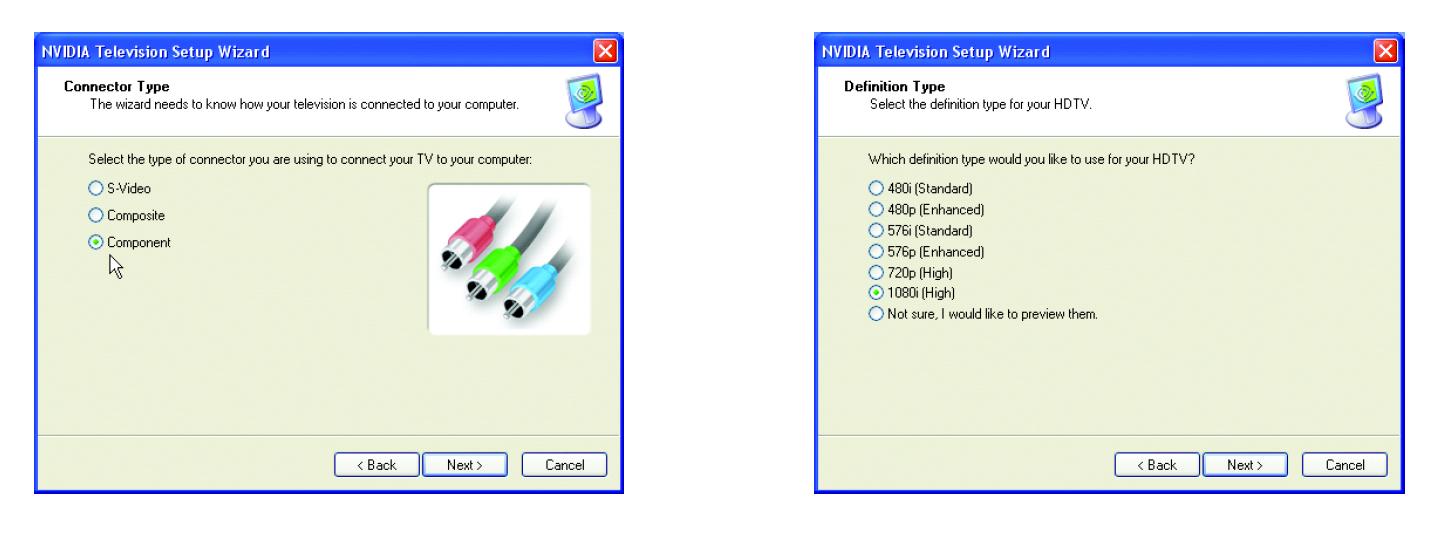
terry you mentioned that your friends can do 1080p with those cards but can you confirm that they do it with VGA or component? my 8800gt doesnt work either and if theres a way to do it then please post here about how it was done? heres a screenshot
| Description: |
|
| Filesize: |
68.76 KB |
| Viewed: |
8698 Time(s) |
|
|
|
| Back to top |
|
|
Mark_A_W
Joined: 15 Mar 2006
Posts: 3068
Location: Sunny Melbourne Australia
|
| Posted: Wed Nov 14, 2007 8:55 am Post subject: |
|
|
I have an ATi card, so it's not quite the same game.
Oliver, try VGA, not component. Component has different rules applied it seems. I don't really understand why you would try component to a CRT pj, designed to run RGBHV/VGA "natively", unless you also have a RPTV.
Jask I had trouble with a 6800GT and Powerdvd. It worked with Powerdvd version 6.5, but that used VMR9 and it tore like crazy - totally unwatchable (Nvidia driver flaw - they ignore Vsync for VMR9 with 6xxx and maybe 7xxx series cards). It didn't work AT ALL with Powerdvd 7.3 (which uses Overlay), as that version just uses a list of approved cards.
So any late model HDCP card should work ok. My Ati HD2600XT just works, custom res's work, the only flaw is Powerdvd doesn't have Gamma adjustment, and being Overlay the desktop Gamma doesn't work, and I can't get the Gamma in the Catalyst Control Centre to do squat. If anyone knows a reg hack to force Powerdvd to use VMR9 with XP, please let me know. I probably should install a new video driver.
|
|
| Back to top |
|
|
Mark_A_W
Joined: 15 Mar 2006
Posts: 3068
Location: Sunny Melbourne Australia
|
| Posted: Wed Nov 14, 2007 9:01 am Post subject: |
|
|
| james69 wrote: | i read oliverqs post on avs.. its merely a seeking of opinions.. whats wrong with that? i don't think the people that answer will be chums... that link oliverq provided arent friends of his... did you even read the post he linked... i just did a google on this and there are 100s of entries about people with hdcp enabled cards that cant do 1080P via analog...
terry you mentioned that your friends can do 1080p with those cards but can you confirm that they do it with VGA or component? my 8800gt doesnt work either and if theres a way to do it then please post here about how it was done? heres a screenshot |
Stop playing with the TV wizard thingy and just set 1920x1080 as the desktop res, preferrably at 48/72hz (or 96i, that's quite nice, if you can get custom res's to work).
|
|
| Back to top |
|
|
WanMan

Joined: 19 Mar 2006
Posts: 10270
|
| Posted: Wed Nov 14, 2007 10:13 am Post subject: |
|
|
| Chuchuf wrote: | | oliverg wrote: |
On the nvidia forums, its been brought up several times. If you don't have a HDCP compliant display, the video card wont output. I've just hooked up the component adapter on my 8800GTX and it wont output 1080P - only 1080i. Is this different with ATI/AMD cards?
I just tried VGA too, but 1080P isn't even an option that appears.
|
I didn't read this entire thread, but couldn't help but notice this statement.
I and friends/customers run NVidia 8800 and 8600 series cards and DO output 1080P via VGA using PowerDVD 7.x when playing back HD-DVD and BlyRay. Heck that is the point of all this to output the native resolution if you have a PJ that can handle it.
Personally my card is an 8800GTS by EVGA running the combo LG drive.
Terry |
Hey Terry, have you tried the LG drive with the F-I90HD at this resolution? I suspect the HDMI output is restricted to 1080i (have not verified this), but I am curious to know what you have accomplished with it. Maybe time to dig up the old thread I created a month or two ago.
_________________
Trust no one. Absolutely no one. Advice of the board.
|
|
| Back to top |
|
|
nuttall_chris
Joined: 08 Mar 2006
Posts: 832
Location: Ottawa, Ontario, Canada
|
| Posted: Wed Nov 14, 2007 1:04 pm Post subject: |
|
|
| oliverg wrote: | It appears that the nvidia 8 series cards disable 1080p when using analog but the earlier non HDCP compliant cards work fine.
If there is a way around this (apart from using a device like the HDFury) I'd like to know how its done.
I've posted a thread on AVS - it will be interesting to see what is said. |
I'm using an Nvidia 8500GT and it works perfectly at 1080P with the VGA analog out. It also works at 1080P through the DVI output to the HDFury. I'm using PowerDVD Ultra 7.3 for both HD-DVD and Blu-ray playback.
Chris.
|
|
| Back to top |
|
|
oliverg
Joined: 15 May 2007
Posts: 800
Location: Melbourne, Australia
TV/Projector: Sony G90 X2 - Vidikron Vision 1
|
| Posted: Wed Nov 14, 2007 1:14 pm Post subject: |
|
|
Chris, what brand of 8500 do you have and what driver version are you using?
James, same question? When you say analog are you using component and VGA or just component
Cheers
_________________
( R ) G ( G ) 9 ( B ) 0 ( R ) G ( G ) 9 ( B ) 0
( R ) G ( G ) 9 ( B ) 0 ( R ) G ( G ) 9 ( B ) 0
|
|
| Back to top |
|
|
nuttall_chris
Joined: 08 Mar 2006
Posts: 832
Location: Ottawa, Ontario, Canada
|
| Posted: Wed Nov 14, 2007 2:30 pm Post subject: |
|
|
| oliverg wrote: | Chris, what brand of 8500 do you have and what driver version are you using?
James, same question? When you say analog are you using component and VGA or just component
Cheers |
My 8500GT is made my BFG. I'll check the driver tonight but it is what ever came on the installation disk with the card. When I say analog I mean VGA, I don't use component.
Chris.
|
|
| Back to top |
|
|
scottap
Joined: 27 Mar 2007
Posts: 177
Location: Palo Alto, CA
|
| Posted: Wed Nov 14, 2007 5:41 pm Post subject: |
|
|
|
The drives seem to be back in stock for the moment. At least they were last night.
|
|
| Back to top |
|
|
james69
Joined: 02 Nov 2007
Posts: 20
|
| Posted: Thu Nov 15, 2007 2:41 am Post subject: |
|
|
i think i have a theory why my vga doesn't work and it turns out that its not the card..
component doesnt work at all but vga also doesnt work but i think thats because the display im using doesnt accept 1080p from vga....... im not using the wizard either ... that was just to illustrate the option was lacking
my black pearl does 1080p happily through dvi but not vga... i just checked... i think it may be the displays not accepting 1080p.. oliverq what display are you using your htpc with right now? i dont recognise the model in your profile
james
|
|
| Back to top |
|
|
AnalogRocks
Forum Moderator

Joined: 08 Mar 2006
Posts: 26706
Location: Toronto, Ontario, Canada
TV/Projector: Sony 1252Q, AMPRO 4000G
|
| Posted: Thu Nov 15, 2007 5:38 am Post subject: |
|
|
Hi james69, welcome to the forum.
Are you running a digital or do you also have a CRT projector?
The two projectors listed in Oliver's profile are top shelf 9" CRT's.
I've seen some digital displays that are happy as a horny red neck at a family reunion when using HDMI but won't do their full display resolution over VGA. Many of the flat pannels I've seen are like that. It's annoying.
_________________
Tech support for nothing
CRT.
HD done right!
|
|
| Back to top |
|
|
Darren Wadsworth

Joined: 20 Mar 2006
Posts: 238
Location: Tacoma, Washington
|
| Posted: Thu Nov 15, 2007 9:12 pm Post subject: |
|
|
Analog Component is currently limited it to 1080i.
Darren
_________________
·
"DLP is the official ESPN on ABC HD telecast sponser of college football"
|
|
| Back to top |
|
|
|
|




