| Author |
Message |
wallace123456

Joined: 14 Aug 2006
Posts: 2236
Location: Northwest VA area
|
| Posted: Fri Sep 14, 2007 2:10 pm Post subject: Cannot see the dots on the H test pattern on 1272q |
|
|
I have having the damnest time trying to get my 1272 to the point where I can see the dots in the H on that test pattern.
The pj has about 7,900 hours on it, 07msp tubes, PT-65 lens.
Any suggestions, please? I know I probably am doing something wrong, as usual.
wallace
_________________
Life Is Good, But BBQ Is Better! BBQ Competition Team
|
|
| Back to top |
|
 |
ecrabb
Forum Moderator

Joined: 13 Mar 2006
Posts: 15909
Location: Utah
TV/Projector: JVC RS40, Epson 5010
|
| Posted: Fri Sep 14, 2007 2:24 pm Post subject: |
|
|
That's a lot of hours on those tubes. Are you using the internal sync as opposed to an external source? You probably won't see the dots over 480p - if even then.
I have a 3500-hourish 1271 with well-focused PT-65's, and I don't know that I can see discrete dots, either. I know focus is good because I have some weird spots on the face of the red tube... they look like water spots. They're very sharp compared to the projected image, so I know it's the tubes that are soft as opposed to the mechanical focus.
Maybe I could see dots with the internal clock a little... I can't remember.
Hey, maybe we should have a 12xx shootout where we all take closeup pics of our H's, dots, etc. so we can compare setups. I've been wanting to see how my setup compared to others' 12xx's for a long time.
Anybody else game for a 12xx focus shootout?
SC
|
|
| Back to top |
|
|
1031

Joined: 22 Mar 2006
Posts: 657
Location: Finland
|
| Posted: Fri Sep 14, 2007 2:29 pm Post subject: Re: Cannot see the dots on the H test pattern on 1272q |
|
|
| wallace123456 wrote: | I have having the damnest time trying to get my 1272 to the point where I can see the dots in the H on that test pattern.
The pj has about 7,900 hours on it, 07msp tubes, PT-65 lens.
Any suggestions, please? I know I probably am doing something wrong, as usual.
wallace |
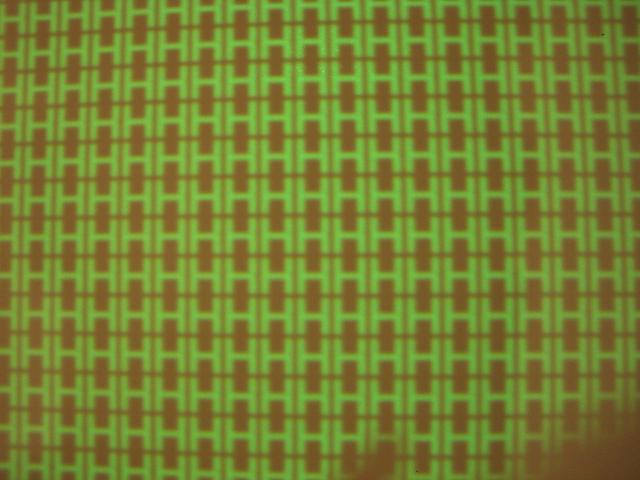
Those dots on H letters dependts what resolution or aspect ratio you use. Usually att those hours of use on tubes, you can see invidual dots only at 480i/576i.
Trye plug composite or S-vid. and put that H- pattern on and if you still dont have invidual dots  then i would say something is wrong. then i would say something is wrong.
That is how my old 1272 did that H-pattern with hd-145 lenses 567p@50hz 16/9 unknow tube history? probably over 5000 hours on tubes.
| Description: |
|
| Filesize: |
76.44 KB |
| Viewed: |
12788 Time(s) |
|
_________________
Marquee 9500LC (Frankenyokes / Thomas electric tubes / HD-10L / +many mod´s)
DVDO VP-50
New hobby, Rally
http://www.youtube.com/watch?v=vX2Rtpr1njs
http://www.youtube.com/watch?v=6ZP9FEFXV5c
http://www.youtube.com/watch?v=j065vei6j6s
http://www.facebook.com/pages/JTS-Racing-team/204443719572685
Last edited by 1031 on Sat Sep 15, 2007 8:03 am; edited 1 time in total
|
|
| Back to top |
|
|
wallace123456
Joined: 14 Aug 2006
Posts: 2236
Location: Northwest VA area
|
| Posted: Fri Sep 14, 2007 4:37 pm Post subject: |
|
|
| ecrabb wrote: | | That's a lot of hours on those tubes. Are you using the internal sync as opposed to an external source? SC |
Using the internal test pattern. But, now that I have a XA2 and hd-dve, I'll try that and see.
| ecrabb wrote: | Hey, maybe we should have a 12xx shootout where we all take closeup pics of our H's, dots, etc. so we can compare setups. I've been wanting to see how my setup compared to others' 12xx's for a long time.
Anybody else game for a 12xx focus shootout? |
Sure! Let me try to get some tonight or tomorrow night and I'll kick it off on a new thread.
| 1031 wrote: | | Trye plug composite or S-vid. and put that H- pattern on and if you still dont have invidual dots then i would say something is wrong. |
Another good idea!
wallace
_________________
Life Is Good, But BBQ Is Better! BBQ Competition Team
|
|
| Back to top |
|
|
ecrabb
Forum Moderator
Joined: 13 Mar 2006
Posts: 15909
Location: Utah
TV/Projector: JVC RS40, Epson 5010
|
| Posted: Fri Sep 14, 2007 4:42 pm Post subject: |
|
|
Aspect ratio... that's really excellent point. Squeezing the raster to 16:9 really squeezes the scan lines together, making the dots blend together much more than at 4:3. Now that I see that image, I'm pretty sure my dots are pretty visible on the internal sync. I'll try it tonight and snap a photo.
SC
|
|
| Back to top |
|
|
ecrabb
Forum Moderator
Joined: 13 Mar 2006
Posts: 15909
Location: Utah
TV/Projector: JVC RS40, Epson 5010
|
| Posted: Fri Sep 14, 2007 4:45 pm Post subject: |
|
|
| wallace123456 wrote: | | ecrabb wrote: | | That's a lot of hours on those tubes. Are you using the internal sync as opposed to an external source? SC |
Using the internal test pattern. But, now that I have a XA2 and hd-dve, I'll try that and see. |
No, that will make it even worse. I asked because if you were using an HD source, you definitely would NOT be able to see the dots.
1031's point about using composite or s-video is the right direction - that would be 480i as opposed to the internal sync, which is around 480p, I think. So, at 480i, the dots should be pretty visible.
SC
|
|
| Back to top |
|
|
GEBrown

Joined: 08 Mar 2006
Posts: 729
Location: Denver
|
| Posted: Fri Sep 14, 2007 5:27 pm Post subject: |
|
|
Back when I had a 1272, I asked the same question. As I remember, I was told at the time that I'd need to connect a S-Video external source and then bring up the H's test pattern in order to see the dots.
So basically the same thing Ecrab is saying - they apparently only show up at lower resolutions.
My 2 cents
_________________
Member of the Marquee Maniacs Club
|
|
| Back to top |
|
|
Brian Hampton

Joined: 22 Apr 2006
Posts: 1173
|
| Posted: Fri Sep 14, 2007 7:15 pm Post subject: |
|
|
You may get them with 480p if the tubes are good.
I could see them at 480p after I re-tubed my 1271. But I had AKB off and contrast around 40, that makes all the difference. I still had enough light for me in my fully dark room with small-ish 70" wide screen
|
|
| Back to top |
|
|
Sonynut

Joined: 08 Aug 2006
Posts: 367
Location: Bradford,PA
|
| Posted: Sat Sep 15, 2007 6:55 am Post subject: |
|
|
At 7900 hours the guns themselves have worn quite a bit, no doubt.. The S-Video trick should work, though. By the way.. Two more machines in my house, and still no luck on another good blue and green...What really sucks is that the new additions are both low hours(668 and 1684), just had been setup incorrectly, and driven too hard.. aargh 
_________________
1272 Stack coming soon:)
|
|
| Back to top |
|
|
CZ Eddie
Joined: 23 Mar 2006
Posts: 1601
Location: Austin, TX
|
| Posted: Sat Sep 15, 2007 7:35 am Post subject: Re: Cannot see the dots on the H test pattern on 1272q |
|
|
| wallace123456 wrote: | I have having the damnest time trying to get my 1272 to the point where I can see the dots in the H on that test pattern.
The pj has about 7,900 hours on it, 07msp tubes, PT-65 lens.
Any suggestions, please? I know I probably am doing something wrong, as usual.
wallace |
Get a few sheets of 8.5 x 11 printer paper and stick it on the front of your screen, then slowly bring it away from the screen and see if everything comes into focus a few inches from the screen. Or if the best focus is in fact AT the screen. You might be surprised.
_________________
Back after a digital sabatical.
|
|
| Back to top |
|
|
1031
Joined: 22 Mar 2006
Posts: 657
Location: Finland
|
|
| Back to top |
|
|
perisoft

Joined: 29 Aug 2007
Posts: 2920
Location: Ithaca, NY
|
| Posted: Sat Sep 15, 2007 12:27 pm Post subject: |
|
|
I just got a 1271 that seems relatively minty, though I don't know the hours. Can anyone tell me how to switch test patterns? The manual on Curt's site is hosed - it starts correctly, but jumps to page 72, then goes to the end, then starts again at 1 and ends at 50! Naturally the bits I was looking for the other day were between 50 and 72... 
|
|
| Back to top |
|
|
ecrabb
Forum Moderator
Joined: 13 Mar 2006
Posts: 15909
Location: Utah
TV/Projector: JVC RS40, Epson 5010
|
| Posted: Sat Sep 15, 2007 12:54 pm Post subject: |
|
|
Press and hold the TEST key for 5 or so seconds, the PJ will say "ENTER SERVICE MAN MODE, PRESS (UP)". Press the up arrow, and you'll be in service mode.
Then, if you keep tapping the TEST key, the PJ will cycle through all available test patterns for the selected adjustment mode.
SC
EDIT - Cycle through status pages with the PAGE key. In service man mode, there are a couple of additional page (or one) that shows hours.
|
|
| Back to top |
|
|
perisoft
Joined: 29 Aug 2007
Posts: 2920
Location: Ithaca, NY
|
| Posted: Sat Sep 15, 2007 12:58 pm Post subject: |
|
|
Ahh - I got into SERVICE MAN mode (which always makes me chuckle for some reason... Up in the sky! Coming to save the day, and converge the projectors of the city! It's SERVICE MAN!!) to do convergence but didn't try hitting the test key. Thanks.
I'll take a look at the Hs when I get a chance - I've got to fix this stupid fan first, though. I oiled it and it still doesn't want to start (fan on the LVPS). If I poke it it starts going fine - not even noisy. Doesn't feel like it's resisting any more than the other one, either, so either I need to figure it out or attach a pony-fan to it to get it going on startup. 
|
|
| Back to top |
|
|
ecrabb
Forum Moderator
Joined: 13 Mar 2006
Posts: 15909
Location: Utah
TV/Projector: JVC RS40, Epson 5010
|
| Posted: Sat Sep 15, 2007 8:45 pm Post subject: |
|
|
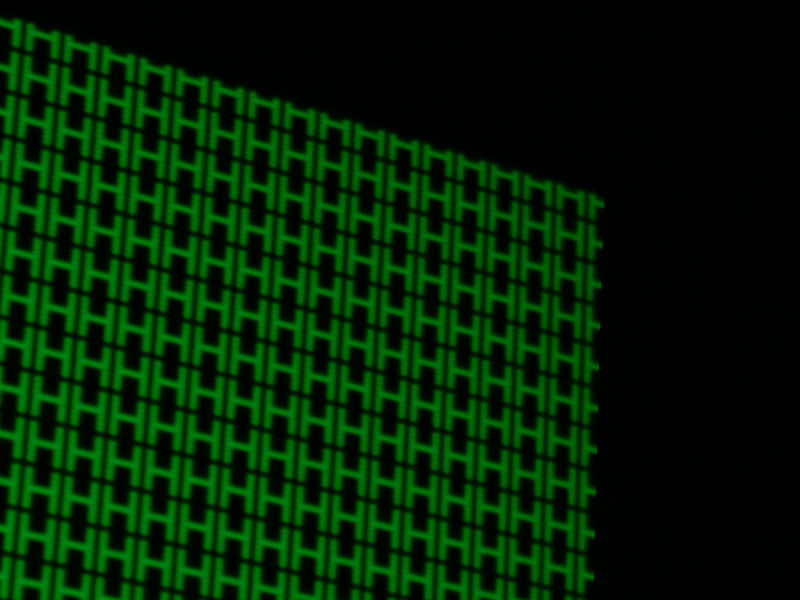
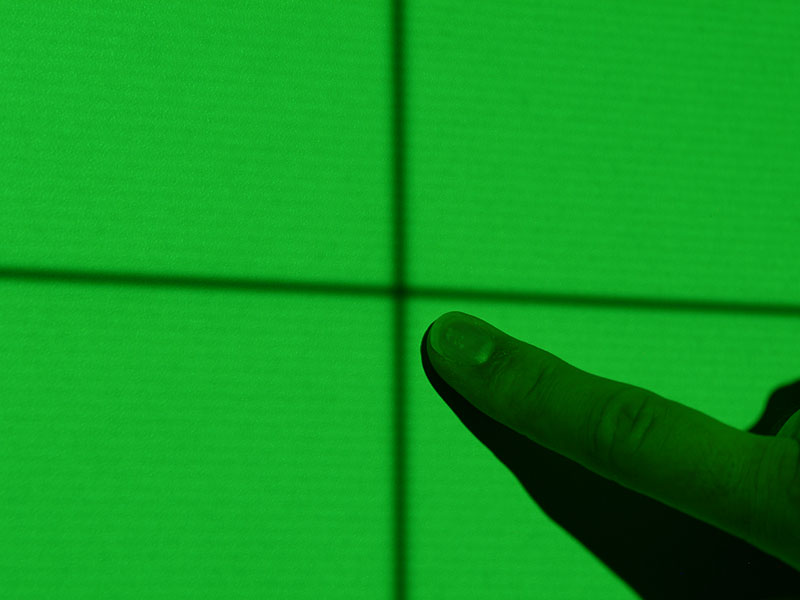
OK, here are my test pattern sharpness shots. This is my good old 1271 w/about 2800 hours on the tubes. Very, very light wear - probably 9-10 all across. Ceiling mounted, dead-on physical setup, and decent mechanical and electronic setup.
Screen is 96x54, WilsonArt DW.
I'm no expert, but I'm pretty obsessive compulsive about image quality being a design/photo/video guy. Let's just say I'm pretty damn anal and leave it there. I went a little conservative on throw/raster max for better uniformity and corner focus, and I think it might have paid off. As you'll see, my bottom corners still need some work. I haven't even done the mooneyass mods yet, but I think it's a damn good image for a projector this old.
These were all using the internal sync signal, which I think is about 480p.
One good thing about these old 12xx's is that even when they're set up as sharp as possible, they're just soft enough at 1080i that it really looks "filmy". MUCH better than SD, but very "solid" - as in no gaps, lines, pixes structure, etc. Practically no scan lines visible, even right at the screen. Looks very film-like from the seating position. Saves lots of money on 1080p processors!
SC
| Description: |
| H's - screen center, all tubes on |
|
| Filesize: |
78.25 KB |
| Viewed: |
12657 Time(s) |

|
| Description: |
| H's - screen center, R and B muted |
|
| Filesize: |
96.37 KB |
| Viewed: |
12657 Time(s) |

|
| Description: |
|
| Filesize: |
61.82 KB |
| Viewed: |
12657 Time(s) |

|
| Description: |
|
| Filesize: |
67.54 KB |
| Viewed: |
12657 Time(s) |

|
| Description: |
|
| Filesize: |
72.54 KB |
| Viewed: |
12657 Time(s) |
|
| Description: |
|
| Filesize: |
68.91 KB |
| Viewed: |
12657 Time(s) |

|
| Description: |
| White field, R and B muted. 480p scan lines are pretty obvious near the screen, but not so much from 1.2x screen width seating position. Whites are where they become noticeable from the seating position. |
|
| Filesize: |
29.65 KB |
| Viewed: |
12658 Time(s) |

|
| Description: |
|
| Filesize: |
40.29 KB |
| Viewed: |
12658 Time(s) |

|
| Description: |
| Crosshair (screen center) with a digit for sharpness reference. |
|
| Filesize: |
43.06 KB |
| Viewed: |
12658 Time(s) |
|
|
|
| Back to top |
|
|
tony359

Joined: 04 Aug 2006
Posts: 378
|
| Posted: Sun Sep 16, 2007 12:12 am Post subject: |
|
|
On a 1272 I had on my hands, I could saw easily dots with composite interlaced DVD source. Then, "H" dots were there, sharp and well defined. When running higher definition, the dots were not defined.
Check the photo, projected on a wall!!

Ciao
A
|
|
| Back to top |
|
|
ecrabb
Forum Moderator
Joined: 13 Mar 2006
Posts: 15909
Location: Utah
TV/Projector: JVC RS40, Epson 5010
|
| Posted: Sun Sep 16, 2007 1:18 am Post subject: |
|
|
Tony,
OK, so 480i. Was that 4x3 or 16x9?
Nice dots.
SC
|
|
| Back to top |
|
|
tony359
Joined: 04 Aug 2006
Posts: 378
|
| Posted: Sun Sep 16, 2007 1:24 am Post subject: |
|
|
Oh, that was just a test on a wall, but was 4:3 setup.
Ciao
A
|
|
| Back to top |
|
|
wallace123456
Joined: 14 Aug 2006
Posts: 2236
Location: Northwest VA area
|
| Posted: Sun Sep 16, 2007 4:09 am Post subject: |
|
|
Hhhmm, those look really dog-gone good!!!
Sc, I see DOTS!!! Big time! I'll bet the picture is great as well.
Ciao,
I also see DOTS big time.
Do you guys have any source cable hooked up? Are you just using the internal test pattern?
I did not get a chance today or tonight to fire up the pj; I was stuck trying to pu a new front door in all day!!!! 
GGRRRRRR!! What a PITA!!
wallace
_________________
Life Is Good, But BBQ Is Better! BBQ Competition Team
|
|
| Back to top |
|
|
wallace123456
Joined: 14 Aug 2006
Posts: 2236
Location: Northwest VA area
|
| Posted: Sun Sep 16, 2007 4:42 am Post subject: |
|
|
| Sonynut wrote: | | By the way.. Two more machines in my house, and still no luck on another good blue and green...What really sucks is that the new additions are both low hours(668 and 1684), just had been setup incorrectly, and driven too hard.. aargh |
Well, I still have 6 machines sitting in the basement. I am thinking of picking up another 1272q with good tubes.
I have been looking for a marquee 8500, but it seems like thats like looking for a "needle in a hay stack". Or, I aint looking in the right place.
Did you use a htpc on your set-up when it was running?
wallace
_________________
Life Is Good, But BBQ Is Better! BBQ Competition Team
|
|
| Back to top |
|
|
|
|