|
As this forum is rarely used anymore, we've locked it. Feel free to browse and read. Questions? Please reach out to us directly. Cheers! |

|
 |
|
|
| Author |
Message |
AFryia

Joined: 09 Mar 2006
Posts: 965
Location: S.E. Michigan VPH-G70Q
|
| Posted: Sat Jul 28, 2007 6:18 pm Post subject: |
|
|
| garyfritz wrote: | | is there at least a shortcut way to change video memories without having to step through the MENU structure? I |
No  not that I know of. not that I know of.
You could program a macro that assumes the menu is at the bottom then "key" up X positions. It will stop at the top menu. then over to the video memory # you want.
|
|
| Back to top |
|
 |
garyfritz

Joined: 08 Apr 2006
Posts: 12088
Location: Fort Collins, CO
|
| Posted: Tue Jul 31, 2007 3:41 pm Post subject: |
|
|
Yeah. Barf. Especially barfulous because my remote only issues one command per 0.8-1.0 sec or so. So we're talking about 5-10 seconds of waiting for the menus to flash just to switch memories. That sucks.
I did finally get into the extended menu section and I see the memory operations now. Not quite sure what I did wrong before, but I'm in now. Rajdude over at the A site posted a summary of how to get the menu and what it can do.
|
|
| Back to top |
|
|
AFryia
Joined: 09 Mar 2006
Posts: 965
Location: S.E. Michigan VPH-G70Q
|
| Posted: Tue Jul 31, 2007 11:14 pm Post subject: |
|
|
| garyfritz wrote: | Yeah. Barf. Especially barfulous because my remote only issues one command per 0.8-1.0 sec or so. So we're talking about 5-10 seconds of waiting for the menus to flash just to switch memories. That sucks.
|
Ya I hear you!
I just programmed the macro for Video memory on my Pronto. Now it's just one button.
I was getting tired of fumbling with 4 remotes so I macro'd everything.
|
|
| Back to top |
|
|
garyfritz
Joined: 08 Apr 2006
Posts: 12088
Location: Fort Collins, CO
|
| Posted: Thu Aug 16, 2007 4:00 am Post subject: |
|
|
Damn. I am REALLY starting to miss the simple convergence system on the Marquee. 
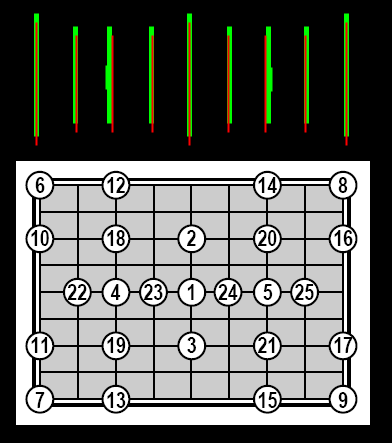
I recently hung the G70 and I'm trying to give it a proper setup. I've just spent nearly an hour trying (unsuccessfully) to converge red onto green. With the normal geometry / convergence controls (size, lin, skew, bow, key, pin) I can get a near-perfect convergence on the entire screen -- except the vertical lines left & right of center. As I tried to show in the attached picture, the green horizontal spacing is nonlinear. If you line up the R & G at center, left, and right, the green vertical lines between left¢er and between right¢er are too close to the edges.
So I tried to fix it with zone. I went through red & green zone 5-6 times each, trying to line things up. (I know I shouldn't use green zone at all, but I'm trying to get the two to come together, and red can't do it on its own.) But when I'd line up one area, I'd pull neighboring areas out of whack. I'm having to use WAY WAY too much zone to try to correct these problems -- MAX and MIN in a few places!! -- and it's still not working.
I noticed that without any zone at all, the green vertical lines seem to be bowed away from center a bit in the area of zones 4 and 5 (see clumsy representation below). Furthermore the green zone control for zones 4 & 5 works OK in the vertical direction, but **NOT** in the horizontal. It seems to be maxed out ("minned out" on the left), and I can't adjust it. I suspect this is what's causing my nonlinearity.
I SHOULD be able to adjust the horiz zone for green zones 4 & 5, right?
Curt, if you're reading: any idea what might cause this horizontal nonlinearity in green?
| Description: |
|
| Filesize: |
16.52 KB |
| Viewed: |
6448 Time(s) |
|
|
|
| Back to top |
|
|
Brian Hampton

Joined: 22 Apr 2006
Posts: 1173
|
| Posted: Sat Aug 18, 2007 5:33 pm Post subject: |
|
|
Hmmm,
Looks interesting, could pincusion be causing this somehow?
|
|
| Back to top |
|
|
garyfritz
Joined: 08 Apr 2006
Posts: 12088
Location: Fort Collins, CO
|
| Posted: Sat Aug 18, 2007 10:27 pm Post subject: |
|
|
|
I don't see how. I adjusted out any pincushion error on the edges, but then I've got the bow at zones 4 and 5. Due, I think, to the fact that the green zone at 4 and 5 is maxed out and I can't adjust it.
|
|
| Back to top |
|
|
Chuchuf
Joined: 11 Mar 2006
Posts: 548
|
| Posted: Sun Aug 19, 2007 1:00 pm Post subject: |
|
|
Zones 4 and 5 should help to balance that out. Also the use of zones 22, 23, 24 and 25 can help as they are to help with linearity.
Terry
|
|
| Back to top |
|
|
garyfritz
Joined: 08 Apr 2006
Posts: 12088
Location: Fort Collins, CO
|
| Posted: Sun Aug 19, 2007 7:23 pm Post subject: |
|
|
Terry, that's the problem. I CAN'T balance it out with zones 4 and 5, because the green zones 4 & 5 are broken somehow. They're maxed out toward the sides of the screen, and I can't change them. The H values change when I adjust them, but the the zone doesn't move. I can move the green zones 4 & 5 vertically, and I can move the R & B zones 4 & 5 horizontally & vertically. I just can't move the green zones 4 & 5 horizontally.
If they were stuck at the centerpoint, I wouldn't be having this problem. But they're stuck at the most extreme point and I can't adjust B/R to match them without messing up the rest of the screen. And fixing the rest of the screen messes up zones 4 & 5.
I've worked with 22-25, and that helps. Maybe I'll be able to find the balance of zone & size adjustments that will deal with this. But I really wish the green zones 4 & 5 worked properly, in which case dialing in the convergence would be a snap. I would barely need any zone at all.
|
|
| Back to top |
|
|
|
|
|
|
|
You cannot post new topics in this forum
You cannot reply to topics in this forum
You cannot edit your posts in this forum
You cannot delete your posts in this forum
You cannot vote in polls in this forum
You cannot attach files in this forum
You can download files in this forum
|
Forum powered by phpBB © phpBB Group
|
|




