|
As this forum is rarely used anymore, we've locked it. Feel free to browse and read. Questions? Please reach out to us directly. Cheers! |

|
 |
|
|
| Author |
Message |
garyfritz

Joined: 08 Apr 2006
Posts: 12088
Location: Fort Collins, CO
|
| Posted: Sat Jul 14, 2007 4:32 am Post subject: G70 setup issues |
|
|
(Title edited to reflect what the thread turned into)
I just put an almost-new green tube into my new (to me) G70. This tube had a couple of known minor issues, but those don't seem to be a problem.
However I noticed a "spark" of light at the bottom of the raster (with the G70 sitting on the floor). It's a small bright dot that flashes every 15-30 seconds or so. This is with no signal, nothing hooked to the inputs. I'm 99% sure the projector didn't do this with the old green. (I'm hoping I don't have to put the old green back in to verify it. Getting that HV lead in & out was a real PITA !!!)
I haven't had a chance to get the projector hooked up to a signal source yet, so I don't know for sure if the flash is in the image area or not. If it's outside in the blanking/porch area, no biggie, especially if the blanking gets rid of it. But if it's in the image area, it would be really distracting.
Any guesses what this might be?
Thanks!
Gary
Last edited by garyfritz on Thu Aug 16, 2007 4:12 am; edited 1 time in total
|
|
| Back to top |
|
 |
Phil Smith
Joined: 08 Mar 2006
Posts: 7717
|
| Posted: Sat Jul 14, 2007 5:30 am Post subject: |
|
|
Gary,
I've never noticed anything like that on my G70 when there's no source. However, HDTV makes for some weirdness that I have to blank out (blanking does get rid of it). It's outside the picture. Hopefully your problem will be outside the picture as well.
|
|
| Back to top |
|
|
Axatax

Joined: 01 Nov 2006
Posts: 403
TV/Projector: Sony VPH-G70Q (aka Barco Cine8 Onyx)
|
| Posted: Sat Jul 14, 2007 5:50 am Post subject: |
|
|
I would check for proper yoke adjustment, centering, and RGB shift.
Also try toggling the ABG function and see if this has any effect on the flashing. If the AKB line is below the blanked area or off the tube it will cause the ABG to malfucntion, which will cause a pulsing effect.
|
|
| Back to top |
|
|
garyfritz
Joined: 08 Apr 2006
Posts: 12088
Location: Fort Collins, CO
|
| Posted: Sat Jul 14, 2007 2:36 pm Post subject: |
|
|
The raster was centered (magnetically, RGB shift = 128) with the old tube, but I need to rotate the yoke to level the pic in the new tube and re-check the centering.
I'll try turning off the ABG. BTW the flash is on the opposite side as the ABG line. The ABG is on the top of the raster, and the flash is on the bottom.
|
|
| Back to top |
|
|
garyfritz
Joined: 08 Apr 2006
Posts: 12088
Location: Fort Collins, CO
|
| Posted: Sat Jul 14, 2007 6:25 pm Post subject: |
|
|
Uh-oh. Something's wrong.
I unhooked my DVD player (Momitsu V880N upscaling player) and took it over to the G70. Hooked it up with a VGA->5BNC cable. I did this briefly when I first got the projector and it worked fine.
Today the G70 won't sync to 720p at all. It will sync to other resolutions (1080i@60, 576x480, 480p, etc), but the display has horizontal "tearing" / flickering going on, and horizontal bands are darker than they should be. There is also streaking across the raster where there are brighter areas. See below for a pic -- other than the dark line across the middle of the blue (camera artifact) and a bit of camera shake, that's pretty much what it looks like.
I hooked the v800N up to my Marquee with the exact same cable and it worked fine. I tried hooking a laptop up to the G70 (1024x768) and it wouldn't sync to that either.
Also, when there is a signal on A (even if it won't sync to it), when I switch to input A the brightness is as it should be. But then it dims down over about 10 seconds until it's almost dark. Remove the signal and it goes bright, attach the signal and it dims.
What in God's name have I done!??? Could the new green tube be doing this??
| Description: |
|

Download |
| Filename: |
G70problem.jpg |
| Filesize: |
159.77 KB |
| Downloaded: |
900 Time(s) |
|
|
| Back to top |
|
|
JohnHWman
Joined: 15 May 2007
Posts: 215
Location: France - Grenoble
TV/Projector: Sony VPH-G90U (one unit for me, four others units repaired and sold)
|
| Posted: Sun Jul 15, 2007 8:08 am Post subject: |
|
|
Check if 'CLAMP' parameter in the input menu of the G70 is well set to 'H/C' mode rather than 'AUTO'. I had the same issue with HTPC hooked to my G90 in 1080P.
Hope this helps
John
_________________
Home theater enthusiast for over 20 years !
My dedicated HT room !
|
|
| Back to top |
|
|
garyfritz
Joined: 08 Apr 2006
Posts: 12088
Location: Fort Collins, CO
|
| Posted: Sun Jul 15, 2007 5:43 pm Post subject: |
|
|
Aha!!! That wasn't quite it, John, but it got me pointed in the right direction.
I couldn't set CLAMP. Hm. So I searched through the manual and found that happens if you have non-RGB input signals. Sure enough, under SET SETTINGS, Input A was set to HDTV YPbPr. Not sure how/why that happened, but changing it back to RGB fixed the problem. Thanks John!!!
Now I can get back to checking out that flash...
|
|
| Back to top |
|
|
JohnHWman
Joined: 15 May 2007
Posts: 215
Location: France - Grenoble
TV/Projector: Sony VPH-G90U (one unit for me, four others units repaired and sold)
|
| Posted: Sun Jul 15, 2007 6:26 pm Post subject: |
|
|
Glad that my statement helped you to solve the issue.
Yes, 'CLAMP' parameter should only be available for RGB input type.
John
_________________
Home theater enthusiast for over 20 years !
My dedicated HT room !
|
|
| Back to top |
|
|
garyfritz
Joined: 08 Apr 2006
Posts: 12088
Location: Fort Collins, CO
|
| Posted: Mon Jul 16, 2007 12:47 am Post subject: |
|
|
Darn newbies, don't know their way around their new projector and ask all kindsa dumb questions.  Thanks for the help, John. Thanks for the help, John.
So, back to the flash: at this point it appears it only happens in a no-signal condition or with test patterns on the screen. Beats me what's causing it, but as long as it doesn't happen when I have real content on the screen, it won't bother me any.
As long as I've already got this "dumb newbie" thread started, I guess I might as well continue asking questions here...
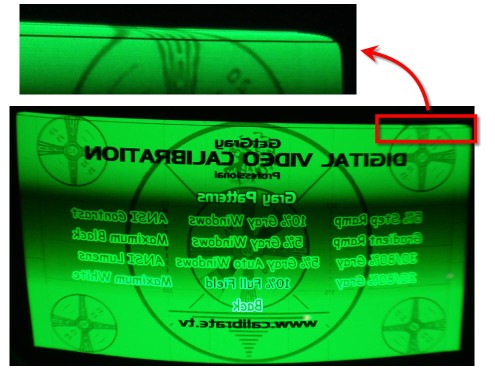
* I have a dark line along the top of the raster. At first I assumed this was the ABG line, since it seems to appear in the same place as the ABG line. (Is the ABG line supposed to appear inside the active picture area!??) But I turned ABG off and the dark line is still there. There's also some distortion happening above the line, and the raster is rounded in the top left & right corners -- see the attached enlargement of the top-right corner of the raster, looking at the tube. If I have to, I can cut off the top with blanking and probably never miss it, but I'd like to fix it if I can. Any guesses?
* I was thinking the G70 had magnetic centering adjustments. I wanted to do a full reset on the beastie and then, with the centering controls reset to factory defaults, center the rasters with the magnetics. But now I can't find the magnetic adjustments. Am I missing something, or does the G70 have ONLY electronic menu-driven raster centering?
* What's the right way to do a full reset? Hold RESET for 5 seconds, then select the ALL RESET, ALL MEMORIES option?
Thanks guys!
Gary
| Description: |
|
| Filesize: |
48.44 KB |
| Viewed: |
21254 Time(s) |
|
|
|
| Back to top |
|
|
Axatax
Joined: 01 Nov 2006
Posts: 403
TV/Projector: Sony VPH-G70Q (aka Barco Cine8 Onyx)
|
| Posted: Mon Jul 16, 2007 6:25 am Post subject: |
|
|
I can answer a few of these:
1. The line of the top of the raster is caused by misadjusted RGB size/dot phase controls (center top on the remote). Play with these and you'll get rid of the line.
2. The focusing controls are all electronic, with the exception of the dot shape (circle) which is controlled by the mangets on the tube neck. Use the 2PA/2PV adjustments to adjust centering.
|
|
| Back to top |
|
|
Phil Smith
Joined: 08 Mar 2006
Posts: 7717
|
| Posted: Mon Jul 16, 2007 12:47 pm Post subject: |
|
|
| garyfritz wrote: | | Darn newbies, don't know their way around their new projector and ask all kindsa dumb questions. Thanks for the help, John. |
I forgot you were a newbie. I would have suggested to check your input settings had I remembered. Anyone that's owned a G70 has experienced that problem at one time or another.
| Quote: | | * I have a dark line along the top of the raster. At first I assumed this was the ABG line, since it seems to appear in the same place as the ABG line. (Is the ABG line supposed to appear inside the active picture area!??) But I turned ABG off and the dark line is still there. There's also some distortion happening above the line, and the raster is rounded in the top left & right corners -- see the attached enlargement of the top-right corner of the raster, looking at the tube. If I have to, I can cut off the top with blanking and probably never miss it, but I'd like to fix it if I can. Any guesses? |
I've always used "Shift" to fix that problem. "Center" adjustments will not help.
| Quote: | | * I was thinking the G70 had magnetic centering adjustments. I wanted to do a full reset on the beastie and then, with the centering controls reset to factory defaults, center the rasters with the magnetics. But now I can't find the magnetic adjustments. Am I missing something, or does the G70 have ONLY electronic menu-driven raster centering? |
The only mechanical adjustment you need to make on a G70 is skew, and you probably don't need to adjust that.
| Quote: | | * What's the right way to do a full reset? Hold RESET for 5 seconds, then select the ALL RESET, ALL MEMORIES option? |
Yep. Sometimes it's hard to do with the remote. If so, use the built-in remote.
|
|
| Back to top |
|
|
Phil Smith
Joined: 08 Mar 2006
Posts: 7717
|
| Posted: Mon Jul 16, 2007 12:50 pm Post subject: |
|
|
| Axatax wrote: | I can answer a few of these:
1. The line of the top of the raster is caused by misadjusted RGB size/dot phase controls (center top on the remote). Play with these and you'll get rid of the line. |
Does your remote say "dot phase"? Mine says "shift".
|
|
| Back to top |
|
|
garyfritz
Joined: 08 Apr 2006
Posts: 12088
Location: Fort Collins, CO
|
| Posted: Mon Jul 16, 2007 4:24 pm Post subject: |
|
|
Yeah, mine says SHIFT too. So SHIFT is for moving/centering all 3 rasters together? Or does it shift the image within the raster, like PHASE on a Marquee? That would fit with the DOT PHASE term.
And the CENT button on the bottom is for centering each raster individually? I assume the CENT R and B buttons (near the SHIFT button) are identical to using the bottom CENT button on R and B? I'm not quite sure why they have R/B CENT on the "user" portion of the remote instead of / in addition to CENT on the bottom covered buttons.
I'll give the SHIFT a try, just to make sure it resolves the problem. Then I'll do a full reset and start over. There are two kinds of RESET for most things, FACTORY and SERVICE reset. (I forget if the full reset offers that choice.) I assume FACTORY is what gets set for all G70's, and SERVICE is what they tune for a particular set of tubes, or something like that? And if you replace a tube those SERVICE settings are invalid? Should I worry about that, or just do the full reset and assume I'm back to a clean slate?
Jeff, you said to use the 2PA/2PV adjustments for centering. Do you mean the 2PH/2PV adjustments in the MG FOCUS screen? I thought those were for adjusting flare?? It seems like the neck tabs and the MG FOCUS 2PH/2PV do similar but not quite the same things. I assume you get the magnetic flare adjustments right, as well as you can, and then you tweak the focus with the 2PH/2PV.
But centering -- don't you use the R G B CENT for that? I'd planned on doing a full reset and then, with everything back to zero, do a magnetic centering. I guess there's no way to do that with this projector, so I'll just center them with CENT.
Oh, more questions: most projectors use a simple 0-100 or 0-255 scale for their adjustments. Many of the G70 adjustments have two numbers, e.g. Hc/Hf and Vc/Vf for SIZE. What are the c/f numbers and how do they fit together?
When I squeezed the vertical size down to a 16:9 raster, I'm certain the image got dimmer. Not just because it covered less phosphor area, but the brightness per unit area went down. What would cause that?
Thanks guys!
|
|
| Back to top |
|
|
Mark_A_W
Joined: 15 Mar 2006
Posts: 3068
Location: Sunny Melbourne Australia
|
| Posted: Tue Jul 17, 2007 3:00 am Post subject: |
|
|
Hc Horizontal Course
Hf Horizontal Fine
|
|
| Back to top |
|
|
garyfritz
Joined: 08 Apr 2006
Posts: 12088
Location: Fort Collins, CO
|
| Posted: Thu Jul 19, 2007 4:01 am Post subject: |
|
|
OK, finally got a chance to fool with it a bit more. Sure enough, SHIFT sorted the mystery line right out. Now I have the image centered in the raster better.
Brian convinced me (at least temporarily ) not to reset the beast, but just to set all the zone and mag focus zones to 128. There doesn't seem to be any way to do that with RESET -- it may set them to some level but it sure doesn't set 'em all to 128 -- so I've been manually setting everything to 128, all zones, all colors. Definitely a pain but I especially wanted to get the mag focus centered so I could optimize the spot size with the CPC rings.
I still have to run through the procedures in ch 3 of the Service manual (after putting in a new tube). Then it's time to put the lenses back on, haul this thing in front of a screen, and see what it looks like!
|
|
| Back to top |
|
|
garyfritz
Joined: 08 Apr 2006
Posts: 12088
Location: Fort Collins, CO
|
| Posted: Sat Jul 21, 2007 5:34 pm Post subject: |
|
|
OK, I'm doing a rough setup on the floor. I'm trying to converge it with a minimum of ZONE. So far I haven't used ZONE at all, and ZONE is all reset.
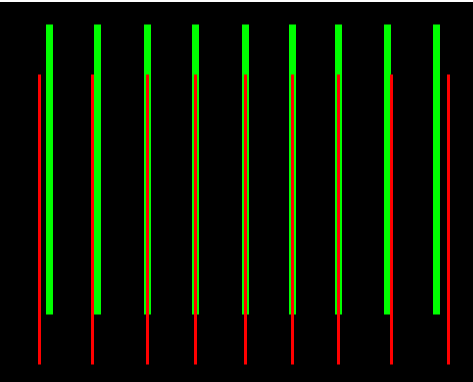
I'm having a bit of trouble with the green horizontal linearity. It seems to compress a bit at the edges -- see pic for an approximation. I can line the red up perfectly with the green in the middle 3/4 of the screen, but the outside few green lines seem to have non-linear spacing. (Only the green does this. Blue and red are reasonably linear. Well, I haven't measured yet, but blue and red are the same.) If I set the red SIZE to match the outside lines, then the middle ones are off.
XG's have a "linearity balance" control that lets you adjust stuff like this. I see pin balance and key balance, but I don't see anything like a lin balance. Do I just have to use ZONE on this?
| Description: |
|
| Filesize: |
7.92 KB |
| Viewed: |
21118 Time(s) |
|
|
|
| Back to top |
|
|
AFryia

Joined: 09 Mar 2006
Posts: 965
Location: S.E. Michigan VPH-G70Q
|
| Posted: Sat Jul 21, 2007 9:31 pm Post subject: |
|
|
I believe the last four zones in zone control will kinda adjust the linearity left to right.
Unlike the other zones these only adjust left/right (horizontal) from top to bottom of the screen.
_________________
My Volt Blog
|
|
| Back to top |
|
|
garyfritz
Joined: 08 Apr 2006
Posts: 12088
Location: Fort Collins, CO
|
| Posted: Sun Jul 22, 2007 3:25 pm Post subject: |
|
|
Hm, I see what you mean. The manual doesn't say anything about it, but those four zones have only horizontal movement, and they seem to control top-to-bottom.
It's still not really enough. I've got zones 22/25 maxed out and I still can't get it quite right. With a lot of juggling between size/lin and those zones I got it close, but not right, and it was not easy. It's like I can get all the zones right except the far left and right edges, and red on the edges sticks way out beyond where it should. I need another "top-to-bottom" zone like 22/25, but on the edge of the screen.
Is this common? Is there just some trick to converging this thing that I'm not getting, or is there something wrong with my projector's geometry?
|
|
| Back to top |
|
|
AFryia
Joined: 09 Mar 2006
Posts: 965
Location: S.E. Michigan VPH-G70Q
|
| Posted: Sun Jul 22, 2007 4:07 pm Post subject: |
|
|
If your graphic is a fair representation I would adjust GREEN SIZE to match RED, along the perimeter.
Then zone at the 1/4 and 3/4 horizontal position.
General rule of thumb is to work all other controls (SIZE,LIN, PIN,etc.) before using zone. Use zone sparingly as possible.
All zone adjustments should be set to 128 (neutral) before stating any convergence.
|
|
| Back to top |
|
|
garyfritz
Joined: 08 Apr 2006
Posts: 12088
Location: Fort Collins, CO
|
| Posted: Sun Jul 22, 2007 4:33 pm Post subject: |
|
|
Yup, I did set everything to 128 before starting. Several times.
Adjust G size to match R? But doesn't G always control all 3 colors? Obviously I could adjust R to match G, but just curious if I'm missing something.
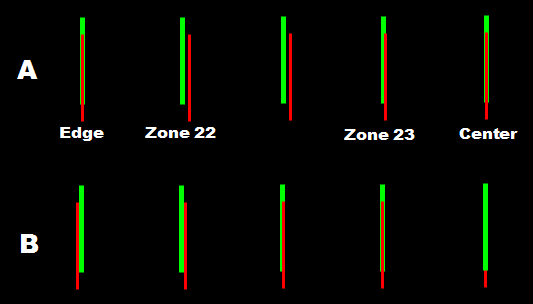
I tried doing that, but still had an awful time getting things to line up. E.g. I just tried resetting to 128, then adjusting R size to line up with G at the left & right edges. (See A below.) Next I tried working with zones 22 & 23, the two "super-zones" on the left side. I could line up 23 just by reducing it to 60 or so. But in zone 22, even when I took it all the way to MIN the R is still to the right of G. Worse, moving zone 22 to the left also moved the left edge to the left (see B) -- which means now I'd have to reduce red SIZE to get the edge to line up with G, which will make zone 22 even further off!
I can also work with the Green ZONE settings to get R & G to come together, but I still have the same problem shown in B -- moving the G zone 22 to the right moves the G left edge to the right.
What am I doing wrong??
| Description: |
|
| Filesize: |
5.56 KB |
| Viewed: |
21068 Time(s) |
|
|
|
| Back to top |
|
|
|
|
|
|
|
You cannot post new topics in this forum
You cannot reply to topics in this forum
You cannot edit your posts in this forum
You cannot delete your posts in this forum
You cannot vote in polls in this forum
You cannot attach files in this forum
You can download files in this forum
|
Forum powered by phpBB © phpBB Group
|
|




