| Would you be interested in purchasing a software blend option for your PC? |
| I am intersted in the software. |
|
11% |
[ 2 ] |
| I am not interested in the software |
|
22% |
[ 4 ] |
| I am only interested if it can play SD and HD content |
|
66% |
[ 12 ] |
|
| Total Votes : 18 |
|
| Author |
Message |
racerxnet
Joined: 20 Jun 2007
Posts: 362
Location: Illinois
|
| Posted: Fri Jul 06, 2007 5:56 pm Post subject: Custom CRT Projector Blending software for PC's |
|
|
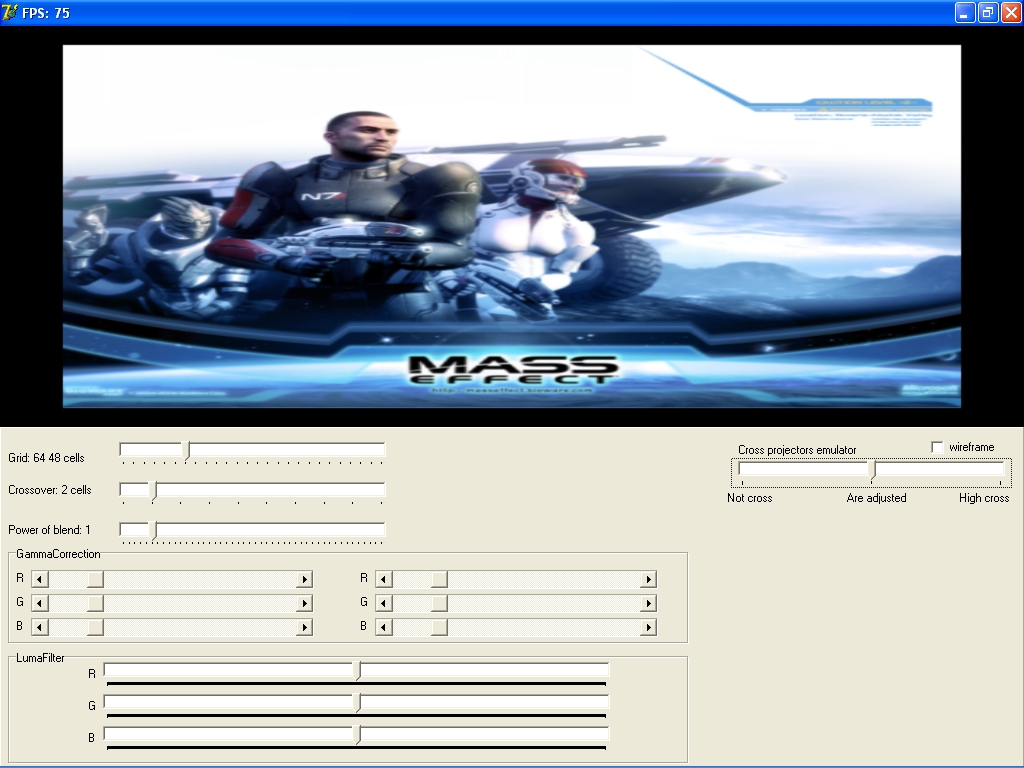
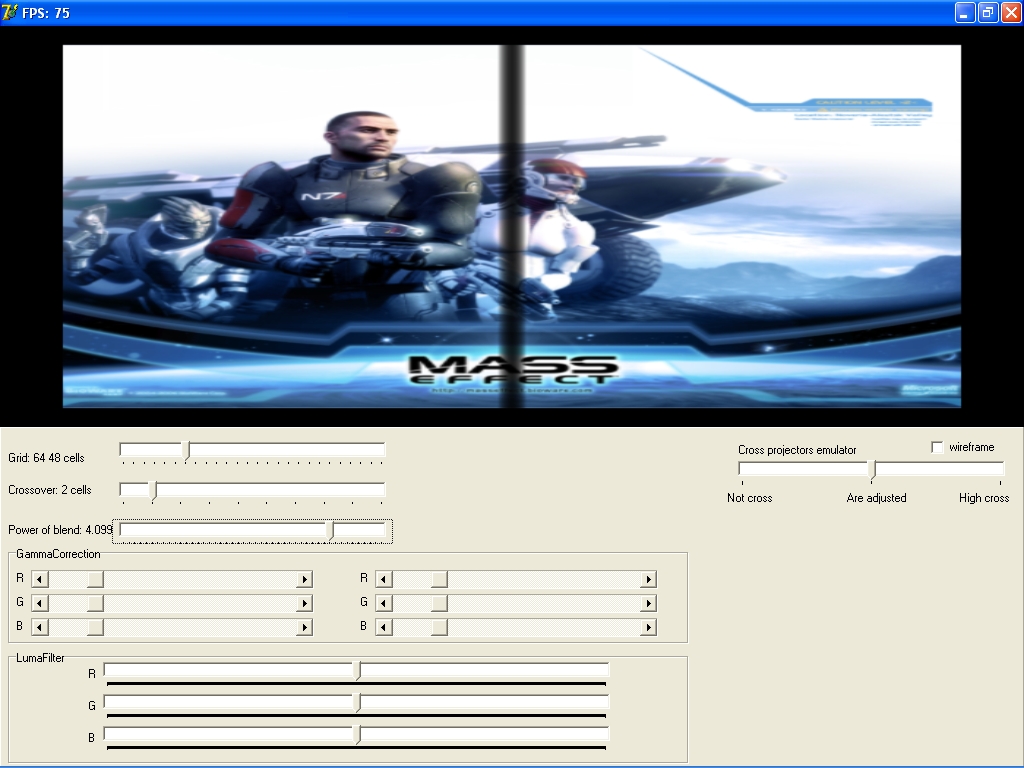
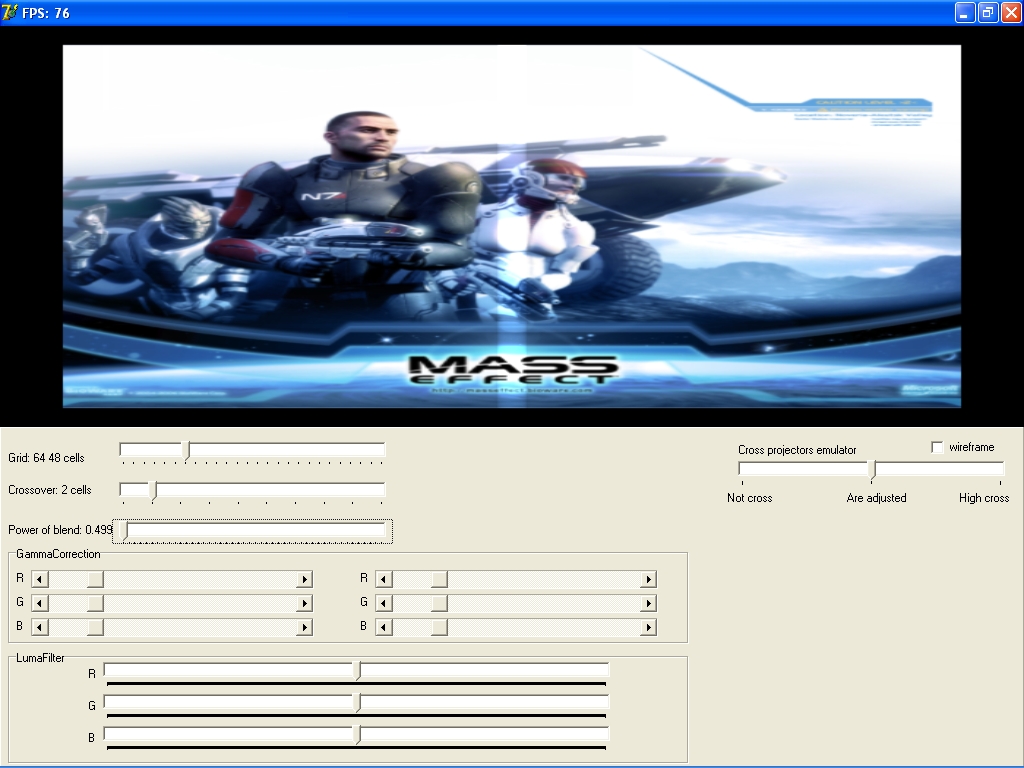
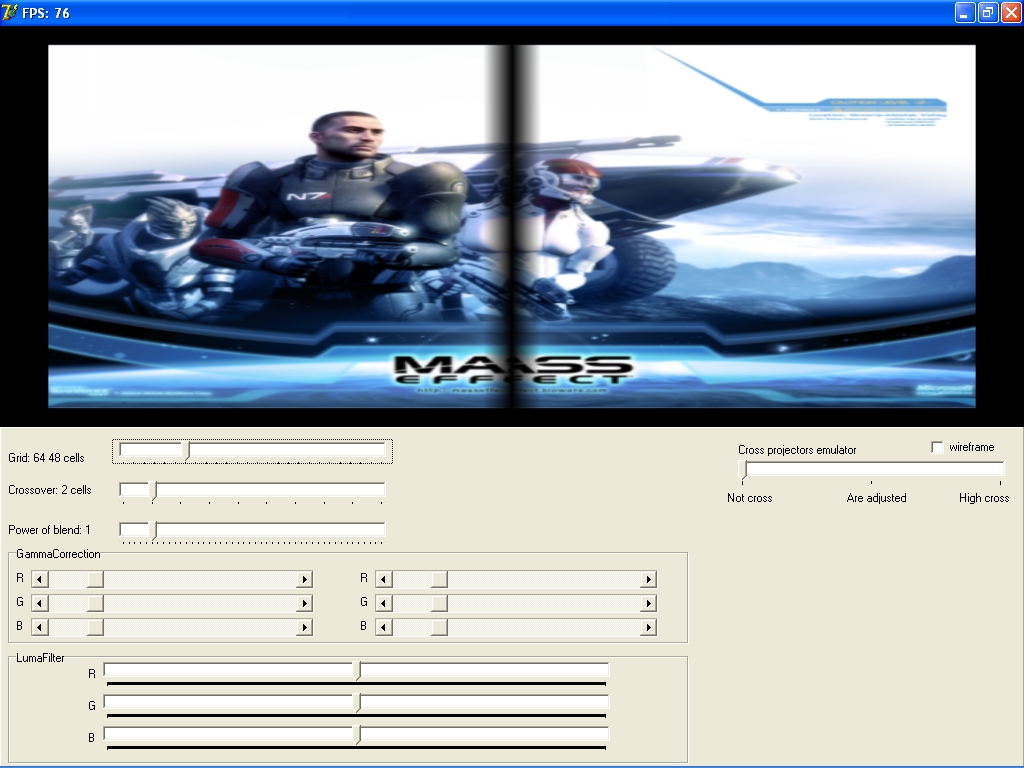
Who would be interested in purchasing a blend Plug-in for their HTPC. This is a software solution to blend 2 projectors on a single PC application. Pictures have been posted at another forum. Cost is under $1100.00 dollars. The filter is accessed with Media Player Classic as the front end.
You have controls for:
Blend Power
Blend width
Contrast adjustment in the blend zone (independent each half)
Gamma RGB blend zone (user selectable input for each color, each half)
Luma RGB blend zone (user selectable input for each color, each half)
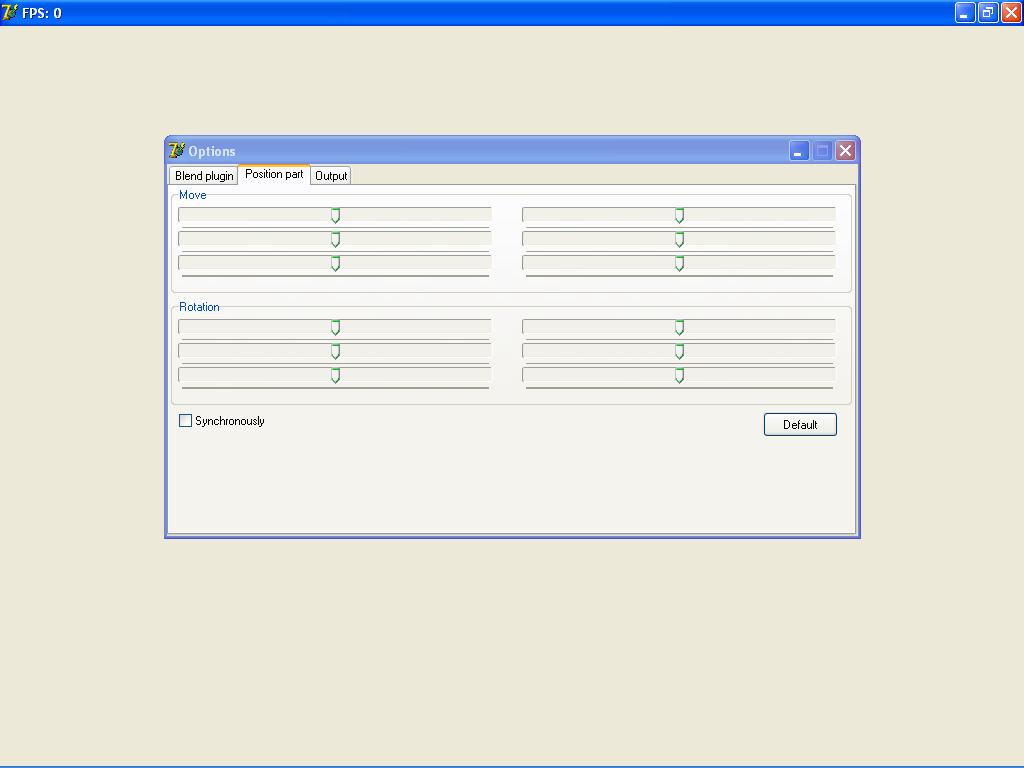
Horizontal movement of each image half
Vertical movement of each image half
Rotation of each image half
Grid alignment overlay for projector setup
Selectable video file types, TS VOB and others
Selectable image resolution output
Color curves are savable on each half for calibration, as well as all other aspects for repeatable image projection.
HD-DVD playback will be available soon.
SD playback with:
KT880 dual channel MB
1 GIG of PC3200 dual channel ram
Athlon XP 3200 CPU
Nvidia Quadro 3000G or 7800GS
Nvidia Purevideo
Blend filter
Media Player Classic
This software is much easier to configure and calibrate than the VLC software. Continuous input is appreciated, and I update the code as required for optimal use. This software has been in use for several months on my blended 8500's through the HTPC. We are under new construction at our house for a new reference 2 channel audio room and other additions. The projectors have been taken down for a short period of time.

| Description: |
|
| Filesize: |
306.32 KB |
| Viewed: |
20783 Time(s) |
|
| Description: |
|
| Filesize: |
51.62 KB |
| Viewed: |
20783 Time(s) |
|
| Description: |
|
| Filesize: |
304.39 KB |
| Viewed: |
20782 Time(s) |
|
| Description: |
|
| Filesize: |
305.06 KB |
| Viewed: |
20782 Time(s) |
|
| Description: |
|
| Filesize: |
307.37 KB |
| Viewed: |
20782 Time(s) |
|
Last edited by racerxnet on Sat Jul 07, 2007 3:47 am; edited 2 times in total
|
|
| Back to top |
|
 |
emdawgz1

Joined: 14 Mar 2006
Posts: 7949
|
| Posted: Fri Jul 06, 2007 6:01 pm Post subject: |
|
|
I'm interested. I'd like more info... Like posting some pics on this site....
_________________
Follow my blog
www.thesinglebrother.com
|
|
| Back to top |
|
|
Joust
Joined: 05 May 2006
Posts: 2429
Location: Almonte, Ontario, Canada
TV/Projector: Marquee 8501LC
|
| Posted: Fri Jul 06, 2007 6:07 pm Post subject: |
|
|
I heard VLC does blending right out of the box.
cost = free
|
|
| Back to top |
|
|
madpoet
Joined: 30 Mar 2006
Posts: 851
|
| Posted: Sun Jul 08, 2007 8:51 pm Post subject: |
|
|
Yes, but it is a real bitch to do. If racer can get his working for HD and SD with a better interface I am all over it.
_________________
9500LC + MP Mods V2 + HD10F lenses + Frankenyoke V2 = Something nice... I hope I get to actually watch it sometime!
|
|
| Back to top |
|
|
racerxnet
Joined: 20 Jun 2007
Posts: 362
Location: Illinois
|
| Posted: Sun Jul 08, 2007 11:58 pm Post subject: |
|
|
Madpoet,
What type of interface would you like? I thought the grouping of controls with the tabs was very good and in the appropriate place. I can rename the sliders as others wish, but changes will be final when sold to the public. I prefer a clean look without to much clutter. The sliders for image rotation and H/V movement have been named. There was none on the screen shots posted.
|
|
| Back to top |
|
|
Jesse S
Joined: 12 May 2007
Posts: 209
Location: Etobicoke
|
| Posted: Mon Jul 09, 2007 4:34 am Post subject: |
|
|
Looks cool but good god, who wants 2 CRT pjs 
|
|
| Back to top |
|
|
Nycon
Joined: 10 Apr 2007
Posts: 34
Location: Germany, NRW
|
| Posted: Mon Jul 09, 2007 7:27 pm Post subject: |
|
|
This looks very promising, but on the other hand spending over 1000$ for software... Half of that price would be way more acceptable, but that may just be my opinion. I have already taken into account that this product is a very specialized one with a very limited market. I don't know if how much (if any) you spent on different licenses for different modules of the software (the "if any" means that everything may have been programmed by yourself of course). But, on the other hand, people who already plan to blend two CRTs (and meybe already own them) will have the money to buy your software.
Even though I might not be a customer (now) I wish you the best success with your product.
|
|
| Back to top |
|
|
emdawgz1
Joined: 14 Mar 2006
Posts: 7949
|
| Posted: Mon Jul 09, 2007 7:43 pm Post subject: |
|
|
So this is a windows based software solution.
This means that you run all of your sources thru the HTPC, then to the pj's?
What kind of setup do i need?
_________________
Follow my blog
www.thesinglebrother.com
|
|
| Back to top |
|
|
Person99
Joined: 09 Mar 2006
Posts: 4899
Location: Flower Mound, TX
|
| Posted: Mon Jul 09, 2007 7:49 pm Post subject: |
|
|
| emdawgz1 wrote: | So this is a windows based software solution.
This means that you run all of your sources thru the HTPC, then to the pj's?
What kind of setup do i need? |
I don't think it could blend external HD solutions. But, if that is possible, I would be interested. As I understand it, there is not really affordable component video capture card so component sources may be out. Is there an affordable HDMI input card that could be used for this?
Also, I'd have to know if the quality is there as I've read negatives about VLC as a blending solution.
_________________
Dave
A train station is where the train stops. A bus station is where the bus stops. On my desk, I have a work station....
|
|
| Back to top |
|
|
emdawgz1
Joined: 14 Mar 2006
Posts: 7949
|
| Posted: Mon Jul 09, 2007 7:58 pm Post subject: |
|
|
| Person99 wrote: | | emdawgz1 wrote: | So this is a windows based software solution.
This means that you run all of your sources thru the HTPC, then to the pj's?
What kind of setup do i need? |
I don't think it could blend external HD solutions. But, if that is possible, I would be interested. As I understand it, there is not really affordable component video capture card so component sources may be out. Is there an affordable HDMI input card that could be used for this?
Also, I'd have to know if the quality is there as I've read negatives about VLC as a blending solution. |
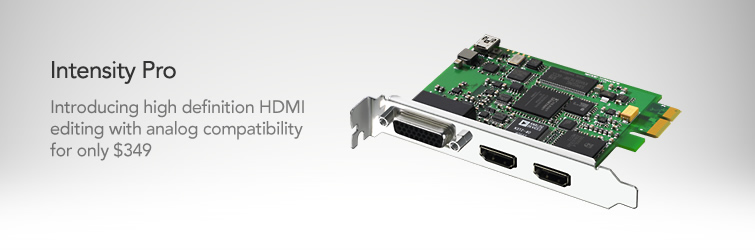
http://www.blackmagic-design.com/products/intensity/
Add the incredible quality of HDMI to your computer. Intensity features the latest HDMI technology for the highest quality capture and playback on Windows or Mac OS X computers. Now you can edit using big-screen HDMI televisions and video projectors, or capture uncompressed quality from HDV cameras all for only $249
| Description: |
|
| Filesize: |
44.08 KB |
| Viewed: |
20570 Time(s) |
|
_________________
Follow my blog
www.thesinglebrother.com
|
|
| Back to top |
|
|
Nycon
Joined: 10 Apr 2007
Posts: 34
Location: Germany, NRW
|
| Posted: Mon Jul 09, 2007 7:59 pm Post subject: |
|
|
There was a more or less popular component capture card around for professional studio use but the price was around 1000 US$. It was marketed by a German company whose name I unfortunately forgot. If was a card that you could add several daghter boards to for even more functions. If I remember the name, I will post it here. But I am certain that there are other cards as well.
@JohnE: Regarding the HDMI capture card:
"The HDMI standard sometimes includes copy protection encryption, such as commonly found on DVD players and some brands of set top boxes. When connected to these copy protected sources, the HDMI specification defines that Intensity cards cannot capture."
Means: You cannot connect a BluRay or HD-DVD player out of the box without (an illegal) HDCP stripper.
But for 349$ you get a component input. Thats quite a bargain!
|
|
| Back to top |
|
|
Person99
Joined: 09 Mar 2006
Posts: 4899
Location: Flower Mound, TX
|
| Posted: Mon Jul 09, 2007 8:56 pm Post subject: |
|
|
| Nycon wrote: |
Means: You cannot connect a BluRay or HD-DVD player out of the box without (an illegal) HDCP stripper. |
So, with a stripper it would let us use this card and the PC as a scaler/blender for all HDMI sources?
| Nycon wrote: | | But for 349$ you get a component input. Thats quite a bargain! |
Does anyone know the quality of the component capture? And can this be processed in real time from both component and HDMI or first capture to hard drive then played back?
_________________
Dave
A train station is where the train stops. A bus station is where the bus stops. On my desk, I have a work station....
|
|
| Back to top |
|
|
madpoet
Joined: 30 Mar 2006
Posts: 851
|
| Posted: Mon Jul 09, 2007 9:33 pm Post subject: |
|
|
AVS has some threads on the card. There are some limitations if I recall correctly.
_________________
9500LC + MP Mods V2 + HD10F lenses + Frankenyoke V2 = Something nice... I hope I get to actually watch it sometime!
|
|
| Back to top |
|
|
Person99
Joined: 09 Mar 2006
Posts: 4899
Location: Flower Mound, TX
|
| Posted: Mon Jul 09, 2007 10:04 pm Post subject: |
|
|
| madpoet wrote: | | AVS has some threads on the card. There are some limitations if I recall correctly. |
Sorry, I got sick of trying to keep up with HTPCs waiting for them to be ready for an HD home theater. I guess I've become lazy, but I'm sort of in a "wake me when a PC can be used in a theater" mode, so not keeping up. But I'll assume your mentioned limitations make them a no-go.
_________________
Dave
A train station is where the train stops. A bus station is where the bus stops. On my desk, I have a work station....
|
|
| Back to top |
|
|
Nycon
Joined: 10 Apr 2007
Posts: 34
Location: Germany, NRW
|
| Posted: Mon Jul 09, 2007 10:05 pm Post subject: |
|
|
@Person99: With a stripper the card could capture and display whatever your input is.
If the card is properly designed, then the display of live-playback material should be no problem. In the ideal case the graphics card will provide an overlay array for the HDMI card to write the data into. This was, at least, the case in the aforementioned component input card I used a for a short time.
Even if the driver is not overlay based, the playback should pose no problem.
I would expect having more problems with recording of HD content via the card in case your computer is not absolute top notch.
|
|
| Back to top |
|
|
madpoet
Joined: 30 Mar 2006
Posts: 851
|
| Posted: Mon Jul 09, 2007 11:13 pm Post subject: |
|
|
For starters it is limited to 1080i:
"1080i/59.94, 1080i/50, 720p/59.94, 720p/50, NTSC and PAL"
Second it only allows 2 channel HDMI AND SPDIF audio, which means you can't capture any advanced audio that way. So you'd need to use something else for that. It is DirectShow capable so someone could write software to make it work better with an HTPC. Oh yeah... and uncompressed video runs 46GB per hour! You need a high speed disk array to actually capture it.
_________________
9500LC + MP Mods V2 + HD10F lenses + Frankenyoke V2 = Something nice... I hope I get to actually watch it sometime!
|
|
| Back to top |
|
|
kschmit2
Joined: 09 Mar 2006
Posts: 1141
Location: Heidelberg, Germany
|
| Posted: Tue Jul 10, 2007 6:42 am Post subject: |
|
|
| madpoet wrote: | | Oh yeah... and uncompressed video runs 46GB per hour! You need a high speed disk array to actually capture it. |
It's actually much closer to 460 GB per hour.
|
|
| Back to top |
|
|
Nycon
Joined: 10 Apr 2007
Posts: 34
Location: Germany, NRW
|
| Posted: Tue Jul 10, 2007 7:13 am Post subject: |
|
|
|
@madpoet: Well, you're right. I didn't register that 1080p is not supported. But why would one like to capture advanced audio or even the video other than just to make a copy of it? I thought this was about playback of external sources via a HTPC to make use of the relly nice blending plugin.
|
|
| Back to top |
|
|
jantje112
Joined: 17 Jul 2006
Posts: 328
|
| Posted: Tue Jul 10, 2007 7:35 am Post subject: |
|
|
| Nycon wrote: | There was a more or less popular component capture card around for professional studio use but the price was around 1000 US$. It was marketed by a German company whose name I unfortunately forgot. If was a card that you could add several daghter boards to for even more functions. If I remember the name, I will post it here. But I am certain that there are other cards as well.
|
The Immersive Holo3d (HoloGraph 3d) you mean?
|
|
| Back to top |
|
|
jantje112
Joined: 17 Jul 2006
Posts: 328
|
| Posted: Tue Jul 10, 2007 7:35 am Post subject: |
|
|
| Nycon wrote: | There was a more or less popular component capture card around for professional studio use but the price was around 1000 US$. It was marketed by a German company whose name I unfortunately forgot. If was a card that you could add several daghter boards to for even more functions. If I remember the name, I will post it here. But I am certain that there are other cards as well.
|
The Immersive Holo3d (HoloGraph 3d) you mean?
|
|
| Back to top |
|
|
|
|




