| Author |
Message |
fabrizio
Joined: 08 Jan 2025
Posts: 13
Location: Italy
|
| Posted: Wed Jan 08, 2025 11:23 pm Post subject: BG808s - No image |
|
|
Hi All,
After 20 years of flawless service, my Barco Graphics 808s projector stopped working on Christmas Eve...(thanks Santa... ) )
In the days before I noticed that it was taking longer than usual to start up and that it did not immediately show the correct image, but it was as if it was trying to hook different resolution, enlarging and stretching the image. Only after about ten seconds the image was shown.
The LEDs on the G2/diagnostic board are correct (all green on, red off) while the red LED on the EHT board is on.
I uploaded the video of the projector starting up on Vimeo ( https://vimeo.com/1045164514 ) in the hope that it can be of some help.
Thanks for your help!
Fabrizio
|
|
| Back to top |
|
 |
Hulio
Joined: 15 Apr 2006
Posts: 494
Location: Belgium
|
| Posted: Thu Jan 09, 2025 6:51 am Post subject: |
|
|
|
Red led on EHT means a bad quadrupler, splitter, EHT board or shorted tube.
|
|
| Back to top |
|
|
fabrizio
Joined: 08 Jan 2025
Posts: 13
Location: Italy
|
| Posted: Thu Jan 09, 2025 9:32 am Post subject: |
|
|
Hi Hulio,
the fact that I clearly hear the electrostatic noise made me think (and hope) that it could be some other component that is easier to find.
Thanks for your reply
Bye
Fabrizio
|
|
| Back to top |
|
|
Curt Palme
CRT Tech
Joined: 08 Mar 2006
Posts: 24396
Location: Langley, BC
TV/Projector: All of them!
|
| Posted: Thu Jan 09, 2025 3:34 pm Post subject: |
|
|
|
The HV started up, but then shut down due to one of the bad components that Hulio outlined. It's much harder to hear the HV shutting down than when it turns on.
|
|
| Back to top |
|
|
fabrizio
Joined: 08 Jan 2025
Posts: 13
Location: Italy
|
| Posted: Fri Jan 10, 2025 10:05 am Post subject: |
|
|
Hi Hulio, Curt,
I checked if the tubes were shorted by disconnecting them individually from the splitter, but the LED on the EHT board still remained lit.
I found a guy who has a working EHT and a splitter (same part number, so no risk of different EHT and quad versions).But as you can imagine, the quad is not available.
From what I understand, in this situation, the quad is responsible in 99% of cases. Do you agree or is it still worth trying to replace only the cards above?
Thanks
Fabrizio
|
|
| Back to top |
|
|
Hulio
Joined: 15 Apr 2006
Posts: 494
Location: Belgium
|
| Posted: Fri Jan 10, 2025 11:30 am Post subject: |
|
|
No, you are right. Mostly, the quad is suspect number one in the HV section.
Are you located in Italy ? Send me a PM with your address and i will send you a working quad to try. You only have to pay the shipping cost.
If the problem is somewhere else, you send it back. If the projector is running back, you keep it and pay what you think is worth (we'll come to a resonable agreement).
|
|
| Back to top |
|
|
fabrizio
Joined: 08 Jan 2025
Posts: 13
Location: Italy
|
| Posted: Fri Jan 10, 2025 1:40 pm Post subject: |
|
|
Hi Hulio,
yes I'm in Italy
The guy that has EHT and Splitter has also found a quad (not guaranted since it was removed from a working projector 2y ago), so I will test it before proceed with you.
What you suggest as replacement order? Splitter then quad and finally eht board?
This morning I also tested the voltage on the splitter with a multimeter, where the teflon wire that start near EHT is connected.
The voltage gradually increases to 20v and then returns to 4. Could this be a clue?
I've also measured the + 17 volt trimpot with my Fluke 179 and it was 17.49. Do you think I've to adjust it to 17?
I really am grateful for your help!
Fabrizio
|
|
| Back to top |
|
|
Hulio
Joined: 15 Apr 2006
Posts: 494
Location: Belgium
|
| Posted: Fri Jan 10, 2025 3:51 pm Post subject: |
|
|
|
The usual order is quad, splitter, EHT. The feedback voltage on the splitter should be 34,7V, but don't dorget, this is only when you don't have a red led on the EHT. Just replace them one by one.
|
|
| Back to top |
|
|
fabrizio
Joined: 08 Jan 2025
Posts: 13
Location: Italy
|
| Posted: Fri Jan 10, 2025 4:14 pm Post subject: |
|
|
Thanks Hulio,
and regarding the 17.5v I've found on the SMPS board? Should I adjust it to 17v?
|
|
| Back to top |
|
|
Hulio
Joined: 15 Apr 2006
Posts: 494
Location: Belgium
|
| Posted: Fri Jan 10, 2025 6:43 pm Post subject: |
|
|
|
No, 17,5V is ok.
|
|
| Back to top |
|
|
fabrizio
Joined: 08 Jan 2025
Posts: 13
Location: Italy
|
| Posted: Sat Jan 11, 2025 10:21 pm Post subject: |
|
|
Hi all,
today I received the cards, and I found that the defective card was, as expected, the quad. Everything seemed to work perfectly, but doing a real test, I found that the projector went black every time the image became brighter. I suspect therefore that the quad, that was given to me, no longer works when the projector requires more current.
Do you agree or I've to investigate further?
Thanks!
Fabrizio
|
|
| Back to top |
|
|
Hulio
Joined: 15 Apr 2006
Posts: 494
Location: Belgium
|
| Posted: Sat Jan 11, 2025 11:05 pm Post subject: |
|
|
|
Have you touched the 17V reference voltage already ? Put brightness at 50, contrast to 75 and adjust for 17,5V at SMPS.
|
|
| Back to top |
|
|
fabrizio
Joined: 08 Jan 2025
Posts: 13
Location: Italy
|
| Posted: Sun Jan 12, 2025 9:05 am Post subject: |
|
|
Hi Hulio,
No I’ve not touched v ref since it was already set to 17.5v. Should I check again after quad replacement?
Thanks
Fabrizio
|
|
| Back to top |
|
|
Hulio
Joined: 15 Apr 2006
Posts: 494
Location: Belgium
|
| Posted: Sun Jan 12, 2025 9:48 am Post subject: |
|
|
Hi Fabrizio,
Yes, each time a component in the HV section is changed, the 17V reference voltage should be check.
Also, when the image goes black, it stays that way ? Or comes back to normal once the image is less bright ?
Take a look on the G2 diagnostic leds while this happens.
|
|
| Back to top |
|
|
fabrizio
Joined: 08 Jan 2025
Posts: 13
Location: Italy
|
| Posted: Sun Jan 12, 2025 10:20 pm Post subject: |
|
|
Hi Hulio,
I checked 17v as per your instructions, and it was correct.
When the image goes black, the red EHT led lights up as before and G2 led are correct. I contacted the guy who gave me the quad and he said he should have another one. So on Tuesday I can test another quad.
Should I try to replace other board/component?
Thanks
Fabrizio
|
|
| Back to top |
|
|
km987654

Joined: 25 Jul 2007
Posts: 2874
Location: Australia
TV/Projector: Barco BG809s
|
| Posted: Mon Jan 13, 2025 12:42 am Post subject: |
|
|
|
There are other boards in the Scan Fail circuit. You should make sure they are not the source of the issue.
|
|
| Back to top |
|
|
fabrizio
Joined: 08 Jan 2025
Posts: 13
Location: Italy
|
| Posted: Tue Jan 14, 2025 2:16 pm Post subject: |
|
|
I All,
I tested the "new" quad today and initially thought I had fixed the problem. However, when I tried to calibrate, I only selected the white screen (dvdo test pattern) for 1 second and the image went black.
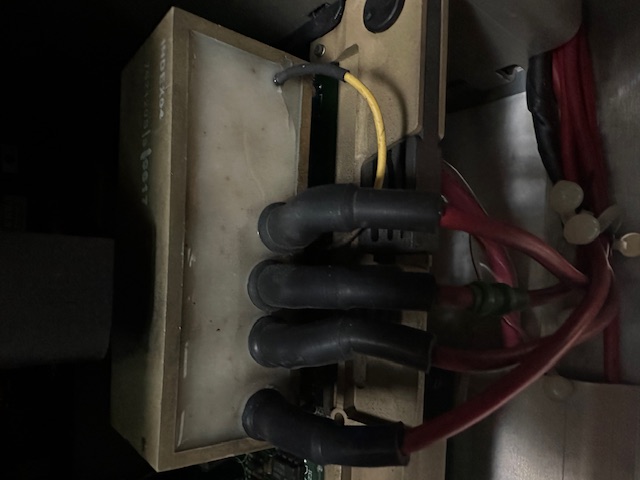
I repeated these steps paying attention to the "weird" sound and I hear a loud "tick" on g2/diagnostic every time I change a pattern on dvd. Focus/G2 block has a crack.
@km987654, thanks for your reply. I saw the diagram you made. How can I check the other cards?
Thanks all
Fabrizio
| Description: |
|
| Filesize: |
64.76 KB |
| Viewed: |
1215 Time(s) |
|
|
|
| Back to top |
|
|
Hulio
Joined: 15 Apr 2006
Posts: 494
Location: Belgium
|
| Posted: Tue Jan 14, 2025 4:48 pm Post subject: |
|
|
Alright, that crack is not ok. Try to change the G2 board.
In case of a scan fail (horizontal or vertical), the red led on the G2 board (SF led) should be on.
Since the red led on the EHT is on (hold down EHT) it means your problem is high tension related.
So first swap the G2 board and than tweak the G2 adjustments of each color.
|
|
| Back to top |
|
|
fabrizio
Joined: 08 Jan 2025
Posts: 13
Location: Italy
|
| Posted: Tue Jan 14, 2025 10:09 pm Post subject: |
|
|
Hi Hulio,
thanks again for your amazing support!
I'll check tomorrow if the G2 Board is available.
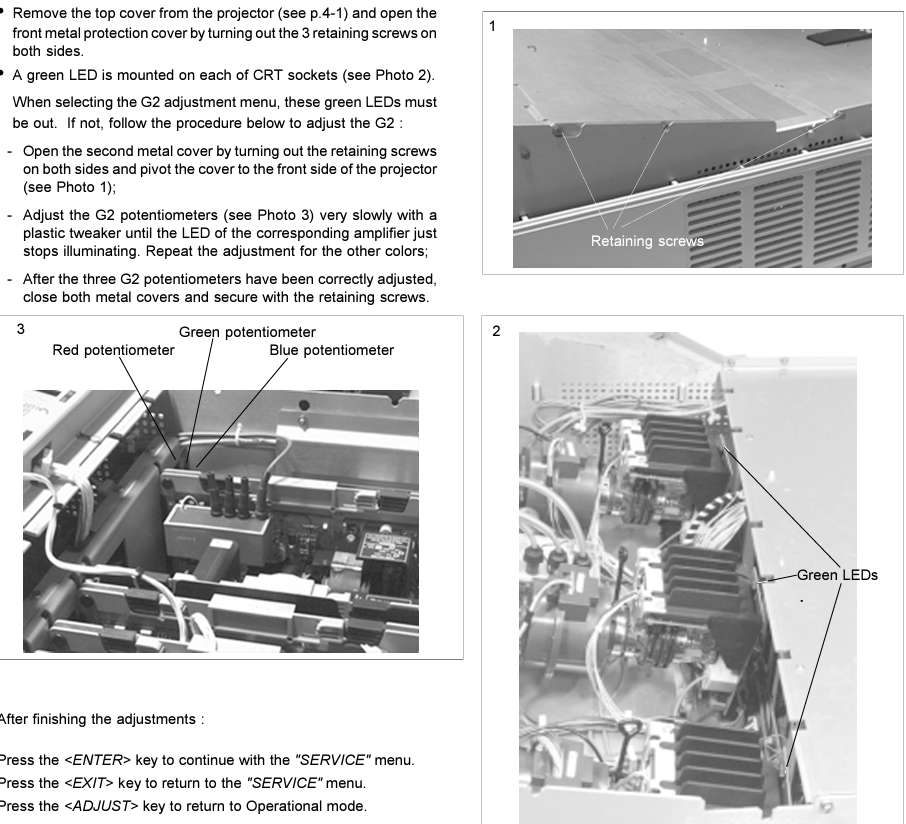
In the meantime, can you confirm that the steps in the attached image are the correct ones for an 808s?
| Description: |
|
| Filesize: |
393.41 KB |
| Viewed: |
1193 Time(s) |
|
|
|
| Back to top |
|
|
Hulio
Joined: 15 Apr 2006
Posts: 494
Location: Belgium
|
| Posted: Wed Jan 15, 2025 3:40 am Post subject: |
|
|
Yes, correct. Don't use a metal screwdriver.
Turn very slowly and keep in mind that the leds must be out only after pressing enter in G2 adjustments (service menu). If one of the leds (or all) are on during operation , this is normal.
|
|
| Back to top |
|
|
|
|




