| Author |
Message |
Videodrome

Joined: 22 Feb 2023
Posts: 56
|
| Posted: Wed Sep 04, 2024 7:00 am Post subject: Sony VPH-D50, Neckboard recapping to fix streaking. |
|
|
To address the streaking issue on the projector, I’ve read that recapping the neckboards might be the solution.
To clarify the streaking issue, a sample image to illustrate.

I’ve ordered all the capacitors listed in the service manual and would appreciate any tips from those who have done this before.
For instance are there other areas I should consider that could also be causing the problem?
| Description: |
|
| Filesize: |
7.39 KB |
| Viewed: |
1269 Time(s) |

|
|
|
| Back to top |
|
 |
Videodrome
Joined: 22 Feb 2023
Posts: 56
|
| Posted: Wed Sep 04, 2024 9:39 am Post subject: |
|
|
To add, on a full black background it doesn't show this behavior with a bright spot.
However on a dark gray background it shows the streaking on both sides.

| Description: |
|
| Filesize: |
13.32 KB |
| Viewed: |
1262 Time(s) |

|
|
|
| Back to top |
|
|
Dancrt
Joined: 16 Sep 2017
Posts: 88
|
| Posted: Wed Sep 04, 2024 9:54 am Post subject: |
|
|
Mine was bad I got a recapped think it’s the PA board from curt which helped
It was the middle board in the front tray
But it was still there so I looked again and bought new ones again
And it was the tiny tiny tiny ones think there was only 3-5 of them
Once I put new ones in high quality ones. The streaking went away
Be careful though the board is very easily broken my first attempt
Failed (I did my original board and it died ) then I re did the one from curt
And fixed was very happy had nothing to do with the neck boards
But of course they may help but didn’t effect mine from memory it was all the pa board
I did have moome hdmi (upgraded to Barco 909 in the end)
|
|
| Back to top |
|
|
Videodrome
Joined: 22 Feb 2023
Posts: 56
|
| Posted: Wed Sep 04, 2024 11:20 am Post subject: |
|
|
Thank you.
Checking the PA board seems a lot simpler than recapping the neckboards.
I might swap the PA board with a D50 I have in storage.
I'll wait on some more input here before deciding.
|
|
| Back to top |
|
|
Curt Palme
CRT Tech
Joined: 08 Mar 2006
Posts: 24396
Location: Langley, BC
TV/Projector: All of them!
|
| Posted: Wed Sep 04, 2024 2:34 pm Post subject: |
|
|
|
Correct, there are some small caps on the PA board that provide the G2 voltage that need changing. 2.2 or 4.7uf if I remember correctly.
|
|
| Back to top |
|
|
Videodrome
Joined: 22 Feb 2023
Posts: 56
|
| Posted: Wed Sep 04, 2024 3:46 pm Post subject: |
|
|
Thank you so much!
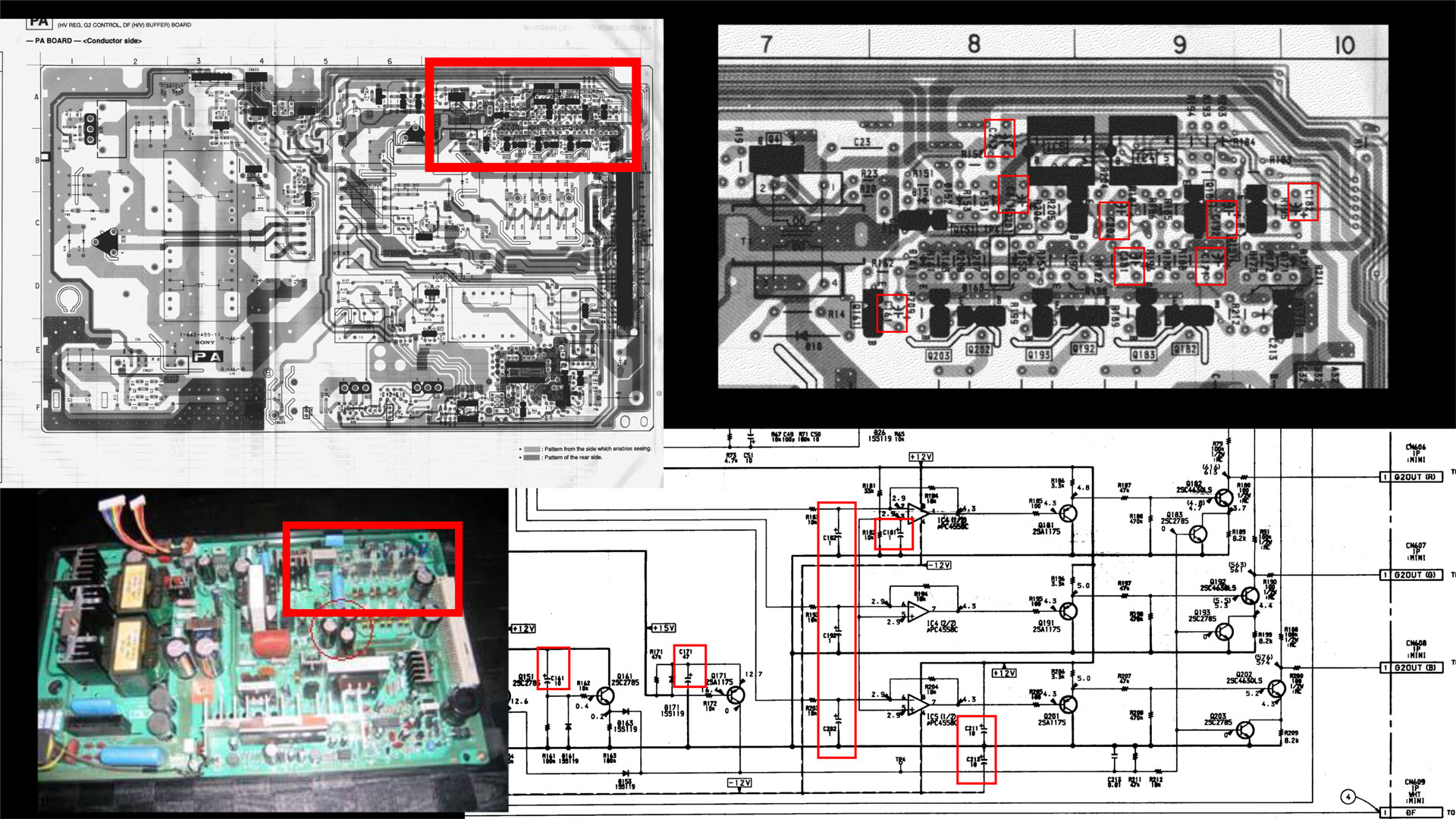
I took a look at the service manual and my guess it's about 8 caps that need replacing.
C161 10uF 50v
C171 47uF 50v
C181 1uF 50v
C182 1uF 50v
C192 1uF 50v
C202 1uF 50v
C211 10uF 50v
C212 10uF 50v
Maybe I can jolt a memory from either of you and can confirm I'm in the right area.
The image in the bottom left, red squared.

| Description: |
|
| Filesize: |
467.36 KB |
| Viewed: |
1237 Time(s) |
|
|
|
| Back to top |
|
|
Dancrt
Joined: 16 Sep 2017
Posts: 88
|
| Posted: Wed Sep 04, 2024 6:52 pm Post subject: |
|
|
Ah yes I think it was the little 1uf ones
Curt’s ones where slightly bigger and
I think I put slightly bigger ones again
Which solved the issue
I did also when I had a broken donor
Projector with mint tubes swap there neck boards
Too and think it helped a little bit but was still terrible
Untill the 3 or 4 little ones
For my Barco 909 I bought a capacitor ESR meter
I think the vp50 ones go bad because there so small
They probably dryed out years ago
I was shocked my Barco all but one capacitor tested ok
I think the super bad capacitor plague was really early 2000s
Computers and TVs
I have heard the d50’main board caps can leak as
Well but my main board on original one a tube went
Out I got a new board from curt all original caps and all worked well
Didn’t have a meter then but unit performed well.
I have later found in a forum
There is three RGB switching chips
That go bad when that happens there about $20 ea from
Memory so if that happens don’t panic common fault on d50
Tubes just appear to go out but it probably is the signal
Is just no longer getting through …
How is your tubes ?
|
|
| Back to top |
|
|
Videodrome
Joined: 22 Feb 2023
Posts: 56
|
| Posted: Thu Sep 05, 2024 4:17 am Post subject: |
|
|
Thank you!
I’ve just ordered the caps from Mouser, 10k hour versions, so they should do the job.
The tubes and projector were in 'mint' condition, after 18 months they have about 1200 hours on them.
Sitting idle for around 20 years caused some deterioration, swapping the PSU from another D50 and recapping the small convergence boards made a big difference.
The green tube jittered a little at higher resolutions, so I sprayed some Deoxit in the connectors and that solved it.
Currently running it at 1080i 100Hz without issues, except for the streaking.
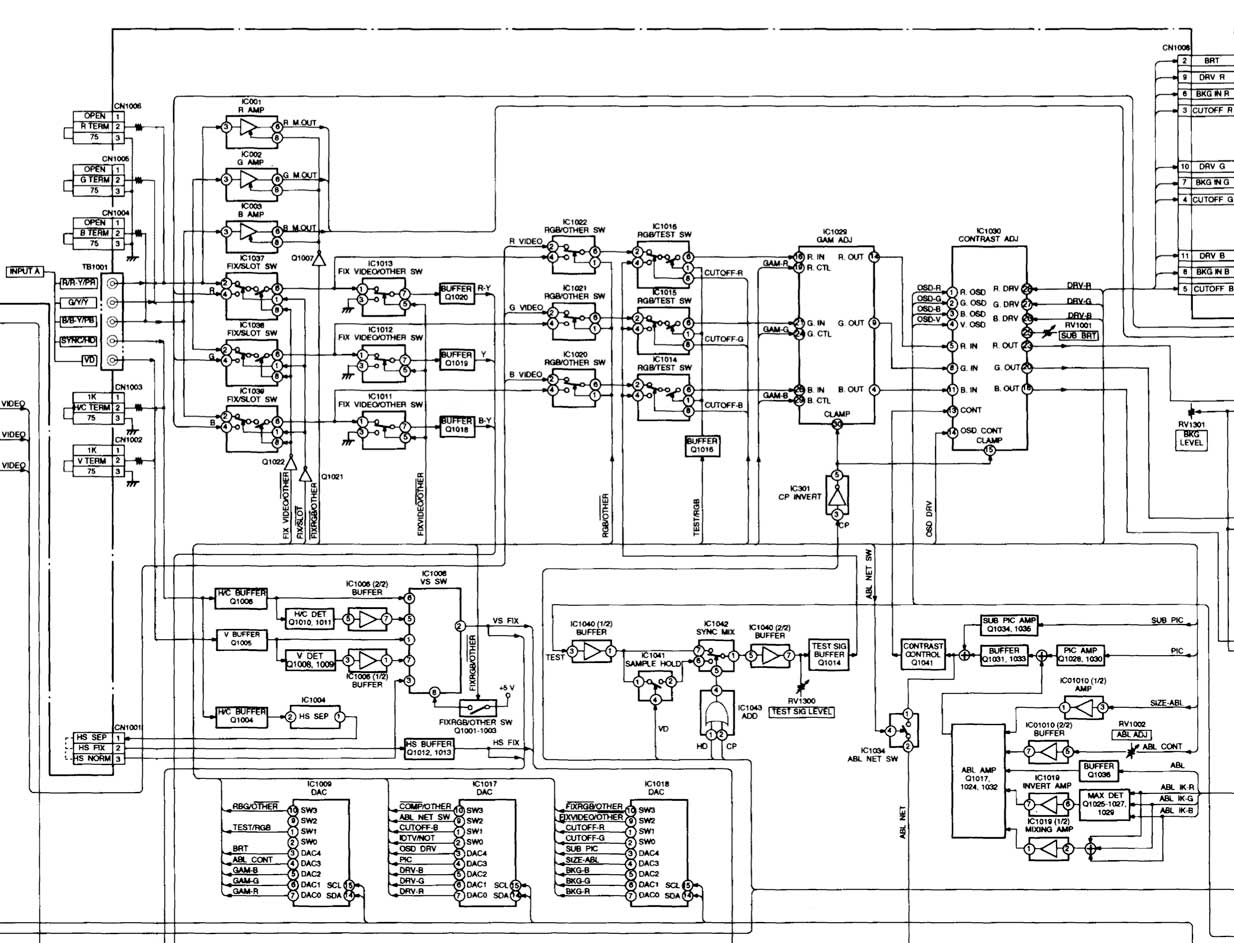
Would you have more information on the RGB switching chips? I tried searching, but nothing came up.
Any details on potential repairs might be invaluable for future troubleshooting.
I checked the A board diagram and I believe this part has the switches on it.
Any idea which ones were responsible for the cutting off?
| Description: |
|
| Filesize: |
162.51 KB |
| Viewed: |
1210 Time(s) |
|
|
|
| Back to top |
|
|
Dancrt
Joined: 16 Sep 2017
Posts: 88
|
| Posted: Fri Sep 06, 2024 1:10 pm Post subject: |
|
|
Nice
I only remeber the guy said there was three of them
And I found a place that had them in stock I didn’t worry about
It as they had 500+ in stock and if it ain’t broke I’ll should be fine is
What I thought (now I have so many parts as backup for my 909)
Might have been on the fixanything forums come to think of it
You might be lucky anyhow two of my three d50 boards have the issue
The one I got off curt lasted well the other that died had hardly any hours
So think it’s an age think some chips where just as maybe ?
1080i at 100 that’s epic I used to run mine at 1080 60
Or 720p 1080 at 100 must nearly be as good as 1080p
Except sharpness
I was amazed with my d50 I think it is capable well above its
Tube size but I used to run mine so hard the tubes would arc if
The contrast was set any higher !!!! 120” screen nice and bright lol 😝
|
|
| Back to top |
|
|
Videodrome
Joined: 22 Feb 2023
Posts: 56
|
| Posted: Fri Sep 13, 2024 11:55 am Post subject: |
|
|
So I first replaced the three 4.7uf capacitors which Curt recommended.
Alas, no change in the streaking behavior.
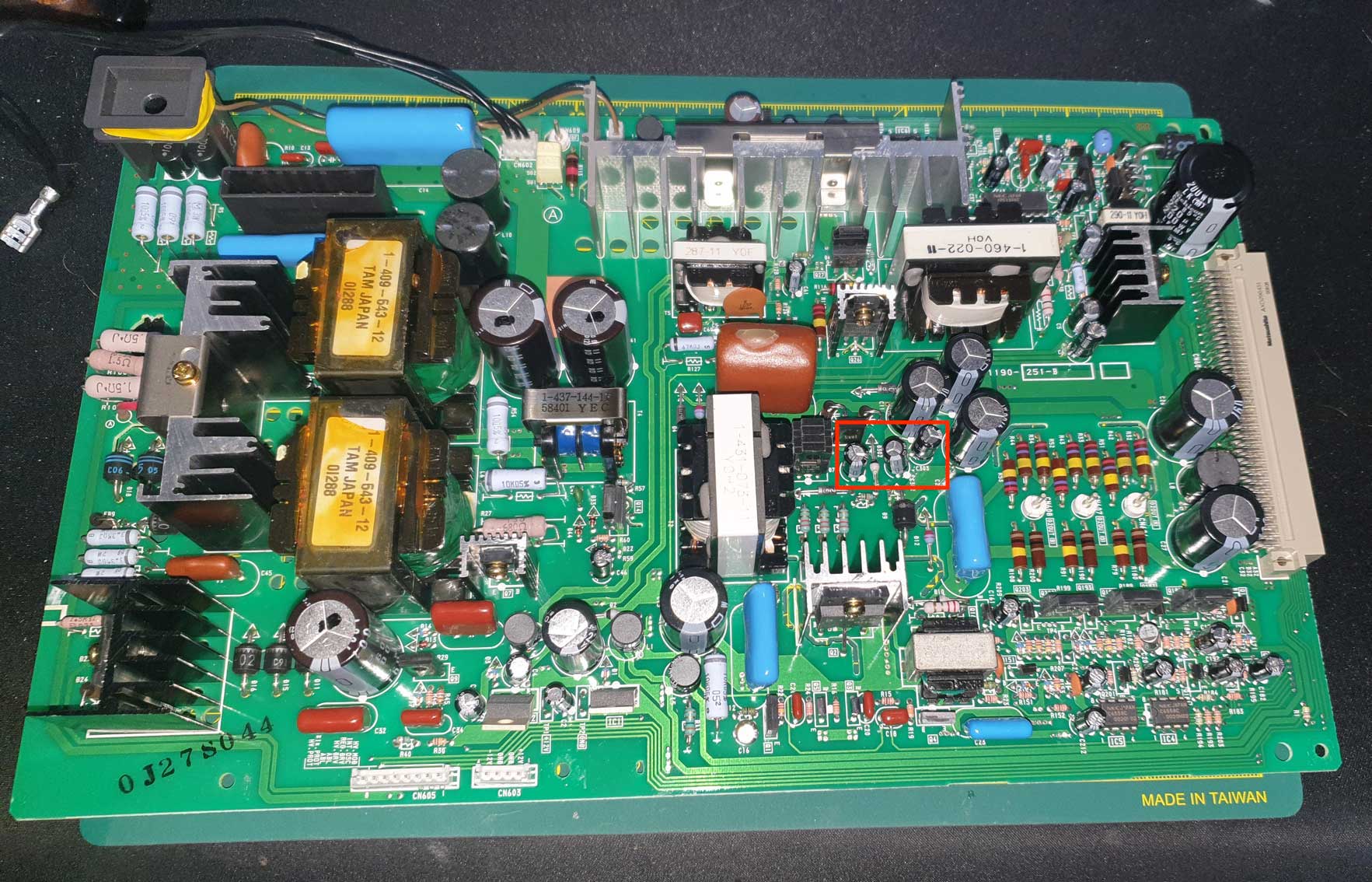
Before I start recapping the ones I mentioned before, here is a pic of the board.
The brown thing in the middle looks a bit iffy, like it has a blister.
I wonder if it has anything to do with the streaking, my gut says it’s harmless.
I’m hoping someone with more experience has something to say about this.
Thank you.
//measurements of old vs new 4.7uf caps, just because I have them:
old
4827uf
0.8% loss
5.7 ohm
new
4558uf
0.2% loss
2.3 ohm
| Description: |
|
| Filesize: |
322.63 KB |
| Viewed: |
1129 Time(s) |
|
|
|
| Back to top |
|
|
Dancrt
Joined: 16 Sep 2017
Posts: 88
|
| Posted: Fri Sep 13, 2024 12:59 pm Post subject: |
|
|
I wish I had mine easy to go look at it’s very much packed away in shed
I do remeber when I got broken unit with good tubes
I swaped to using its neck boards which helped a bit
And its psu which I forgot about but I did help a bit as well
The hardly used unit was nearly new broken main board
So very low hour caps
And the last bit was the three little caps which made the most
Difference when I put bigger ones in than came out
It’s werid as your pic from memory looks different to mine
Was there something on top of the board you removed i
Remeber something black and metal ?
Anyhow good luck
Maybe Recap your neck cards and psu maybe 🤔
|
|
| Back to top |
|
|
Videodrome
Joined: 22 Feb 2023
Posts: 56
|
| Posted: Fri Sep 13, 2024 4:05 pm Post subject: |
|
|
After some searching I realized the blister on top is a sign of a failing capacitor.
So I’ll need another batch of capacitors to include all filmic ones as well.
I’ll first get another PA board from storage to see if it shows any difference at all.
When the ‘new’ board shows the exact same intensity of the issue, I believe it’s safe to say that it’s not the PA boards fault. I guess the neckboards would become the next suspect…
|
|
| Back to top |
|
|
Dancrt
Joined: 16 Sep 2017
Posts: 88
|
| Posted: Sat Sep 14, 2024 1:56 am Post subject: |
|
|
Yeah good luck I would recap the psu first maybe
I was lucky and just swaped to a low hour one
From memory the newer psu gave massively less
Noise in the picture and increased brightness as well
And less streaking my old one was must have been weak
Have you got a esr might be worth the $100
|
|
| Back to top |
|
|
Videodrome
Joined: 22 Feb 2023
Posts: 56
|
| Posted: Sun Sep 15, 2024 7:09 am Post subject: |
|
|
Thanks.
Minor update, today I swapped the PA board but it threw an errorcode 33, which indicates unusual high voltage.
So sadly I can't see if it would make any difference, because I do not want to troubleshoot 2 things at once.
Swapped the original board back in, next I'm going to measure the physical dimensions of all the caps and replace them.
I highly doubt it's the PSU.
I have no streaking on pure black with white images, only when the background is lighter than black things start to streak.
So my guess is some capacitors that filter or amplify the video signal are failing.
I read there was a 1292 neckboard mod years ago that helped the streaking issues.
It never touched the PA board, so I'm curious if the PA board is really the problem?
I hope to get some input from others.

|
|
| Back to top |
|
|
Videodrome
Joined: 22 Feb 2023
Posts: 56
|
| Posted: Sun Sep 15, 2024 6:48 pm Post subject: |
|
|
Above the PA board there is the K-board(HV REG. CONTROL, OSC DEV, HV REG. OUT).
Any advice on whether to recap this as well?
Or would it have nothing to do with the streaking problem?
|
|
| Back to top |
|
|
|
|




